
1. บทนำ
Welcome to the user manual for your ATTACK SHARK R68 HE Carbon Fiber 8000Hz Rapid Trigger Keyboard. This manual provides detailed instructions for setting up, operating, customizing, and maintaining your keyboard to ensure optimal performance and a superior gaming experience.

Image: The ATTACK SHARK R68 HE Wired Forged Carbon Fiber Keyboard, showcasing its design and vibrant RGB lighting.
2. คุณสมบัติหลัก
The ATTACK SHARK R68 HE keyboard is engineered for high-performance gaming and typing, incorporating advanced technologies:
- การก่อสร้างพรีเมี่ยม: Features a compact 60% layout with CNC-machined aluminum alloy side trims and advanced carbon fiber composite materials for durability and aesthetics.
- สวิตช์แม่เหล็ก: Equipped with Hall effect magnetic switches for ultra-sensitive operation and a silky smooth feel.
- Rapid Trigger (RT) Functionality: Adjustable 0.005mm RT accuracy with a global actuation range of 0.005mm to 3.4mm, allowing for precise and instant key responses.
- อัตราการสำรวจสูง: An 8000Hz polling rate delivers 8x faster response times than traditional gaming keyboards, with ultra-low 0.08ms latency.
- Advanced Key Functions: Supports Dynamic Keystroke (DKS), Mod Tap (MT), Toggle Key (TGL), and Snap Tap (SOCD) for enhanced gaming precision.
- ไฟ RGB ที่ปรับแต่งได้: Dual-sided dynamic RGB light strips and individual key RGB lighting with 16.8 million colors, featuring 20+ preset light effects.
- คิวเอ็มเค Web-ไดรเวอร์พื้นฐาน: Offers comprehensive customization for key remapping, macros, lighting effects, and magnetic switch settings.
- C01 Ultra RGB Coiled Cable: Designed for stable data transfer and fast charging.
- ความเข้ากันได้: Fully compatible with Windows and Mac operating systems.

Image: Visual representation of the keyboard's high performance metrics, including 8000Hz polling rate and 256K scan rate, emphasizing instant response and precision.
3. เนื้อหาบรรจุภัณฑ์
ตรวจสอบว่ามีรายการทั้งหมดอยู่ในแพ็คเกจของคุณ:
- ATTACK SHARK R68 HE Keyboard
- C01 Ultra RGB Coiled Cable
- เครื่องมือถอดกุญแจ 2in1
- แผ่นรองคีย์บอร์ด
- 2 x Spare Magnetic Switches
- 2 x ATTACK SHARK Stickers
- คู่มือการใช้งาน (เอกสารนี้)

ภาพ: โอเวอร์view of all items included in the ATTACK SHARK R68 HE keyboard retail box, neatly arranged.
4. การตั้งค่า
4.1 การเชื่อมต่อคีย์บอร์ด
The R68 HE is a wired keyboard. Connect it to your computer using the provided C01 Ultra RGB Coiled Cable.
- Insert the USB-C end of the coiled cable into the port on the back of the keyboard.
- ต่อปลาย USB-A ของสายเคเบิลแบบขดเข้ากับพอร์ต USB ที่ว่างอยู่บนคอมพิวเตอร์ของคุณ
- The keyboard will automatically be recognized by your operating system (Windows or Mac).

Image: The keyboard connected to a coiled USB-C cable, emphasizing the wired connection and high polling rate for stable data transfer.
4.2 การสอบเทียบเบื้องต้น
For optimal performance, especially with Rapid Trigger features, it is recommended to perform an initial calibration using the web ซอฟต์แวร์ไดรเวอร์
- Open the QMK webไดรเวอร์แบบ -based (www.qmk.top) or the downloaded software.
- Navigate to the "Keyboard Setting" panel.
- Locate and click "Travel calibration" on the right side.
- In the pop-up window, select "Start Calibration."
- Follow the on-screen instructions, then click "Calibration Complete" to finish.
Image: A visual guide demonstrating the steps for performing a quick calibration using the keyboard's web driver software interface.
5. คู่มือการใช้งาน
5.1 ฟังก์ชันพื้นฐานของแป้นพิมพ์
The R68 HE features a 68-key ANSI layout. Standard key functions operate as expected. Utilize the Function (Fn) key for secondary key actions, typically indicated by legends on the keycaps.
5.2 การควบคุมแสง RGB
The keyboard features dynamic RGB backlighting and side light bars. You can control these directly from the keyboard or through the customization software.
Keyboard Backlight Controls:
- ฟน + \ |: Switch Light Effects
- กดปุ่ม Fn + Enter: เปลี่ยนสีไฟ
- Fn + แบ็คสเปซ: ไฟเปิด/ปิด
- Fn + แท็บ: แสงสีขาว
- Fn + + / -: ปรับความเร็วไฟแบ็คไลท์
- Fn + ↑ / ↓: ปรับความสว่างของแบ็คไลท์
Side Light Bar Controls:
- Fn + Z: Switch Side Light Effects
- Fn + X: Switch Side Light Color
- Fn + ค: Side Light On/Off

Image: The keyboard displaying various RGB lighting effects, accompanied by a guide to onboard lighting controls for both key backlights and side light bars.
5.3 Magnetic Switch Features (Rapid Trigger, DKS, MT, TGL, SOCD)
The magnetic switches allow for advanced functionalities crucial for competitive gaming:
- ทริกเกอร์อย่างรวดเร็ว (RT): Allows a key to activate and deactivate based on movement rather than a fixed actuation point. This means a key can register a press as soon as it moves down and reset as soon as it moves up, enabling extremely fast repeated inputs.
- การปรับการทำงาน: Customize the actuation point for each key individually from 0.005mm to 3.4mm via the software, tailoring sensitivity to your preference.
- คีย์สโตรกแบบไดนามิก (DKS): Assign up to four different actions to a single key based on how far it is pressed.
- Mod Tap (MT): A key can perform one action when tapped and a different action when held.
- ปุ่มสลับ (TGL): Press and hold a key to activate a continuous action, release to stop.
- Snap Tap (SOCD - Simultaneous Opposite Cardinal Directions): Optimizes directional inputs in games by neutralizing opposing inputs (e.g., pressing both 'A' and 'D' simultaneously results in no horizontal movement).

Image: A detailed explanation of magnetic Hall Effect switches and the Rapid Trigger mechanism, comparing its dynamic actuation to standard switches.

Image: Visual guides for advanced magnetic switch features including Toggle Key (TGL), Snap Tap (SOCD), and Dynamic Keystroke (DKS).
6. การปรับแต่ง
The ATTACK SHARK R68 HE keyboard offers extensive customization through its QMK web-based driver or downloadable software. This allows you to personalize your keyboard experience to a high degree.
ตัวเลือกการปรับแต่ง:
- การรีแมปคีย์: Reassign any key to a different function.
- การตั้งค่ามาโคร: Create and assign complex macros for single-key execution.
- RGB Lighting Settings: Fine-tune lighting effects, colors, and brightness beyond onboard controls.
- Magnetic Switch Settings: Adjust actuation points, Rapid Trigger sensitivity, and configure DKS, MT, TGL, and SOCD functions.
- Music Visualization: Synchronize lighting with audio output.
- Zone Wake-up & Screen Lighting Rhythm: Advanced lighting synchronization features.
เข้าถึง web คนขับที่: www.qmk.top

Image: The user interface of the QMK web driver, demonstrating options for customizing lighting, magnetic switch behavior, and key functions.
7. การบำรุงรักษา
การบำรุงรักษาอย่างถูกต้องจะช่วยให้แป้นพิมพ์ของคุณมีอายุการใช้งานยาวนานและมีประสิทธิภาพ
- การทำความสะอาด: Use a soft, dry cloth to wipe the keyboard surface. For deeper cleaning, use the provided key puller to remove keycaps and clean dust or debris with compressed air. Avoid using harsh chemicals or abrasive materials.
- พื้นที่จัดเก็บ: When not in use, store the keyboard in a clean, dry environment. The included keyboard cover can help protect it from dust.
- การดูแลสายเคเบิล: ควรหลีกเลี่ยงการดัดงออย่างรุนแรงหรือการดึงสายเคเบิลที่ม้วนอยู่มากเกินไป เพื่อป้องกันความเสียหาย
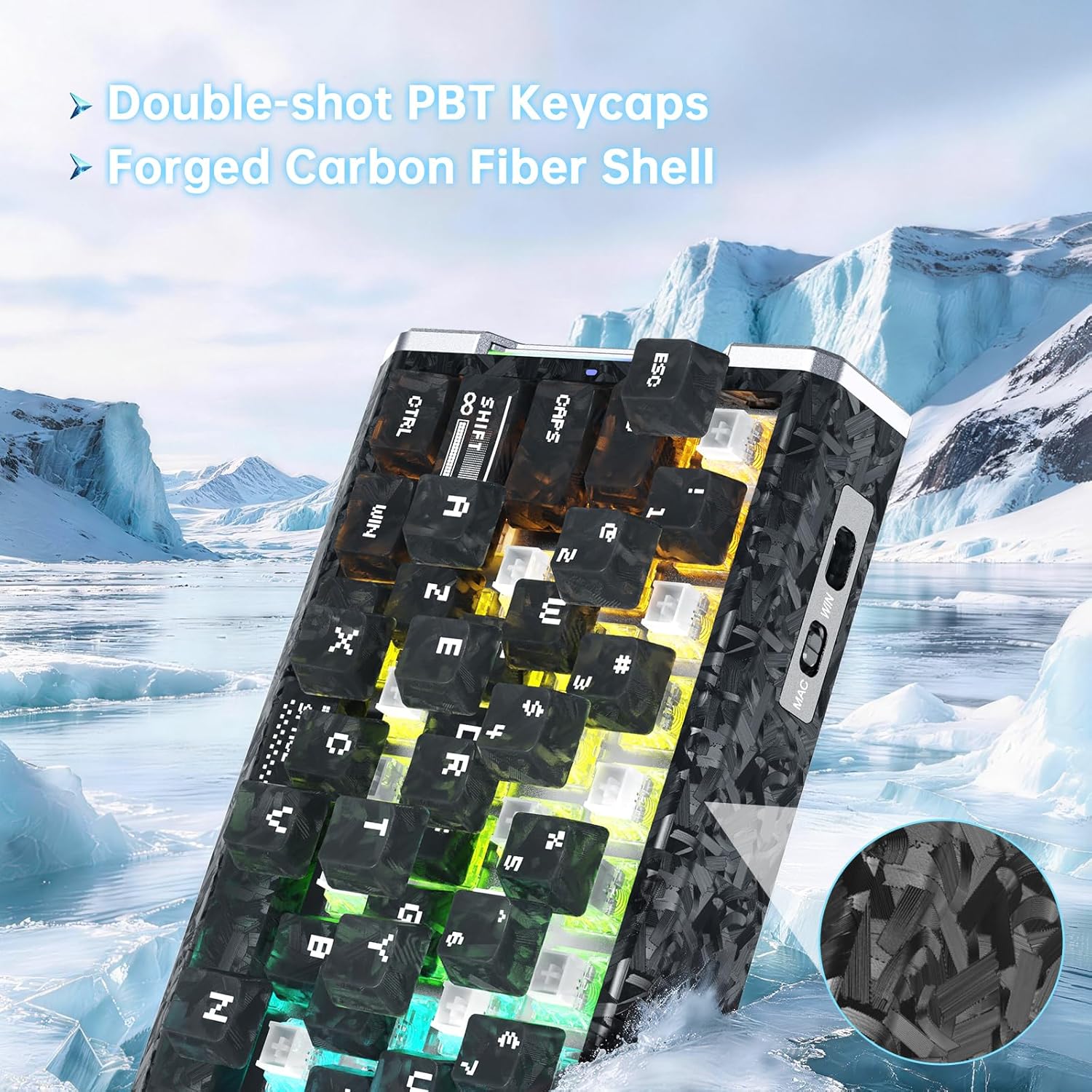
ภาพ: รายละเอียด view of the keyboard's forged carbon fiber keycaps and shell material, alongside accessories like spare switches and a key puller, relevant for maintenance.
8 การแก้ไขปัญหา
If you encounter issues with your ATTACK SHARK R68 HE keyboard, refer to the following common solutions:
| ปัญหา | สาเหตุที่เป็นไปได้ | สารละลาย |
|---|---|---|
| แป้นพิมพ์ไม่ตอบสนอง | การเชื่อมต่อสายเคเบิลหลวม, พอร์ต USB ไม่ถูกต้อง, ปัญหาไดรเวอร์ | Ensure the USB-C cable is securely connected to both the keyboard and the computer. Try a different USB port. Restart your computer. Check device manager for driver issues. |
| แสง RGB ไม่ทำงานหรือไม่ถูกต้อง | การตั้งค่าแสงไม่ถูกต้อง เกิดความขัดแย้งทางซอฟต์แวร์ | Use the onboard Fn key combinations to cycle through effects and colors (see Section 5.2). Check the QMK web driver for detailed lighting settings. Ensure no other lighting software is conflicting. |
| กุญแจไม่ลงทะเบียนหรือพิมพ์ซ้ำ | Dust/debris under keycap, magnetic switch calibration needed, software issue. | Remove the keycap and clean the switch area. Perform a "Travel calibration" using the QMK web driver (see Section 4.2). Update or reinstall the keyboard software/driver. |
| Advanced features (RT, DKS, etc.) not working | Features not enabled or configured in software. | Ensure these features are properly configured and enabled within the QMK web driver software (see Section 6). |
| Computer lagging or freezing after connecting keyboard | Potential software conflict or system resource issue (rare). | Ensure your operating system and drivers are up to date. Try connecting the keyboard to a different computer to isolate the issue. If the problem persists, contact customer support. |
9. ข้อมูลจำเพาะ
Detailed technical specifications for the ATTACK SHARK R68 HE Keyboard:
| คุณสมบัติ | รายละเอียด |
|---|---|
| ยี่ห้อ | โจมตีฉลาม |
| แบบอย่าง | R68 HE |
| เทคโนโลยีการเชื่อมต่อ | USB-C (แบบมีสาย) |
| เค้าโครงแป้นพิมพ์ | 68-Key ANSI (60% Layout) |
| ประเภทสวิตซ์ | Magnetic Hall Effect Switches (Linear) |
| ช่วงการทำงาน | 0.005 มม. ถึง 3.4 มม. (ปรับได้) |
| ความแม่นยำในการยิงอย่างรวดเร็ว | 0.005มม. |
| อัตราการสำรวจความคิดเห็น | 8000เฮิรตซ์ |
| ความหน่วงเวลา | 0.08มิลลิวินาที |
| อัตราการสแกน | 256กิโลเฮิรตซ์ |
| วัสดุปุ่มกด | PC Matte Forged Carbon |
| วัสดุของตู้หุ้ม | คาร์บอนไฟเบอร์, อลูมิเนียมอัลลอย |
| ไฟ RGB | 16.8 Million Colors, Dynamic Backlight & Side Strips |
| ระบบปฏิบัติการที่รองรับ | Windows, Mac OS 14 Sonoma and above |
| ขนาด | 325 มม. x 122 มม. x 20 มม. (ประมาณ 12.8 นิ้ว x 4.8 นิ้ว x 0.79 นิ้ว) |
| ยูพีซี | 707630517426 |
Image: A technical diagram illustrating the ANSI layout and physical dimensions of the R68 HE keyboard.
10. การรับประกันและการสนับสนุน
10.1 การรับประกันของผู้ผลิต
The ATTACK SHARK R68 HE keyboard comes with a การรับประกันจากผู้ผลิต 1 ปี นับจากวันที่ซื้อสินค้า การรับประกันนี้ครอบคลุมถึงข้อบกพร่องในวัสดุและฝีมือการผลิตภายใต้การใช้งานปกติ ไม่ครอบคลุมถึงความเสียหายที่เกิดจากการใช้งานผิดวิธี อุบัติเหตุ การดัดแปลงโดยไม่ได้รับอนุญาต หรือการสึกหรอตามปกติ
โปรดเก็บหลักฐานการซื้อของคุณไว้เพื่อเรียกร้องการรับประกัน
10.2 การสนับสนุนลูกค้า
For technical assistance, warranty claims, or any questions regarding your ATTACK SHARK R68 HE keyboard, please contact ATTACK SHARK customer support through their official channels or the retailer where the product was purchased.
You may also refer to the official brand store on Amazon: ร้านค้า ATTACK SHARK
11. วิดีโอผลิตภัณฑ์
ATTACK SHARK R68 HE Carbon Fiber 8000Hz Rapid Trigger Keyboard Overview
วิดีโอ: เจ้าหน้าที่ผ่านview of the ATTACK SHARK R68 HE Carbon Fiber 8000Hz Rapid Trigger Keyboard, highlighting its features and design.
R68HE Carbon Fiber Rapid Trigger Keyboard with Magnetic Switch Features
Video: A demonstration of the R68HE Carbon Fiber Rapid Trigger Keyboard, focusing on its magnetic switch technology and rapid trigger capabilities.