
1. บทนำ
The iCarsoft CR MAX P is a high-performance bidirectional diagnostic scan tool designed for comprehensive vehicle diagnostics. It features a 10-inch touchscreen, Android 8.1 operating system, and supports a wide range of diagnostic functions including full-system scanning, up to 51 maintenance services, over 4000 bidirectional tests, and complete OBD2 functions. This tool is compatible with most vehicles manufactured after 1996 and supports advanced protocols like CAN FD and DoIP.
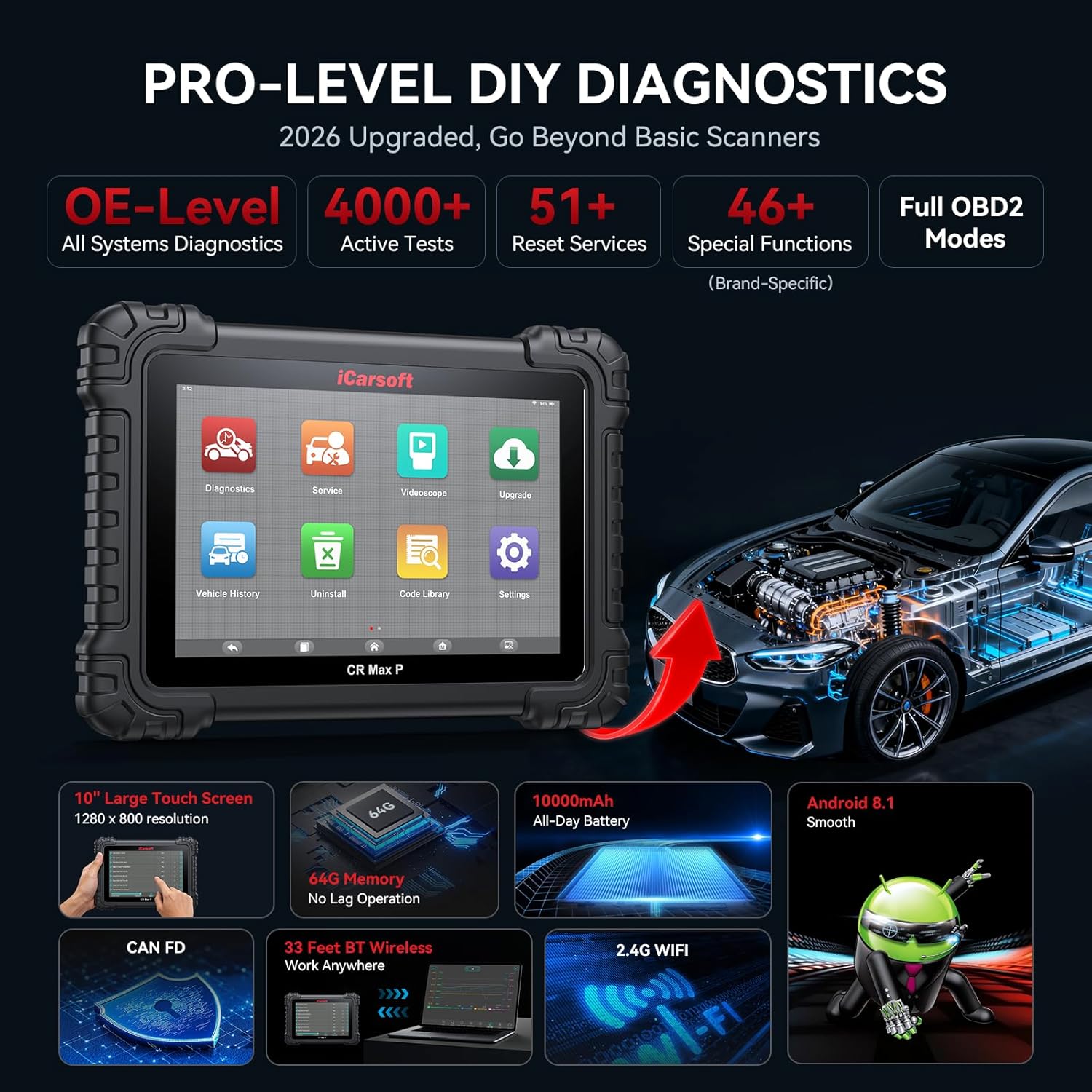
Image: The iCarsoft CR MAX P device showcasing its key features and capabilities.
2. อะไรอยู่ในกล่อง
เมื่อเปิดบรรจุภัณฑ์ ตรวจสอบว่ามีส่วนประกอบทั้งหมดอยู่ครบ:
- iCarsoft CR MAX P Diagnostic Tool
- คู่มือการใช้งาน
- ตัวยึดอะแดปเตอร์ VCI
- VCI Adapter
- สาย USB
- USB to Ethernet Adapter Cable
- อะแดปเตอร์แปลงไฟ
- OBDII Connector F-Chassis
- RJ45 Network Cable, 1.2 M
- ผ้าเช็ดทำความสะอาด

Image: All items included in the iCarsoft CR MAX P product package, including the main unit, cables, and accessories.
3. การตั้งค่า
3.1 การเปิดเครื่องและการชาร์จครั้งแรก
Before first use, ensure the device is fully charged using the provided power adapter. Connect the power adapter to the device's charging port and plug it into a standard electrical outlet. The device features a 10,000mAh battery for extended operation.
3.2 การเชื่อมต่อกับยานพาหนะ
Locate your vehicle's OBD2 diagnostic port, typically found under the dashboard on the driver's side. Connect the 16-pin OBD2 diagnostic adapter (or appropriate adapter for non-16pin sockets) to the vehicle's port, then connect the other end to the iCarsoft CR MAX P device.
3.3 Wireless Connection (Bluetooth & Wi-Fi)
The CR MAX P supports wireless diagnostics via Bluetooth and Wi-Fi. This allows for flexible operation up to 33 feet away from the vehicle. To establish a connection:
- Power on the CR MAX P device.
- ไปที่เมนู 'การตั้งค่า' บนอุปกรณ์ของคุณ
- Enable Bluetooth and Wi-Fi.
- For Bluetooth, select the VCI adapter from the list of available devices to pair.
- For Wi-Fi, select your network and enter the password if required.

Image: The iCarsoft CR MAX P device connected wirelessly to a vehicle, demonstrating its 33ft Bluetooth range.
3.4 การอัปเดตซอฟต์แวร์
Regular software updates are provided to ensure compatibility with new vehicle models and to enhance functionality. Connect the device to a Wi-Fi network and navigate to the 'Upgrade' section on the main menu to check for and install available updates.
4. คู่มือการใช้งาน
4.1 การวินิจฉัยระบบทั้งหมด
The CR MAX P can perform a deep scan of all vehicle modules to identify diagnostic trouble codes (DTCs) and monitor system status. This includes engine, transmission, ABS, airbag, and more.
- อ่านและล้างรหัส: Retrieve and erase DTCs from all accessible control units.
- ข้อมูลสด: View real-time data streams from various sensors and components. Data can be displayed in analog, text, graphing, or progress bar formats.
- ตรึงกรอบ: บันทึกภาพสภาพรถในขณะที่รหัสข้อผิดพลาดปรากฏขึ้น
- ข้อมูลรถ: Access vehicle identification number (VIN), calibration IDs, and calibration verification numbers.
- การทดสอบมอนิเตอร์: ตรวจสอบสถานะของเครื่องตรวจสอบที่เกี่ยวข้องกับการปล่อยมลพิษต่างๆ
- การทดสอบเซ็นเซอร์ O2: เรียกดูผลการทดสอบการตรวจสอบเซ็นเซอร์ O2
- ความพร้อมของ I/M: Check the readiness status of the emission-related monitoring systems.

Image: The iCarsoft CR MAX P displaying full system diagnostic capabilities, including reading codes, live data, and ECU information across various vehicle systems.
4.2 การควบคุมแบบสองทิศทาง (การทดสอบเชิงรุก)
This function allows the diagnostic tool to send commands to vehicle components to test their functionality directly. This helps in pinpointing faults and verifying repairs.
Examples of actuation tests include:
- การทดสอบหัวฉีด
- Fuel Pump Test
- Idle Air Control Valve Test
- Ignition Coil Test
- การทดสอบมอเตอร์ปั๊ม ABS
- EV-AP Valve Test
- Throttle Position Actuator Test
- การทดสอบพัดลมระบายความร้อน
- HVAC Test
- A/C Compressor Test
- Window, Headlight, Wiper, Door Lock, Horn tests

Image: The iCarsoft CR MAX P demonstrating bidirectional control, sending commands to various vehicle components for active testing.
4.3 Reset and Maintenance Services
The CR MAX P offers up to 51 maintenance and reset services to restore vehicle systems to optimal status after repair or replacement. The availability of specific functions depends on the vehicle model and its systems.
Key services include:
- รีเซ็ตน้ำมัน
- การรีเซ็ตเบรกจอดรถอิเล็กทรอนิกส์ (EPB)
- Steering Angle Sensor (SAS) Reset
- การเรียนรู้คันเร่ง
- การสร้างตัวกรองอนุภาคดีเซล (DPF)
- รีเซ็ตระบบจัดการแบตเตอรี่ (BMS)
- การไล่ลมระบบเบรกป้องกันล้อล็อก (ABS)
- การเข้ารหัสหัวฉีด
- การรีเซ็ตระบบตรวจสอบแรงดันลมยาง (TPMS)
- การปรับเทียบระบบกันสะเทือน
- Air Conditioning (AC) System Reset
- หัว ล.amp การปรับเปลี่ยน
- Body Stability System Reset
- Engine, Transmission, Airbag System Resets
- Seat, Door-Window-Roof System Resets
- การเปิดใช้งานปั๊มเชื้อเพลิง
- Exhaust Gas Recirculation (EGR) Adaptation
- รีเซ็ต AdBlue
- การปรับคลัตช์
- Crankshaft Position Sensor Learning
- เล่มสูงtagการวินิจฉัยแบตเตอรี่
- Cruise Control System Adaptation
- รีเซ็ตเซ็นเซอร์ NOx
- Rain Sensor Calibration
- Stop And Start System Reset
- การปรับเทียบเทอร์โบชาร์จเจอร์
- Head Up Display Calibration
- Radar Camera Calibration
- การตั้งค่ายานพาหนะ
- การตรวจสอบการจุดระเบิดผิดพลาดของกระบอกสูบ
- ระบบช่วยจำกัดความเร็ว
- รีเซ็ตหน่วยควบคุม
- การสอบเทียบเซ็นเซอร์ออกซิเจน
- Seatbelt Warning Reset
- VIN Verification (New Service)
- Mileage Verification (New Service)

Image: A comprehensive display of the 51 maintenance and reset services available on the iCarsoft CR MAX P.
4.4 การเขียนโค้ด ECU
The ECU Coding function allows for advanced vehicle customization and component adaptation, primarily for V.A.G (Volkswagen, Audi, Skoda, SEAT), BMW, MINI, Bentley, Lamborghini, and Ducati vehicles. This includes:
- Unlocking Hidden Features: Enable manufacturer-equipped functions that are not active by default (e.g., auto door lock, coming home/leaving home lights, blind spot monitoring, instrument cluster coding).
- Disabling Annoying Features: Customize vehicle behavior by deactivating certain functions.
- Coding Retrofitted Components: Adapt new components to the vehicle's existing systems.

Image: The iCarsoft CR MAX P demonstrating its advanced ECU coding capabilities to unlock vehicle potential.
4.5 One-Click Auto VIN & Auto Scan
For efficient and comprehensive diagnostics, the device supports automatic VIN detection and a one-click auto scan function that quickly scans all accessible modules for fault codes.

Image: The iCarsoft CR MAX P displaying its one-click auto VIN and auto scan feature for quick vehicle identification and diagnostic overview.
5. การบำรุงรักษา
- การทำความสะอาด: ใช้แบบนุ่มๆamp ใช้ผ้าเช็ดทำความสะอาดหน้าจอและภายนอกของอุปกรณ์ หลีกเลี่ยงการใช้สารทำความสะอาดที่มีฤทธิ์กัดกร่อนหรือตัวทำละลาย
- การอัปเดตซอฟต์แวร์: ตรวจสอบและติดตั้งซอฟต์แวร์อัปเดตเป็นประจำ เพื่อให้มั่นใจได้ถึงประสิทธิภาพสูงสุดและความเข้ากันได้กับรถยนต์รุ่นล่าสุด
- พื้นที่จัดเก็บ: Store the device in a cool, dry place, away from direct sunlight and extreme temperatures. Use the provided carrying case for protection during transport.
- การดูแลแบตเตอรี่ เพื่อยืดอายุการใช้งานแบตเตอรี่ ควรหลีกเลี่ยงการปล่อยให้แบตเตอรี่หมดจนเกลี้ยงบ่อยๆ ชาร์จอุปกรณ์เป็นประจำ โดยเฉพาะอย่างยิ่งหากจะเก็บไว้เป็นเวลานาน
6 การแก้ไขปัญหา
| ปัญหา | สาเหตุที่เป็นไปได้ | สารละลาย |
|---|---|---|
| อุปกรณ์ไม่เปิดเครื่อง | Low battery; faulty power adapter; device malfunction. | Charge the device for at least 30 minutes. Ensure the power adapter is working correctly. If the issue persists, contact support. |
| ไม่สามารถเชื่อมต่อกับรถได้ | Loose OBD2 connection; incorrect adapter; vehicle ignition off; incompatible vehicle. | Ensure the OBD2 connector is securely plugged into the vehicle's port. Turn the vehicle ignition to the ON position (engine off). Verify vehicle compatibility with the manufacturer. |
| Wireless connection (Bluetooth/Wi-Fi) issues. | นอกช่วงสัญญาณ; สัญญาณรบกวน; การตั้งค่าไม่ถูกต้อง | Ensure the device is within 33 feet of the VCI adapter. Check Bluetooth and Wi-Fi settings on the device. Restart both the device and the VCI adapter. |
| Diagnostic functions not working for specific vehicle. | Software not updated; vehicle not supported; specific function not available for that model. | Perform a software update. Contact iCarsoft support with your vehicle's VIN to confirm compatibility for specific functions. |
7. ข้อมูลจำเพาะ
| คุณสมบัติ | รายละเอียด |
|---|---|
| ยี่ห้อ | iCarsoft |
| หมายเลขรุ่น | CR MAX P |
| แหล่งพลังงาน | ใช้พลังงานจากแบตเตอรี่ |
| ระบบปฏิบัติการ | แอนดรอยด์ 8.1 |
| ขนาดหน้าจอ | 10 นิ้ว |
| หน่วยความจำ | พื้นที่เก็บข้อมูล 64GB |
| ความจุของแบตเตอรี่ | 10,000mAh |
| ช่วงสาย | 33ft (Bluetooth/Wi-Fi) |
| โปรโตคอลที่รองรับ | ISO9141-2, ISO14230-2, ISO15765, K/L-Line, Flashing Code, SAE-J1850 VPW, SAE-J1850 PWM, ISO11898, SAE J2610, GM UART, UART Echo Byte Protocol, Honda Diag-H Protocol, TP2.0, TP1.6, CAN FD, DoIP |
| ประเภทความพอดีของยานยนต์ | พอดีทุกประการ |

Image: Visual representation of the iCarsoft CR MAX P's enhanced hardware, including screen size, memory, battery, and operating system.
8. ข้อมูลการรับประกัน
The iCarsoft CR MAX P comes with a การรับประกันจากผู้ผลิต 1 ปี. This warranty covers defects in materials and workmanship under normal use. Please retain your proof of purchase for warranty claims. For detailed terms and conditions, refer to the official iCarsoft webไซต์หรือติดต่อฝ่ายสนับสนุนลูกค้า
9. การสนับสนุนลูกค้า
For technical assistance, compatibility inquiries, or any other support needs, please contact iCarsoft customer service. When contacting support, it is helpful to have your device's serial number and your vehicle's VIN (Vehicle Identification Number) ready, especially for compatibility checks regarding specific functions.
You can often find support contact information on the iCarsoft official website or within the device's 'About' or 'Settings' menu.