
1. บทนำและเรื่องอื่นๆview
The CooSpo S10 Power Meter Spider is a precision cycling power meter designed to provide accurate and reliable power, cadence, and torque effectiveness data. This dual-sided power meter is specifically engineered for Easton 110 BCD 4-bolt cranksets, ensuring seamless integration and optimal performance for both road and mountain bikes. With Bluetooth and ANT+ dual connectivity, it pairs effortlessly with various cycling computers and apps, helping you train smarter and perform better.

Image 1: CooSpo S10 Power Meter Spider for Easton 110 BCD 4-Bolt Crankset.
2. อะไรอยู่ในกล่อง
โปรดตรวจสอบว่าบรรจุภัณฑ์มีส่วนประกอบทั้งหมด:
- S10-Easton 110 BCD 4-Bolt Bike power meter spider x 1
Note: Other tools and components like cranks, chainrings, and specific installation tools are typically sold separately or are part of your existing bike setup.
3. การตั้งค่าและการติดตั้ง
Proper installation is crucial for accurate data and safe operation. It is recommended to consult a professional bike mechanic if you are unsure about any steps.
3.1 เครื่องมือที่จำเป็น
- ประแจหกเหลี่ยม 5 มม.
- ประแจหกเหลี่ยม 6 มม.
- Torque wrench (for precise tightening)
- เครื่องมือถอดแหวนล็อคขนาด 44 มม. - 16T
- Crankset removal tool (specific to your crankset, e.g., Shimano or SRAM)
3.2 Power Meter Spider Installation
- Remove Crankset: Carefully remove your existing crankset from your bike using the appropriate crankset removal tool.
- Prepare Easton Crankset: Ensure your Easton crankset is clean and ready for the power meter installation.
- Align Power Meter: Align the CooSpo S10 Power Meter Spider with the right crank interface. Ensure it sits correctly in position.
- Install Lockring: ใส่แหวนล็อคเข้ากับตัวยึด โดยจัดให้ตรงกับทิศทางที่ระบุไว้
- Tighten Lockring: Use a 44 mm - 16T lockring tool along with a torque wrench to tighten the lockring clockwise. Apply a torque of 35-40 N·m.
3.3 การติดตั้งจานหน้า
This product package does not provide a chainring. Please refer to your chainring's manual for installation instructions. Ensure your chainrings are 110 BCD compatible with the power meter. Make sure the chainring is installed in the correct direction.
3.4 Crankset Installation
- Check Bottom Bracket: Confirm that your bike's bottom bracket is Shimano standard 24mm. If not, replace the bottom bracket before proceeding.
- ทาจารบี: ทาจาระบีปริมาณเล็กน้อยที่บริเวณกระโหลกบันได
- Insert Drive-Side Crank: Insert the drive-side crank (with the power meter and chainrings installed) into the bottom bracket. You may need to gently tap it to ensure the crank is fully seated.
- Slide Left Crank Arm: Slide the left crank arm onto the spindle of the right crank assembly. Ensure the left crank is positioned 180 degrees opposite the right crank.
- Thread Spindle Bolt: Thread the spindle bolt into the left end of the spindle (clockwise thread). Note that the slot on the left crank should be at its widest position.
- Tighten Spindle Bolt: ใช้เครื่องมือปรับแรงดึงที่ให้มาเพื่อขันน็อตแกนหมุนให้แน่น (หมุนตามเข็มนาฬิกา) ตรวจสอบแรงบิดในการขันด้วยประแจวัดแรงบิดให้ได้ 1-1.5 นิวตันเมตร อย่าขันแน่นเกินไป เพราะอาจทำให้การหมุนไม่ดี
- Tighten Left-Crank Fixing Bolts: ขันน็อตยึดข้อเหวี่ยงด้านซ้ายทั้งสองตัวให้แน่นโดยใช้ประแจหกเหลี่ยมขนาด 5 มม. อย่าขันน็อตตัวใดตัวหนึ่งให้แน่นสนิทในครั้งเดียว แต่ให้ขันสลับกันทีละน้อย ตรวจสอบแรงบิดสุดท้ายด้วยประแจวัดแรงบิดให้ได้ 12-15 นิวตันเมตร
- Reinstall Chain: หลังจากติดตั้งเสร็จแล้ว ให้ติดตั้งโซ่กลับเข้าไปใหม่
Video 1: CooSpo S10 Bike Spider Power Meter Installation Guide. This video demonstrates the step-by-step process of installing the CooSpo S10 power meter onto your bike's crankset.
4. Pairing with the Device
The CooSpo S10 Power Meter supports both Bluetooth and ANT+ connectivity for seamless pairing with your cycling computer or smartphone app.
- Wake Up Power Meter: Before pairing, ensure the power meter is awake. Rotate the crank several times to activate it.
- ค้นหา อุปกรณ์: On your cycling computer or smartphone app (e.g., CooSpoRide, Zwift, Garmin Connect), navigate to the sensor pairing menu. ค้นหา new power meter devices.
- เชื่อมต่อ: Select the CooSpo S10 from the list of available devices. It will typically appear with a unique ANT ID or Bluetooth name.
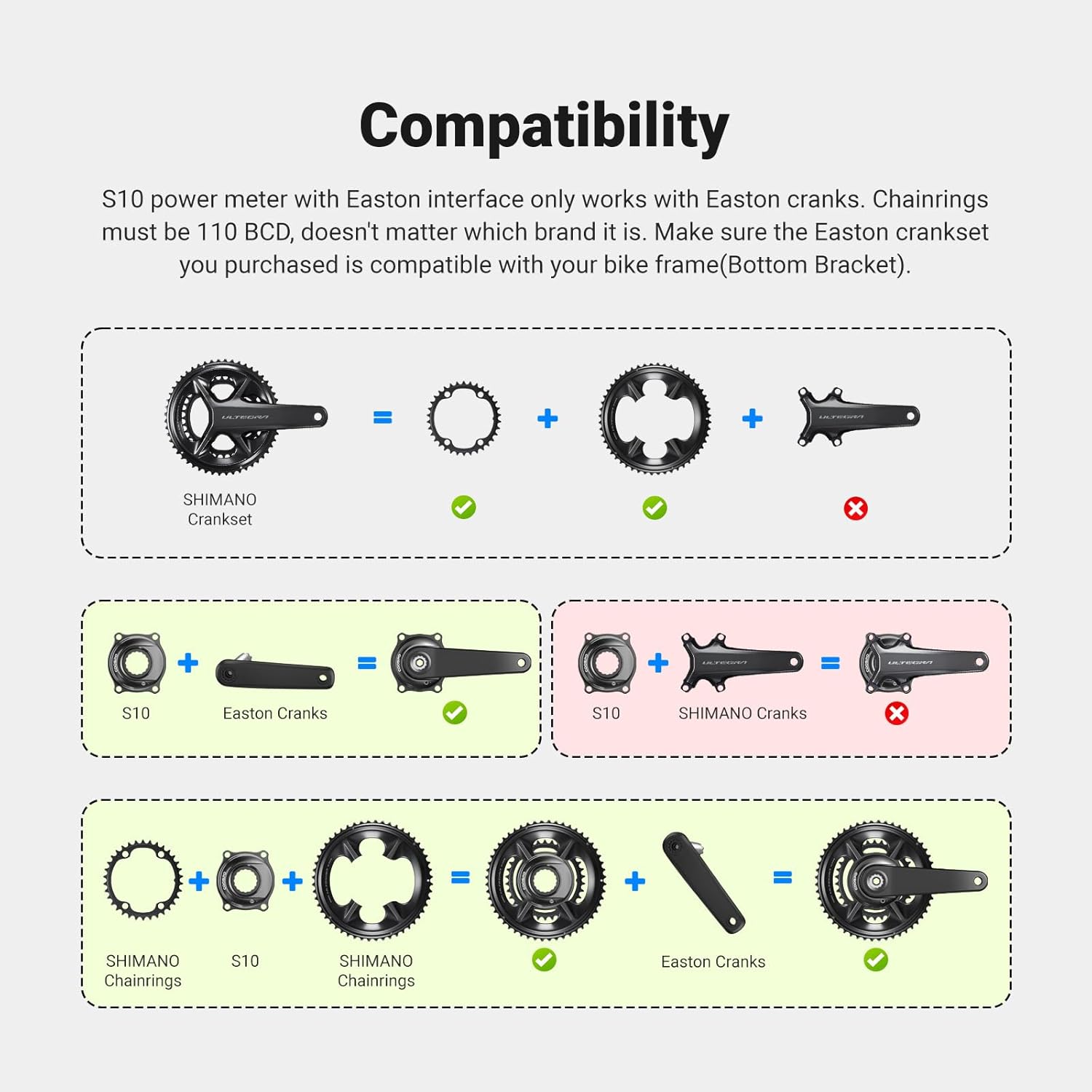
Image 2: The CooSpo S10 Power Meter offers instant connectivity via Bluetooth and ANT+ to various cycling computers and apps.
5 การสอบเทียบจุดศูนย์
To ensure accurate power measurement, perform a zero point calibration after each installation or a long ride. This compensates for any environmental or mechanical changes.
- Position Crank: Ensure the crank arm is in a vertical position (6 or 12 o'clock) and there is no weight on the pedals.
- Access Calibration: On your paired cycling computer or app, find the 'Calibrate' or 'Zero Offset' function for the power meter.
- ดำเนินการปรับเทียบ: Initiate the calibration process. The device will typically display a success message and a zero offset value upon completion.
6. คู่มือการใช้งาน
The CooSpo S10 Power Meter automatically activates when you start pedaling and transmits data to your paired device.
- การติดตามข้อมูล: The S10 provides real-time data for power output, cadence, and torque effectiveness. Dual-sided measurement accurately tracks total, left/right leg power and cadence for balanced training analysis.
- ความนุ่มนวลของแป้นเหยียบ: Advanced dual-sided sensing analyzes left and right Pedal Smoothness (Torque Effectiveness), providing actionable data to eliminate dead spots, improve pedal circularity, and boost overall power transfer.
- การเชื่อมต่อ: Seamlessly connects with Garmin/Wahoo cycling computers and supports pairing with most cycling apps via Bluetooth and ANT+.
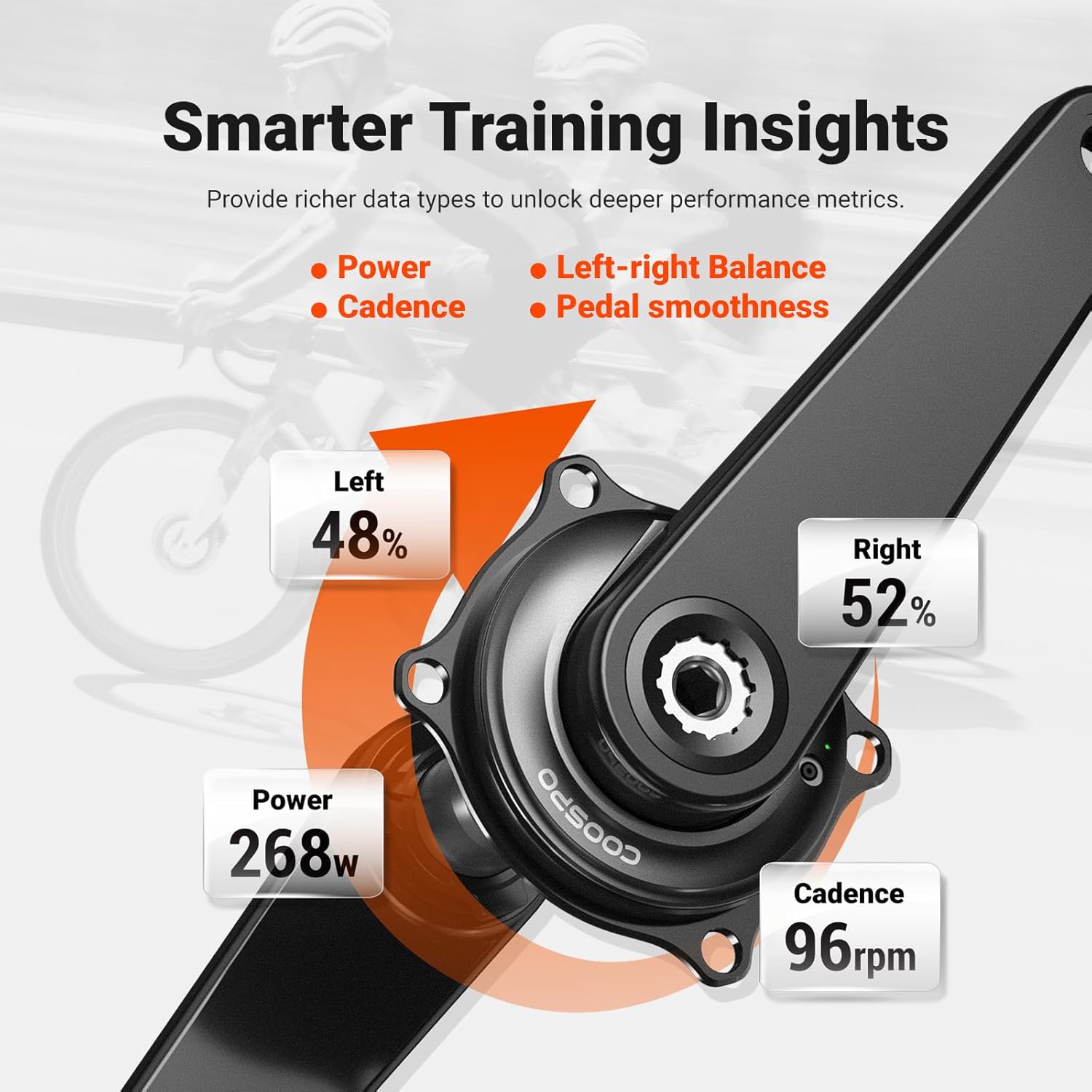
Image 3: Smarter Training Insights provided by the CooSpo S10 Power Meter, including power, cadence, left-right balance, and pedal smoothness.
7. การบำรุงรักษา
To ensure the longevity and optimal performance of your CooSpo S10 Power Meter, follow these maintenance guidelines:
- การทำความสะอาด: Clean the power meter regularly with a damp ผ้า. หลีกเลี่ยงการใช้สารเคมีรุนแรงหรือวัสดุกัดกร่อน
- การชาร์จ: The integrated rechargeable battery provides up to 300 hours of use. Charge the device using the magnetic charging cable when the battery is low.
- ความต้านทานน้ำ: The S10 has an IPX7 waterproof rating, protecting it from rain, mud, and dust. However, avoid submerging it in water for extended periods.
- พื้นที่จัดเก็บ: Store the power meter in a cool, dry place when not in use.

Image 4: The CooSpo S10 Power Meter features a rechargeable battery offering up to 300 hours of use on a single charge.

Image 5: The CooSpo S10 Power Meter is waterproof with an IPX7 rating, making it suitable for all-weather riding conditions.
8 การแก้ไขปัญหา
If you encounter issues with your CooSpo S10 Power Meter, try the following steps:
- ไม่มีไฟ/การเชื่อมต่อ:
- ตรวจสอบให้แน่ใจว่าแบตเตอรี่ชาร์จแล้ว
- Rotate the crank several times to wake up the power meter.
- ตรวจสอบว่า Bluetooth/ANT+ เปิดใช้งานอยู่ในอุปกรณ์รับสัญญาณของคุณแล้ว
- ลองจับคู่อุปกรณ์อีกครั้ง
- การอ่านค่าที่ไม่ถูกต้อง:
- Perform a zero point calibration.
- Ensure the power meter is securely installed and all bolts are torqued to specification.
- Check for any physical damage to the power meter or crankset.
- App/Computer Issues:
- Update your cycling computer's firmware or smartphone app to the latest version.
- Restart your cycling computer or smartphone.
9. ข้อมูลจำเพาะ
| คุณสมบัติ | รายละเอียด |
|---|---|
| ความแม่นยำ | ±1% |
| ความเข้ากันได้ | Easton 110 BCD 4-Bolt Cranksets |
| ประเภทการวัด | Dual-Sided Power, Cadence, Torque Effectiveness |
| การเชื่อมต่อ | บลูทูธ & ANT+ |
| อายุการใช้งานแบตเตอรี่ | สูงสุด 300 ชั่วโมง (ชาร์จไฟได้) |
| ความต้านทานต่อน้ำ | IPX7 |
| วัสดุ | โลหะผสมอลูมิเนียม |
| น้ำหนัก | ประมาณ 100กรัม |
| ขนาดแพ็คเกจรายการ | 5.24 x 5.2 x 1.54 นิ้ว |
| น้ำหนักแพ็คเกจ | 0.25 กิโลกรัม |
10. การรับประกันและการสนับสนุน
The CooSpo S10 Power Meter Spider comes with a 12-month warranty from the date of purchase. For warranty claims, technical support, or any inquiries, please contact CooSpo customer service through their official webไซต์หรือผู้ค้าปลีกที่ซื้อผลิตภัณฑ์
โปรดเก็บหลักฐานการซื้อไว้เพื่อใช้ยืนยันการรับประกัน