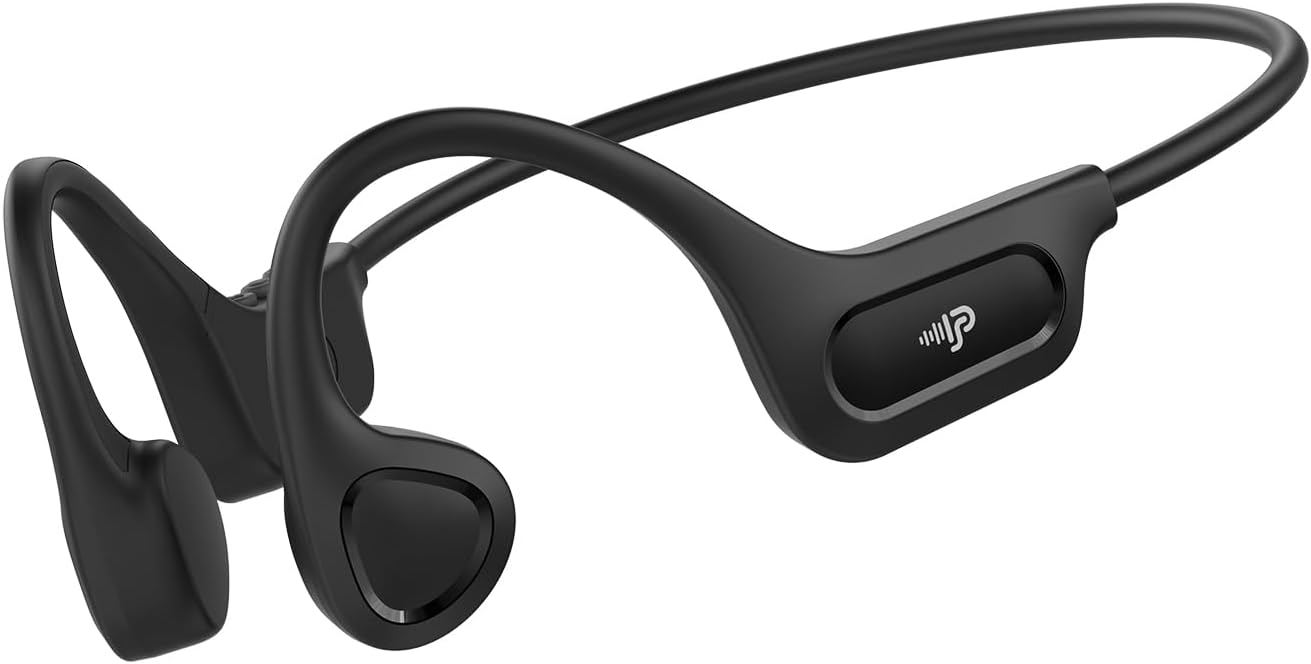
The PSIER X18 Bone Conduction Headphones offer an innovative audio experience by transmitting sound through your cheekbones, leaving your ears open to ambient sounds. This design enhances situational awareness, making them ideal for outdoor activities, sports, and office environments. Featuring Bluetooth 6.0 connectivity, a lightweight design, and IPX5 waterproofing, these headphones are built for comfort and durability.
คุณสมบัติหลัก:
เทคโนโลยีการนำเสียงทางกระดูก: Delivers audio through bone vibrations, keeping ear canals open.
การออกแบบแบบเปิดหู: Maintains awareness of surroundings for enhanced safety during activities.
Bluetooth 6.0: Provides stable and low-latency wireless connectivity.
น้ำหนักเบา สบาย: Weighs only 23g with a flexible memory-titanium frame for a secure fit.
IPX5 กันน้ำ: Resistant to sweat and rain, suitable for various weather conditions (not for swimming).
วิดีโอ: จบแล้วview of PSIER Bone Conduction Headphones, highlighting their suitability for active lifestyles and outdoor use, demonstrating the open-ear design and secure fit.
2. อะไรอยู่ในกล่อง
The package for your PSIER X18 Bone Conduction Headphones includes all necessary items to get started and ensure a comfortable experience.
PSIER X18 Bone Conduction Earbuds (1 pair)
Adjustable Strap (1)
Earplugs (1 pair)
สายชาร์จ Type-C (1)
คู่มือการใช้งาน (1)
3. คู่มือการติดตั้ง
3.1 ค่าบริการเริ่มต้น
Before first use, fully charge your headphones. Connect the provided Type-C charging cable to the charging port on the headphones and plug the other end into a USB power source. The LED indicator will show charging status and turn off when fully charged.
Image: PSIER X18 headphones connected to a Type-C charging cable.
3.2 เปิด/ปิดเครื่อง
เปิดเครื่อง: Press and hold the multi-function button (usually the middle button on the control panel) for 2 seconds until the LED indicator flashes blue and a voice prompt says "Power On".
หมดแรง: Press and hold the multi-function button for 3 seconds until the LED indicator flashes red and a voice prompt says "Power Off".
3.3 การจับคู่บลูทูธ
ตรวจสอบให้แน่ใจว่าหูฟังปิดอยู่
Press and hold the multi-function button for 5 seconds until the LED indicator flashes red and blue alternately, and a voice prompt says "Pairing". This indicates the headphones are in pairing mode.
บนอุปกรณ์ของคุณ (สมาร์ทโฟน แท็บเล็ต คอมพิวเตอร์) เปิดใช้งาน Bluetooth และค้นหาอุปกรณ์ที่มีอยู่
Select "X18" from the list of available devices.
เมื่อเชื่อมต่อแล้ว ไฟ LED จะกะพริบเป็นสีน้ำเงินช้าๆ และเสียงแจ้งเตือนจะยืนยันว่า "เชื่อมต่อแล้ว"
Video: Demonstrates powering on and pairing the PSIER Bone Conduction Headphones with a mobile device. The user presses the power button, then navigates to Bluetooth settings on their phone to connect to "X12" (note: model name in video is "X12", product is "X18").
3.4 การสวมหูฟัง
Place the headphones with the transducers resting on your cheekbones, just in front of your ears. The neckband should rest comfortably behind your head. Adjust the fit using the included adjustable strap if needed to ensure a snug and secure fit, especially during active use.
Image: A person demonstrating the secure and comfortable fit of the PSIER X18 Bone Conduction Headphones during a run.
4. คู่มือการใช้งาน
4.1 การเล่นเพลง
เล่น/หยุดชั่วคราว: กดปุ่มมัลติฟังก์ชั่นหนึ่งครั้ง
เพลงถัดไป: กดปุ่มมัลติฟังก์ชันสองครั้ง
แทร็กก่อนหน้า: กดปุ่มมัลติฟังก์ชันสามครั้ง
ปรับระดับเสียงขึ้น: กดปุ่มระดับเสียง +
ลดเสียงลง: กดปุ่มปรับระดับเสียง -
4.2 การจัดการการโทร
รับ/วางสาย: กดปุ่มมัลติฟังก์ชั่นหนึ่งครั้ง
ปฏิเสธสาย: กดปุ่มมัลติฟังก์ชั่นค้างไว้ 2 วินาที
เปิดใช้งาน Voice Assistant: Press the multi-function button twice quickly when not on a call.
4.3 การรับรู้สถานการณ์
The open-ear design allows you to hear your audio while remaining aware of your surroundings. This is crucial for safety during outdoor activities like running or cycling, where hearing traffic or other warnings is important.
Image: A person cycling with PSIER X18 headphones, highlighting the open-ear design for environmental awareness.
5. การบำรุงรักษา
5.1 การทำความสะอาด
เช็ดหูฟังด้วยผ้านุ่มdamp cloth after each use, especially after workouts, to remove sweat and dirt. Do not use abrasive cleaners or submerge the headphones in water.
5.2 พื้นที่จัดเก็บ
Store the headphones in a cool, dry place away from direct sunlight and extreme temperatures. Avoid placing heavy objects on them to prevent damage to the frame.
5.3 ความต้านทานน้ำ (IPX5)
The PSIER X18 headphones are IPX5 rated, meaning they are protected against low-pressure water jets from any direction. This makes them suitable for use during light rain and sweaty workouts. They are not designed for submersion in water or for swimming.
Image: PSIER X18 headphones being splashed with water, demonstrating their IPX5 water resistance.
6 การแก้ไขปัญหา
6.1 ไม่มีไฟฟ้า
ตรวจสอบให้แน่ใจว่าหูฟังชาร์จเต็มแล้ว
Try using a different charging cable and power adapter.
6.2 ไม่สามารถจับคู่กับอุปกรณ์ได้
ตรวจสอบให้แน่ใจว่าหูฟังอยู่ในโหมดจับคู่ (ไฟ LED จะกะพริบสีแดงและสีน้ำเงินสลับกัน)
Ensure Bluetooth is enabled on your device and it is within range (up to 10 meters).
The PSIER X18 Bone Conduction Headphones come with a 1-year manufacturer's warranty covering defects in materials and workmanship. Please retain your proof of purchase for warranty claims.
8.2 การสนับสนุนลูกค้า
For further assistance, troubleshooting, or warranty inquiries, please contact PSIER customer support through the retailer's platform or visit the official PSIER webเว็บไซต์สำหรับรายละเอียดการติดต่อ
Ask a question about this manual
Ask about setup, troubleshooting, compatibility, parts, safety, or missing instructions. Manuals+ will review the question and use this page’s manual context to help answer it.