
1. บทนำ
Welcome to the user manual for your truke TruClips Wireless Open Ear Buds (Model S45). These earbuds are designed to provide a comfortable and immersive audio experience with their open-ear design, custom drivers, and advanced features. This manual will guide you through the setup, operation, and maintenance of your new device.
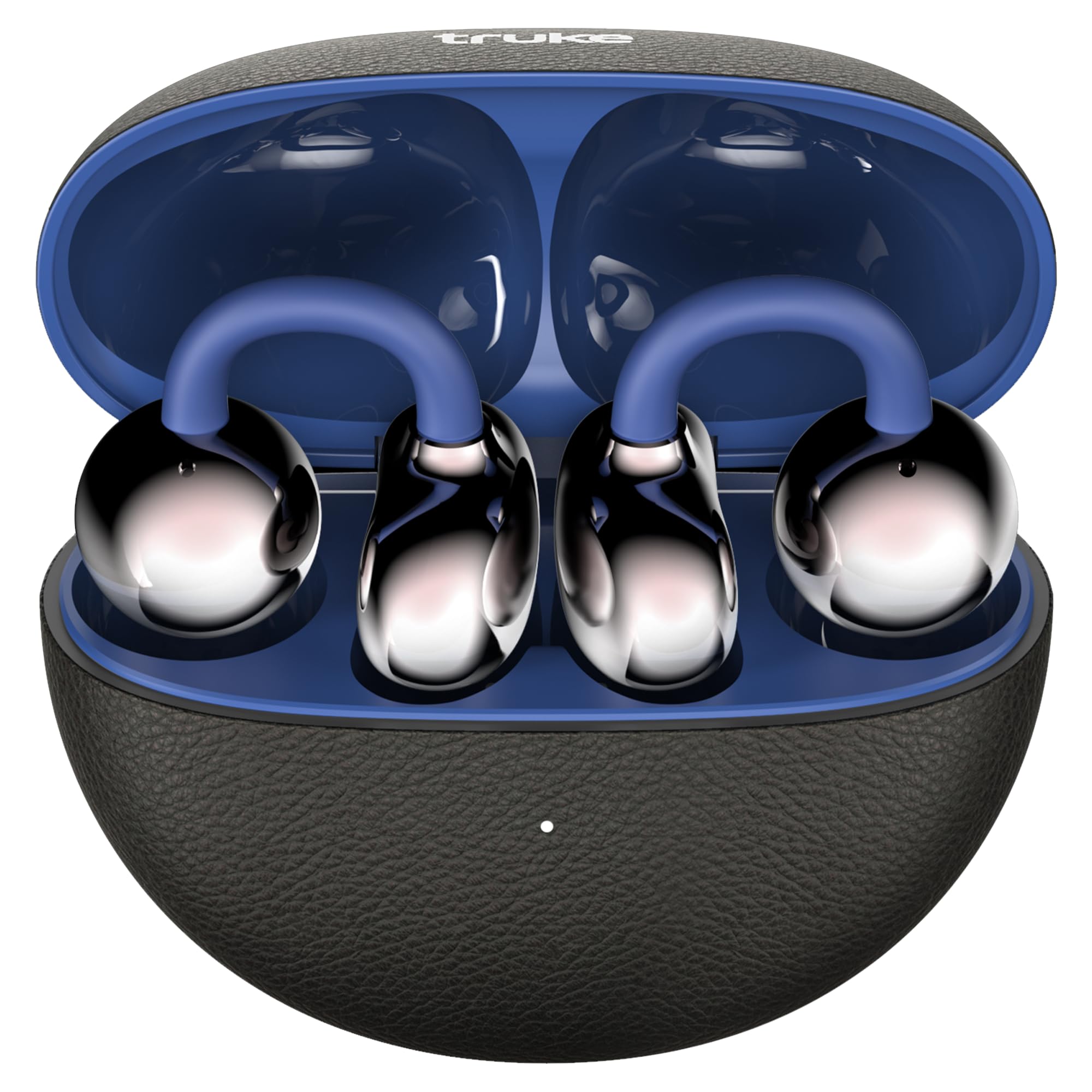
Image: truke TruClips Wireless Open Ear Buds in Onyx Blue, showcasing การออกแบบที่เพรียวบาง

Image: Close-up of the truke TruClips charging case, highlighting its premium leather-like finish.
2. การตั้งค่า
2.1 อะไรอยู่ในกล่อง
- truke TruClips Earbuds
- สายชาร์จ Type-C
- คู่มือการใช้งาน
2.2 การชาร์จหูฟังและเคส
Before first use, fully charge your truke TruClips.
- วางหูฟังลงในกล่องชาร์จ
- เชื่อมต่อสายชาร์จ Type-C เข้ากับพอร์ตชาร์จบนเคสและแหล่งจ่ายไฟ
- ไฟแสดงสถานะบนเคสจะแสดงสถานะการชาร์จ การชาร์จเต็มหนึ่งครั้งจะใช้งานได้นานสูงสุด 55 ชั่วโมงเมื่อใช้ร่วมกับเคสชาร์จ

Image: Visual representation of the 55-hour total playtime capability of the TruClips earbuds and charging case.
2.3 การจับคู่กับอุปกรณ์ของคุณ
- เปิดกล่องชาร์จ หูฟังจะเข้าสู่โหมดจับคู่โดยอัตโนมัติ
- เปิดใช้งาน Bluetooth บนอุปกรณ์ของคุณ (สมาร์ทโฟน แท็บเล็ต ฯลฯ)
- ค้นหา "truke TruClips" in the list of available Bluetooth devices and select it to connect.
- เมื่อเชื่อมต่อเสร็จแล้ว คุณจะได้ยินเสียงแจ้งเตือน และไฟแสดงสถานะบนหูฟังจะเปลี่ยนไป
2.4 การสวมหูฟัง
The truke TruClips feature an open-ear design for comfort and ambient awareness.
- Gently place the earbuds onto your ears, ensuring the clip rests securely.
- Adjust for a comfortable fit. The open-ear design allows you to hear your surroundings while enjoying audio.

Image: Diagram illustrating the true open-ear design of the TruClips, showing how it sits comfortably without blocking the ear canal.
3. การดำเนินการ
3.1 ระบบควบคุมแบบสัมผัส
The truke TruClips feature intuitive touch controls for easy management of music, calls, and voice assistants. Specific touch gestures may vary; refer to the quick start guide for detailed commands.
- เล่น/หยุดชั่วคราว: แตะที่หูฟังข้างใดข้างหนึ่งเพียงครั้งเดียว
- เพลงถัดไป: แตะสองครั้งที่หูฟังด้านขวา
- แทร็กก่อนหน้า: แตะสองครั้งที่หูฟังด้านซ้าย
- รับ/วางสาย: แตะที่หูฟังข้างใดข้างหนึ่งเพียงครั้งเดียว
- ปฏิเสธสาย: กดที่หูฟังข้างใดข้างหนึ่งค้างไว้
- เปิดใช้งาน Voice Assistant: แตะสามครั้งที่หูฟังข้างใดข้างหนึ่ง
3.2 คุณสมบัติด้านเสียง
- 12mm Custom Drivers: Experience deep bass and high-fidelity acoustics.
- เสียงเชิงพื้นที่: Immerse yourself in a 360-degree soundstage for a cinematic audio experience.
- Quad Mic PureVoice ENC: Ensures crystal-clear calls by reducing environmental noise.

ภาพ: ระเบิด view diagram of the 12mm customised titanium drivers, illustrating components like the speaker, sound tube, graphene diaphragm, and bass reflector.

Image: Graphic depicting 24-bit 360-degree spatial audio, showing sound waves emanating around the earbuds.

Image: Illustration of Quad Mic PureVoice ENC technology, showing its effectiveness in various environments like indoor, street, and metro stations for clear calls.

Image: Diagram showing Smart Directional Sound Technology within the earbud, highlighting the placement of the call mic and crystal clear windproof audio components.
3.3 โหมดพิเศษ
- การรับรู้สภาพแวดล้อม: The open-ear design naturally allows you to stay aware of your surroundings, ideal for commuting or outdoor activities.
- Ultra-Low Latency Mode (Battle Mode): For gaming, activate this mode to minimize audio lag, providing an instant response for an immersive experience.

Image: Graphic illustrating the Ultra Low Latency feature, showing earbuds connected to a gaming setup for reduced audio delay.
4. การบำรุงรักษา
4.1 การทำความสะอาด
To ensure optimal performance and hygiene, regularly clean your earbuds.
- ใช้ผ้าแห้งนุ่มและไม่ขุยเช็ดหูฟังและกล่องชาร์จ
- ห้ามใช้สารทำความสะอาดที่มีฤทธิ์กัดกร่อน ตัวทำละลาย หรือสเปรย์แอโรซอล
- หลีกเลี่ยงไม่ให้ความชื้นเข้าในช่องเปิดต่างๆ
4.2 ความต้านทานน้ำ (IPX5)
The truke TruClips are rated IPX5 for water and sweat resistance. This means they are protected against sweat and heavy splashes of water.
- ห้ามจุ่มหูฟังลงในน้ำ
- ตรวจสอบให้แน่ใจว่าหูฟังแห้งก่อนใส่กลับเข้าไปในกล่องชาร์จเพื่อป้องกันความเสียหาย
5 การแก้ไขปัญหา
If you encounter any issues with your truke TruClips, please refer to the following common solutions:
| ปัญหา | สารละลาย |
|---|---|
| หูฟังเอียร์บัดไม่จับคู่ |
|
| ไม่มีเสียงหรือเสียงเบา |
|
| ไมโครโฟนไม่ทำงาน |
|
| หูฟังเอียร์บัดไม่ชาร์จ |
|
6. ข้อมูลจำเพาะ
| คุณสมบัติ | รายละเอียด |
|---|---|
| ยี่ห้อ | พักรบ |
| ชื่อรุ่น | truke TruCLips earbuds |
| หมายเลขรุ่น | S45 |
| การวางตำแหน่งหู | หูเปิด |
| ฟอร์มแฟกเตอร์ | หูเปิด |
| สี | Onyx Blue |
| ไดรเวอร์ | 12mm Custom Drivers |
| เวลาเล่น | นานถึง 55 ชั่วโมง (พร้อมกล่องชาร์จ) |
| ไมโครโฟน | ไมโครโฟนสี่ตัวพร้อมระบบตัดเสียงรบกวน (ENC) |
| ความต้านทานต่อน้ำ | IPX5 |
| การเชื่อมต่อ | Bluetooth (latest stable technology) |
| น้ำหนักสินค้า | 42 กรัม |
| ประเทศต้นกำเนิด | อินเดีย |
7. การรับประกันและการสนับสนุน
7.1 ข้อมูลการรับประกัน
Your truke TruClips earbuds come with a รับประกัน 12 เดือน นับจากวันที่ซื้อ การรับประกันนี้ครอบคลุมถึงข้อบกพร่องจากการผลิต โปรดเก็บหลักฐานการซื้อไว้เพื่อใช้ในการเรียกร้องการรับประกัน
7.2 การสนับสนุนลูกค้า
For technical assistance, warranty claims, or any other inquiries, please contact truke customer support.
- ผู้ผลิต: STAUNCH ELECTRONICS INDIA LLP
- ผู้นำเข้า: บริษัท เอ็กเซนทริก เอ็นเตอร์ไพรส์ จำกัด
- Refer to the official truke webไซต์หรือเอกสารการซื้อของคุณสำหรับรายละเอียดการติดต่อล่าสุด
8. สินค้าหมดview วีดีโอ
Video: A hands-on demonstration of the truke TruClips Wireless Open Ear Buds, showing their design, how they are worn, and key features like touch controls and open-ear design. This video provides a practical overview of the product's functionality and comfort.


