
1. บทนำและเรื่องอื่นๆview
Welcome to the Samsung Galaxy A07 5G. This smartphone is designed to provide a comprehensive mobile experience with advanced features and robust performance. Key highlights include a 6.7-inch 120Hz immersive display, a massive 6000mAh battery, a 50MP True Dual Camera system, and enhanced security with Knox Vault. This manual provides essential information for setting up, operating, and maintaining your device.

รูปที่ 1.1: เกินview of Samsung Galaxy A07 5G key features.
2. การตั้งค่าอุปกรณ์
2.1 อะไรอยู่ในกล่อง
ก่อนที่คุณจะเริ่มต้น โปรดตรวจสอบให้แน่ใจว่ามีส่วนประกอบทั้งหมดครบถ้วน:
- Smartphone (Samsung Galaxy A07 5G)
- สายข้อมูล (USB-C ถึง USB-C)
- SIM Ejection PIN
- คู่มือเริ่มต้นอย่างรวดเร็ว

Figure 2.1: Items included with your Samsung Galaxy A07 5G.
2.2 การใส่ซิมการ์ด
- ค้นหาถาดใส่การ์ด SIM ที่ด้านข้างอุปกรณ์ของคุณ
- ใส่หมุดถอดซิมเข้าไปในรูเล็ก ๆ ข้างถาดแล้วกดเบา ๆ จนกว่าถาดจะดีดออกมา
- วางการ์ด Nano-SIM และ/หรือการ์ด microSD ของคุณลงในถาดโดยให้ด้านที่มีหน้าสัมผัสสีทองคว่ำลง
- ใส่ถาดกลับเข้าไปในช่องอย่างระมัดระวัง
2.3 Initial Power On and Data Transfer
Press and hold the Power button until the Samsung logo appears. Follow the on-screen prompts to complete the initial setup. If you are transferring data from an old device, use the Smart Switch feature for a seamless transition of photos, videos, contacts, and apps.

Figure 2.2: Using Smart Switch for easy data transfer.
3. คู่มือการใช้งาน
3.1 การนำทางพื้นฐาน
The Galaxy A07 5G features a responsive touchscreen. Use gestures like tapping, swiping, pinching, and spreading to navigate the interface, open apps, and interact with content.
3.2 One UI 8 Interface
Experience an intuitive and upgraded user interface with One UI 8, designed for ease of use and enhanced functionality.

Figure 3.1: The new One UI 8 interface.
3.3 แบ่งปันอย่างรวดเร็ว
Effortlessly share files between Samsung Galaxy devices, and even with iOS and PC devices, using the Quick Share feature.

Figure 3.2: Quick Share functionality.
4. คุณสมบัติของกล้อง
The Galaxy A07 5G is equipped with a versatile camera system to capture your moments.
- กล้องหลัก 50MP: For clear and detailed photos.
- กล้องความลึก 2MP: Enhances portraits by separating the subject from the background.
- กล้องหน้า 8MP: For high-resolution selfies and video calls.

Figure 4.1: Pro-grade camera system.

Figure 4.2: Depth Camera for enhanced portraits.

Figure 4.3: 8MP Selfie Camera.
5. การจัดการแบตเตอรี่
The Galaxy A07 5G is powered by a massive 6000mAh battery, designed for extended usage. It also supports 25W fast charging to quickly power up your device.

Figure 5.1: Long-lasting 6000mAh battery.
5.1 เคล็ดลับในการยืดอายุการใช้งานแบตเตอรี่
- Adjust screen brightness to a lower level.
- Enable power-saving modes when not in active use.
- ปิดแอพพลิเคชันพื้นหลังที่กินพลังงานมากเกินไป
- Disable Wi-Fi, Bluetooth, and GPS when not needed.
6. คุณสมบัติการแสดงผล
Enjoy a vibrant visual experience on the 6.7-inch immersive display with a 120Hz refresh rate for smooth scrolling and an 800 nits High Brightness Mode (HBM) for clear viewแม้ในสภาพกลางแจ้งที่มีแสงสว่างจ้า

Figure 6.1: Immersive 120Hz display.
7. การเชื่อมต่อ
The Galaxy A07 5G supports superfast 5G speeds with up to 12 5G bands, ensuring swift and reliable connectivity for streaming, gaming, and downloading. It also includes standard connectivity options such as Bluetooth, USB, and Wi-Fi.
8. Software Updates and Security
Your Galaxy A07 5G is designed for long-term relevance and security, offering 6 generations of OS upgrades and 6 years of security updates from the first global launch date.

Figure 8.1: Extended OS upgrade support.
8.1 Samsung Knox Vault
The device features Samsung Knox Vault (EAL5+ certified), providing advanced security to protect your private information from unauthorized access.
9. Physical Design and Durability
The Galaxy A07 5G boasts a slim, modern design with an 8.2mm thickness. It also offers IP54-rated protection against dust and splashes, ensuring durability in various conditions.

Figure 9.1: IP54-rated protection against spills and splashes.
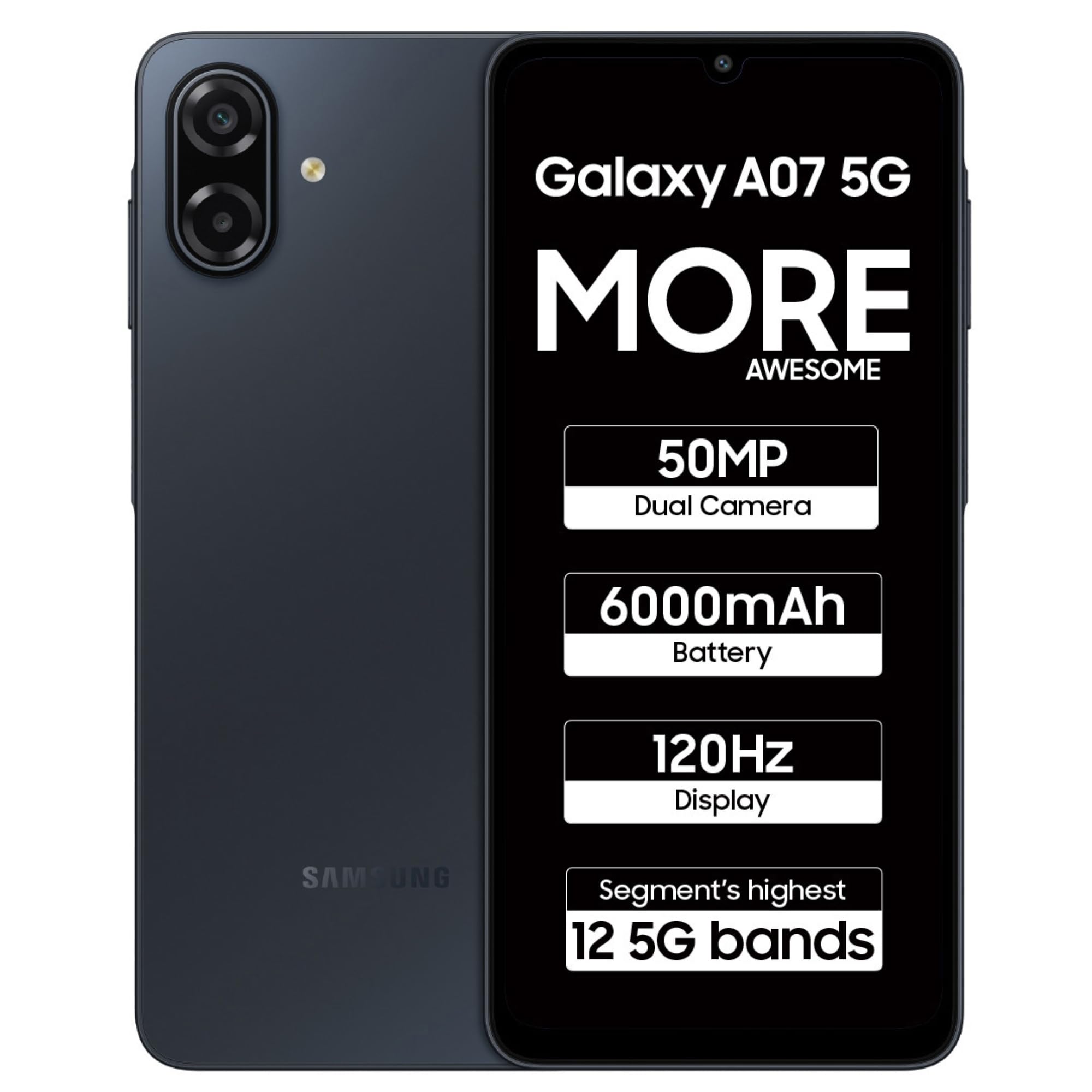
Figure 9.2: Samsung Galaxy A07 5G (Black).
10. การบำรุงรักษา
To ensure optimal performance and longevity of your Samsung Galaxy A07 5G, follow these maintenance guidelines:
- การอัปเดตซอฟต์แวร์: ตรวจสอบและติดตั้งการอัปเดตซอฟต์แวร์เป็นประจำเพื่อรับประโยชน์จากคุณลักษณะล่าสุด แพตช์ความปลอดภัย และการปรับปรุงประสิทธิภาพ
- การทำความสะอาด: ใช้ผ้านุ่มที่ไม่เป็นขุยทำความสะอาดหน้าจอและตัวเครื่อง หลีกเลี่ยงสารเคมีรุนแรงหรือวัสดุที่มีฤทธิ์กัดกร่อน
- การจัดการพื้นที่เก็บข้อมูล: ล้างสิ่งที่ไม่จำเป็นออกเป็นระยะๆ fileและแอปต่างๆ เพื่อเพิ่มพื้นที่เก็บข้อมูลและรักษาความเร็วของอุปกรณ์
- การดูแลแบตเตอรี่ หลีกเลี่ยงอุณหภูมิที่สูงเกินไป และอย่าปล่อยให้แบตเตอรี่หมดจนหมดบ่อยๆ
11 การแก้ไขปัญหา
หากคุณพบปัญหาเกี่ยวกับอุปกรณ์ของคุณ โปรดลองทำตามขั้นตอนการแก้ไขปัญหาทั่วไปเหล่านี้:
- อุปกรณ์ไม่ตอบสนอง: กดปุ่มเปิด/ปิดค้างไว้ประมาณ 10 วินาทีเพื่อบังคับรีสตาร์ทอุปกรณ์
- ปัญหาเกี่ยวกับแอป: ล้างแคชและข้อมูลของแอปที่มีปัญหา หรือถอนการติดตั้งและติดตั้งใหม่อีกครั้ง
- ปัญหาการเชื่อมต่อ: Toggle Wi-Fi or Bluetooth off and on. For mobile data, ensure your SIM card is properly inserted and your plan is active.
- ประสิทธิภาพการทำงานช้า: ปิดแอปที่ไม่ได้ใช้ ล้างแคช และตรวจสอบให้แน่ใจว่ามีพื้นที่เก็บข้อมูลเพียงพอ พิจารณารีเซ็ตเป็นค่าโรงงานเป็นทางเลือกสุดท้าย (สำรองข้อมูลของคุณก่อน)
- ปัญหาการชาร์จ: Ensure the data cable and charger are securely connected and undamaged. Try a different charger or cable if available.
12. ข้อมูลจำเพาะ
Detailed technical specifications for the Samsung Galaxy A07 5G (Model: SM-A076B).
| คุณสมบัติ | ข้อมูลจำเพาะ |
|---|---|
| ระบบปฏิบัติการ | แอนดรอยด์ 16.0 |
| ขนาดสินค้า | 0.82 x 7.74 x 16.74 ซม.; 199 กรัม |
| หมายเลขรุ่นสินค้า | SM-A076B |
| เทคโนโลยีการเชื่อมต่อ | บลูทูธ, ยูเอสบี, ไวไฟ |
| จีพีเอส | จริง (มี GPS ในตัว) |
| คุณสมบัติพิเศษ | Dual SIM, Expandable Memory, Mobile Hotspot Capability, Supports USB OTG |
| คุณสมบัติการแสดงผล | Wireless, Touchscreen, 720 x 1600 Resolution, 120Hz Refresh Rate, 800 nits HBM |
| คุณสมบัติกล้อง | Front (8MP), Rear (50MP Main, 2MP Depth) |
| แจ็คเสียง | 3.5 มม. |
| ฟอร์มแฟกเตอร์ | บาร์ |
| สี | สีดำ |
| ระดับพลังงานแบตเตอรี่ | 6000 มิลลิวินาทีamp ชั่วโมง |
| ขนาดหน่วยความจำ RAM ที่ติดตั้ง | 4GB |
| รุ่นซีพียู | มีเดียเทก ไดเมนซิตี้ 6300 |
| ความเร็วซีพียู | 2.4 กิกะเฮิรตซ์ |
| ระดับการป้องกันน้ำและฝุ่น (IP) | IP54 |
13. การรับประกันและการสนับสนุน
สำหรับข้อมูลการรับประกันและการสนับสนุนลูกค้า โปรดดูที่เว็บไซต์อย่างเป็นทางการของ Samsung website or contact Samsung customer service. Samsung provides extensive support with over 3300 service touchpoints.

Figure 13.1: Samsung service center network.
คุณยังสามารถเยี่ยมชม ร้านค้า Samsung บน Amazon สำหรับข้อมูลผลิตภัณฑ์และอุปกรณ์เสริมเพิ่มเติม