
1. การตั้งค่า
1.1 การแกะกล่องและการตรวจสอบเบื้องต้น
เมื่อเปิดบรรจุภัณฑ์แล้ว โปรดตรวจสอบให้แน่ใจว่าส่วนประกอบทั้งหมดครบถ้วนและอยู่ในสภาพดี กล่องควรประกอบด้วย:
- XIAOMI Redmi Note 15 Pro 5G AI Smartphone
- ตัวดันถาดซิม
- สาย USB
- เคสโทรศัพท์
1.2 การติดตั้งซิมการ์ด
The Redmi Note 15 Pro 5G AI supports Dual SIM functionality (nano SIM + nano SIM or nano SIM + eSIM). It does ไม่ have a Micro SD slot.
- ค้นหาถาดซิมที่ด้านข้างของอุปกรณ์
- ใส่เครื่องมือถอดถาดซิมที่ให้มาเข้าไปในรูเล็ก ๆ ข้างถาดแล้วกดเบา ๆ จนกว่าถาดจะดีดออกมา
- Place your nano SIM card(s) into the designated slots on the tray. Ensure the gold contacts face downwards and the card is correctly oriented.
- ใส่ถาดซิมกลับเข้าไปในโทรศัพท์อย่างระมัดระวังจนกระทั่งล็อคเข้าที่
บันทึก: For USA market, this phone is compatible with T-Mobile, Mint, Tello, or any network operating under the T-Mobile infrastructure. An already activated SIM card is required. Outside the USA, it works with any GSM carrier SIM.
1.3 การชาร์จและเปิดเครื่องครั้งแรก
Before first use, it is recommended to fully charge your device. The phone supports 45W turbo charging.
- Connect the USB cable to the phone's USB Type-C port and to a compatible power adapter.
- เสียบอะแดปเตอร์แปลงไฟเข้ากับเต้ารับที่ผนัง ไฟแสดงสถานะการชาร์จจะปรากฏบนหน้าจอ
- Once sufficiently charged, press and hold the power button on the side of the device until the XIAOMI logo appears.
- ทำตามคำแนะนำบนหน้าจอเพื่อทำการตั้งค่าเบื้องต้นให้เสร็จสมบูรณ์ รวมถึงการเลือกภาษา การเชื่อมต่อ Wi-Fi และการตั้งค่าบัญชี Google
2. คู่มือการใช้งาน
2.1 คุณสมบัติการแสดงผล
The device features a 6.83-inch AMOLED display with a 1.5K resolution (2772 x 1280) and a refresh rate of up to 120Hz. It offers a peak brightness of 3200 nits and is protected by Corning Gorilla Glass Victus 2.
เทคโนโลยีสัมผัสเปียก 2.0: This feature intelligently detects water, oil, foam, or sweat, providing a smoother and more responsive touch experience even in challenging conditions.
2.2 การใช้งานกล้อง
The Redmi Note 15 Pro 5G AI is equipped with an advanced camera system:
- กล้องหลัง: 200MP main camera with Optical Image Stabilization (OIS) and an 8MP ultra-wide camera.
- กล้องหน้า: 20 ล้านพิกเซล
To access the camera, tap the camera icon on your home screen or lock screen. Select modes such as Photo, Video, Portrait, or Pro mode. The 200MP AI Engine supports features like AI Film Camera for cinematic effects and various AI image editing tools.
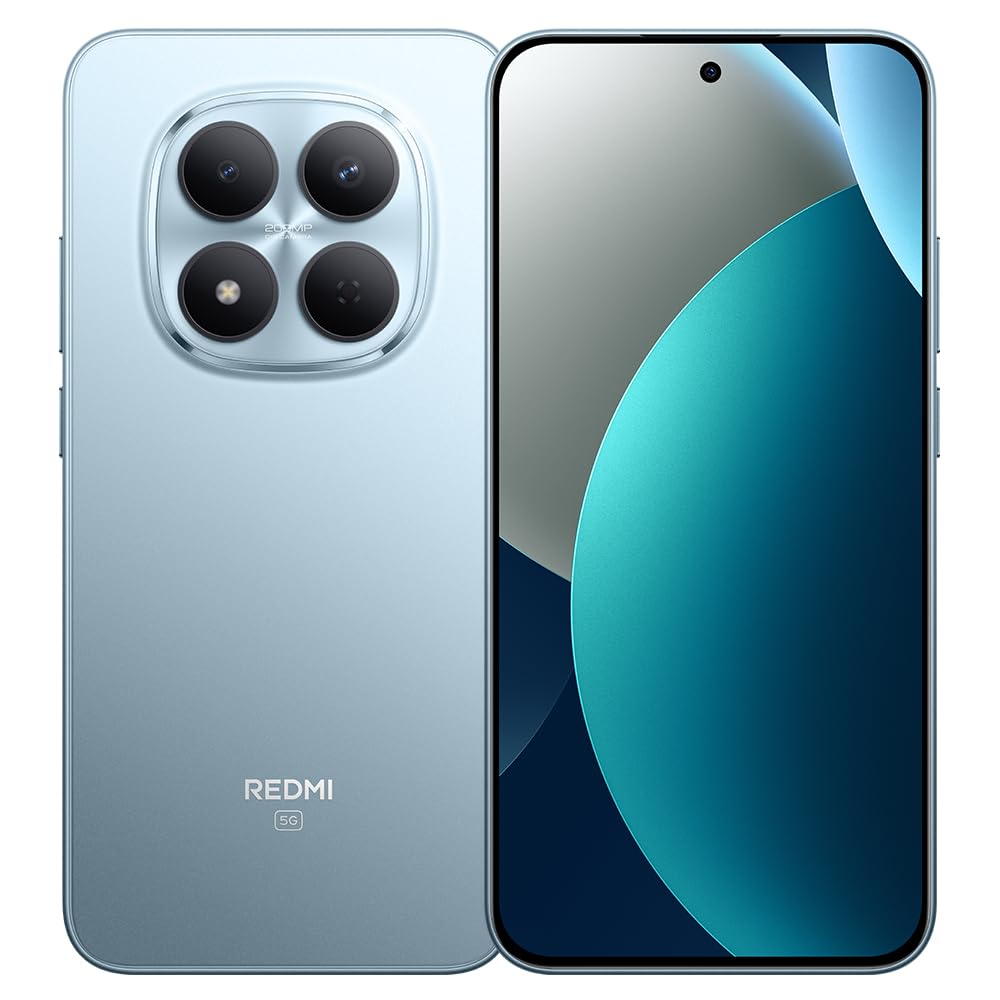
Image: XIAOMI Redmi Note 15 Pro 5G AI smartphone, black color, showing the front display and side profile.
2.3 ระบบรักษาความปลอดภัยไบโอเมตริก
The device offers two primary biometric security methods:
- เซ็นเซอร์ลายนิ้วมือบนหน้าจอ: Register your fingerprint(s) in the Security settings for quick and secure unlocking.
- ปลดล็อคด้วยใบหน้า AI: Set up face recognition in the Security settings to unlock your device by looking at the front camera.
2.4 Navigation and AI Features
The phone supports multiple global navigation satellite systems including GPS, GLONASS, BDS, Galileo, and QZSS for accurate positioning.
Integrated AI features enhance user experience:
- วงกลมเพื่อค้นหาด้วย Google: ค้นหาข้อมูลได้อย่างรวดเร็วโดยการวงกลมเนื้อหาบนหน้าจอของคุณ
- Google เจมินี่: AI assistant for various tasks.
- การแก้ไขภาพด้วย AI: Includes AI Erase Pro, AI Remove Reflection, AI Image Expansion, AI Sky, AI Bokeh, AI Cutouts, AI Image Enhancement, and AI Beautify.
3. การบำรุงรักษา
3.1 การดูแลแบตเตอรี่
The device is equipped with a 6580mAh silicon-carbon battery designed for longevity, boasting a 6-year battery life guarantee. To maximize battery life:
- หลีกเลี่ยงอุณหภูมิที่สูงหรือต่ำเกินไป
- Use the provided 45W turbo charger for optimal charging speed.
- The phone also supports up to 22.5W reverse charging to power other compatible devices.
3.2 ความทนทานและการป้องกัน
The Redmi Note 15 Pro 5G AI is built for durability:
- ความต้านทานการตก: Certified for 2.5-meter drop resistance.
- การป้องกันหน้าจอ: Features Corning Gorilla Glass Victus 2 for enhanced impact and scratch resistance.
- ความต้านทานน้ำและฝุ่น: Rated P66/IP68/IP69/IP69K for dust and water resistance, ensuring protection against various environmental challenges.
3.3 การทำความสะอาดอุปกรณ์ของคุณ
วิธีทำความสะอาดสมาร์ทโฟนของคุณ:
- ใช้ผ้านุ่มที่ไม่เป็นขุยเช็ดหน้าจอและตัวเครื่อง
- สำหรับรอยเปื้อนฝังแน่น ให้เช็ดออกเล็กน้อยampเทน้ำหรือน้ำยาทำความสะอาดหน้าจอลงบนผ้า
- หลีกเลี่ยงการใช้สารเคมีรุนแรง วัสดุที่มีฤทธิ์กัดกร่อน หรือความชื้นที่มากเกินไป
4 การแก้ไขปัญหา
4.1 ปัญหาทั่วไปและแนวทางแก้ไข
- อุปกรณ์ไม่เปิดเครื่อง: Ensure the battery is charged. Connect the phone to its charger for at least 15 minutes, then try powering it on again. If it still doesn't turn on, perform a forced restart by holding the power button for 10-15 seconds.
- Poor network signal or no service: Check if your SIM card is properly inserted. Verify that airplane mode is off. Go to Settings > SIM cards & mobile networks and ensure your SIM is enabled. If issues persist, contact your mobile carrier.
- หน้าจอสัมผัสไม่ตอบสนอง: Restart the device. If the issue continues, ensure the screen is clean and dry. If using a screen protector, ensure it is properly applied and not interfering with touch sensitivity.
- แบตเตอรี่หมดเร็ว: Reduce screen brightness, close unused apps running in the background, disable unnecessary notifications, and limit location services. Check battery usage in Settings to identify power-hungry apps.
- แอปขัดข้องหรือค้าง: Clear the cache and data for the problematic app in Settings > Apps. If the issue persists, uninstall and reinstall the app. Ensure your device's software is up to date.
4.2 รีเซ็ตเป็นค่าโรงงาน
If you encounter persistent software issues that cannot be resolved through other troubleshooting steps, a factory reset may be necessary. คำเตือน: การรีเซ็ตเป็นค่าเริ่มต้นจากโรงงานจะลบข้อมูลทั้งหมดในโทรศัพท์ของคุณ โปรดสำรองข้อมูลสำคัญก่อนดำเนินการ
- ไปที่ การตั้งค่า > เกี่ยวกับโทรศัพท์ > รีเซ็ตเป็นค่าจากโรงงาน
- Tap 'Erase all data' and follow the on-screen instructions.
5. ข้อมูลจำเพาะ
| ยี่ห้อ | เสี่ยวหมี่ |
| ชื่อรุ่น | โน๊ต15โปร5G |
| หมายเลขรุ่น | 25080RABDG |
| ระบบปฏิบัติการ | ไฮเปอร์โอเอส 2 |
| รุ่นซีพียู | Mediatek Dimensity 7400-Ultra (Octa-core, up to 2.6GHz) |
| แรม | 8GB |
| ความจุในการเก็บข้อมูล | 256GB |
| ขนาดหน้าจอ | หน้าจอ AMOLED ขนาด 6.83 นิ้ว |
| ปณิธาน | 1.5K (2772x1280) ความคมชัดระดับ XNUMXK |
| อัตราการรีเฟรช | สูงถึง 120Hz |
| ความสว่างสูงสุด | 3200 นิต |
| กล้องหลัง | 200 MP (Main, OIS) + 8 MP (Ultra-wide) |
| กล้องหน้า | 20 MP |
| ความจุของแบตเตอรี่ | 6580 มิลลิแอมป์ |
| การชาร์จไฟ | 45W Turbo Charging, 22.5W Reverse Charging |
| ช่องใส่ซิมการ์ด | Dual SIM (Nano SIM + Nano SIM or Nano SIM + eSIM) |
| การเชื่อมต่อ | 5G, 4G LTE, Wi-Fi, Bluetooth, NFC, USB Type-C |
| ความต้านทานต่อน้ำ | IP66/IP68/IP69/IP69K |
| การรักษาความปลอดภัยด้วยไบโอเมตริกซ์ | In-screen Fingerprint, AI Face Unlock |
| ขนาด | Not specified in data |
6. การรับประกันและการสนับสนุน
6.1 ข้อมูลการรับประกัน
The XIAOMI Redmi Note 15 Pro 5G AI comes with a 30-day Xiaomi Europe Warrantyโปรดเก็บหลักฐานการซื้อไว้เพื่อใช้เรียกร้องการรับประกัน
Additionally, spare parts for this device are available for a duration of 6 ปี within the EU.
6.2 การสนับสนุนลูกค้า
For technical assistance, warranty claims, or further inquiries, please contact XIAOMI customer support through their official website or authorized service centers. Refer to the official XIAOMI webเว็บไซต์สำหรับข้อมูลติดต่อและทรัพยากรสนับสนุนล่าสุด