
การแนะนำ
This manual provides essential information for setting up, operating, maintaining, and troubleshooting your new OPPO A6 5G smartphone. Please read this guide thoroughly to ensure optimal performance and longevity of your device.
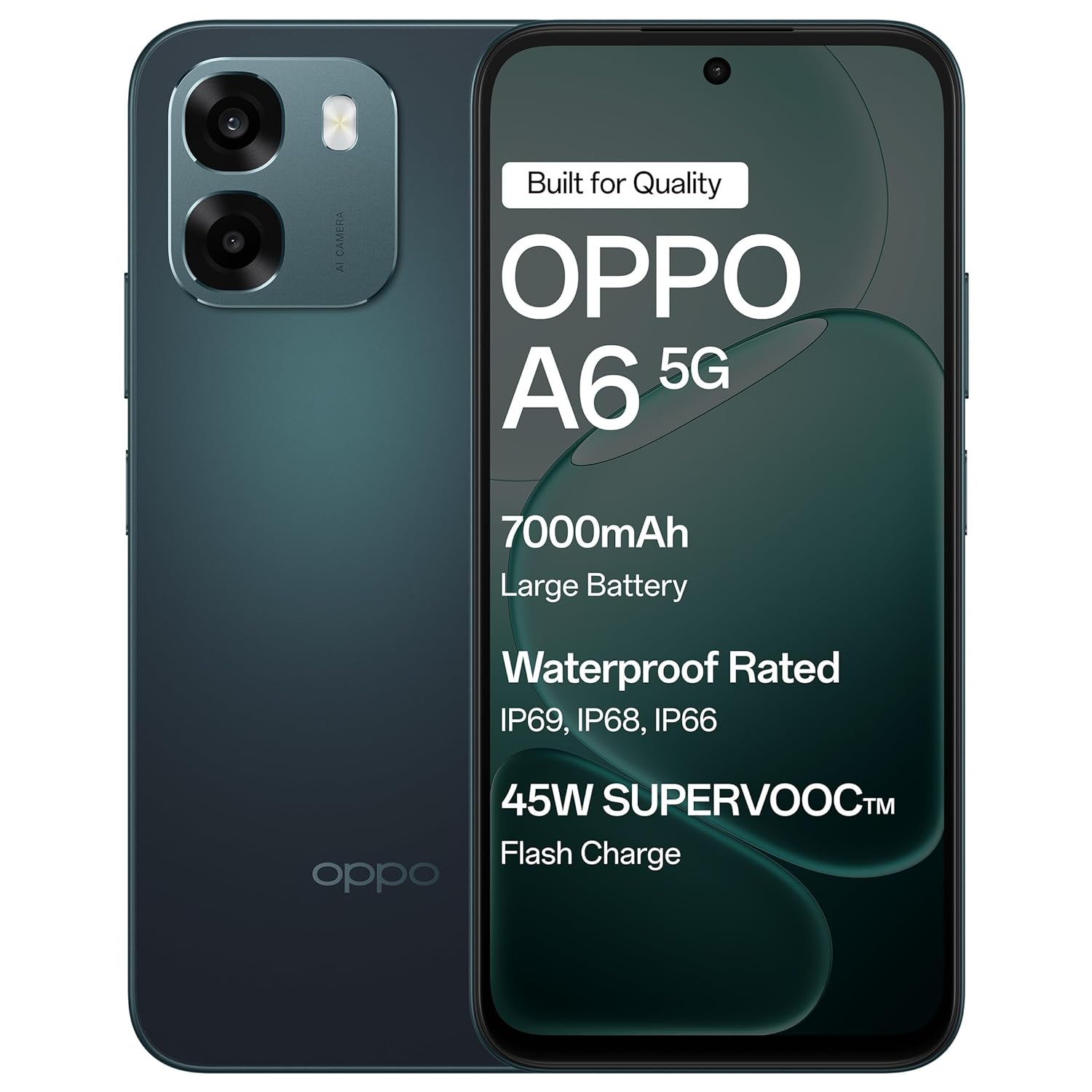
The OPPO A6 5G smartphone in Sapphire Blue, featuring its sleek design.
การตั้งค่า
1. การแกะกล่องและการตรวจสอบเบื้องต้น
Carefully remove all items from the packaging. Verify that all components are present and undamaged.
สิ่งของในกล่อง:
- สมาร์ทโฟน OPPO A6 5G
- เคสโทรศัพท์
- อะแดปเตอร์แปลงไฟ
- สาย USB
- ตัวดันถาดซิม
- ฟิล์มกันรอยหน้าจอ (ติดมาแล้วหรืออยู่ในกล่อง)
2. การใส่ซิมการ์ด
- ค้นหาถาดใส่การ์ด SIM ที่ด้านข้างของอุปกรณ์
- ใส่เครื่องมือถอดถาดซิมเข้าไปในรูเล็ก ๆ ข้างถาดแล้วกดเบา ๆ จนกว่าถาดจะดีดออกมา
- Place your Nano-SIM card(s) into the designated slots on the tray. Ensure the gold contacts face downwards. This device supports Dual SIM.
- ใส่ถาดซิมกลับเข้าไปในโทรศัพท์อย่างระมัดระวังจนกระทั่งล็อคเข้าที่
3. การชาร์จและเปิดเครื่องครั้งแรก
- Connect the USB cable to the power adapter and then to the phone's USB Type-C port. Plug the power adapter into a wall outlet.
- ควรชาร์จโทรศัพท์อย่างน้อย 30 นาทีก่อนใช้งานครั้งแรก หรือจนกว่าตัวแสดงสถานะแบตเตอรี่จะแสดงว่ามีประจุเพียงพอ
- กดปุ่มเปิด/ปิด (โดยปกติจะอยู่ด้านขวา) ค้างไว้จนกว่าโลโก้ OPPO จะปรากฏขึ้น
- ปฏิบัติตามคำแนะนำบนหน้าจอเพื่อทำการตั้งค่าเบื้องต้นให้เสร็จสมบูรณ์ รวมถึงการเลือกภาษา การเชื่อมต่อ Wi-Fi และการตั้งค่าบัญชี Google

The OPPO A6 5G supports 45W SUPERVOOC Flash Charge, allowing for rapid battery replenishment.
การใช้งานอุปกรณ์ของคุณ
1. การนำทางพื้นฐาน
- ท่าทางการสัมผัสหน้าจอ: แตะเพื่อเลือก ปัดเพื่อเลื่อน บีบเพื่อซูม
- ปุ่มเปิด/ปิด: Press to lock/unlock the screen. Press and hold to power off or restart.
- ปุ่มปรับระดับเสียง: ปรับระดับเสียงสื่อ ระดับเสียงการโทร หรือระดับเสียงการแจ้งเตือน
2. คุณสมบัติการแสดงผล
The OPPO A6 5G features a large 6.75-inch LCD display with a 120Hz adaptive refresh rate, providing smooth visuals and enhanced readability even in sunlight.

The 120Hz Ultra Bright Display ensures smooth and vibrant visuals.
3. การใช้กล้อง
Your device is equipped with a 50MP AI Dual Camera system for capturing high-quality photos and videos.
- กล้องหลัก: 50MP sensor for detailed everyday photos.
- เซ็นเซอร์ความลึก: 2MP for enhanced portrait shots.
- กล้องหน้า: กล้อง 8MP สำหรับถ่ายเซลฟี่คมชัด
- โหมด: Utilize Night mode for low-light conditions, Portrait mode for artistic depth effects, and Dual-View Video for simultaneous front and rear camera recording.

The 50MP Ultra-Clear Camera captures every detail effortlessly.

Explore various camera modes such as Underwater Photography, AI Night Mode, and Portrait Mode.
4. Audio and Speakers
Experience enhanced audio with dual stereo speakers and an Ultra Volume Mode, providing louder and clearer sound for media consumption and calls.

Dual Stereo Speakers with Ultra Volume Mode deliver immersive sound.
5. ประสิทธิภาพและการเล่นเกม
The MediaTek Dimensity 6300 5G processor ensures smooth performance for daily tasks, streaming, and gaming. AI GameBoost 2.0 optimizes your gaming experience.

AI GameBoost 2.0 provides a smooth and confident gaming experience.

The MediaTek Dimensity 6300 Mobile Platform ensures better and smoother performance.
6. การจัดการแบตเตอรี่
The device is equipped with a massive 7000mAh battery for extended usage. Utilize 45W SUPERVOOC charging for quick power-ups. The phone also supports reverse wired charging to share power with other devices.

The 7000mAh large battery provides power throughout your day.

Reverse Wired Charging allows you to share power with other devices when needed.
7. การเชื่อมต่อเครือข่าย
The OPPO A6 5G supports 5G cellular technology, Wi-Fi, and Bluetooth. AI LinkBoost 3.0 enhances network stability and reduces lag.

AI LinkBoost 3.0 provides a levelled-up network with zero lag.
การซ่อมบำรุง
1. การทำความสะอาดอุปกรณ์ของคุณ
- ใช้ผ้านุ่มที่ไม่เป็นขุยเช็ดหน้าจอและแผงด้านหลัง
- หลีกเลี่ยงการใช้สารเคมีรุนแรงหรือวัสดุที่มีฤทธิ์กัดกร่อน
- สำหรับรอยเปื้อนฝังแน่น ให้เช็ดออกเล็กน้อยampเทน้ำหรือน้ำยาทำความสะอาดหน้าจอที่ออกแบบมาสำหรับอุปกรณ์อิเล็กทรอนิกส์ลงบนผ้า
2. การอัปเดตซอฟต์แวร์
ตรวจสอบและติดตั้งการอัปเดตซอฟต์แวร์เป็นประจำเพื่อให้แน่ใจว่าอุปกรณ์ของคุณมีฟีเจอร์ แพตช์ความปลอดภัย และการปรับปรุงประสิทธิภาพล่าสุด ไปที่ การตั้งค่า > เกี่ยวกับอุปกรณ์ > อัปเดต เพื่อตรวจสอบการอัปเดต
3. การดูแลแบตเตอรี่
- หลีกเลี่ยงอุณหภูมิที่สูงเกินไป เพราะอาจทำให้แบตเตอรี่มีอายุการใช้งานลดลง
- อย่าชาร์จโทรศัพท์ทิ้งไว้นานเกินไปหลังจากแบตเตอรี่ถึง 100%
- เพื่อประสิทธิภาพการชาร์จและความปลอดภัยสูงสุด โปรดใช้เฉพาะที่ชาร์จและสายเคเบิลที่ให้มาเท่านั้น
4. การจัดการการจัดเก็บข้อมูล
ล้างสิ่งที่ไม่จำเป็นออกเป็นระยะๆ files, apps, and media to maintain optimal performance. Your device has 128GB of internal storage, with support for external flash memory up to 128GB.
5. ความทนทานต่อน้ำและฝุ่นละออง
The OPPO A6 5G features IP69 water and dust resistance. This means it is protected against high-pressure, high-temperature water jets and can withstand immersion in water at 1.5 meters for 30 minutes. While resistant, it is not waterproof. Avoid intentional submersion and exposure to saltwater or other liquids.
The OPPO A6 5G offers IP69 Water and Dust Resistance, making it a durable device.
6. Fluency Protection
The device is designed with 60-Month Fluency Protection, ensuring sustained smooth performance over an extended period.

Enjoy 5 years of flawless flow with 60-Month Fluency Protection.
การแก้ไขปัญหา
ปัญหาทั่วไปและแนวทางแก้ไข
- อุปกรณ์ไม่เปิด: Ensure the battery is charged. Connect to the charger and wait a few minutes before attempting to power on again. If unresponsive, press and hold the Power button and Volume Up button simultaneously for about 10-15 seconds to force a restart.
- ปัญหาการชาร์จไฟ: Check if the charger and USB cable are securely connected. Try a different power outlet. Inspect the charging port for any debris.
- ปัญหาการเชื่อมต่อเครือข่าย: Verify that your SIM card is correctly inserted and active. Check if Airplane Mode is off. Restart the device. If issues persist, contact your mobile network provider.
- แอปขัดข้องหรือหยุดทำงาน: Close and reopen the app. Clear the app's cache (Settings > Apps > [App Name] > Storage > Clear cache). If the problem continues, uninstall and reinstall the app.
- ประสิทธิภาพการทำงานช้า: ปิดแอปพลิเคชันที่ทำงานอยู่เบื้องหลังที่ไม่ได้ใช้งาน ล้างแคชและไฟล์ชั่วคราว files. Restart the device regularly. Ensure sufficient storage space is available.
รีเซ็ตเป็นค่าเริ่มต้นจากโรงงาน (วิธีสุดท้าย)
If severe software issues persist, a factory reset may be necessary. This will erase all data on your phone. สำรองข้อมูลสำคัญทั้งหมดก่อนดำเนินการต่อ
- ไปที่ การตั้งค่า > การตั้งค่าระบบ > การสำรองข้อมูลและการรีเซ็ต > รีเซ็ตโทรศัพท์.
- เลือก ลบข้อมูลทั้งหมด.
- ยืนยันการตัดสินใจของคุณและป้อนรหัสผ่านล็อคหน้าจอของคุณหากได้รับแจ้ง
ข้อมูลจำเพาะ
| คุณสมบัติ | รายละเอียด |
|---|---|
| ยี่ห้อ | ออปโป้ |
| แบบอย่าง | A6 5จี |
| ระบบปฏิบัติการ | แอนดรอยด์ 15 |
| แรม | 6GB |
| การจัดเก็บข้อมูลภายใน | 128GB |
| หน่วยความจำที่ขยายได้ | Up to 128 GB (Flash Memory Supported Size Maximum) |
| ขนาดหน้าจอ | 6.75 นิ้ว |
| ประเภทจอภาพ | จอแอลซีดี |
| อัตราการรีเฟรช | 120 เฮิรตซ์ |
| กล้องหลัง | 50 MP (Main) + 2 MP (Depth) |
| กล้องหน้า | 8 MP |
| ความจุของแบตเตอรี่ | 7000 มิลลิแอมป์ |
| การชาร์จไฟ | 45W SUPERVOOC Fast Charging, Reverse Wired Charging |
| ช่องใส่ซิมการ์ด | ซิมคู่ |
| ประเภทขั้วต่อ | USB ประเภท C |
| แจ็คหูฟัง | 3.5 มม. |
| ระดับความต้านทานต่อน้ำ | ทนน้ำระดับ IP69 |
| เทคโนโลยีเซลลูล่าร์ | 5G |
| การเชื่อมต่อแบบไร้สาย | บลูทู ธ Wi-Fi |
| น้ำหนักสินค้า | 216 กรัม |
| ขนาดรายการ | 16.7 x 7.9 x 0.9 เซนติเมตร |
| รุ่นปี | 2026 |
| ประเทศต้นกำเนิด | อินเดีย |
ข้อมูลการรับประกัน
Your OPPO A6 5G smartphone comes with a limited warranty:
- โทรศัพท์มือถือ: 12 เดือนนับจากวันที่ซื้อ
- Adapter & Cable: 6 เดือนนับจากวันที่ซื้อ
Please retain your proof of purchase for warranty claims. The warranty covers manufacturing defects and does not cover damage caused by misuse, accidents, unauthorized repairs, or normal wear and tear.
สนับสนุน
For further assistance, technical support, or service inquiries, please contact OPPO customer service:
- ผู้ผลิต: บริษัท โอเป้ โมบิลส์ อินเดีย จำกัด
- ที่อยู่: 5th FLOOR, Tower B, BUILDING, N-8, DLF Cyber City, DLF Phase 2, Gurugram, Haryana 122002, India.
- ฝ่ายบริการลูกค้า โทร: 18001032777
- การสนับสนุนทางออนไลน์: เยี่ยมชมเว็บไซต์ OPPO อย่างเป็นทางการ website for FAQs, support articles, and service center locations.