
1. บทนำ
Thank you for choosing the Baseus FC41 145W 25000mAh Power Bank. This high-capacity portable charger is designed to provide ultra-fast charging for a wide range of devices, including laptops, smartphones, and tablets. Featuring a powerful 145W output and two integrated USB-C cables, it offers convenience and reliability for users on the go. This manual provides essential information for safe and efficient use of your power bank.
2. ข้อมูลด้านความปลอดภัย
- อย่านำพาวเวอร์แบงค์ไปวางไว้ในที่ที่มีอุณหภูมิสูงหรือต่ำเกินไป (สูงกว่า 60°C/140°F หรือต่ำกว่า 0°C/32°F) แสงแดดโดยตรง หรือใกล้ไฟ
- หลีกเลี่ยงการทำตก ถอดประกอบ หรือพยายามซ่อมแซมอุปกรณ์ด้วยตัวเอง
- ควรเก็บให้ห่างจากน้ำ ความชื้น และสารกัดกร่อน
- ใช้เฉพาะสายชาร์จและอะแดปเตอร์ที่ผ่านการรับรองเท่านั้น
- เก็บให้พ้นจากมือเด็ก
- กำจัดพาวเวอร์แบงค์ตามระเบียบข้อบังคับท้องถิ่น ห้ามทิ้งรวมกับขยะทั่วไป
- หากพาวเวอร์แบงค์บวม มีกลิ่น หรือร้อนจัด ให้หยุดใช้งานทันที
3. สินค้าหมดview
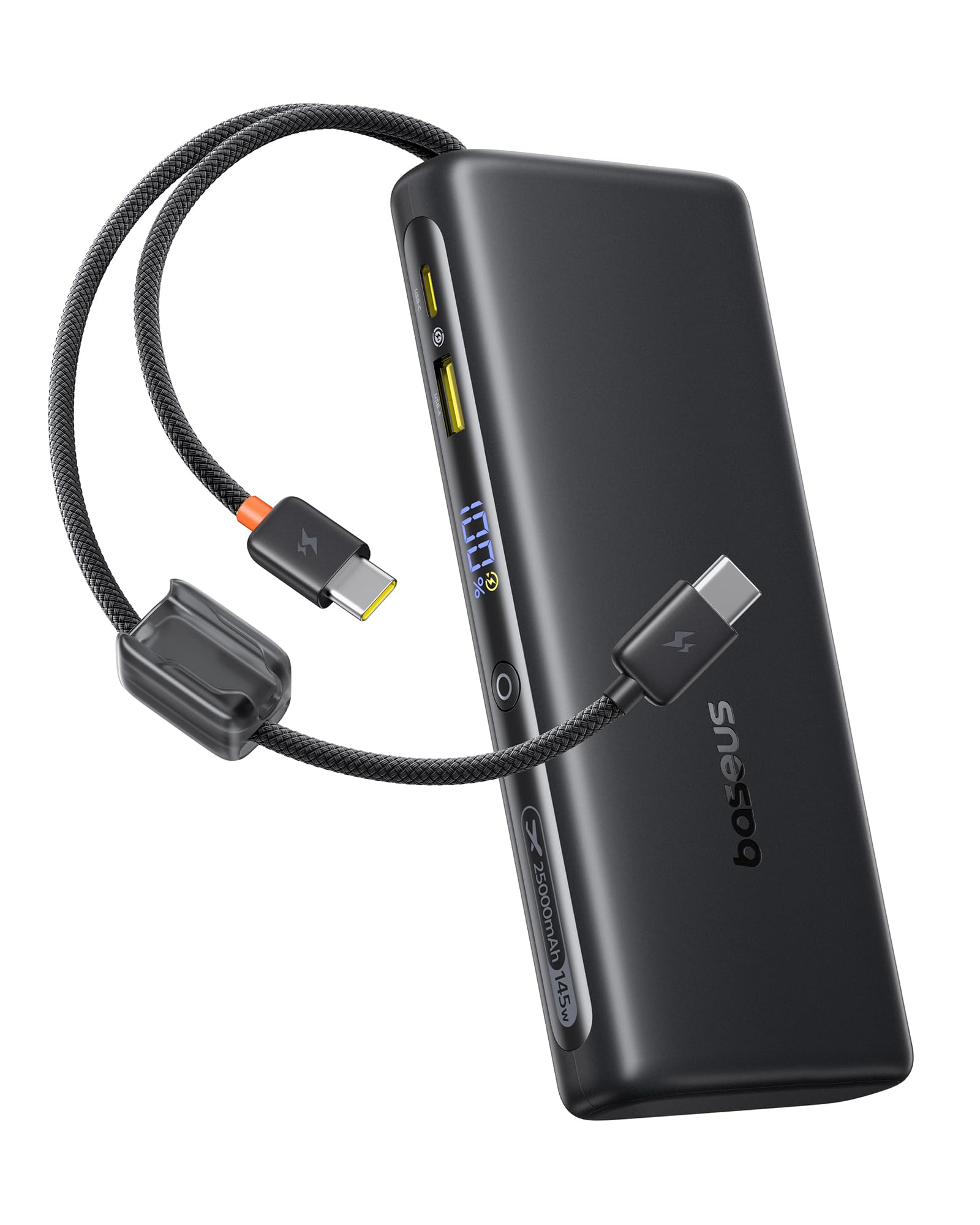
The Baseus FC41 Power Bank features a sleek design with multiple ports and integrated cables for maximum versatility.
เนื้อหาแพ็คเกจ
- Baseus FC41 145W 25000mAh Power Bank
- คู่มือการใช้งาน
ส่วนประกอบ
The power bank includes the following key components:
- จอแสดงผลดิจิตอล: แสดงเปอร์เซ็นต์แบตเตอรี่แบบเรียลไทม์tage และสถานะการชาร์จ
- Integrated USB-C1 Cable: Supports up to 140W output/65W input.
- Integrated USB-C2 Cable: Supports up to 100W output/65W input.
- พอร์ต USB-C: Supports up to 100W output/65W input.
- พอร์ต USB-A: รองรับกำลังไฟสูงสุด 22.5 วัตต์
- ปุ่มเปิด/ปิด: Activates the display, initiates charging, and toggles low-power mode.

4. การตั้งค่า
4.1 การชาร์จ Power Bank ครั้งแรก
Before first use, fully charge your Baseus FC41 Power Bank. This ensures optimal battery performance and longevity.
- Connect a USB-C power adapter (not included) to either of the integrated USB-C cables or the external USB-C port on the power bank.
- เสียบอะแดปเตอร์ไฟฟ้าเข้ากับเต้ารับไฟฟ้าที่ผนัง
- The digital display will show the charging progress. A full charge from 0% to 100% typically takes approximately 4 hours with a 65W input.
- เมื่อชาร์จเต็มแล้ว หน้าจอจะแสดง 100% ถอดพาวเวอร์แบงค์ออกจากที่ชาร์จ

5. คู่มือการใช้งาน
5.1 การชาร์จอุปกรณ์ของคุณ
The Baseus FC41 Power Bank can charge various devices using its multiple output options.
Using Integrated USB-C Cables
- The integrated USB-C1 cable provides up to 140W output, ideal for laptops like MacBook Pro/Air.
- The integrated USB-C2 cable provides up to 100W output, suitable for laptops, tablets, and smartphones.
- Simply pull out the desired integrated USB-C cable and connect it to your device's USB-C charging port. The power bank will automatically begin charging.
Using External Ports
- พอร์ต USB-C: Connect your device using a compatible USB-C to USB-C cable. This port supports up to 100W output.
- พอร์ต USB-A: Connect your device using a compatible USB-A to USB-C/Lightning cable. This port supports up to 22.5W output.
การชาร์จพร้อมกัน
The power bank can charge up to four devices simultaneously. The BPS 2.0 technology intelligently distributes power for maximum efficiency.
- When charging a single device via USB-C1, it can reach up to 140W.
- When charging a laptop (e.g., 100W) and a smartphone (e.g., 45W) simultaneously, the total output can reach 145W.


5.2 การตรวจสอบระดับแบตเตอรี่
Press the power button once to activate the digital display, which will show the remaining battery percentage.
5.3 Low-Power Mode
For charging low-current devices such as Bluetooth earbuds or smartwatches, double-press the power button to activate low-power mode. This prevents the power bank from automatically shutting off due to low power draw.
5.4 Integrated Cables as Lanyard
The integrated USB-C cables are designed to also function as a durable lanyard, allowing for convenient carrying or attachment to a backpack.

6. การบำรุงรักษา
6.1 การทำความสะอาด
เช็ดทำความสะอาดพาวเวอร์แบงค์ด้วยผ้าแห้งเนื้อนุ่ม ห้ามใช้น้ำยาทำความสะอาดหรือวัสดุที่มีฤทธิ์กัดกร่อน
6.2 พื้นที่จัดเก็บ
Store the power bank in a cool, dry place away from direct sunlight and extreme temperatures. For long-term storage, it is recommended to keep the battery charged to around 50-70%.
6.3 การดูแลแบตเตอรี่
เพื่อยืดอายุการใช้งานแบตเตอรี่ ควรหลีกเลี่ยงการปล่อยประจุแบตเตอรี่จนหมดบ่อยๆ ชาร์จใหม่เมื่อระดับแบตเตอรี่เหลือน้อย
7 การแก้ไขปัญหา
- พาวเวอร์แบงค์ไม่ชาร์จ: ตรวจสอบให้แน่ใจว่าสายชาร์จและอะแดปเตอร์เชื่อมต่ออย่างถูกต้องและใช้งานได้ ลองใช้สายหรืออะแดปเตอร์อื่นดู
- อุปกรณ์ไม่ชาร์จจากพาวเวอร์แบงค์: Ensure the power bank has sufficient charge. Check if the cable connecting the device to the power bank is securely connected and compatible. Press the power button to activate charging.
- การชาร์จช้า: Ensure your device and cable support fast charging protocols. If charging multiple devices, the total output power is shared, which may reduce individual charging speeds.
- จอแสดงผลดิจิตอลไม่ทำงาน: Press the power button to activate the display. If it remains unresponsive, contact customer support.
- พาวเวอร์แบงค์จะร้อนขึ้นขณะใช้งาน: It is normal for the power bank to generate some heat during high-power charging. If it becomes excessively hot, discontinue use and contact customer support.
8. ข้อมูลจำเพาะ
| คุณสมบัติ | รายละเอียด |
|---|---|
| หมายเลขรุ่น | E0028H |
| ความจุของแบตเตอรี่ | 25000mAh |
| เอาท์พุต วัดtage | 145W (สูงสุด) |
| ใส่วัดtage | 65W (สูงสุด) |
| ประเภทแบตเตอรี่ | ลิเธียมไอออน |
| จำนวนเซลล์แบตเตอรี่ | 5 |
| ขนาดสินค้า | 16.5 x 7.4 x 2.5 ซม. |
| น้ำหนักผลิตภัณฑ์ | 506 กรัม |
| สี | สีดำ |
| คุณสมบัติพิเศษ | CCC Certification |
| อุปกรณ์ที่รองรับ | Google Pixel 10 Pro XL/10 Pro/9 Pro/8 Series, MacBook Pro/Air; HP/Dell/Asus/Lenovo Laptops, Samsung Galaxy S25/S24/S23/S22 Series, iPhone 17/16/15 Pro/Pro Max Series |
| แหล่งพลังงาน | สายไฟ |
| ยูพีซี | 810196184848 |
| GTIN | 810196184848 |
9. การรับประกันและการสนับสนุน
9.1 ข้อมูลการรับประกัน
ผลิตภัณฑ์ Baseus ชิ้นนี้มาพร้อมกับ รับประกัน 24 เดือน. We also offer lifetime customer service and a 45-day money-back guarantee. Please retain your proof of purchase for warranty claims.
9.2 การสนับสนุนลูกค้า
For any questions, technical support, or warranty claims, please contact Baseus customer service through the retailer where you purchased the product or visit the official Baseus webเว็บไซต์สำหรับรายละเอียดการติดต่อ