
1. สินค้าหมดview
The TechniSat DIGITRADIO 320 is a versatile compact stereo Hi-Fi system designed to deliver high-quality audio from various sources. It features DAB+ and FM radio reception, an integrated CD player, Bluetooth connectivity for wireless streaming, and a USB port for MP3 playback and device charging. The system is equipped with a TFT color display and intuitive controls for ease of use.
คุณสมบัติหลัก
- Digital and FM Radio: Enjoy a wide selection of digital radio programs via DAB+ and traditional FM stations.
- เครื่องเล่นซีดี: Supports audio CDs, MP3 CDs, CD-R, and CD-RW formats.
- Bluetooth 5.0: สตรีมเพลงแบบไร้สายจากสมาร์ทโฟนของคุณหรืออุปกรณ์ที่ใช้ Bluetooth อื่นๆ
- พอร์ต USB: เล่น MP3 files from external storage or charge mobile devices (5V, 1A).
- เสียงสเตอริโอ: Two integrated 5-watt RMS speakers provide a total of 10 watts of clear stereo sound.
- จอแสดงผลสี TFT: A 2.4-inch adjustable brightness display shows station information, time, and slideshows.
- ฟังก์ชั่นที่สะดวกสบาย: Includes alarm clock, sleep timer, and snooze functions.
- รีโมทคอนโทรล: รีโมตคอนโทรลแบบครบฟังก์ชันเพื่อการใช้งานที่สะดวกสบาย
มีอะไรอยู่ในกล่อง
- TechniSat DIGITRADIO 320 Unit
- รีโมทคอนโทรล
- แบตเตอรี่ AAA 2 ก้อน (สำหรับรีโมทคอนโทรล)
- คู่มือการใช้งาน
2. คู่มือการติดตั้ง
2.1 การแกะและการจัดวาง
Carefully remove all components from the packaging. Place the DIGITRADIO 320 on a stable, flat surface. Ensure adequate ventilation around the unit. Avoid placing it near heat sources or in direct sunlight.
2.2 การต่อสายไฟ
Connect the power cable to the AC inlet on the rear of the unit, then plug it into a standard wall outlet. The unit will enter standby mode.
2.3 การเชื่อมต่อเสาอากาศ
Extend the telescopic antenna located at the rear of the unit for optimal DAB+ and FM radio reception. Adjust its position for the best signal quality.

รูปที่ 2.1: การเชื่อมต่อแผงด้านหลัง This image displays the rear panel of the DIGITRADIO 320, highlighting the telescopic DAB/FM antenna, USB 5V 1A port, 3.5mm AUX IN, and 3.5mm headphone output. The remote control is also shown for reference.
2.4 ตั้งค่าการควบคุมระยะไกล
Insert the two supplied AAA batteries into the remote control, observing the correct polarity (+/-). The remote control is now ready for use.
3. คู่มือการใช้งาน
3.1 เปิด/ปิดเครื่อง
กดปุ่ม พลัง กดปุ่มบนแผงด้านหน้าหรือรีโมทคอนโทรลเพื่อเปิดหรือปิดเครื่อง (โหมดสแตนด์บาย)
3.2 การใช้งานวิทยุ (DAB+/FM)
- กดปุ่ม โหมด button to select DAB+ or FM radio mode.
- In DAB+ mode, the radio will automatically scan for available stations upon first use. Use the การปรับแต่ง ลูกบิดหรือ สแกน button to navigate and select stations.
- ในโหมด FM ให้ใช้ การปรับแต่ง knob to manually tune to a frequency or press the สแกน button for automatic station search.
- To save a favorite station, press and hold one of the preset buttons (1-20) until the display confirms the save.

รูปที่ 3.1: หน้าจอแสดงผลวิทยุ DAB+ This image shows the DIGITRADIO 320's color display indicating DAB+ mode, station name ("Deutschlandfunk"), and program information.

Figure 3.2: TFT Color Display. รายละเอียด view of the 2.4-inch TFT color display, which provides clear information on stations, time, and other functions.
3.3 การทำงานของเครื่องเล่นซีดี
- กดปุ่ม โหมด ปุ่มเพื่อเลือกโหมดซีดี
- Insert a CD into the disc slot on the front of the unit with the label side facing up. The CD will load automatically.
- ใช้ เล่น/หยุดชั่วคราว, ข้าม, และ หยุด ปุ่มเพื่อควบคุมการเล่น
- หากต้องการนำแผ่นซีดีออก ให้กดปุ่ม ดีดออก ปุ่ม.

Figure 3.3: CD Player. This image illustrates the integrated CD player with a disc partially ejected, demonstrating its functionality for playing audio and MP3 CDs.
3.4 การเชื่อมต่อบลูทูธ
- กดปุ่ม โหมด button to select Bluetooth mode. The display will show "Pairing" or "Waiting for connection".
- On your smartphone or Bluetooth device, enable Bluetooth and search for "DIGITRADIO 320".
- Select the device to pair. Once connected, you can stream audio wirelessly to the DIGITRADIO 320.
3.5 การเล่นและการชาร์จผ่าน USB
- เสียบอุปกรณ์จัดเก็บข้อมูล USB ที่มีไฟล์ MP3 fileเสียบสายเข้ากับพอร์ต USB ที่ด้านหลังของตัวเครื่อง
- กดปุ่ม โหมด button to select USB mode. The unit will automatically detect and begin playing MP3 files.
- ใช้ปุ่มควบคุมการเล่น (เล่น/หยุดชั่วคราว, ข้าม) เพื่อจัดการเพลงของคุณ
- The USB port can also be used to charge compatible mobile devices (5V, 1A) even when the unit is in standby.
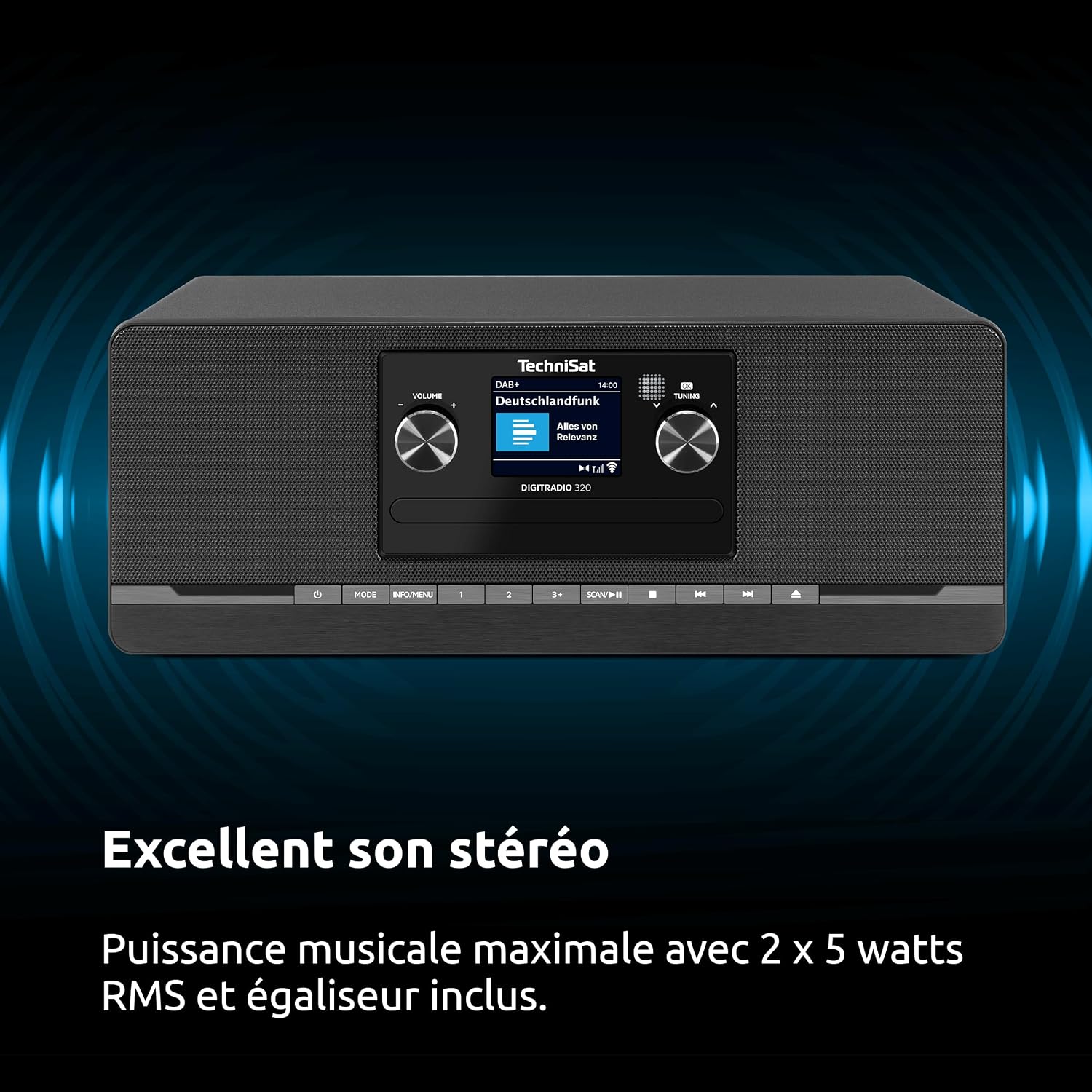
Figure 3.4: USB Functionality. This image highlights the USB port's dual functionality for playing MP3 files from external storage and charging mobile devices.
3.6 ช่องต่อ AUX IN
Connect an external audio device (e.g., an MP3 player) to the 3.5mm AUX IN port on the rear of the unit using an appropriate audio cable. Press the โหมด button to select AUX IN mode to play audio from the connected device.
3.7 เอาต์พุตหูฟัง
For private listening, connect headphones with a 3.5mm jack to the headphone output port on the rear of the unit. The main speakers will be muted automatically.
3.8 Alarm, Sleep Timer, and Snooze Functions
- เตือน: Set up to two independent alarms with customizable sources (DAB+, FM, CD, or buzzer) and volume levels. Refer to the on-screen menu for detailed alarm setup.
- เวลานอน: Program the unit to automatically switch to standby after a set period (e.g., 15, 30, 60 minutes).
- ปิดเสียงเตือนชั่วคราว: เมื่อสัญญาณเตือนดังขึ้น ให้กดปุ่ม เลื่อน button to temporarily silence it for a few minutes.

Figure 3.5: Excellent Stereo Sound. The DIGITRADIO 320 delivers powerful and clear stereo sound through its two integrated 5-watt RMS speakers, providing a rich audio experience.
4. การบำรุงรักษา
4.1 การทำความสะอาดหน่วย
Before cleaning, ensure the unit is switched off and unplugged from the power outlet. Use a soft, dry cloth to wipe the exterior surfaces. Do not use abrasive cleaners, waxes, or solvents as they may damage the finish. For the display, use a soft, lint-free cloth specifically designed for electronic screens.
4.2 การดูแลรักษาเครื่องเล่นซีดี
Handle CDs by their edges to avoid fingerprints and scratches. If a CD is dirty, wipe it gently from the center outwards with a soft, lint-free cloth. Do not use cleaning sprays or abrasive materials on CDs. Regularly inspect the CD slot for dust or debris and clean if necessary with a soft brush or compressed air.
4.3 การดูแลทั่วไป
Keep the unit away from excessive dust, moisture, and extreme temperatures. Do not block ventilation openings. If the unit will not be used for an extended period, unplug it from the power outlet.
5 การแก้ไขปัญหา
| ปัญหา | สาเหตุที่เป็นไปได้ | สารละลาย |
|---|---|---|
| ไม่มีไฟฟ้า | สายไฟไม่ได้เชื่อมต่อ เต้าเสียบไฟฟ้าไม่ทำงาน | Ensure the power cable is securely connected. Check if the power outlet is working by plugging in another device. |
| การรับสัญญาณวิทยุไม่ดี (DAB+/FM) | Antenna not extended or poorly positioned; Weak signal in the area. | Fully extend and adjust the telescopic antenna. Try repositioning the unit. Perform a new station scan. |
| ซีดีไม่เล่นหรือข้าม | CD is dirty, scratched, or inserted incorrectly; Unsupported CD format. | Clean the CD with a soft cloth. Ensure the CD is inserted with the label side up. Check if the CD format (audio CD, MP3 CD) is supported. |
| การจับคู่บลูทูธล้มเหลว | Bluetooth not enabled on device; Device too far; DIGITRADIO 320 not in pairing mode. | Ensure Bluetooth is enabled on your device. Move the device closer to the DIGITRADIO 320. Select Bluetooth mode on the unit to enter pairing mode. |
| ไม่มีเสียง | Volume too low; Mute function active; Headphones connected. | Increase the volume. Check if the unit is muted. Disconnect headphones if you want sound from the speakers. |
6. ข้อมูลจำเพาะทางเทคนิค
| คุณสมบัติ | ข้อมูลจำเพาะ |
|---|---|
| ยี่ห้อ | เทคนิแซท |
| หมายเลขรุ่น | 0000/2958 |
| เทคโนโลยีการเชื่อมต่อ | อุปกรณ์เสริม, บลูทูธ, USB |
| สี | สีดำ |
| ประเภทลำโพง | Stereo (2 speakers) |
| โหมดเอาต์พุตเสียง | สเตอริโอ 2.0 |
| กำลังขับ | 10 วัตต์ (2 x 5 วัตต์ RMS) |
| ขนาด (กว้าง x ยาว x สูง) | 35 x 20 x 13.5 ซม. (13.8 x 7.9 x 5.3 นิ้ว) |
| น้ำหนักสินค้า | 2.8 กิโลกรัม (6.17 ปอนด์) |
| แหล่งพลังงาน | สายไฟฟ้า |
| อุปกรณ์ที่รองรับ | Headphones, Smartphone |
| มาตรฐานที่รองรับ | DAB+, FM, Bluetooth, USB |
| เวอร์ชันบลูทูธ | 5.0 |
| รูปแบบเสียงที่รองรับ | CD-DA, MP3 |
| แสดง | จอแสดงผลสี TFT ขนาด 2.4 นิ้ว |
| ประเทศต้นกำเนิด | จีน |

รูปที่ 6.1: ขนาดผลิตภัณฑ์ This image provides a visual representation of the DIGITRADIO 320's dimensions: 35.1 cm (width), 21.2 cm (depth), and 13.3 cm (height).
7. การรับประกันและการสนับสนุน
7.1 ข้อมูลการรับประกัน
This TechniSat DIGITRADIO 320 comes with a รับประกัน 2 ปี นับจากวันที่ซื้อสินค้า การรับประกันนี้ครอบคลุมถึงข้อบกพร่องจากการผลิตและความผิดพลาดของวัสดุภายใต้การใช้งานปกติ โปรดเก็บหลักฐานการซื้อไว้เพื่อใช้ในการเรียกร้องการรับประกัน การรับประกันไม่ครอบคลุมถึงความเสียหายที่เกิดจากการใช้งานผิดวิธี อุบัติเหตุ การดัดแปลงโดยไม่ได้รับอนุญาต หรือการสึกหรอตามปกติ
7.2 การสนับสนุนลูกค้า
For technical assistance, troubleshooting, or warranty service, please contact TechniSat customer support. You can find contact information on the official TechniSat website or through your local retailer. Please have your product model number (DIGITRADIO 320) and proof of purchase ready when contacting support.
Official TechniSat Webเว็บไซต์: www.technisat.com