
1. บทนำ
This manual provides instructions for the safe and effective operation of the TopTes Guard-863Pro 4 Gas Monitor. This device is designed to detect and monitor concentrations of Hydrogen Sulfide (H₂S), Carbon Monoxide (CO), Combustible Gases (LEL), and Oxygen (O₂) in various environments. Read this manual thoroughly before use to ensure proper handling and to maximize the device's performance and your safety.
2. ข้อมูลด้านความปลอดภัย
Adhere to the following safety guidelines to prevent injury or damage to the device:
- Always operate the device in accordance with local safety regulations and industry best practices.
- Ensure the device is calibrated regularly to maintain accuracy and reliability. Refer to the calibration section for details.
- Do not expose the device to extreme temperatures, direct sunlight for prolonged periods, or corrosive chemicals.
- In case of an alarm, evacuate the area immediately and follow established safety protocols for the detected gas. Do not re-enter until the area is confirmed safe.
- The device is designed to be dustproof, waterproof, and explosion-proof, but it is not indestructible. Avoid dropping or subjecting it to severe impacts.
3. เนื้อหาบรรจุภัณฑ์
Upon unpacking, verify that all the following items are present in your package:
- Guard-863Pro Gas Detector
- Protective Packaging Box
- คู่มือการใช้งาน
- สายชาร์จ USB
- Standard Gas Hood

Image: Contents of the Guard-863Pro package, showing the gas detector, a protective carrying case, a USB charging cable, the user manual, and a standard gas hood.
4. อุปกรณ์โอเวอร์view
The Guard-863Pro is a robust multi-gas detector featuring a clear TFT color screen and intuitive controls for reliable gas monitoring.

ภาพ: ด้านหน้า view of the Guard-863Pro gas monitor, highlighting its display and button layout.
4.1 คุณสมบัติหลัก
- Detects four critical gases: Hydrogen Sulfide (H₂S), Carbon Monoxide (CO), Combustible Gases (LEL), and Oxygen (O₂).
- Fast 0.5-second response time for immediate hazard detection.
- Equipped with an upgraded O₂ sensor offering an extended service life of up to 5 years.
- Vivid TFT color screen displays real-time gas data, including concentration matrices and trend curves.
- Integrated triple alarm system: audible, visual (light), and vibration alerts for comprehensive notification.
- USB data export function for efficient tracking and analysis of alarm records, fault logs, calibration records, and operation history.
- Rapid charging: 2.5 hours for a full charge, providing over 18 hours of continuous operation.
- Durable design: dustproof, waterproof, and explosion-proof for reliable performance in demanding environments.
- Features a portable back clip for convenient carrying during work.

ภาพ: ภายใน view of the Guard-863Pro, emphasizing the upgraded O₂ sensor designed for a 5-year lifespan, ensuring long-term reliability.
5. การตั้งค่า
5.1 ค่าบริการเริ่มต้น
Before using the device for the first time, ensure it is fully charged. Connect the provided USB charging cable to the device's USB port and a compatible power source (e.g., a USB wall adapter or computer USB port). A full charge typically takes approximately 2.5 hours.
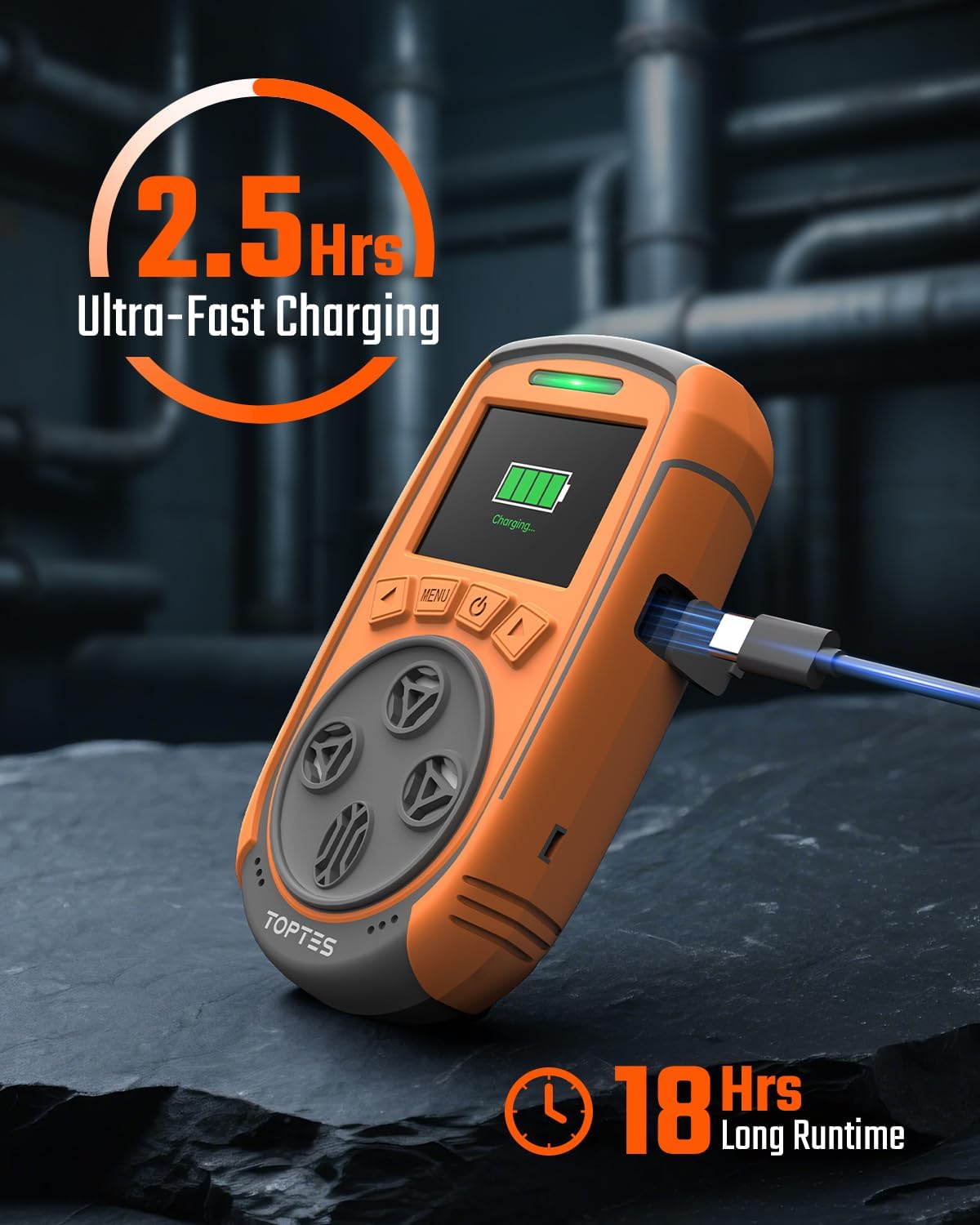
Image: The Guard-863Pro device connected to its charging cable, illustrating the charging process and battery indicator on the screen.
5.2 เปิด/ปิดเครื่อง
- การเปิดเครื่อง: Press and hold the power button (usually marked with a power symbol) until the screen illuminates and the device begins its self-check sequence.
- วิธีปิดเครื่อง: Press and hold the power button until a shutdown prompt appears on the screen. Confirm your selection to power off the device.
5.3 การปรับเทียบศูนย์
For accurate readings, it is essential to perform a zero calibration in a fresh air environment that is known to be free of the target gases. Refer to the device's on-screen menu for specific instructions on how to initiate and complete the zero calibration process.
6. คู่มือการใช้งาน
6.1 การตรวจสอบตามเวลาจริง
Once powered on and calibrated, the device will automatically begin monitoring the air and displaying real-time gas concentrations on its TFT color screen. The display provides current readings for H₂S, CO, LEL, and O₂.

Image: The Guard-863Pro's TFT color screen displaying real-time concentration values for H₂S, CO, LEL, and O₂.
6.2 โหมดการแสดงผล
The Guard-863Pro supports two primary display modes to suit different monitoring needs:
- Real-time 4-Gas Readout Display: This mode shows the current concentration levels for all four monitored gases simultaneously in a clear numerical format.
- Gas Concentration Curve: This mode provides a graphical representation of gas levels over a period, which is useful for observing trends and fluctuations in gas concentrations.
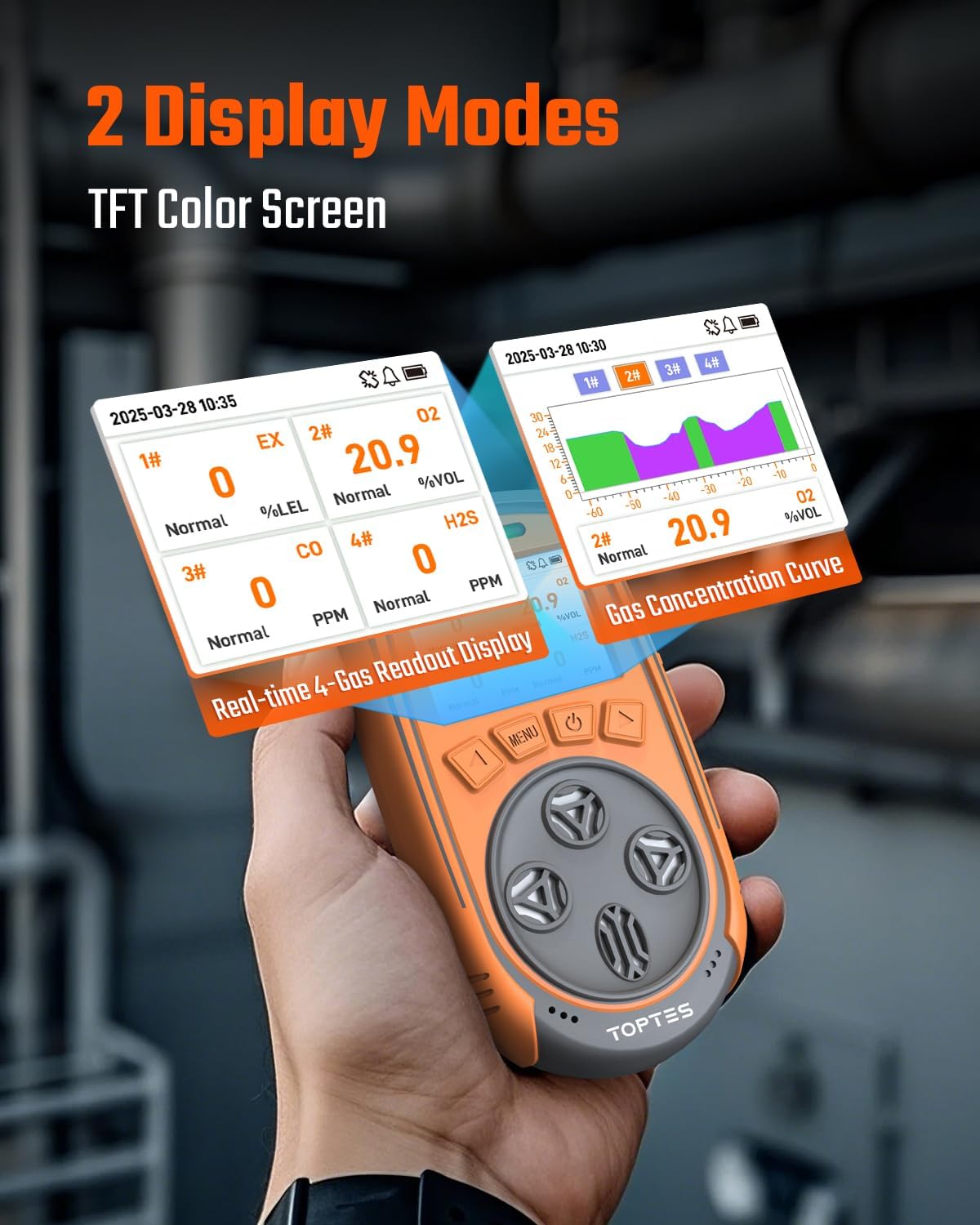
Image: Illustration of the two display modes available on the Guard-863Pro: a numerical readout of all four gases and a graphical trend curve for historical data.
ระบบสัญญาณเตือนภัย 6.3
The Guard-863Pro is equipped with a continuous triple alarm system to alert users to hazardous conditions:
- เสียงปลุก: A loud sound signal to alert users in the vicinity.
- สัญญาณเตือนภาพ: Flashing lights on the device provide a clear visual warning, especially useful in noisy environments.
- สัญญาณเตือนการสั่นสะเทือน: The device vibrates, offering a tactile alert that can be felt even if audible or visual alarms are missed.
Alarms activate when gas levels exceed or fall below preset safe thresholds and will continue until the gas concentrations return to safe limits. Users can typically adjust alarm thresholds within safety parameters via the device's menu.
7. การจัดการข้อมูล
7.1 การส่งออกข้อมูล
The device allows for convenient USB data export. To export data, connect the Guard-863Pro to a computer using the provided USB charging cable. The device can export various types of data for review and analysis, including:
- บันทึกการเตือนภัย
- Fault logs
- บันทึกการสอบเทียบ
- ประวัติการดำเนินงาน
This function facilitates efficient tracking, reporting, and analysis of gas monitoring data, which is crucial for safety compliance and incident investigation.

Image: The Guard-863Pro connected to a laptop, illustrating the USB data export capability for reviewing alarm records, fault logs, and operational history.
7.2 ความจุในการเก็บข้อมูล
The device is capable of storing a significant amount of data, with capacity for over 16,000 alarm data records.
8. แบตเตอรี่และการชาร์จ
The Guard-863Pro is equipped with a high-capacity rechargeable battery designed for extended use.
- เวลาในการชาร์จ: การชาร์จจนเต็มจากแบตเตอรี่หมดใช้เวลาประมาณ 2.5 ชั่วโมง
- เวลาทำการ : The device provides over 18 hours of continuous operation on a full charge, enabling prolonged monitoring in various work environments.
To ensure optimal battery life and safety, use only the provided charging cable or a compatible USB charger that meets the device's power requirements.
9. การบำรุงรักษา
9.1 Sensor Lifespan and Calibration
The upgraded O₂ sensor in the Guard-863Pro has an extended service life of up to 5 years. The lifespan of other sensors (H₂S, CO, LEL) may vary. Regular calibration is crucial for maintaining the accuracy and reliability of all sensors. Refer to the device's menu or contact TOPTES support for recommended calibration schedules and procedures.
9.2 การทำความสะอาด
ทำความสะอาดภายนอกของอุปกรณ์ด้วย d . ที่อ่อนนุ่มamp ใช้ผ้าเช็ดทำความสะอาดเท่านั้น ห้ามใช้สารทำความสะอาดที่มีฤทธิ์กัดกร่อน ตัวทำละลาย หรือสารเคมีรุนแรง เพราะอาจทำให้ผ้าเสียหายได้asing or sensors. Ensure no liquids enter the sensor openings or charging port.
9.3 พื้นที่จัดเก็บ
When not in use, store the Guard-863Pro in its original protective packaging box in a cool, dry place, away from direct sunlight and extreme temperatures. Ensure the battery is partially charged (e.g., 50%) before long-term storage to preserve battery health.
10 การแก้ไขปัญหา
This section addresses common issues you might encounter with your Guard-863Pro gas monitor.
| ปัญหา | สาเหตุที่เป็นไปได้ | สารละลาย |
|---|---|---|
| อุปกรณ์ไม่เปิดเครื่อง | แบตเตอรี่เหลือน้อย; อุปกรณ์ทำงานผิดปกติ | Charge the device fully using the provided USB cable. If the problem persists after charging, contact TOPTES customer support. |
| การอ่านค่าก๊าซไม่แม่นยำ | Needs calibration; sensor obstruction; sensor end-of-life. | Perform a fresh air zero calibration. Check sensor openings for any debris or blockages. If readings remain inaccurate or inconsistent, the sensor may require replacement or professional service. |
| Alarm triggers frequently without apparent gas presence. | False alarm due to environmental factors (e.g., sudden temperature change); sensor sensitivity settings are too low; device needs calibration. | Ensure the device is in a stable environment. Review and adjust alarm thresholds if necessary, always adhering to safety guidelines. Perform a fresh air calibration. |
| Cannot export data to computer. | Incorrect USB connection; driver issues; required software not installed or outdated. | Ensure the USB cable is securely connected to both the device and the computer. Try a different USB port or computer. Verify that any necessary software or drivers from the manufacturer's website are installed and up-to-date. |
11. ข้อมูลจำเพาะ
Key technical specifications for the TopTes Guard-863Pro 4 Gas Monitor:
| คุณสมบัติ | รายละเอียด |
|---|---|
| ยี่ห้อ | TOPTES |
| หมายเลขรุ่น | Guard-863Pro |
| แหล่งพลังงาน | ใช้พลังงานจากแบตเตอรี่ |
| ก๊าซที่ตรวจพบ | Hydrogen Sulfide (H₂S), Carbon Monoxide (CO), Combustible Gases (LEL), Oxygen (O₂) |
| O₂ Sensor Lifespan | สูงถึง 5 ปี |
| เวลาตอบสนอง | 0.5 วินาที |
| แสดง | หน้าจอสี TFT |
| เวลาในการชาร์จ | ประมาณ 2.5 ชั่วโมง |
| อายุการใช้งานแบตเตอรี่ | ใช้งานได้ต่อเนื่องกว่า 18 ชม |
| การจัดเก็บข้อมูล | 16,000+ alarm records |
| การปกป้องสิ่งแวดล้อม | Dustproof, Waterproof, Explosion-Proof |
12. การรับประกันและการสนับสนุน
TOPTES provides a 36-month after-sale service for the Guard-863Pro. This warranty covers defects in materials and workmanship under normal use.
For technical support, warranty claims, or further assistance, please contact TOPTES customer service through their official website or the contact information provided with your product. Ensure you have your product model number and purchase date available when contacting support.
Manufacturer Warranty Description: We provide a 36-Month after-sale service.