
การแนะนำ
This manual provides instructions for the AT&T DECT 6.0 Cordless Phone, Model BL108. This system features Smart Call Blocker, Bluetooth Connect to Cell technology, a digital answering machine, and a 2.4-inch color display. Please read these instructions carefully before operating your new phone.
มีอะไรอยู่ในกล่อง
- หน่วยฐาน
- โทรศัพท์ไร้สาย 1 เครื่อง
- 1 อะแดปเตอร์
- สายโทรศัพท์
- 2 Battery Cells + Quick Start Guide
การตั้งค่า
1. การเชื่อมต่อหน่วยฐาน
Connect the base unit to power and your telephone line. Ensure all connections are secure.
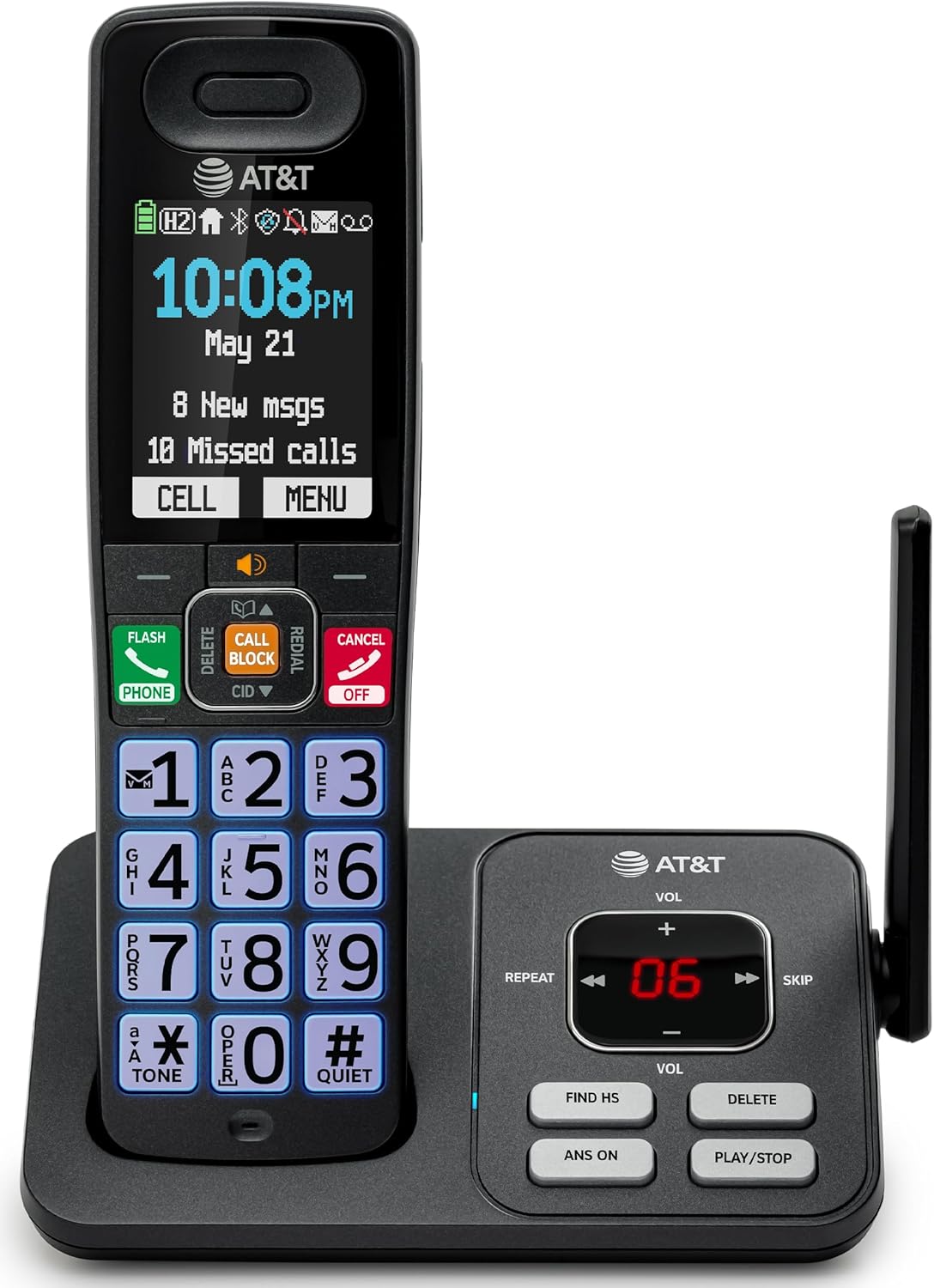
Image: The AT&T BL108 cordless phone base unit connected to a handset, showing its compact design.
2. การติดตั้งและการชาร์จแบตเตอรี่โทรศัพท์มือถือ
Install the provided battery cells into the cordless handset. Place the handset on the base unit or charger to charge for at least 16 hours before initial use. A full charge ensures optimal battery performance.

Image: A cordless handset resting on its charging base, indicating it is ready for use or charging.
3. Set Date and Time
Follow the on-screen prompts on the handset to set the correct date and time. This is important for accurate call logging and answering machine timestamps.
4. การตั้งค่าการเชื่อมต่อบลูทูธกับโทรศัพท์มือถือ
To pair your smartphone with the BL108 system:
- On the handset, navigate to the Bluetooth menu.
- Enable Bluetooth on your smartphone and set it to discoverable mode.
- Select your smartphone from the list of available devices on the handset and confirm pairing.
This feature allows you to make and receive mobile calls through your cordless handset, extending your mobile phone's range within your home.

Image: A visual representation of the phone's Bluetooth Connect to Cell feature, showing a handset on a nightstand connected wirelessly to a smartphone.
คำแนะนำการใช้งาน
การโทรออกและรับสาย
- การโทร: กดหมายเลขแล้วกด โทรศัพท์ ปุ่ม.
- เพื่อรับสาย: กดปุ่ม โทรศัพท์ ปุ่มเมื่อโทรศัพท์ดัง
- การสิ้นสุดการโทร: กดปุ่ม ยกเลิก กดปุ่มหรือวางโทรศัพท์กลับลงบนฐาน/แท่นชาร์จ
ตัวบล็อกการโทรอัจฉริยะ
The Smart Call Blocker automatically screens robocalls. To manually block a number during or after a call, press the บล็อกการโทร button on the handset. The block directory can store up to 1,000 entries.

Image: The handset displaying the "Smart Call Block" screen with a prominent "CALL BLOCK" button highlighted, demonstrating the call blocking feature.
เครื่องตอบรับอัตโนมัติแบบดิจิตอล
The integrated answering machine records up to 22 minutes of messages. Access messages via the handset or the base unit controls (PLAY/STOP, REPEAT, SKIP).

Image: The handset displaying "Answering Sys" with a message icon, and the base unit showing message count, illustrating the answering machine feature.
ประกาศหมายเลขผู้โทร
When a call comes in, the handset will announce the caller's name (if available in your phonebook or Caller ID service). This allows for screening calls without picking up the handset.

Image: The handset displaying a caller's name and number, with a speech bubble indicating "Call from Johnson," demonstrating the Caller ID Announce feature.
สมุดโทรศัพท์
Store up to 1500 names and numbers in the phonebook. Use the navigation buttons to access and manage your contacts.

Image: The handset displaying the "Phonebook" menu with a list of contacts, illustrating the phonebook directory feature.
โทรศัพท์แบบ Full-Duplex พร้อมลำโพงในตัว
Activate the speakerphone function during a call to allow both parties to speak and be heard simultaneously, providing a hands-free conversation experience.

Image: A person using the handset's speakerphone function while working on a laptop, with speech bubbles indicating a two-way conversation.
โหมดเงียบ
Activate Quiet Mode to silence all handset and base ringers for a set period, allowing for undisturbed time. Calls will still be recorded by the answering machine.

Image: The handset displaying "Quiet mode on" with a bell icon crossed out, indicating the phone is in quiet mode, suitable for nighttime use.
ระบบสื่อสารระหว่างโทรศัพท์มือถือ
If you have multiple handsets, you can use them as an intercom system to communicate between rooms or transfer calls.

Image: Two handsets, one on its base and one on a charger, with arrows indicating communication between them, demonstrating the intercom feature.
การซ่อมบำรุง
- การทำความสะอาด: เช็ดโทรศัพท์และฐานด้วยผ้านุ่มๆamp ใช้ผ้าเช็ดทำความสะอาดเท่านั้น ห้ามใช้สเปรย์ทำความสะอาดหรือสารเคมีรุนแรง
- การดูแลแบตเตอรี่ Replace batteries when the handset indicates low battery. Use only the specified battery type.
การแก้ไขปัญหา
| ปัญหา | สารละลาย |
|---|---|
| ไม่มีเสียงโทรออก | ตรวจสอบให้แน่ใจว่าสายโทรศัพท์เชื่อมต่อกับทั้งตัวเครื่องและช่องเสียบที่ผนังอย่างแน่นหนา ตรวจสอบว่าอะแดปเตอร์ไฟฟ้าเชื่อมต่ออย่างถูกต้อง |
| ไม่สามารถโทรออกหรือรับสายได้ | Check the phone line connection. Ensure the handset battery is charged. If using Connect to Cell, verify your smartphone is paired and within range. |
| คุณภาพเสียงไม่ดี | Move closer to the base unit. Avoid placing the phone near other electronic devices that may cause interference. |
| Handset battery does not charge. | Ensure the handset is correctly placed on the charging cradle. Clean the charging contacts on both the handset and base unit. |
| Smart Call Blocker not working. | Ensure the feature is enabled in the phone settings. Verify your Caller ID service is active. |
ข้อมูลจำเพาะ
- ยี่ห้อ: เอทีแอนด์ที
- หมายเลขรุ่น: BL108
- ประเภทโทรศัพท์: ไร้สาย
- เทคโนโลยี: DECT6.0 ภาษาไทย
- แสดง: 2.4-inch Color Backlit Display
- ระบบตอบรับ: ระบบดิจิทัล บันทึกได้นานสูงสุด 22 นาที
- โปรแกรมบล็อกสายเรียกเข้า: ระบบบล็อกสายเรียกเข้าอัจฉริยะ บันทึกได้สูงสุด 1,000 รายการ
- บลูทูธ: Connect to Cell for smartphone pairing
- ขนาด (ยาว x กว้าง x สูง): 5.63 x 2.99 x 7.4 นิ้ว (14.3 x 7.6 x 18.8 ซม.)
- แหล่งพลังงาน: สายไฟ
- เวลาสแตนด์บายโทรศัพท์: 6 วัน
- หมายเลขผู้โทร: ใช่
- วัสดุ: พลาสติก

Image: A diagram showing the dimensions of the AT&T BL108 cordless phone handset and base unit.
การรับประกัน
This product comes with a 1-Year limited warranty. Please refer to the warranty card included in your package for full details and terms.
สนับสนุน
For further assistance, please consult the full user manual or visit the AT&T support webไซต์ โปรดเก็บใบเสร็จรับเงินไว้เป็นหลักฐานการซื้อสำหรับการเรียกร้องการรับประกัน