
การแนะนำ
The Hunter ZenTech 44-inch smart ceiling fan combines modern design with advanced technology to provide efficient air circulation and adjustable lighting for indoor and covered outdoor spaces. This fan features a slim DC motor for quiet operation and energy efficiency, TrueLight LED technology for customizable lighting, and HunterSMART technology for seamless integration with smart home systems like Amazon Alexa, Google Assistant, and Apple HomeKit.
This manual provides detailed instructions for the safe installation, operation, and maintenance of your ZenTech ceiling fan. Please read all instructions carefully before beginning installation or use.
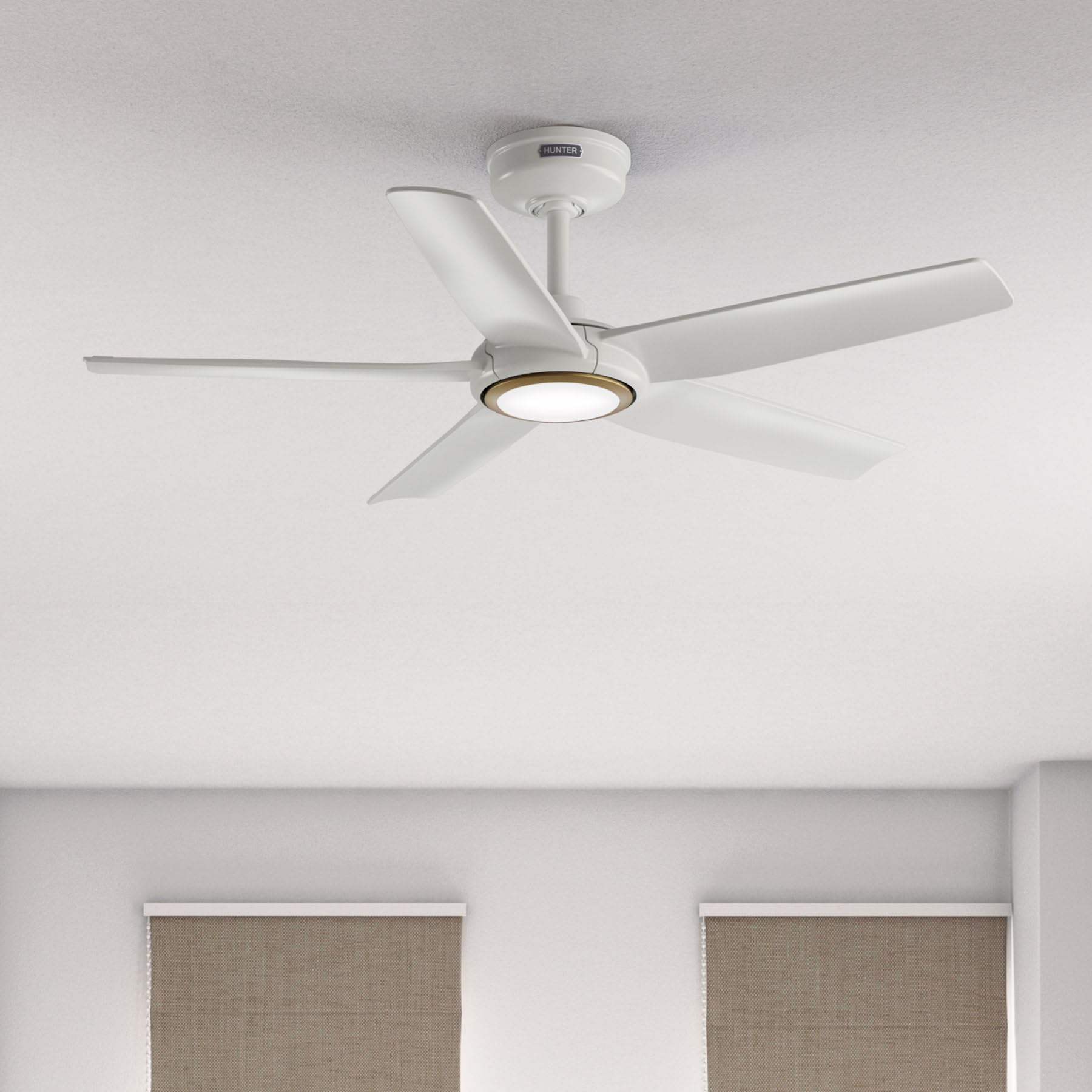
Image: Hunter ZenTech 44-inch ceiling fan in Fresh White, showcasing its sleek design and integrated LED light.
ข้อมูลด้านความปลอดภัย
To reduce the risk of electric shock, fire, or injury to persons, always follow these important safety precautions:
- Read all instructions before installing or using this fan.
- ตรวจสอบให้แน่ใจว่าได้ปิดไฟที่เบรกเกอร์ก่อนการติดตั้งหรือให้บริการ
- การเดินสายไฟทั้งหมดต้องเป็นไปตามมาตรฐานไฟฟ้าทั้งระดับชาติและระดับท้องถิ่น หากคุณไม่คุ้นเคยกับการเดินสายไฟ โปรดปรึกษาช่างไฟฟ้าผู้เชี่ยวชาญ
- ต้องติดตั้งพัดลมโดยเว้นระยะห่างจากขอบด้านท้ายของใบพัดถึงพื้นอย่างน้อย 7 ฟุต (2.1 เมตร)
- ตรวจสอบให้แน่ใจว่าโครงสร้างยึดสามารถรับน้ำหนักของพัดลมได้ (ประมาณ 13.45 ปอนด์)
- Do not operate the fan with damaged blades or any other damaged components.
- พัดลมตัวนี้ดีamp-rated, suitable for indoor use and covered outdoor areas where exposure to moisture may occur. Do not expose to direct water spray.
การติดตั้งและการตั้งค่า
Proper installation is crucial for the performance and safety of your ceiling fan. It is recommended to have a qualified electrician perform the installation.
การตรวจสอบก่อนการติดตั้ง
- ตรวจสอบว่ามีส่วนประกอบครบถ้วนตามรายการบรรจุภัณฑ์หรือไม่
- Ensure the electrical box is securely mounted and capable of supporting a ceiling fan.
- ปิดไฟที่เบรกเกอร์หลัก
การติดตั้งพัดลม
- ติดตั้งขายึดเข้ากับกล่องไฟฟ้าบนเพดานโดยใช้สกรูที่ให้มา
- Assemble the downrod (6 inches included) to the motor housing. Factory-installed wiring and connectors are designed for downrods up to 24 inches. Do not extend or modify.
- ยกชุดพัดลมขึ้นอย่างระมัดระวัง แล้วแขวนไว้กับขายึด
การเชื่อมต่อไฟฟ้า
- Connect the fan's electrical wires to the household wiring according to the wiring diagram in the full instruction manual. Ensure all connections are secure.
- เก็บสายไฟทั้งหมดลงในกล่องไฟฟ้าอย่างเรียบร้อย
การติดตั้งใบพัดและชุดไฟ
- ยึดใบพัดลมทั้ง 5 ใบเข้ากับตัวเรือนมอเตอร์อย่างแน่นหนา
- Install the LED light kit module. The fan includes in-box accessories for a personalized finish, including an interchangeable LED module, a no-light cap, and two trim ring options (one matching the fan finish and one in Luxe Gold).

Image: Hunter ZenTech ceiling fan installed in a modern living room, demonstrating its aesthetic integration into a home environment.

Image: Hunter ZenTech ceiling fan installed on a covered outdoor patio, highlighting its damp-rated suitability for outdoor use.
คำแนะนำการใช้งาน
Your ZenTech fan offers multiple control options for convenience.
รีโมทคอนโทรล
A handheld remote control is included for basic fan and light functions:
- ความเร็วพัดลม: Adjust between 6 speeds.
- ทิศทางของพัดลม: Reverse the fan direction for summer (downward airflow) or winter (upward airflow) operation.
- เปิด/ปิดไฟ: Turn the LED light on or off.
- การหรี่แสง: ปรับความสว่างของไฟ LED
HunterSMART App Control
The HunterSMART app provides advanced control and customization options:
- Download the HunterSMART app from your device's app store.
- Follow the in-app instructions to connect your ZenTech fan to your home Wi-Fi network.
- Once connected, you can control fan speed, light brightness, and color temperature from your smartphone or tablet.
- Access additional features such as scheduling and custom settings.

Image: Diagram illustrating HunterSMART app interface and voice command examples for controlling the ceiling fan.
การควบคุมด้วยเสียง
The ZenTech fan is compatible with leading smart home platforms:
- อเมซอนอเล็กซ่า: Enable the Hunter skill in the Alexa app and link your HunterSMART account.
- ผู้ช่วย Google: Link your HunterSMART account through the Google Home app.
- Apple HomeKit: Follow the pairing instructions in the Apple Home app.
Use voice commands such as "Alexa, turn on the living room fan" or "Hey Google, set the bedroom light to warm white."
TrueLight LED Lighting
The integrated TrueLight LED technology allows for fully adjustable lighting:
- Choose from 10 brightness levels to suit your needs.
- Adjust the color temperature between warm and cool tones to create the desired ambiance.

Image: Graphic illustrating the 'Clearly Brighter' TrueLight features, showing 10 levels of light and 10 color temperatures for adjustable LED lighting.
การซ่อมบำรุง
Regular maintenance ensures the longevity and optimal performance of your ZenTech ceiling fan.
การทำความสะอาด
- ใบพัดลม: เช็ดใบมีดด้วยผ้าเนื้อนุ่มและแห้งamp ใช้ผ้าเช็ดทำความสะอาด ห้ามใช้สารทำความสะอาดที่มีฤทธิ์กัดกร่อน เพราะอาจทำให้พื้นผิวเสียหายได้
- ที่อยู่อาศัยมอเตอร์: Dust the motor housing with a soft, dry cloth.
- ชุดไฟ: Clean the light diffuser with a soft, lint-free cloth.
Always ensure the power is off at the circuit breaker before cleaning any part of the fan.
ค่าบำรุงรักษาทั่วไป
- Periodically check all screws and connections for tightness. Retighten as necessary.
- The fan's DC motor is designed for long-term, maintenance-free operation and does not require lubrication.
การแก้ไขปัญหา
If you encounter issues with your ZenTech ceiling fan, refer to the following common problems and solutions:
| ปัญหา | สาเหตุที่เป็นไปได้ | สารละลาย |
|---|---|---|
| พัดลมไม่เริ่มทำงาน | ไม่มีไฟไปที่พัดลม สายไฟต่อหลวม แบตเตอรี่รีโมทคอนโทรลเหลือน้อย | ตรวจสอบเบรกเกอร์วงจร; ตรวจสอบว่าการเชื่อมต่อสายไฟทั้งหมดแน่นหนาดีแล้ว; เปลี่ยนแบตเตอรี่รีโมทคอนโทรล |
| ไฟไม่ทำงาน | Loose wire connection to light kit; LED module faulty. | Check light kit wiring; Contact customer support for LED module replacement if necessary. |
| พัดลมสั่น | สกรูใบหลวม ใบพัดไม่สมดุล ขายึดหลวม | Tighten all blade screws; Use a blade balancing kit (not included); Ensure mounting bracket is secure. |
| รีโมตคอนโทรลไม่ทำงาน | Battery low or dead; Remote not paired with fan. | Replace battery; Refer to the full manual for remote pairing instructions. |
| ปัญหาการเชื่อมต่อ Wi-Fi | รหัสผ่าน Wi-Fi ไม่ถูกต้อง; เราท์เตอร์อยู่ไกลเกินไป; สัญญาณรบกวนเครือข่าย | Verify Wi-Fi password; Move router closer or use a Wi-Fi extender; Reduce interference from other devices. |
For more complex issues or if troubleshooting steps do not resolve the problem, please contact Hunter customer support.
ข้อมูลจำเพาะ
| คุณสมบัติ | รายละเอียด |
|---|---|
| ยี่ห้อ | ฮันเตอร์ |
| ชื่อรุ่น | ZenTech |
| หมายเลขรุ่น | 53641 |
| ขนาด | 44 นิ้ว |
| สี | เฟรชไวท์ |
| ขนาดสินค้า | ลึก 44 นิ้ว x กว้าง 44 นิ้ว x สูง 11.78 นิ้ว |
| น้ำหนักสินค้า | 13.45 ปอนด์ |
| จำนวนใบมีด | 5 |
| ประเภทมอเตอร์ | DC Motor (43% slimmer) |
| จำนวนความเร็ว | 6 |
| ประเภทไฟ | TrueLight LED (Adjustable Brightness & Color Temperature) |
| วิธีการควบคุม | App Control (HunterSMART), Remote Control, Voice Control |
| ความเข้ากันได้ของสมาร์ทโฮม | Amazon Alexa, Google Assistant, Apple HomeKit |
| การใช้งานภายใน/ภายนอกอาคาร | Indoor, Covered Outdoor (Damp (เรทติ้ง) |
| เล่มที่tage | 120 โวลต์ |
| วัดtage | 14 วัตต์ |
| ความจุการไหลของอากาศ | 4493.25 ลูกบาศก์ฟุตต่อนาที |
| ความยาวดาวน์ร็อด | 6 Inches (included), compatible up to 24 inches |
| การรับรอง | ETL, เอ็นเนอร์จีสตาร์, FCC |
การรับประกัน
The Hunter ZenTech ceiling fan is backed by a limited lifetime motor warranty, reflecting Hunter's commitment to engineering and quality. This warranty covers defects in materials and workmanship of the fan motor for the lifetime of the original purchaser. Specific terms and conditions apply. Please refer to the warranty card included with your product or visit the official Hunter webเว็บไซต์สำหรับรายละเอียดทั้งหมด
สนับสนุน
For technical assistance, warranty claims, or additional information regarding your Hunter ZenTech ceiling fan, please contact Hunter customer support:
- การสนับสนุนทางออนไลน์: เยี่ยมชมบริษัท Hunter Fan Company webไซต์สำหรับคำถามที่พบบ่อย คำแนะนำในการแก้ไขปัญหา และแบบฟอร์มติดต่อ
- การสนับสนุนทางโทรศัพท์: โปรดดูที่บรรจุภัณฑ์ของผลิตภัณฑ์หรือคู่มือของ Hunter webเว็บไซต์นี้มีหมายเลขโทรศัพท์ฝ่ายบริการลูกค้าที่อัปเดตล่าสุด
เมื่อติดต่อฝ่ายสนับสนุน โปรดเตรียมหมายเลขรุ่น (53641) และหลักฐานการซื้อให้พร้อม