
1. สินค้าหมดview
The ATK N9 Tri-Mode Gaming Headset is designed for gamers requiring flexible connectivity, clear audio, and reliable communication across multiple devices. It supports 3.5 mm wired, 2.4G wireless, and Bluetooth connections, allowing seamless switching between gaming consoles, PC, and mobile devices. Stereo-tuned dynamic drivers deliver balanced sound, enhancing in-game audio cues such as footsteps, gunfire, and environmental effects. The detachable noise-canceling microphone improves voice clarity for team communication, online gaming, and voice calls. Its over-ear design, with soft ear cushions and an adjustable headband, ensures a comfortable fit for extended gaming sessions. The headset is compatible with PS5, PS4, PC, Nintendo Switch, and mobile devices. For Xbox Series X|S, audio and microphone functions are supported via the 3.5 mm wired connection.

2. เนื้อหาบรรจุภัณฑ์
ตรวจสอบว่ารายการทั้งหมดที่ระบุไว้ด้านล่างนี้รวมอยู่ในแพ็คเกจของคุณ:
- ATK N9 Pro/White Gaming Headset
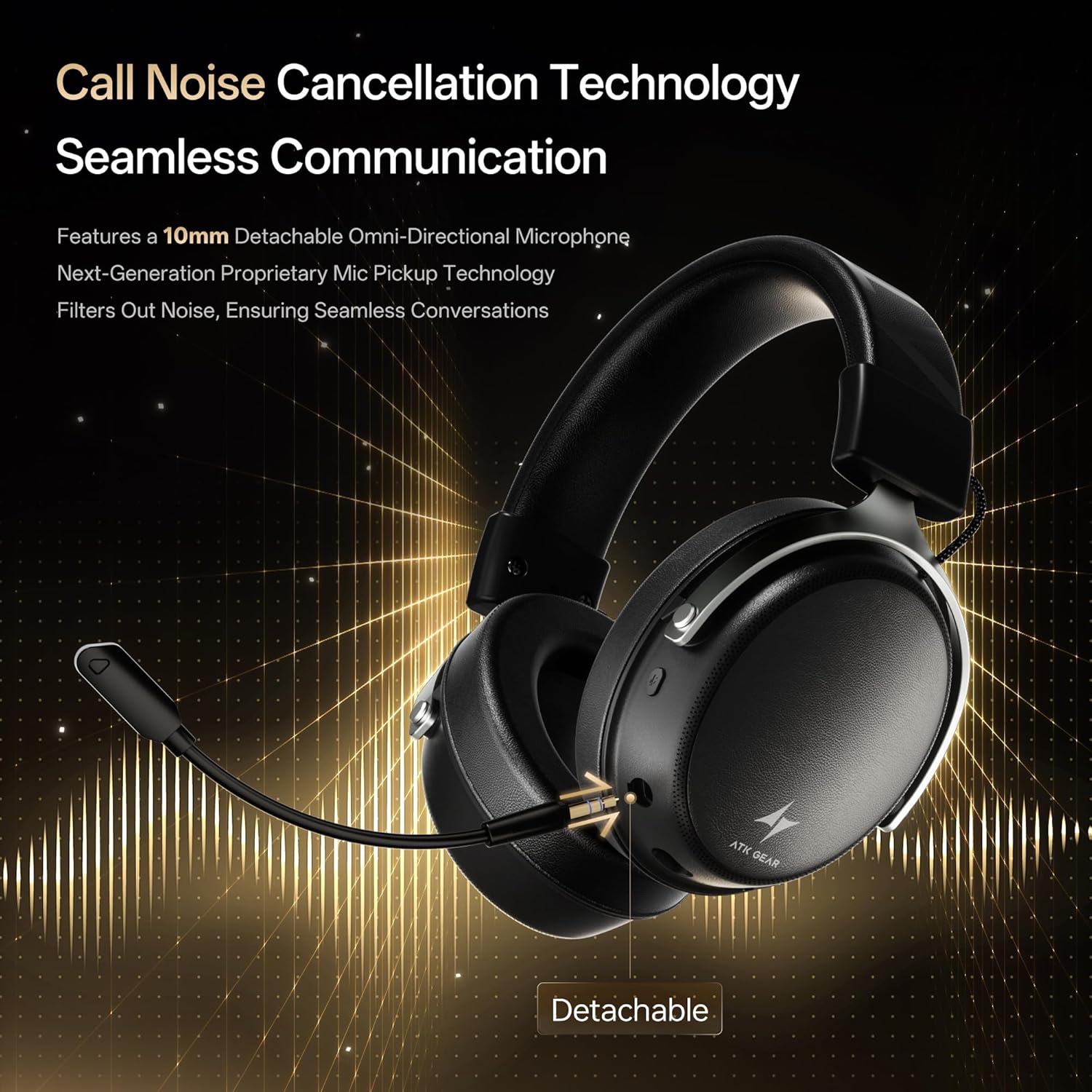
- ไมโครโฟนตัดเสียงรบกวนแบบถอดออกได้
- สายชาร์จ USB-C
- สายสัญญาณเสียงขนาด 3.5 มม.
- 2.4G Wireless USB Adapter
- คู่มือการใช้งาน (เอกสารนี้)

3. การตั้งค่าเริ่มต้น
3.1. การชาร์จชุดหูฟัง
Before first use, fully charge the headset using the provided USB-C charging cable. Connect the USB-C end to the headset's charging port and the USB-A end to a compatible USB power source (e.g., PC, wall adapter). The LED indicator will show charging status.
3.2. การติดตั้งไมโครโฟน
Insert the detachable boom microphone into the microphone port on the left earcup until it clicks into place. Ensure it is securely connected for optimal voice pickup.
3.3. ตัวเลือกการเชื่อมต่อ
The ATK N9 Pro/White headset offers three connectivity modes:
- โหมดไร้สาย 2.4G: For PC, PS4, PS5, and Nintendo Switch (docked mode).
- Plug the 2.4G wireless USB adapter into an available USB port on your device.
- เปิดชุดหูฟัง
- Switch the headset to 2.4G mode using the mode switch. The headset will automatically pair with the adapter.
- Adjust audio output settings on your device if necessary to select the headset.
- โหมดบลูทู ธ : For mobile devices, PC, and Nintendo Switch (handheld mode).
- Power on the headset and switch to Bluetooth mode. The LED indicator will flash, indicating pairing mode.
- On your device, go to Bluetooth settings and select "ATK N9 Pro" from the list of available devices.
- เมื่อเชื่อมต่อแล้ว ไฟ LED จะแสดงแสงคงที่
- โหมดใช้สาย 3.5 มม.: For Xbox Series X|S, PS4, PS5, PC, Nintendo Switch, and mobile devices.
- ต่อปลายด้านหนึ่งของสายสัญญาณเสียงขนาด 3.5 มม. เข้ากับแจ็คขนาด 3.5 มม. ของหูฟัง
- Connect the other end to the 3.5mm audio port on your device (e.g., controller, PC audio jack).
- ชุดหูฟังจะทำงานในโหมดใช้สาย โดยจะไม่รองรับฟังก์ชันไร้สาย

4. คู่มือการใช้งาน
4.1. การควบคุมชุดหูฟัง
The ATK N9 Pro/White headset features intuitive controls located on the earcups:
- ปุ่มเปิด/ปิด: Press and hold to power on/off. Short press for play/pause (in 2.4G/Bluetooth mode).
- สวิตช์โหมด: Toggle between 2.4G wireless, Bluetooth, and wired modes.
- ปุ่มปรับระดับเสียงขึ้น/ลง: หมุนเพื่อปรับระดับเสียง
- ปุ่มปิดเสียงไมโครโฟน: กดเพื่อปิด/เปิดเสียงไมโครโฟน
- Spatial Audio Button: Press to activate/deactivate 3D Spatial Audio.
- Mic Monitoring Button: Press to enable/disable microphone monitoring (sidetone).
4.2. การใช้ไมโครโฟน
The detachable noise-canceling microphone is designed for clear communication. Position the microphone approximately 1-2 inches from your mouth for optimal voice pickup. Use the microphone mute button on the headset to quickly mute your voice when needed.
4.3. การปรับความพอดี
The headset features an adjustable headband and soft ear cushions for comfort. Extend or retract the headband to achieve a snug yet comfortable fit. The earcups are designed to fully enclose your ears for passive noise isolation and comfort during long gaming sessions.
5. ข้อมูลจำเพาะทางเทคนิค
| คุณสมบัติ | ข้อมูลจำเพาะ |
|---|---|
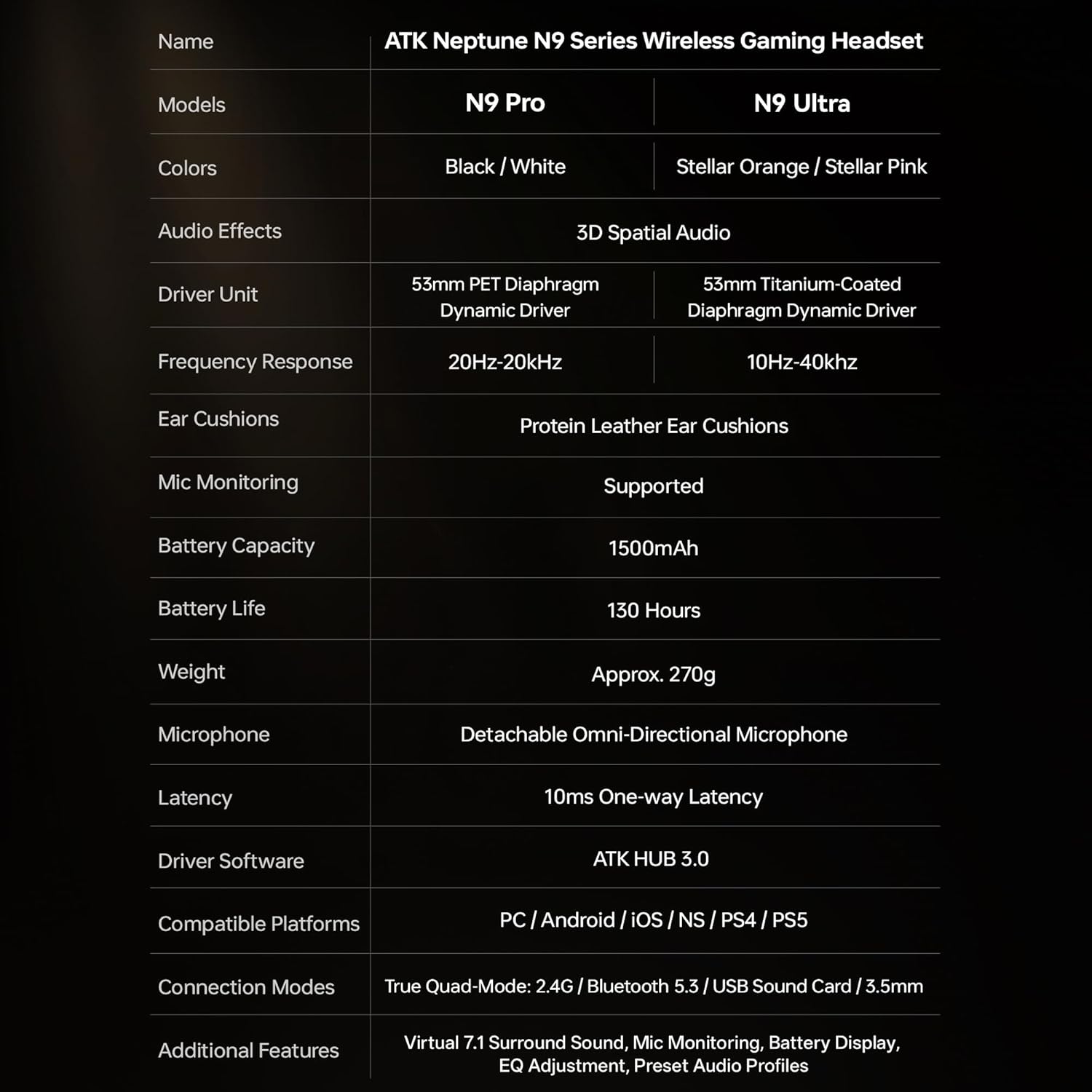
| ชื่อรุ่น | ATK N9 Pro |
| การเชื่อมต่อ | 3.5mm Wired, 2.4G Wireless, Bluetooth 5.3 |
| ประเภทไดรเวอร์ | ไดร์เวอร์แบบไดนามิก |
| ขนาดไดร์เวอร์ | 53 มม. |
| ช่วงความถี่ | 20 เฮิรตซ์ - 20,000 เฮิรตซ์ |
| อิมพีแดนซ์ | 64 โอห์ม |
| ไมโครโฟน | Detachable Noise-Canceling Omni-Directional |
| ความจุของแบตเตอรี่ | 1500 มิลลิแอมป์ |
| อายุการใช้งานแบตเตอรี่ | นานถึง 130 ชั่วโมง |
| ความหน่วง (2.4G) | 10 Milliseconds (one-way) |
| น้ำหนัก | 270 กรัม |
| การวางตำแหน่งหู | ครอบหู |
| อุปกรณ์ที่รองรับ | PS5, PS4, PC, Nintendo Switch, Mobile Devices, Xbox Series X|S (wired) |
| คุณสมบัติเพิ่มเติม | 3D Spatial Audio, Mic Monitoring, Volume Control |

6. การดูแลรักษา
- การทำความสะอาด: ใช้ผ้าแห้งนุ่มๆ เช็ดทำความสะอาดหูฟัง หลีกเลี่ยงการใช้สารเคมีรุนแรงหรือวัสดุที่มีฤทธิ์กัดกร่อน
- พื้นที่จัดเก็บ: เก็บหูฟังไว้ในที่แห้งและเย็น หลีกเลี่ยงแสงแดดโดยตรงและอุณหภูมิที่สูงหรือต่ำเกินไป
- การดูแลแบตเตอรี่ เพื่อยืดอายุการใช้งานแบตเตอรี่ ควรหลีกเลี่ยงการใช้หูฟังจนหมดบ่อย ควรชาร์จหูฟังเป็นประจำ แม้จะไม่ได้ใช้งานเป็นเวลานานก็ตาม
- ความต้านทานน้ำ: ชุดหูฟังนี้ไม่กันน้ำ โปรดหลีกเลี่ยงการสัมผัสกับของเหลว
7 การแก้ไขปัญหา
7.1. ไม่มีเสียง / เสียงเบา
- Ensure the headset is powered on and connected in the correct mode (2.4G, Bluetooth, or 3.5mm wired).
- ตรวจสอบปุ่มปรับระดับเสียงบนหูฟังและการตั้งค่าระดับเสียงของอุปกรณ์ของคุณ
- For wireless modes, ensure the headset is paired correctly and selected as the audio output device in your system settings.
- If using 3.5mm wired, ensure the cable is fully inserted into both the headset and the device.
7.2. ไมโครโฟนไม่ทำงาน
- ตรวจสอบให้แน่ใจว่าไมโครโฟนติดเข้ากับชุดหูฟังอย่างแน่นหนา
- ตรวจสอบว่าปุ่มปิดเสียงไมโครโฟนบนชุดหูฟังถูกกดอยู่หรือไม่
- Verify that the headset microphone is selected as the input device in your device's sound settings.
- For Xbox Series X|S, ensure you are using the 3.5mm wired connection for microphone support.
7.3. ปัญหาการเชื่อมต่อ
- 2.4G ไร้สาย: Ensure the USB adapter is firmly plugged in. Try a different USB port.
- บลูทูธ: Ensure the headset is in pairing mode. Forget the device on your phone/PC and re-pair. Keep the headset within the 5-meter Bluetooth range.
- ทั่วไป: Power cycle both the headset and your connected device.
8. การรับประกันและการสนับสนุน
8.1. ข้อมูลการรับประกัน
The ATK N9 Pro/White Gaming Headset comes with a รับประกัน 6 เดือน นับจากวันที่ซื้อสินค้า การรับประกันนี้ครอบคลุมถึงข้อบกพร่องจากการผลิตและฝีมือการผลิตภายใต้การใช้งานปกติ ไม่ครอบคลุมถึงความเสียหายที่เกิดจากการใช้งานผิดวิธี อุบัติเหตุ การดัดแปลงโดยไม่ได้รับอนุญาต หรือการสึกหรอตามปกติ
8.2. การสนับสนุนลูกค้า
For further assistance, technical support, or warranty claims, please contact ATK customer service through the retailer where the product was purchased or visit the official ATK webเว็บไซต์สำหรับข้อมูลการติดต่อฝ่ายสนับสนุน