
1. บทนำ
This manual provides essential instructions for the safe and efficient use of your DATOUBOSS FBM-JC-6232-EU-3 Home Energy Storage System. This all-in-one unit integrates a powerful 48V 6200W hybrid inverter with a 48V 628Ah Lithium Iron Phosphate (LiFePO4) battery, offering a total capacity of 32.15 kWh. Designed for home energy storage, off-grid solar systems, and backup power applications, this system simplifies installation by combining components into a single, movable unit.
The system features a base equipped with movable pulleys, allowing for easy relocation after unpacking without manual installation. Its integrated design eliminates the need for separate inverter and battery purchases, reducing complex wiring and communication setups.

2. ข้อมูลด้านความปลอดภัย
Read all safety instructions carefully before installation, operation, or maintenance. Failure to follow these instructions may result in electric shock, fire, serious injury, or property damage.
2.1 ข้อควรระวังเพื่อความปลอดภัยทั่วไป
- บุคลากรที่ผ่านการรับรอง: Installation and maintenance must be performed by qualified personnel familiar with electrical systems and battery storage.
- ตัดการเชื่อมต่อไฟฟ้า: Always disconnect all power sources (AC grid, PV input, battery) before performing any service or maintenance.
- การต่อลงดิน: ตรวจสอบให้แน่ใจว่าระบบมีการต่อสายดินอย่างถูกต้องตามข้อกำหนดด้านไฟฟ้าของท้องถิ่น
- การระบายอากาศ : Install the system in a well-ventilated area to prevent overheating. Do not block ventilation openings.
- น้ำหนัก: The unit weighs approximately 526 pounds (239 kg). Use appropriate lifting equipment and techniques to prevent injury during unpacking and placement.
- สิ่งแวดล้อม: Do not expose the unit to rain, snow, liquids, or excessive dust. Operate within specified temperature and humidity ranges.
2.2 ความปลอดภัยของแบตเตอรี่
The integrated LiFePO4 battery includes a Battery Management System (BMS) for protection. However, observe the following precautions:
- ไม่มีการถอดชิ้นส่วน: Do not attempt to open or disassemble the battery pack or the system unit. There are no user-serviceable parts inside.
- หลีกเลี่ยงการลัดวงจร: Ensure all connections are secure and prevent any possibility of short circuits.
- อุณหภูมิ: The BMS protects against overheating and low temperatures. However, avoid installing the unit in environments with extreme temperatures outside the operating range (-10°C to 50°C).
- ความเสียหาย: If the battery or unit appears damaged, do not operate it. Contact customer service immediately.
3. สินค้าหมดview
The DATOUBOSS Home Energy Storage System is an all-in-one solution featuring a hybrid inverter, a high-capacity LiFePO4 battery, and an integrated Battery Management System (BMS). It is designed for ease of use and monitoring through its touch color LCD display.
3.1 ส่วนประกอบหลัก
- ไฮบริดอินเวอร์เตอร์: 48V 6200W capacity, managing power flow between solar panels, battery, grid, and loads.
- แบตเตอรี่ LiFePO4: 48V 628Ah (32.15 kWh) for stable and long-lasting energy storage.
- ระบบจัดการแบตเตอรี่ (BMS): Built-in protection against overcharging, over-discharging, over-current, short circuits, overheating, and low temperatures.
- Touch Color LCD Display: For monitoring system status and configuring settings.
- Movable Casters: 360° swivel casters for easy mobility of the unit.
3.2 Front Panel and Connections
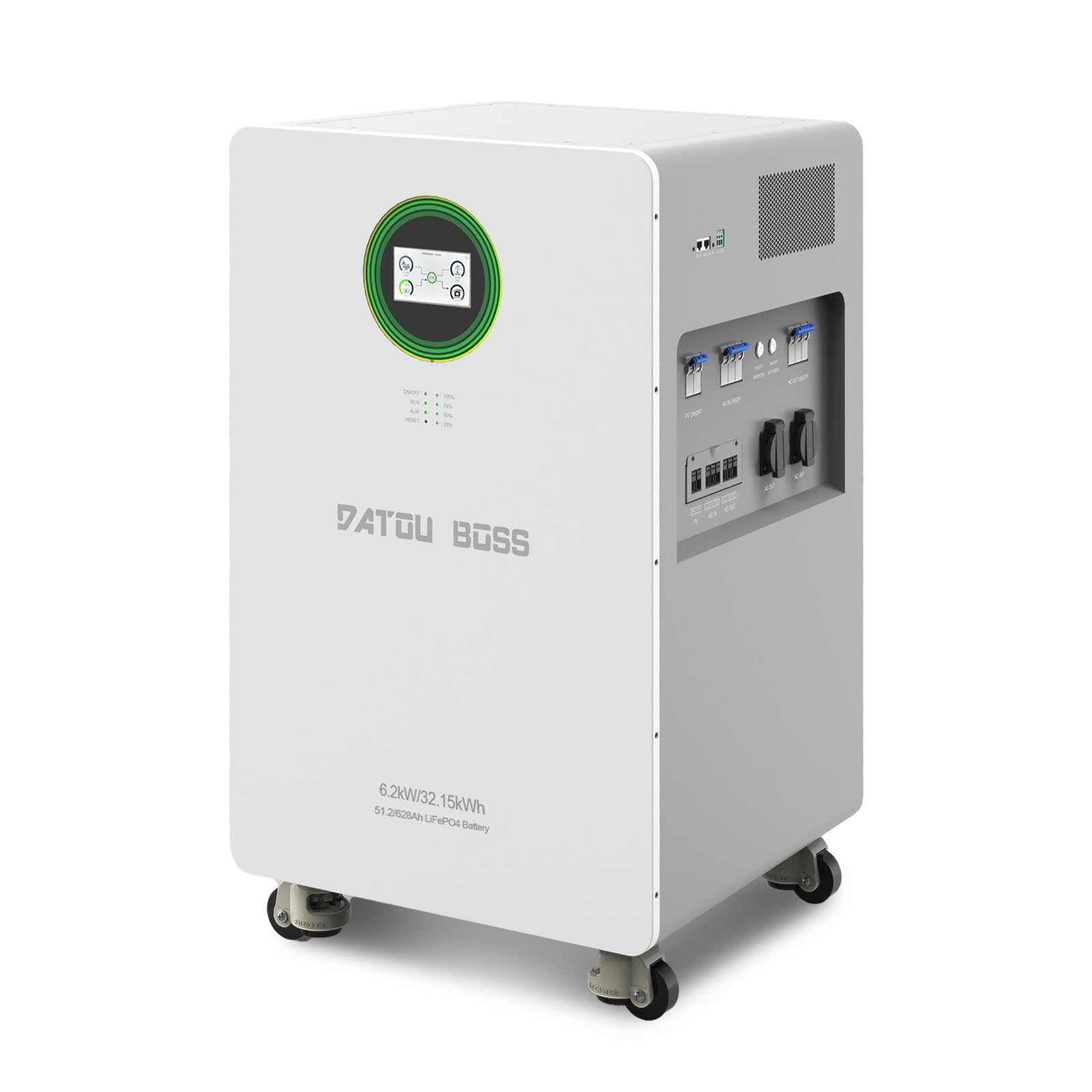
The front panel provides access to the touch screen, indicator lights, and control buttons. The lower section houses the various input and output ports.

- หน้าจอสัมผัส: Main interface for monitoring and control.
- ไฟแสดงสถานะ: RUN (operation status), ALM (alarm), RESET (system reset).
- ไฟแสดงสถานะแบตเตอรี่: Shows charge level (100%, 75%, 50%, 25%).
- AC IN ON/OFF Switch: Controls the AC grid input.
- ON/OFF Inverter Switch: Controls the inverter operation.
- สวิตช์เปิด/ปิดแบตเตอรี่: Controls the battery power.
- AC OUT ON/OFF Switch: Controls the AC output to loads.
- PV ON/OFF Switch (x2): Controls the solar panel inputs.
- PV Interface (x2): เชื่อมต่อกับแผงโซลาร์เซลล์
- อินพุตไฟฟ้ากระแสสลับ: Connects to the utility grid.
- เอาท์พุต AC (x2): Provides power to household loads.

4. การตั้งค่า
4.1 การแกะและการจัดวาง
The DATOUBOSS system is shipped in a protective crate. Due to its significant weight (approximately 526 pounds / 239 kg), ensure adequate personnel or lifting equipment is available for safe handling.
- นำเครื่องออกจากบรรจุภัณฑ์อย่างระมัดระวัง
- Utilize the integrated movable pulleys to position the unit in its desired location.
- Ensure the installation area is well-ventilated, dry, and free from direct sunlight or heat sources. Maintain adequate clearance around the unit for airflow.
- The ambient operating temperature range is -10°C to 50°C.
4.2 การเชื่อมต่อทางไฟฟ้า
การเชื่อมต่อทางไฟฟ้าทั้งหมดต้องดำเนินการโดยช่างไฟฟ้าที่มีคุณสมบัติเหมาะสม โดยเป็นไปตามข้อกำหนดด้านไฟฟ้าของท้องถิ่นและระดับประเทศ
- การเชื่อมต่ออินพุต PV: Connect your solar panel arrays to the PV Interface ports. Ensure correct polarity (+/-) and that the PV input voltage and current are within the system's specifications (Max PV input power: 8500W, MPPT tracking range: 60-500VDC, Max PV input voltage: 500VDC, Max PV input current: 27A).
- การเชื่อมต่ออินพุต AC: Connect the utility grid power to the AC Input port.
- การเชื่อมต่อเอาต์พุต AC: Connect your household loads or distribution panel to the AC Output ports.
- การต่อลงดิน: ตรวจสอบให้แน่ใจว่าระบบมีการต่อลงดินอย่างถูกต้อง
4.3 การเพิ่มพลังเริ่มต้น
หลังจากเชื่อมต่อและตรวจสอบความปลอดภัยเรียบร้อยแล้ว:
- เปิดเครื่อง ON/OFF Battery Switch.
- เปิดเครื่อง ON/OFF Inverter Switch.
- If connecting to the grid, turn on the AC IN ON/OFF Switch.
- If connecting solar panels, turn on the PV ON/OFF Switches.
- Finally, turn on the AC OUT ON/OFF Switch to supply power to your loads.
5. การดำเนินการ
The DATOUBOSS system features a color touch LCD display for intuitive monitoring and control.
5.1 อินเทอร์เฟซหน้าจอสัมผัส
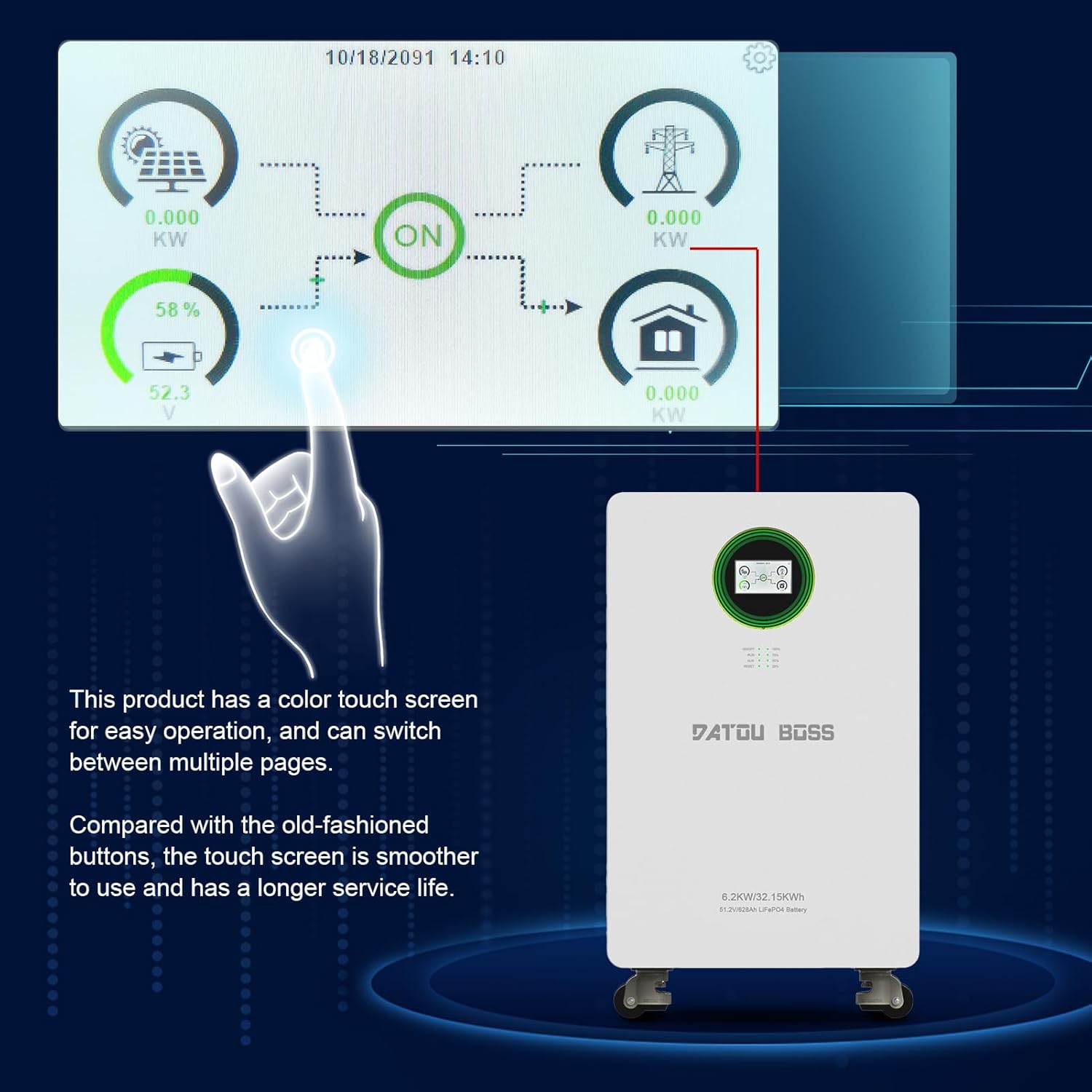
- การติดตาม: The display allows you to monitor real-time information such as PV input power, grid status, battery charge level, and power output to loads.
- การนำทาง: Swipe or tap on the screen to navigate between different pages and view detailed system information.
- การตั้งค่า: Access system settings for configuration, including 'Battery Setting', 'System Work Mode', 'Grid Setting', 'Charge Setting', 'Basic Setting', 'Advanced Function', and 'Device Info'. Refer to the detailed electronic manual for specific setting adjustments.
ไฟแสดงสถานะ 5.2 ดวง
- วิ่ง: Indicates normal system operation.
- ALM (สัญญาณเตือน): Illuminates when a warning or error condition is detected. Check the LCD display for specific codes.
- รีเซ็ต: Used to reset the system in case of certain errors or for troubleshooting.
- ไฟแสดงสถานะแบตเตอรี่: Provides a quick visual reference of the battery's state of charge.
6. การบำรุงรักษา
Regular maintenance ensures the longevity and optimal performance of your DATOUBOSS Home Energy Storage System.
- การทำความสะอาด: Periodically clean the exterior of the unit with a dry, soft cloth. Do not use liquid cleaners or solvents. Ensure ventilation openings are free from dust and debris.
- ตรวจสอบการเชื่อมต่อ: Annually, or as needed, inspect all electrical connections (PV, AC input, AC output) to ensure they are tight and free from corrosion.
- สภาพแวดล้อม : Monitor the ambient temperature and humidity to ensure they remain within the specified operating ranges. Extreme conditions can affect performance and lifespan.
- การอัปเดตซอฟต์แวร์: Check for any available firmware updates through the manufacturer's support channels to ensure optimal system performance and feature enhancements.
7 การแก้ไขปัญหา
The system's touch screen display will show warning or error codes if an issue arises. Refer to the detailed electronic manual for a comprehensive list of error codes and their solutions. Below are general troubleshooting steps for common issues.
7.1 ปัญหาทั่วไปและแนวทางแก้ไข
- ไม่มีกำลังขับ:
- Check if the AC OUT ON/OFF Switch is in the 'ON' position.
- Verify that the ON/OFF Inverter Switch and ON/OFF Battery Switch are 'ON'.
- Check the battery charge level on the display. If low, the system may not output power.
- Inspect circuit breakers for any trips.
- แบตเตอรี่ไม่ชาร์จ:
- Ensure PV ON/OFF Switches are 'ON' and solar panels are receiving sunlight.
- Verify AC IN ON/OFF Switch is 'ON' if charging from the grid.
- ตรวจสอบแรงดันไฟฟ้าขาเข้า PVtage and current on the display to ensure solar panels are producing power.
- Look for any alarm codes on the display that might indicate a charging fault.
- System Alarm (ALM light on):
- Check the touch screen display for the specific error or warning code.
- Consult the electronic manual for the meaning of the code and recommended actions.
- If the issue persists after following manual instructions, contact customer support.
If you are unable to resolve an issue, do not attempt further repairs. Contact DATOUBOSS professional technicians for assistance.
8. ข้อมูลจำเพาะ
The following table details the technical specifications of the DATOUBOSS FBM-JC-6232-EU-3 Home Energy Storage System.
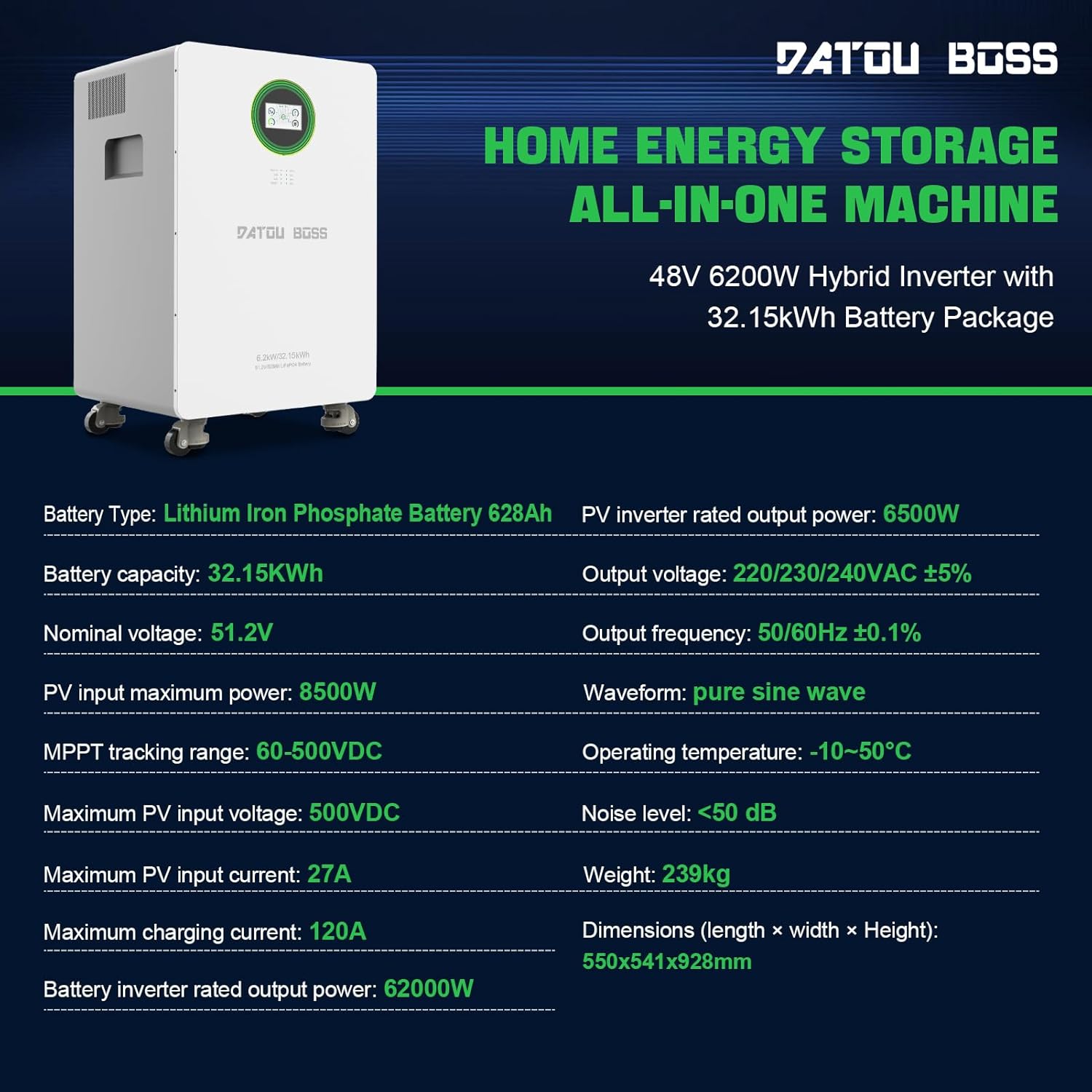
| คุณสมบัติ | ข้อมูลจำเพาะ |
|---|---|
| หมายเลขรุ่น | FBM-JC-6232-EU-3 |
| ประเภทแบตเตอรี่ | ลิเธียมเหล็กฟอสเฟต (LiFePO4) |
| ความจุของแบตเตอรี่ | 628Ah (32.15 kWh) |
| เล่มที่กำหนดtage | 51.2โวลต์ |
| Hybrid Inverter Power | 6200วัตต์ (48โวลต์) |
| PV Inverter Rated Output Power | 6500วัตต์ |
| กำลังอินพุต PV สูงสุด | 8500วัตต์ |
| ช่วงการติดตาม MPPT | 60-500VDC |
| อินพุต PV สูงสุด Voltage | 500VDC |
| กระแสไฟเข้า PV สูงสุด | 27เอ |
| กระแสไฟชาร์จสูงสุด | 120เอ |
| ปริมาณการส่งออกtage | 220/230/240VAC ±5% |
| ความถี่เอาต์พุต | 50/60 เฮิร์ต± 0.1% |
| รูปคลื่น | เพียวไซน์เวฟ |
| อุณหภูมิในการทำงาน | -10°C ถึง 50°C |
| ระดับเสียง | <50 เดซิเบล |
| ขนาดสินค้า (กว้าง x ยาว x สูง) | 21.65 x 21.3 x 36.54 นิ้ว (550 x 541 x 928 มม.) |
| น้ำหนักสินค้า | 526 ปอนด์ (239 กก.) |
| อินเทอร์เฟซการสื่อสาร | RS232, RS485 |
9. การรับประกันและการสนับสนุน
DATOUBOSS stands behind the quality of its products. This all-in-one home energy storage system comes with a รับประกัน 5 ปี.
9.1 การบริการลูกค้า
For any product-related questions, technical assistance, or warranty claims, please contact DATOUBOSS customer service. Our professional customer service team is available 24 hours a day to provide friendly and patient support.
- วิธีการติดต่อ: Please reach out via the Amazon messaging system or through the contact information provided with your purchase.
9.2 Multilingual User Manuals
An English printed user manual is included in the product packaging. If you require a manual in a different language or an electronic version, please contact us via Amazon messaging. We can provide electronic manuals for various countries upon request.