
1. บทนำ
Thank you for choosing the GOBOULT Tenet TWS Earbuds. This manual provides essential information to help you set up, operate, and maintain your earbuds for an optimal audio experience. Please read this manual thoroughly before use and retain it for future reference.
มีอะไรอยู่ในกล่อง
- GOBOULT Tenet TWS Earbuds (Left and Right)
- เคสชาร์จไฟ
- สายชาร์จแบบ USB Type-C
- แผ่นรองหูฟัง (หลายขนาด)
- คู่มือการใช้งาน
- บัตรรับประกัน
2. สินค้าหมดview
Familiarize yourself with the components of your GOBOULT Tenet TWS Earbuds and charging case.
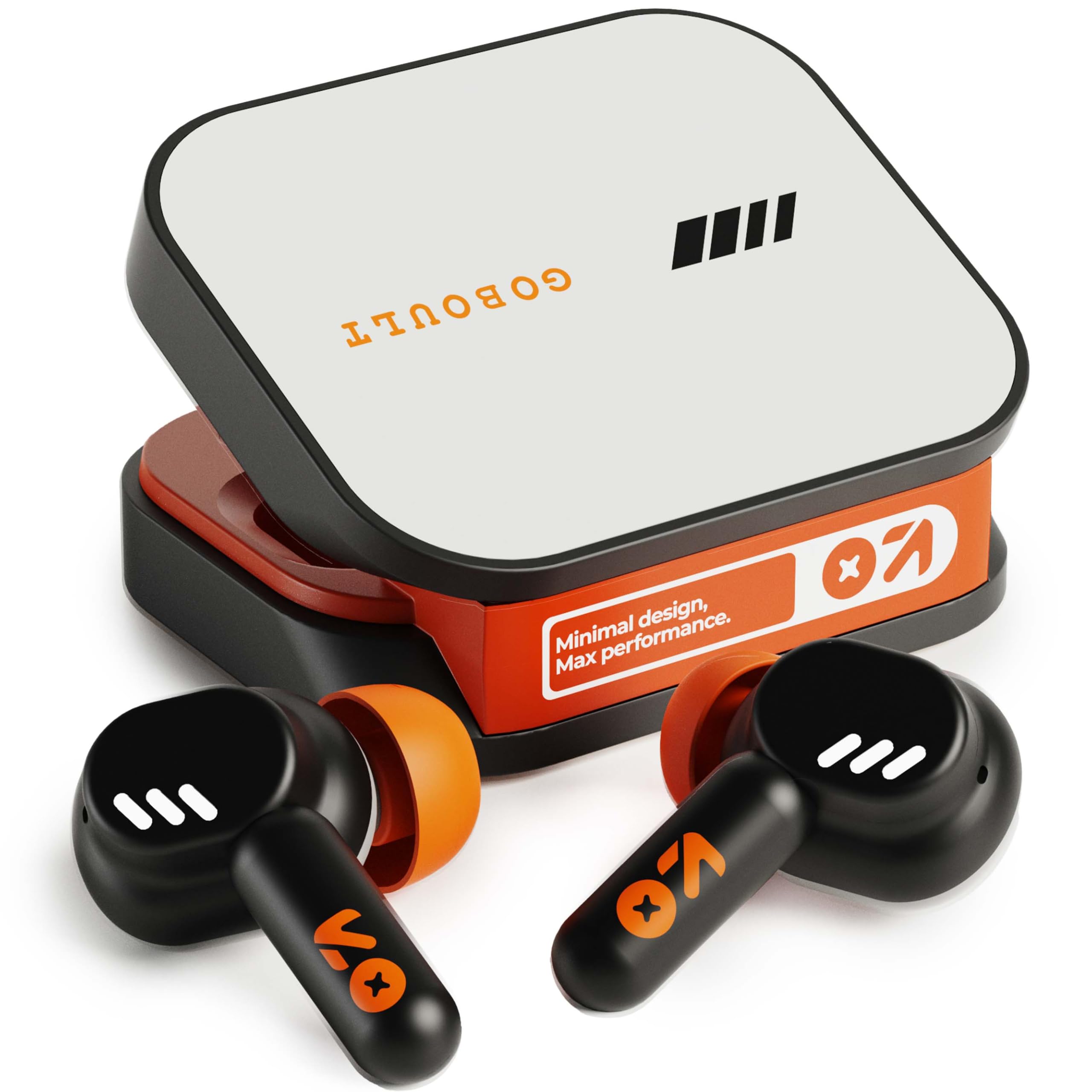
Image: GOBOULT Tenet TWS Earbuds in their charging case, showcasing the Turbo Orange color variant.

ภาพ: ต่างๆ views of the GOBOULT Tenet charging case, highlighting its minimal design and Type-C charging port.
คุณสมบัติหลัก
- เวลาเล่นรวมทั้งหมด 75 ชั่วโมง: อายุการใช้งานแบตเตอรี่ที่ยาวนานขึ้นสำหรับการใช้งานเป็นเวลานาน
- ชาร์จเร็ว: 10 minutes of charge provides up to 120 minutes of playtime.
- Amp การสนับสนุนแอพ: Customize EQ settings and controls via the dedicated application.
- ระบบตัดเสียงรบกวนแบบไมโครโฟนสี่ตัว (Quad Mic ENC): ระบบตัดเสียงรบกวนรอบข้างเพื่อการโทรที่คมชัด
- ไดรเวอร์ไดนามิกขนาด 13 มม.: Delivers deep bass and balanced audio.
- การเชื่อมต่ออุปกรณ์คู่: สลับระหว่างอุปกรณ์ที่จับคู่กันสองเครื่องได้อย่างราบรื่น
- Bluetooth 5.4: Stable connection with low latency.
- ทนน้ำระดับ IPX5: Splash and sweat-ready design.
3. การตั้งค่า
3.1 การชาร์จหูฟังและเคส
ก่อนใช้งานครั้งแรก ควรชาร์จหูฟังและกล่องชาร์จให้เต็ม
- ใส่หูฟังลงในกล่องชาร์จ ตรวจสอบให้แน่ใจว่าใส่หูฟังเข้าที่อย่างถูกต้อง
- Connect the USB Type-C charging cable to the charging port on the case and plug the other end into a power source.
- ไฟ LED บนเคสจะแสดงสถานะการชาร์จ เมื่อชาร์จเต็มแล้ว ไฟแสดงสถานะจะเปลี่ยนสีหรือดับลง ขึ้นอยู่กับรุ่นของเคส
ชาร์จเร็ว: การชาร์จ 10 นาที สามารถใช้งานได้ประมาณ 120 นาที

Image: The GOBOULT Tenet earbuds in their charging case, connected via a Type-C cable, illustrating the charging process and fast charging capability.
3.2 การจับคู่กับอุปกรณ์
For first-time use, follow these steps to pair your earbuds with your device.
- เปิดกล่องชาร์จ หูฟังจะเปิดอัตโนมัติและเข้าสู่โหมดจับคู่
- บนอุปกรณ์ของคุณ (สมาร์ทโฟน แท็บเล็ต แล็ปท็อป) ให้เปิดใช้งาน Bluetooth
- ค้นหา available Bluetooth devices and select "GOBOULT Tenet" from the list.
- เมื่อเชื่อมต่อแล้ว จะมีเสียงแจ้งเตือนยืนยันการจับคู่สำเร็จ
การเชื่อมต่ออุปกรณ์คู่: The earbuds support simultaneous connection to two devices. After pairing with the first device, disable Bluetooth on it. Pair with the second device. Then, re-enable Bluetooth on the first device. The earbuds should now be connected to both, allowing seamless switching.

Image: The GOBOULT Tenet earbuds and case positioned between a smartphone and a laptop, illustrating the dual device connectivity feature.
4. คู่มือการใช้งาน
4.1 เปิด/ปิดเครื่อง
- เปิดเครื่อง: เปิดเคสชาร์จ หรือกดบริเวณสัมผัสบนหูฟังทั้งสองข้างค้างไว้ 3 วินาที
- หมดแรง: วางหูฟังกลับเข้าไปในกล่องชาร์จและปิดฝา หรือกดบริเวณสัมผัสบนหูฟังทั้งสองข้างค้างไว้ 5 วินาที
4.2 ระบบควบคุมแบบสัมผัส
The GOBOULT Tenet earbuds feature intuitive touch controls for various functions.

Image: A close-up of an earbud in an ear, detailing the touch control functions for music, calls, and activation of AI assistance.
| การทำงาน | การกระทำ |
|---|---|
| เล่น/หยุดเพลง | แตะครั้งเดียวที่หูฟังเอียร์บัดข้างใดข้างหนึ่ง |
| เพลงถัดไป | แตะสองครั้งที่หูฟังด้านขวา |
| เพลงก่อนหน้า | แตะสองครั้งที่หูฟังด้านซ้าย |
| รับสาย/วางสาย | แตะครั้งเดียวที่หูฟังเอียร์บัดข้างใดข้างหนึ่ง |
| ปฏิเสธการรับสาย | กดหูฟังข้างใดข้างหนึ่งค้างไว้ 2 วินาที |
| เปิดใช้งานผู้ช่วยเสียง (Siri/Google Assistant) | แตะสามครั้งที่หูฟังข้างใดข้างหนึ่ง |
| Toggle Gaming Mode (Combat Mode) | Quadruple tap on either earbud |
4.3 GOBOULT Amp การสนับสนุนแอป
Enhance your listening experience by downloading the GOBOULT Amp App. The app allows for personalized audio settings and controls.
- โหมดปรับแต่ง EQ แบบกำหนดเอง: ปรับความถี่เสียงตามความต้องการของคุณ
- Rename Earbuds: Personalize the Bluetooth name of your earbuds.
- Tailored Widgets: Access quick controls and information.
- Water Ejection: Utilize this feature to clear water from the earbuds after exposure.

Image: A smartphone displaying the GOBOULT Amp App interface with equalizer settings, alongside the earbuds, demonstrating app customization.
4.4 การสวมหูฟัง
เพื่อคุณภาพเสียงและความสบายที่ดีที่สุด ควรตรวจสอบให้แน่ใจว่าสวมใส่พอดี
- Select the ear tips that best fit your ear canal. Experiment with different sizes for the best seal.
- Gently insert the earbud into your ear, then twist it slightly to secure a snug fit. The "Vacuum Lock Earshell" design is engineered for an air-tight seal.

Image: Diagrams and an illustration showing the proper way to wear the GOBOULT Tenet earbuds for a secure and comfortable fit, highlighting the Vacuum Lock Earshell technology.
4.5 Combat Gaming Mode (Low Latency)
Activate Combat Gaming Mode for a low-latency audio experience, ideal for gaming.
- การเปิดใช้งาน: แตะสี่เท่าบนเอียร์บัดข้างใดข้างหนึ่ง
- This mode reduces audio delay to approximately 45ms, providing synchronized sound with on-screen action.
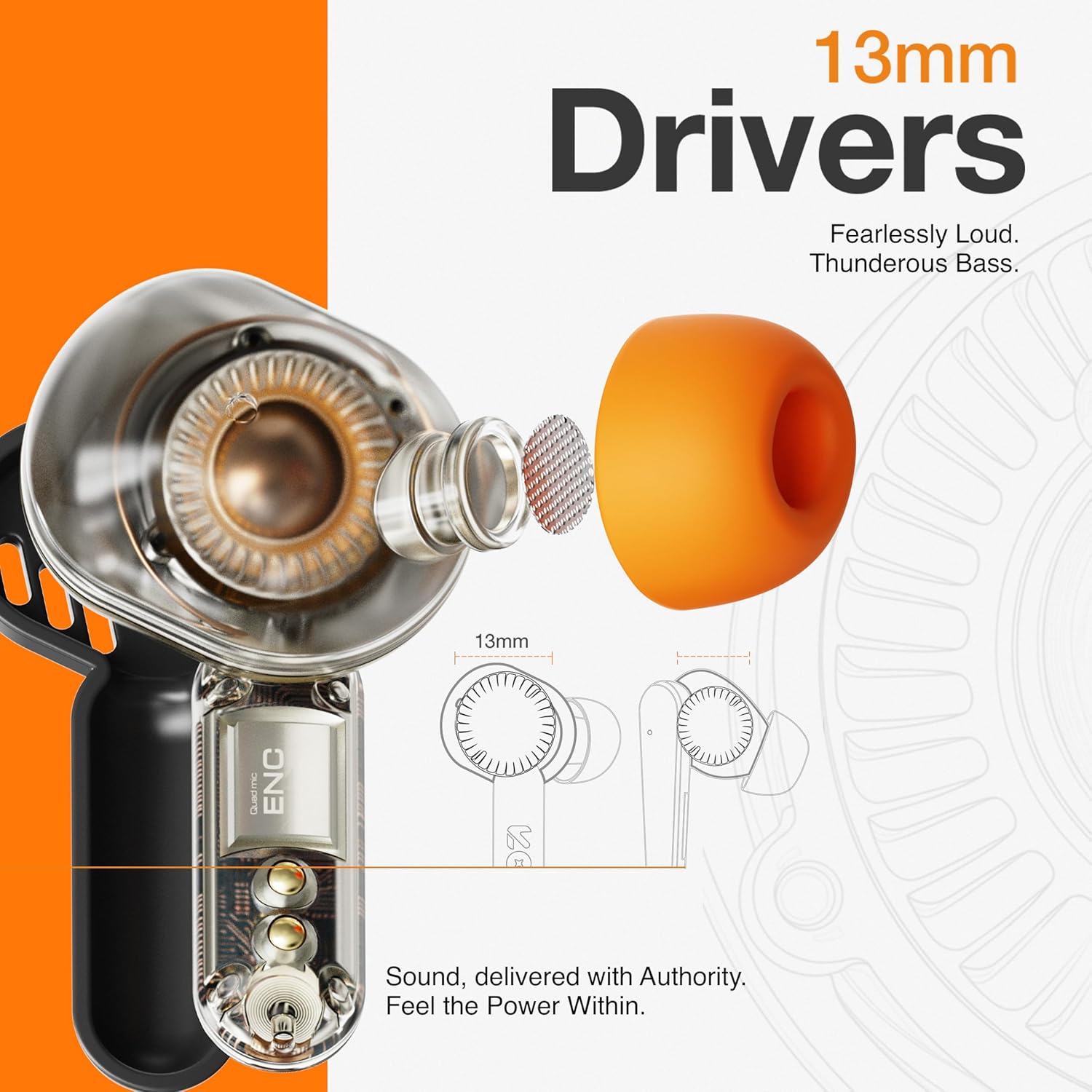
Image: The GOBOULT Tenet earbuds and charging case next to a smartphone and game controller, illustrating Bluetooth 5.4 connectivity and the 45ms ultra-low latency Combat Gaming Mode.
5. การบำรุงรักษา
5.1 การทำความสะอาด
การทำความสะอาดเป็นประจำช่วยรักษาคุณภาพเสียงและสุขอนามัย
- ใช้ผ้าแห้งนุ่มและไม่ขุยเช็ดหูฟังและกล่องชาร์จ
- ถอดปลายหูออกแล้วทำความสะอาดด้วยสบู่ชนิดอ่อนและน้ำ จากนั้นเช็ดให้แห้งสนิทก่อนใส่กลับเข้าไปอีกครั้ง
- Use a cotton swab or a small, soft brush to gently clean the speaker mesh and charging contacts.
- หลีกเลี่ยงการใช้สารกัดกร่อน แอลกอฮอล์ หรือสารเคมีทำความสะอาด
5.2 พื้นที่จัดเก็บ
เมื่อไม่ได้ใช้งาน ให้เก็บหูฟังไว้ในกล่องชาร์จเพื่อปกป้องหูฟังและชาร์จไฟให้หูฟังอยู่เสมอ
- เก็บไว้ในที่แห้งและเย็น หลีกเลี่ยงอุณหภูมิที่สูงและแสงแดดโดยตรง
5.3 ความต้านทานต่อน้ำ
The GOBOULT Tenet earbuds are IPX5 water resistant, meaning they are protected against low-pressure water jets from any direction. This makes them suitable for workouts and light rain.
- ห้ามจุ่มหูฟังลงในน้ำ
- กล่องชาร์จไม่กันน้ำ
- หากหูฟังเปียกน้ำ ให้เช็ดให้แห้งสนิทก่อนเก็บใส่กล่องชาร์จ
6 การแก้ไขปัญหา
หากคุณพบปัญหาเกี่ยวกับหูฟัง โปรดดูวิธีแก้ไขปัญหาทั่วไปต่อไปนี้
| ปัญหา | สารละลาย |
|---|---|
| หูฟังเอียร์บัดไม่จับคู่ | Ensure earbuds are charged. Turn off and on Bluetooth on your device. Forget "GOBOULT Tenet" from your device's Bluetooth list and re-pair. |
| เอียร์บัดตัวเดียวเท่านั้นที่ใช้งานได้ | Place both earbuds back in the case, close the lid, then open again. Ensure both earbuds are charged. Perform a factory reset if the issue persists. |
| ระดับเสียงต่ำหรือคุณภาพเสียงไม่ดี | Adjust volume on both earbuds and your connected device. Ensure ear tips provide a snug fit. Clean earbud speaker meshes. Check EQ settings in the Amp แอป. |
| หูฟังเอียร์บัดไม่ชาร์จ | Ensure charging cable is securely connected. Check if the charging port is clean. Verify the power source is working. Ensure earbuds are correctly seated in the case. |
| การเชื่อมต่อหลุดบ่อย | Ensure your device is within the 10-meter Bluetooth range. Avoid obstacles between earbuds and device. Disconnect from other Bluetooth devices. |
6.1 รีเซ็ตเป็นค่าโรงงาน
If issues persist, a factory reset may resolve them. Refer to the specific reset procedure in the Amp App or contact customer support.
7. ข้อมูลจำเพาะ
Technical specifications for the GOBOULT Tenet TWS Earbuds.
| คุณสมบัติ | รายละเอียด |
|---|---|
| ยี่ห้อ | โกบูลท์ |
| ชื่อรุ่น | Tenet (Airbass Earbuds) |
| การวางตำแหน่งหู | ในหู |
| การควบคุมเสียงรบกวน | Environmental Noise Cancellation (ENC), Sound Isolation |
| เวอร์ชันบลูทูธ | 5.4 |
| ช่วงบลูทูธ | 10 เมตร |
| ขนาดไดร์เวอร์เสียง | 13 มิล |
| การตอบสนองความถี่ | 20 เฮิรตซ์ - 20,000 เฮิรตซ์ |
| อายุการใช้งานแบตเตอรี่โดยเฉลี่ย | 75 ชั่วโมง (เวลาเล่นทั้งหมด) |
| เวลาในการชาร์จแบตเตอรี่ | 10 Minutes (for 120 mins playtime) |
| วิธีการควบคุม | สัมผัส |
| ระดับความต้านทานต่อน้ำ | IPX5 (ทนน้ำ) |
| อุปกรณ์ที่รองรับ | Desktops, Gaming Consoles, Laptops, Smart Watch, Tablets |
| น้ำหนักสินค้า | 54.5 Grams (Carrying Case Weight) |
| วัสดุของตู้หุ้ม | พลาสติก |
8. การรับประกันและการสนับสนุน
8.1 ข้อมูลการรับประกัน
The GOBOULT Tenet TWS Earbuds come with a การรับประกันจากผู้ผลิต 1 ปี นับจากวันที่ซื้อ การรับประกันนี้ครอบคลุมถึงข้อบกพร่องจากการผลิต โปรดเก็บหลักฐานการซื้อไว้เพื่อใช้ในการเรียกร้องการรับประกัน
การรับประกันไม่ครอบคลุมความเสียหายที่เกิดจากการใช้งานผิดวิธี อุบัติเหตุ การดัดแปลงที่ไม่ได้รับอนุญาต หรือการสึกหรอตามปกติ
8.2 การสนับสนุนลูกค้า
For any product-related queries, technical assistance, or warranty claims, please contact GOBOULT customer support through the official webเว็บไซต์หรือข้อมูลการติดต่อที่ให้ไว้ในบัตรรับประกันของคุณ