
1. บทนำ
Thank you for choosing the AULA G7 Pro Wireless Gaming Headset. This manual provides detailed instructions for setting up, operating, and maintaining your headset to ensure optimal performance and an immersive audio experience. Please read this manual thoroughly before using the product.
2. สินค้าหมดview
2.1 เนื้อหาบรรจุภัณฑ์
The AULA G7 Pro package includes the following items:
- AULA G7 Pro Wireless Gaming Headset
- ไมโครโฟนบูมแบบถอดออกได้
- สายชาร์จ USB-C เป็น USB-A
- สายสัญญาณเสียงขนาด 3.5 มม.
- 2.4G Wireless USB-A Receiver
- อะแดปเตอร์ USB-C ถึง USB-A
- คู่มือการใช้งาน
2.2 ส่วนประกอบและปุ่มควบคุมของชุดหูฟัง
Familiarize yourself with the various parts and controls of your AULA G7 Pro headset.
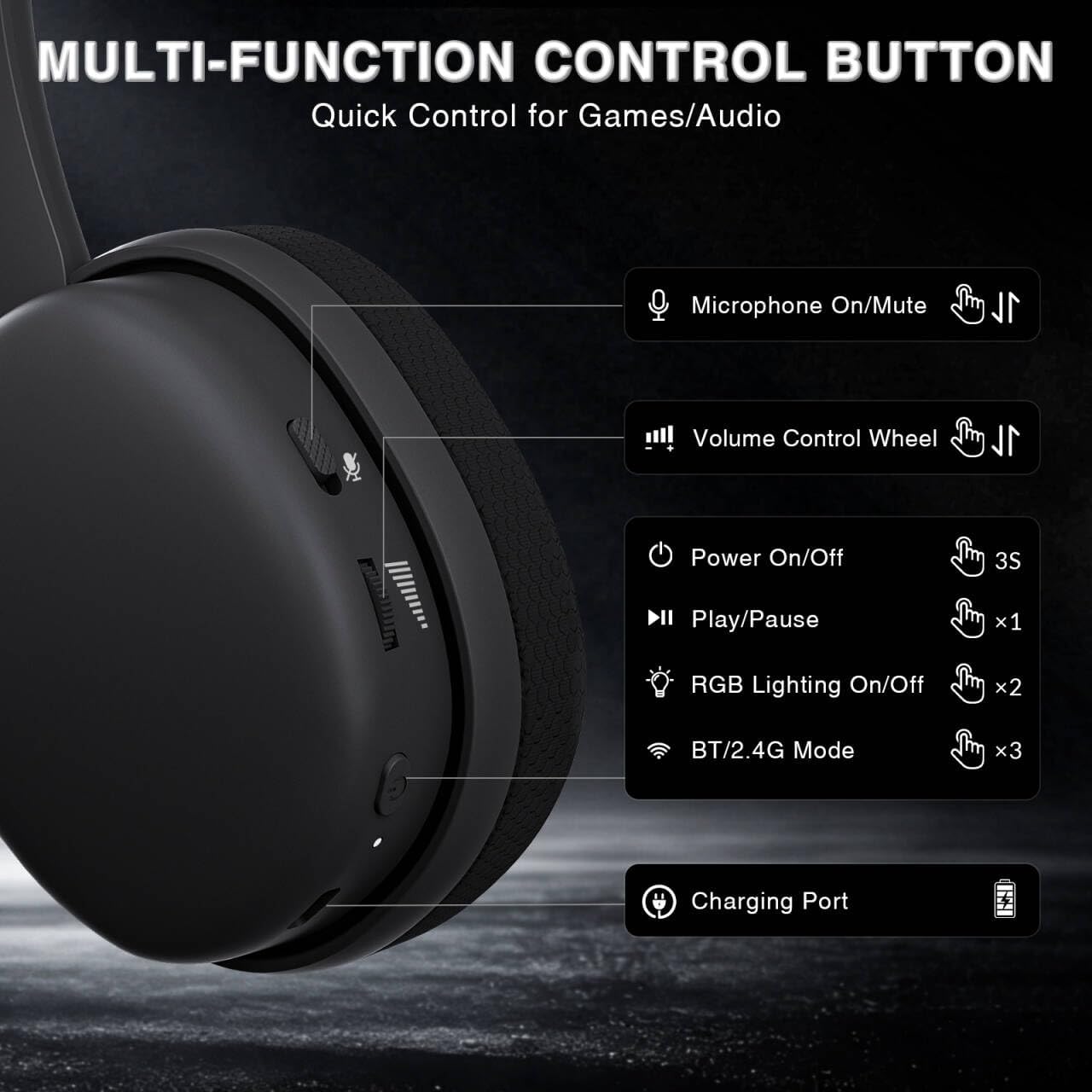
Image: Multi-function control buttons on the AULA G7 Pro headset, showing the microphone on/off toggle, volume control wheel, power switch, play/pause button, RGB lighting on/off button, BT/2.4G mode switch, and charging port.
- Microphone On/Off Toggle: เลื่อนเพื่อปิดเสียงหรือเปิดเสียงไมโครโฟน
- วงล้อควบคุมระดับเสียง: ปรับระดับเสียงเอาต์พุต
- สวิตช์ไฟ: กดค้างไว้ 3 วินาทีเพื่อเปิด/ปิด
- ปุ่มเล่น/หยุดชั่วคราว: กดหนึ่งครั้งเพื่อเล่นหรือหยุดเสียงชั่วคราว
- เปิด/ปิดไฟ RGB: Press twice to toggle RGB lighting.
- BT/2.4G Mode Switch: Press three times to switch between Bluetooth and 2.4G wireless modes.
- พอร์ตชาร์จ: USB-C port for charging the headset.
- แจ็คเสียงขนาด 3.5 มม.: สำหรับการเชื่อมต่อแบบมีสาย
- พอร์ตไมโครโฟน: สำหรับติดตั้งไมโครโฟนแบบบูมที่ถอดได้
วิดีโอ: จบแล้วview of the AULA G7 Pro Wireless Gaming Headset, showcasing its design, features, and different color options (black and pink).
3. การตั้งค่าและการเชื่อมต่อ
3.1 2.4G Wireless Connection (PC, PS5, PS4, Switch)
For low-latency gaming, use the 2.4G wireless connection.
- Insert the 2.4G USB-A receiver into an available USB port on your PC, PS5, PS4, or Nintendo Switch dock. If your device only has USB-C ports, use the provided USB-C to USB-A adapter.
- Power on the AULA G7 Pro headset by pressing and holding the power button for 3 seconds.
- The headset will automatically attempt to connect to the receiver. The indicator light on the headset will show a stable color once connected.
- On your device, ensure the audio output is set to the AULA G7 Pro headset.

Image: The AULA G7 Pro headset demonstrating its tri-mode connectivity options: 3.5mm wired, Bluetooth 5.3, and 2.4G wireless with USB-C and USB-A receivers, compatible with various devices including PC, PS5, PS4, Switch, and smartphones.
3.2 Bluetooth 5.3 Connection (PC, Smartphones, Tablets)
Connect your headset via Bluetooth for general use with compatible devices.
- Power on the AULA G7 Pro headset.
- Press the BT/2.4G mode switch three times to enter Bluetooth pairing mode. The indicator light will flash.
- On your device (PC, smartphone, tablet), go to Bluetooth settings and search for available devices.
- Select "AULA G7 Pro" from the list to pair. The indicator light on the headset will become stable once connected.
3.3 3.5mm Wired Connection (Xbox, PC, PS5, PS4, Switch, Smartphones)
Use the 3.5mm audio cable for a universal wired connection, especially for Xbox consoles.
- ต่อปลายด้านหนึ่งของสายสัญญาณเสียง 3.5 มม. เข้ากับแจ็คสัญญาณเสียง 3.5 มม. บนชุดหูฟัง
- Connect the other end of the 3.5mm audio cable to the audio output port of your device (e.g., Xbox controller, PC audio jack).
- The headset will operate in wired mode. Note that some advanced features like virtual 7.1 surround sound may not be available in wired mode, depending on the device.
4. คู่มือการใช้งาน
4.1 การใช้งานไมโครโฟน
The AULA G7 Pro features a detachable noise-canceling microphone.
- การติดตั้งไมโครโฟน: Align the 3.5mm plug of the boom microphone with the microphone port on the headset and insert it firmly.
- การปิด/เปิดเสียง: Use the microphone on/off toggle switch on the headset to quickly mute or unmute your microphone.
- ตัดเสียงรบกวน: The 360° omnidirectional microphone filters out approximately 80% of background noise. For enhanced noise cancellation and voice clarity, install the driver software (Windows 2.4G mode only).
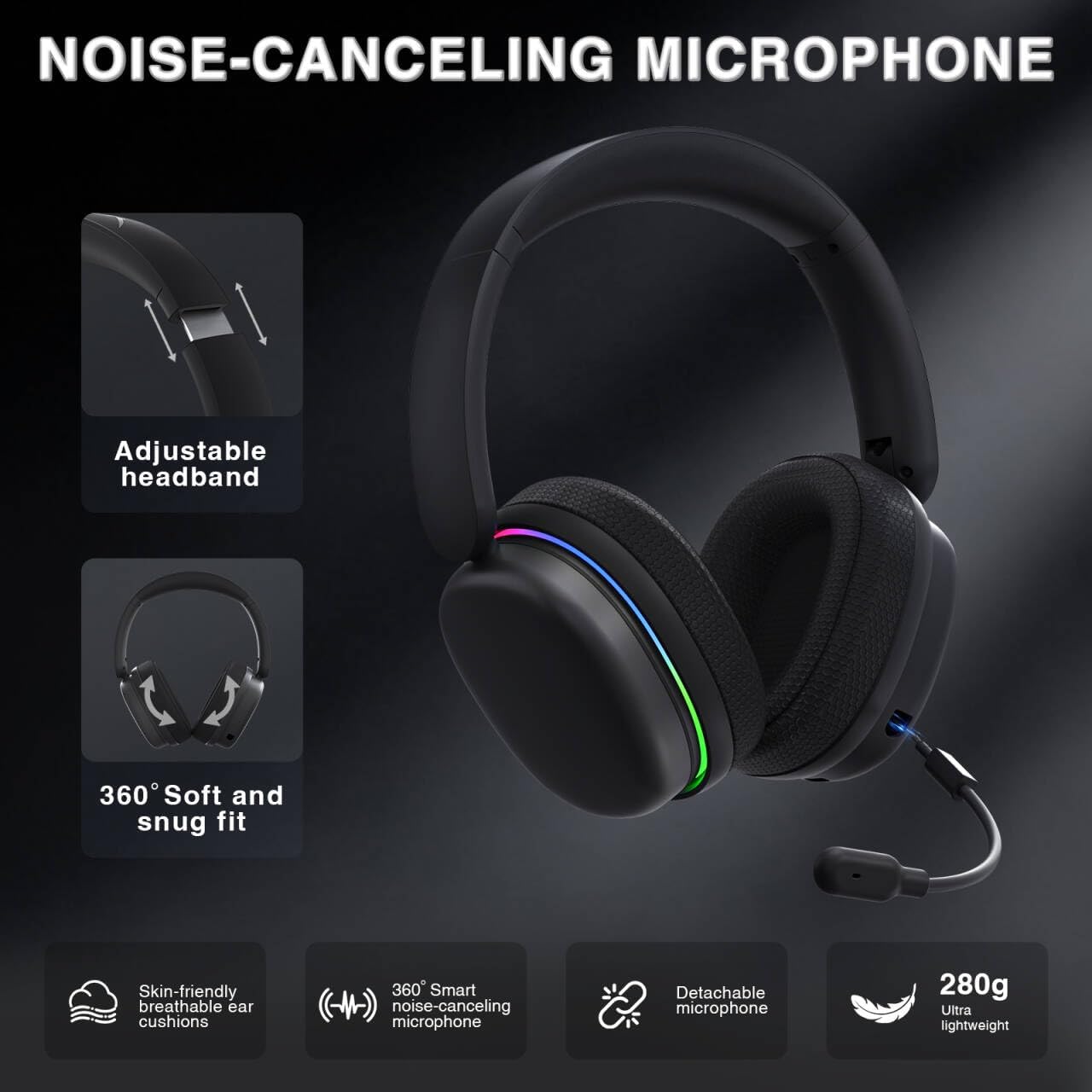
Image: The AULA G7 Pro headset highlighting its adjustable headband, soft and snug fit, skin-friendly breathable ear cushions, 360° smart noise-canceling microphone, detachable microphone, and ultra-lightweight 280g design.
4.2 Virtual 7.1 Surround Sound and EQ Software
Experience immersive audio with virtual 7.1 surround sound and customize your sound profile.
- ระบบเสียงรอบทิศทางเสมือนจริง 7.1: Available in Windows 2.4G mode, this feature provides precise audio positioning for gaming.
- EQ Software: ดาวน์โหลดและติดตั้งไดรเวอร์จาก soaidriver.com (Windows 2.4G mode only). The software allows for customizable EQ settings, dynamic bass boost, vocal enhancement, and voice morphing.
- หมายเหตุการติดตั้ง: First, insert the 2.4G receiver into your computer, then install the driver. After entering the driver interface, right-click the icon on the left side of the screen to access the audio settings menu.
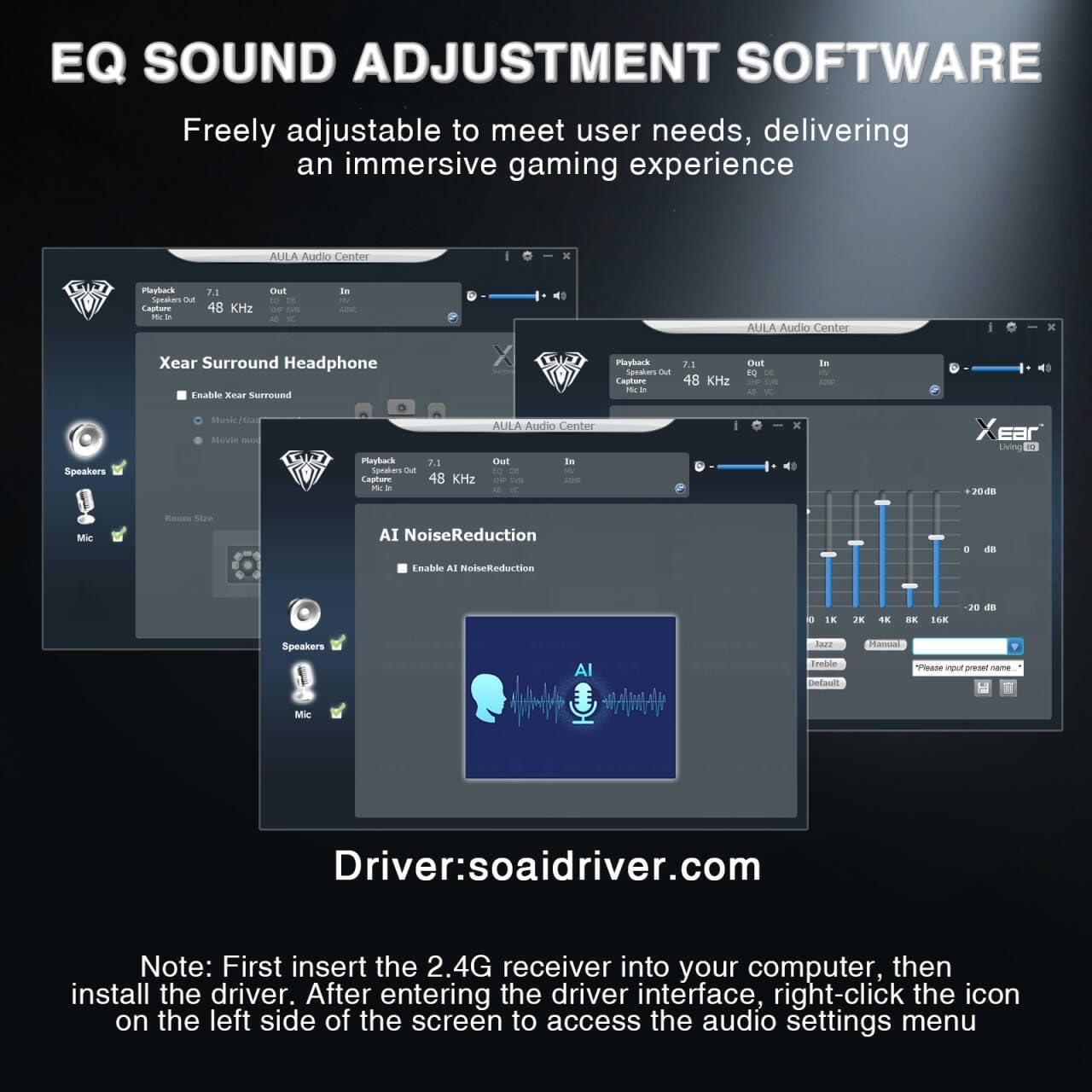
Image: Screenshots of the AULA Audio Center software interface, showing options for Xear Surround Headphone, AI Noise Reduction, and Equalizer settings for sound customization.
4.3 แสง RGB
The headset features 16 million-color RGB lighting.
- สลับค่า RGB: Press the RGB Lighting On/Off button twice to activate or deactivate the lighting.
- การซิงโครไนซ์: RGB lighting can synchronize with gaming peripherals for an immersive atmosphere.
5. การชาร์จและอายุการใช้งานแบตเตอรี่
The AULA G7 Pro is equipped with a 1000mAh rechargeable battery.
- การชาร์จ: Connect the USB-C charging cable to the headset's charging port and the other end to a USB power source (e.g., computer, wall adapter). The indicator light will show charging status.
- อายุการใช้งานแบตเตอรี่: Up to 65 hours of playback with RGB lighting off, and approximately 20 hours with RGB lighting activated.
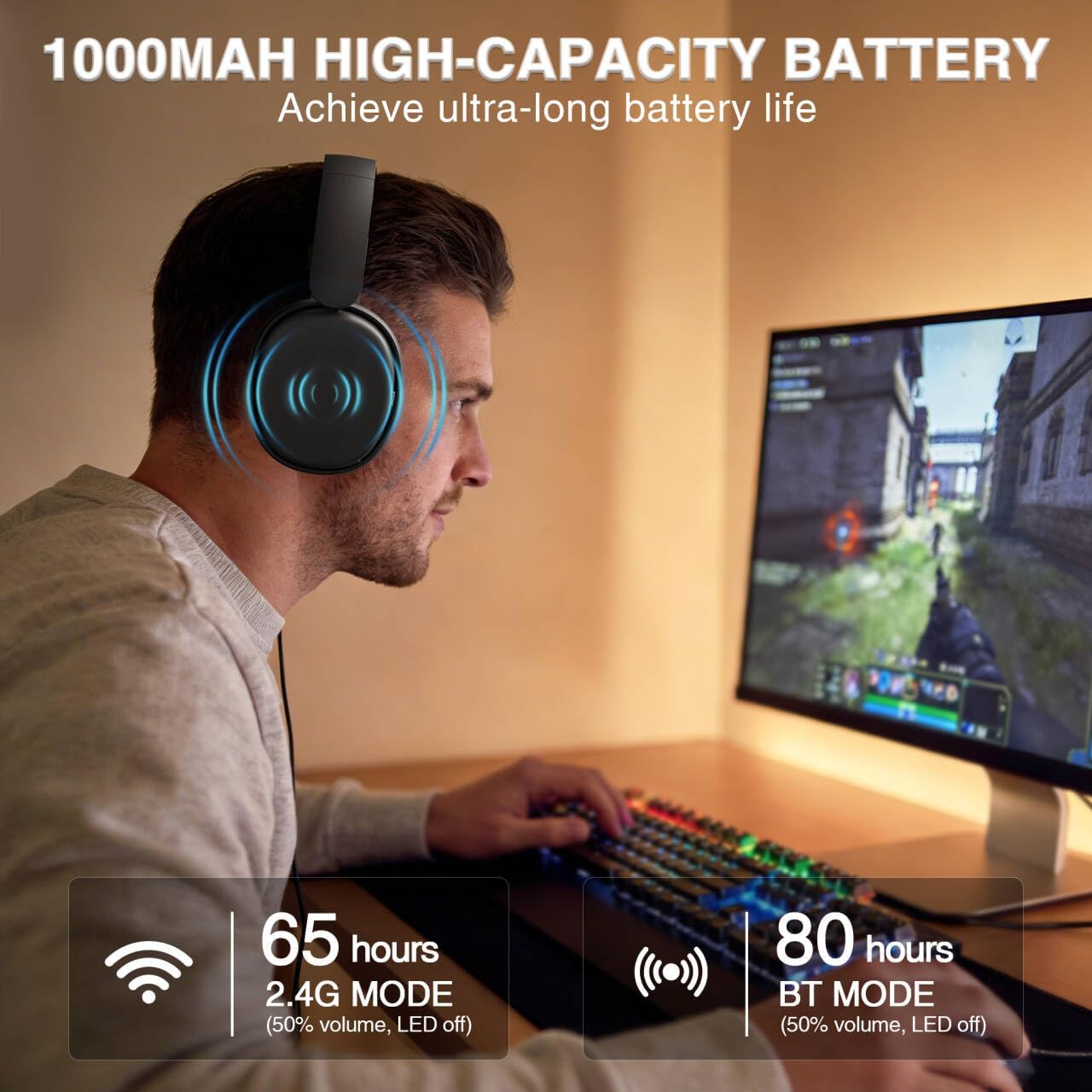
Image: A user wearing the AULA G7 Pro headset while gaming, illustrating the 65 hours of battery life in 2.4G mode (50% volume, LED off) and 80 hours in BT mode (50% volume, LED off).
6. ความสะดวกสบายและการออกแบบ
The headset is designed for extended wear comfort.
- น้ำหนักเบา: Weighing 280g, the headset is designed to minimize pressure during long gaming sessions.
- พอดีตามหลักสรีรศาสตร์: Features an ergonomic headband with protein leather padding and breathable mesh ear cushions.
- ปรับได้: An 8-position adjustable steel frame and 360° acoustic chamber conform to facial contours, with micro-adjustable horizontal angles for a personalized fit.
7. ข้อมูลจำเพาะ
| คุณสมบัติ | รายละเอียด |
|---|---|
| ยี่ห้อ | อูล่า |
| ชื่อรุ่น | G7Pro |
| เทคโนโลยีการเชื่อมต่อ | 2.4G Wireless, BT5.3, Wired (3.5mm Jack) |
| เวอร์ชันบลูทูธ | 5.3 |
| ขนาดไดร์เวอร์เสียง | 40 มิลลิเมตร |
| อิมพีแดนซ์ | 32 โอห์ม |
| การควบคุมเสียงรบกวน | ระบบตัดเสียงรบกวนแบบแอคทีฟ (ไมโครโฟน) |
| ความจุของแบตเตอรี่ | 1000mAh |
| อายุการใช้งานแบตเตอรี่ (ปิด RGB) | Up to 65 Hours (2.4G Mode), Up to 80 Hours (BT Mode) |
| น้ำหนัก | 280กรัม |
| อุปกรณ์ที่รองรับ | PC, PS5, PS4, Switch, Smartphones, Xbox (wired mode only) |
8 การแก้ไขปัญหา
If you encounter issues with your AULA G7 Pro headset, refer to the following common solutions:
- ไม่มีเสียง:
- ตรวจสอบให้แน่ใจว่าชุดหูฟังเปิดอยู่และชาร์จไฟอยู่
- Check that the correct audio output device is selected in your system settings.
- Verify the volume control wheel on the headset is not at minimum.
- For 2.4G/BT modes, ensure the headset is properly paired/connected. Try re-pairing if necessary.
- For wired mode, ensure the 3.5mm cable is fully inserted into both the headset and the device.
- ไมโครโฟนไม่ทำงาน:
- ตรวจสอบให้แน่ใจว่าไมโครโฟนแบบถอดได้ติดตั้งแน่นสนิทแล้ว
- Check the microphone on/off toggle switch on the headset is in the 'on' position.
- Verify the correct microphone input device is selected in your system settings.
- โปรดตรวจสอบให้แน่ใจว่าไม่ได้ปิดเสียงไมโครโฟนในระบบปฏิบัติการหรือซอฟต์แวร์การสื่อสารของคุณ
- ปัญหาการเชื่อมต่อ (2.4G/บลูทูธ):
- Ensure the headset is within range of the receiver/device.
- หลีกเลี่ยงการรบกวนทางแม่เหล็กไฟฟ้าที่รุนแรงจากอุปกรณ์ไร้สายอื่นๆ
- ลองรีสตาร์ททั้งชุดหูฟังและอุปกรณ์ที่เชื่อมต่อ
- For 2.4G, try plugging the receiver into a different USB port.
- 7.1 Surround Sound Not Working:
- Ensure you are in 2.4G wireless mode on a Windows PC.
- Verify that the AULA driver software is installed and configured correctly.
9. การบำรุงรักษา
เพื่อให้มั่นใจถึงอายุการใช้งานที่ยาวนานและประสิทธิภาพสูงสุดของชุดหูฟัง โปรดปฏิบัติตามคำแนะนำในการบำรุงรักษาดังต่อไปนี้:
- การทำความสะอาด: ใช้ผ้านุ่มและแห้งเช็ดทำความสะอาดชุดหูฟัง ห้ามใช้น้ำยาทำความสะอาดหรือสารละลายที่มีฤทธิ์กัดกร่อน
- พื้นที่จัดเก็บ: เก็บหูฟังไว้ในที่แห้งและเย็น หลีกเลี่ยงแสงแดดโดยตรงและอุณหภูมิที่สูงหรือต่ำเกินไป
- การดูแลสายเคเบิล: หลีกเลี่ยงการดัดงอหรือดึงสายเคเบิลอย่างรุนแรงเพื่อป้องกันความเสียหาย
- การดูแลแบตเตอรี่ เพื่ออายุการใช้งานแบตเตอรี่ที่ดีที่สุด ควรหลีกเลี่ยงการใช้แบตเตอรี่จนหมดบ่อยๆ ชาร์จหูฟังเป็นประจำ แม้จะไม่ได้ใช้งานเป็นเวลานานก็ตาม
10. การรับประกันและการสนับสนุน
10.1 ข้อมูลการรับประกัน
The AULA G7 Pro Wireless Gaming Headset comes with a รับประกัน 1 ปี นับจากวันที่ซื้อสินค้า การรับประกันนี้ครอบคลุมถึงข้อบกพร่องจากการผลิตและฝีมือการผลิตภายใต้การใช้งานปกติ ไม่ครอบคลุมถึงความเสียหายที่เกิดจากการใช้งานผิดวิธี อุบัติเหตุ การดัดแปลงโดยไม่ได้รับอนุญาต หรือการสึกหรอตามปกติ
10.2 การสนับสนุนลูกค้า
For technical assistance, warranty claims, or any questions regarding your AULA G7 Pro headset, please contact AULA customer support through the retailer where you purchased the product or visit the official AULA webเว็บไซต์สำหรับข้อมูลการติดต่อ
Please have your purchase receipt and product model number (G7 Pro) ready when contacting support.


