
NAVIMOW i205 AWD
Segway Navimow i205 AWD Robot Lawnmower Instruction Manual
Model: i205 AWD
1. บทนำ
The Segway Navimow i205 AWD is an advanced robotic lawnmower designed for efficient and autonomous lawn care. Featuring all-wheel drive, wireless perimeter technology, and intelligent navigation, it is suitable for complex gardens up to 500 m².
2. อะไรอยู่ในกล่อง
Carefully unpack all components and ensure everything is present before proceeding with installation.
- Navimow i205 AWD Robot Lawnmower x 1
- Charging Station and Installation Kit x 1
- อะแดปเตอร์แปลงไฟ x 1
- GNSS Antenna with 6m Cable x 1
- Antenna Installation Kit x 1
- Blades and 5 Spare Bolts x 5
- Stakes for Extension Cable x 4
- User Documents: Quick Start Guide x 1 & Important Information Note x 1

Image: All components included in the Navimow i205 AWD package.
3. การตั้งค่า
3.1 Charging Station and GNSS Antenna Placement
The Navimow i205 AWD utilizes a wireless perimeter system, eliminating the need for boundary wires. Proper placement of the charging station and GNSS antenna is crucial for accurate navigation.
- สถานีชาร์จ: Place the charging station on a flat, level surface with clear access for the robot. Ensure it is near a power outlet.
- เสาอากาศ GNSS: Install the GNSS antenna in an open area with an unobstructed view of the sky. Avoid placing it under trees or near tall buildings that could block satellite signals. The antenna cable is 6 meters long, allowing for flexible placement.
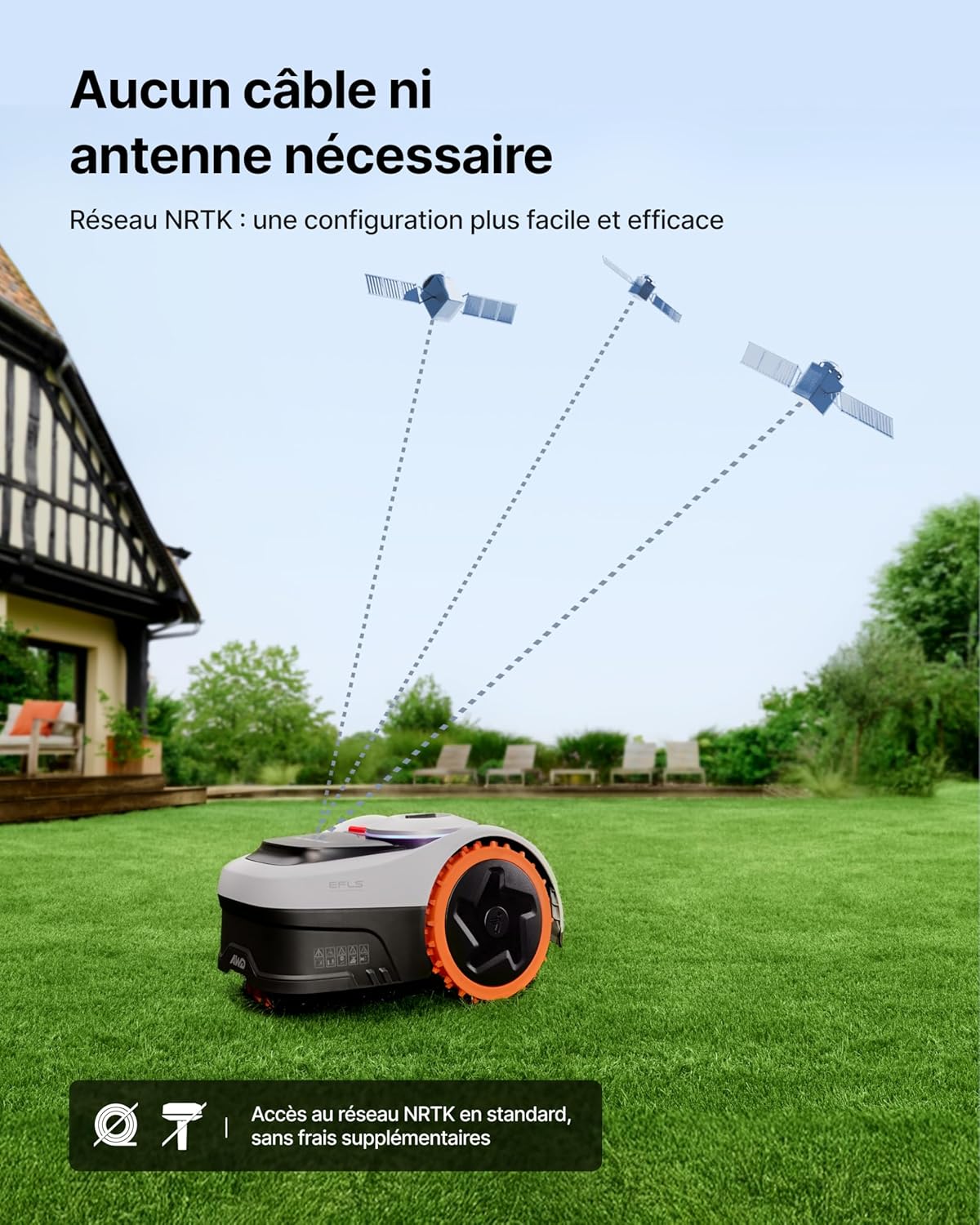
Image: The Navimow i205 AWD operating wirelessly, receiving signals from satellites.
3.2 การกำหนดแผนที่เบื้องต้น
The Navimow i205 AWD features automatic mapping via its companion application. This process defines the mowing area without physical wires.
- Download and install the Navimow app on your smartphone.
- Follow the in-app instructions to connect to your Navimow i205 AWD.
- Initiate the automatic mapping process. You will guide the robot along the perimeter of your lawn using the app.
- The system uses EFLS NRTK and Vision technology for precise centimeter-level localization and mapping.
- Define any "no-go" zones within the app to exclude flowerbeds, obstacles, or sensitive areas.

Image: Automatic mapping of the lawn using the Navimow app.
4. คู่มือการใช้งาน
4.1 การตัดหญ้า
The Navimow i205 AWD is designed for efficient and quiet operation.
- Starting a Mowing Session: Use the Navimow app to schedule mowing times or start a session manually.
- การปรับความสูงของการตัด: The cutting height can be adjusted from 2 to 6 cm. Refer to the app for precise control.
- การจัดการหลายโซน: The robot can manage up to 20 distinct mowing zones, optimizing its path for efficient coverage.
- ชาร์จอัตโนมัติ: When the battery is low, the robot will automatically return to its charging station. It will resume mowing from where it left off after recharging.
- การทำงานที่เงียบ: The i205 AWD operates at a low noise level of only 59 dB(A), minimizing disturbance.
คุณสมบัติขั้นสูง 4.2 ประการ
- All-Wheel Drive (AWD): The three-wheel drive system allows the i205 AWD to navigate challenging terrains, including slopes up to 45% (24°), uneven ground, and areas with roots.
- Xero-Turn Technology: The concentric design of the third wheel enables zero-turn radius pivots, preventing damage to the lawn during turns.
- Adaptive Transmission: The third wheel engages only when necessary, optimizing energy consumption and extending battery life by up to 30%.
- VisionFence (AI-powered Obstacle Avoidance): The robot detects and avoids over 150 types of obstacles, including pets, tools, and small objects, adjusting its path in less than 0.1 seconds and maintaining a safety distance of over 1 meter.
- EFLS NRTK + Vision Positioning: This dual precision system ensures accurate localization and mowing, even in areas with limited satellite visibility like under large trees or in narrow passages.
- การปรับตัวต่อสภาพอากาศ: The mower can identify five extreme weather conditions (wind, frost, rain, snow, high temperatures) and return to its charging station to ensure safe operation.
- การรวมระบบบ้านอัจฉริยะ: Compatible with Alexa and Google Home for voice control.
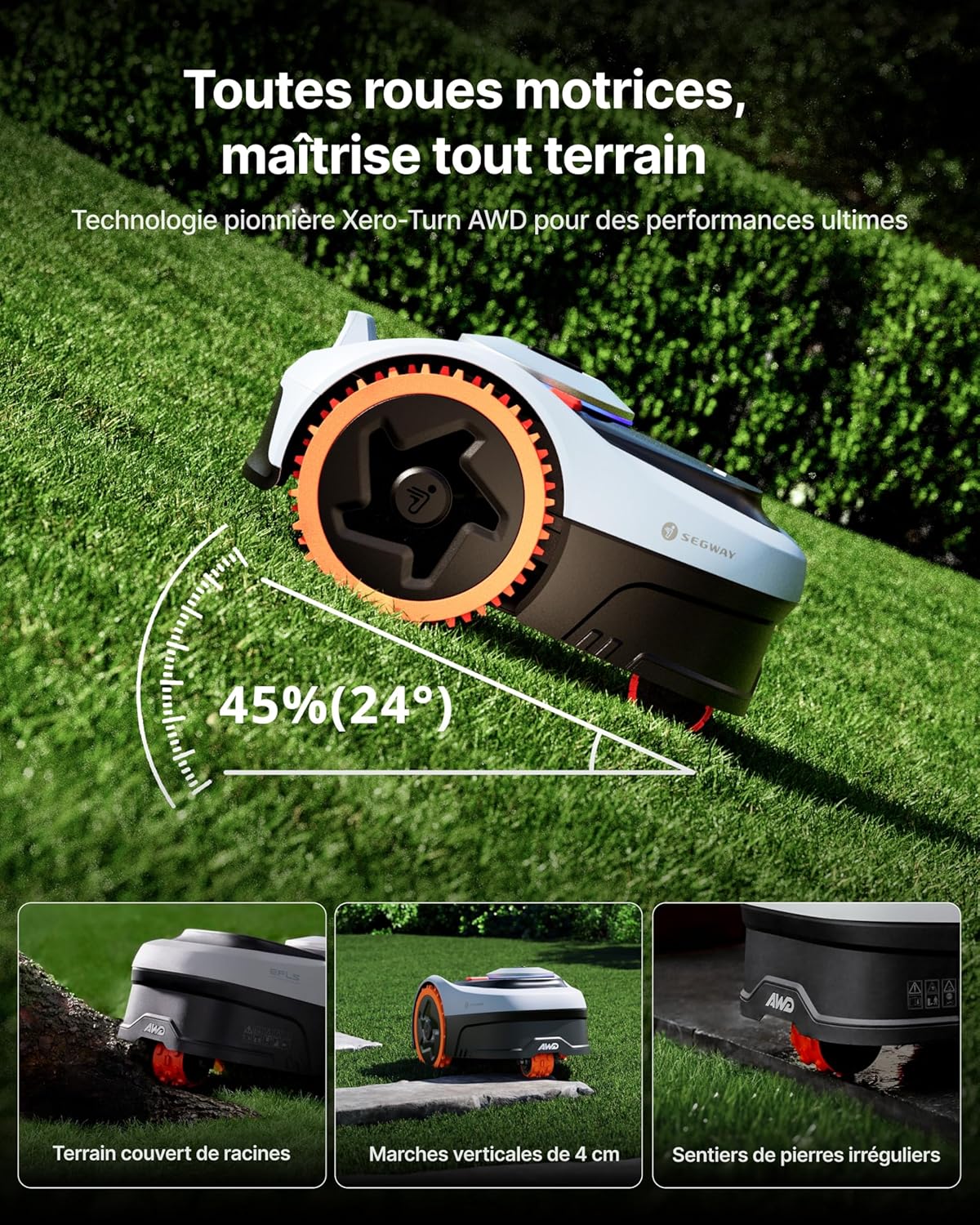
Image: The Navimow i205 AWD demonstrating its all-terrain capabilities on a 45% slope.

Image: The robot mower pivoting smoothly without damaging the lawn.

Image: The VisionFence system detecting and avoiding obstacles like pets.
5. การบำรุงรักษา
Regular maintenance ensures optimal performance and longevity of your Navimow i205 AWD.
- การทำความสะอาด: Regularly clean the robot's chassis, wheels, and cutting deck to remove grass clippings and debris. The unit is IP66 certified for water and dust resistance, allowing for easy cleaning with water.
- การเปลี่ยนใบมีด: Inspect the blades regularly for wear and damage. Replace dull or damaged blades with new ones using the provided spare bolts. Always wear protective gloves when handling blades.
- การอัปเดตซอฟต์แวร์: Keep the Navimow app and robot firmware updated to benefit from the latest features and improvements.
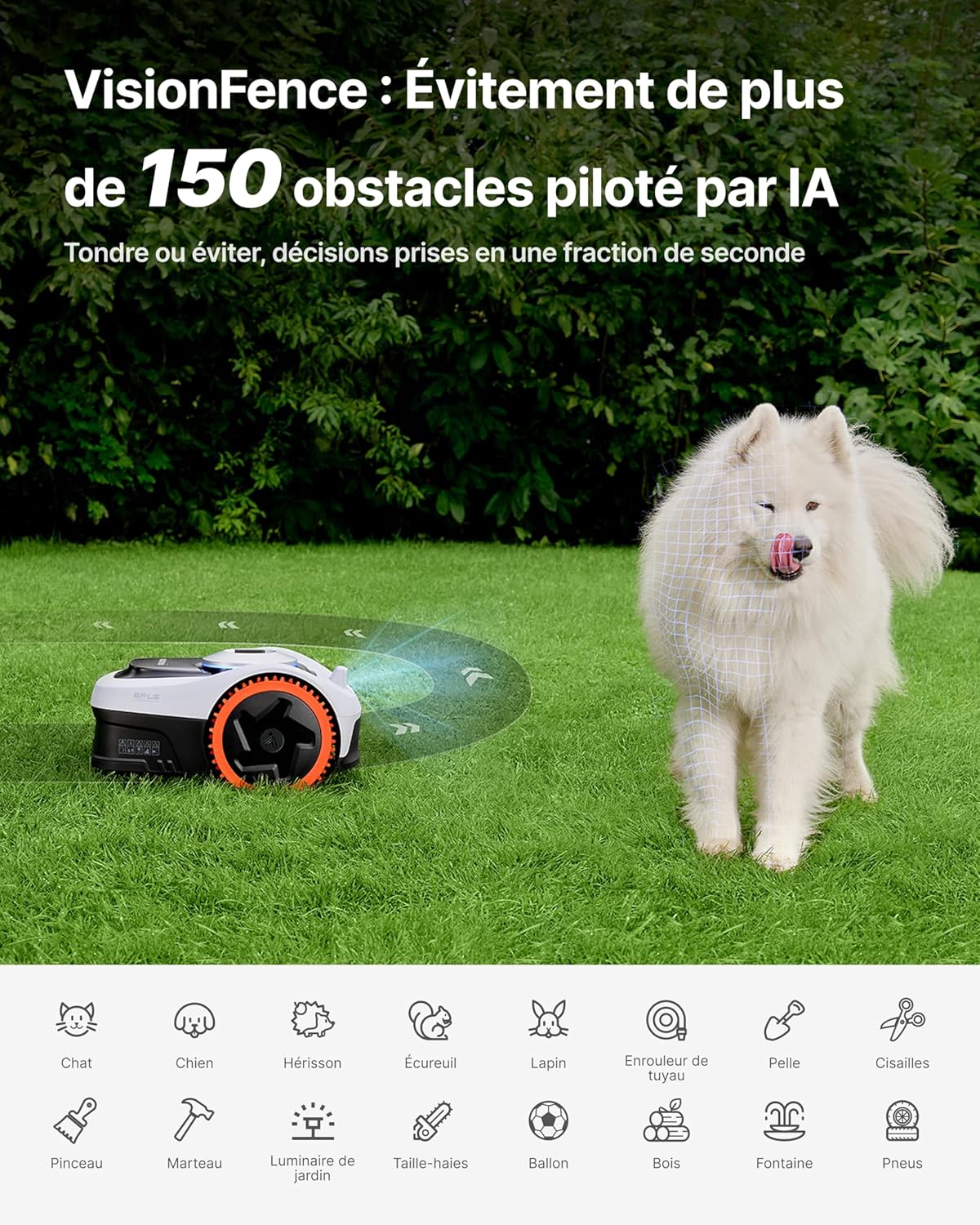
Image: The 5-blade cutting disc of the Navimow i205 AWD.
6 การแก้ไขปัญหา
หัวข้อนี้จะกล่าวถึงปัญหาทั่วไปที่คุณอาจพบเจอ
6.1 ปัญหาทั่วไปและแนวทางแก้ไข
| ปัญหา | สาเหตุที่เป็นไปได้ | สารละลาย |
|---|---|---|
| Robot not mowing or getting stuck. | Incorrect mapping, weak GNSS signal, obstacles. | Review and remap the mowing area in the app. Ensure the GNSS antenna has a clear view of the sky. Remove large obstacles from the lawn. |
| การตัดที่ไม่สม่ำเสมอ | Dull or damaged blades, incorrect cutting height setting. | Replace blades. Adjust cutting height in the app. |
| Robot not returning to charging station. | Charging station obstructed, poor signal. | Ensure the path to the charging station is clear. Check GNSS signal strength. |
ระบบรักษาความปลอดภัยปี 6.2
The Navimow i205 AWD includes an intelligent anti-theft system.
- การติดตามด้วย GPS แบบเรียลไทม์: The app provides real-time location tracking of your mower.
- การแจ้งเตือน: You will receive notifications via the app if the mower is lifted or moves outside its designated mowing zones.

Image: The anti-theft system alerts users if the mower is moved.
7. ข้อมูลจำเพาะ
| คุณสมบัติ | รายละเอียด |
|---|---|
| หมายเลขรุ่น | i205 AWD |
| ขนาด (กว้าง x ยาว x สูง) | 54.5 x 38.5 x 28.5 ซม. |
| น้ำหนัก | 12.05 กก. |
| แหล่งพลังงาน | Battery-powered (2.5 Ah) |
| ความกว้างในการตัด | 18 ซม. |
| ความสูงในการตัดปรับได้ | 2 - 6 ซม. |
| ความสามารถในการรับแรงลาดชันสูงสุด | 45% (24°) |
| ระดับเสียง | 59 เดซิเบล(เอ) |
| กันน้ำและกันฝุ่น | ได้รับการรับรอง IP66 |
| พื้นที่ตัดหญ้าสูงสุด | 500 ตรม. |
| การเชื่อมต่อ | EFLS NRTK + Vision, 4G (included) |
8. การรับประกันและการสนับสนุน
8.1 ข้อมูลการรับประกัน
The Navimow i205 AWD comes with a 3-year warranty, ensuring reliability and peace of mind. Please refer to the included warranty documentation for full terms and conditions.

Image: The Navimow i205 AWD with a 3-year warranty.
8.2 การสนับสนุนลูกค้า
For technical assistance, troubleshooting beyond this manual, or warranty claims, please contact Navimow customer support. Contact details can be found in your product documentation or on the official Navimow webเว็บไซต์.
Access to the NRTK network and 4G network is included without additional fees, ensuring continuous connectivity for support and updates.
Ask a question about this manual
Ask about setup, troubleshooting, compatibility, parts, safety, or missing instructions. Manuals+ will review the question and use this page’s manual context to help answer it.