
1. บทนำ
This manual provides detailed instructions for the setup, operation, and maintenance of your VOOPEAK 4G Trail Camera, model TC31A. Designed for outdoor surveillance and wildlife observation, this camera features 32MP photo resolution, 1080P HD video recording, 850nm invisible infrared night vision, 4G cellular connectivity, and an IP66 waterproof rating.
โปรดอ่านคู่มือนี้อย่างละเอียดก่อนใช้งานกล้อง เพื่อให้มั่นใจได้ถึงประสิทธิภาพสูงสุดและอายุการใช้งานที่ยาวนาน
2. ข้อมูลด้านความปลอดภัย
- Do not attempt to disassemble or modify the camera. Unauthorized modifications can void the warranty and cause damage.
- Use only specified batteries (8 AA batteries). Mixing old and new batteries or different types of batteries is not recommended.
- Ensure the battery compartment is securely closed to maintain the IP66 waterproof rating.
- Keep the camera away from extreme temperatures, direct sunlight for prolonged periods, and corrosive materials.
- ทิ้งแบตเตอรี่ตามระเบียบข้อบังคับในท้องถิ่น
3. เนื้อหาบรรจุภัณฑ์
ตรวจสอบว่ามีรายการทั้งหมดอยู่ในแพ็คเกจของคุณ:
- VOOPEAK TC31A 4G Trail Camera
- สายชาร์จ USB-C
- สายรัด/ขายึดสำหรับติดตั้ง
- คู่มือการใช้งาน
- Integrated SIM Card (pre-installed)
Note: 8 AA batteries and a Micro SD card (up to 64GB) are not included and must be purchased separately.
4. สินค้าหมดview
Familiarize yourself with the main components of your VOOPEAK TC31A Trail Camera.

รูปที่ 4.1 : ด้านหน้า view of the VOOPEAK TC31A 4G Trail Camera, showing the lens, PIR sensor, and integrated screen.

รูปที่ 4.2: ภายใน view of the camera, highlighting the LCD screen, navigation buttons, and mode switch (OFF/SETUP/ON).

Figure 4.3: Close-up of the camera's internal compartment, showing the integrated SIM card slot and the Micro SD card slot (card not included).
- เลนส์หลัก: ถ่ายภาพ 32MP และวิดีโอ HD 1080P
- เซ็นเซอร์ตรวจจับความเคลื่อนไหว PIR: Detects movement up to 20 meters.
- Infrared LEDs (2x 850nm): Provides invisible night vision for clear black and white images in low light.
- หน้าจอ LCD ขนาด 2 นิ้ว: For menu navigation, settings adjustment, and on-site photo/video review.
- ปุ่มควบคุม: นำทางเมนูและยืนยันการเลือก
- สวิตช์โหมด: OFF, SETUP, ON.
- Integrated 4G SIM Card: Enables cellular connectivity for remote access.
- ช่องเสียบการ์ด Micro SD: รองรับพื้นที่เก็บข้อมูลในเครื่องสูงสุด 64GB
- เสาอากาศภายนอก: Enhances 4G signal reception.
- ช่องใส่แบตเตอรี่: ใช้แบตเตอรี่ AA 8 ก้อน
- พอร์ต USB-C: For connecting to a computer or external power source (not for charging internal batteries).
5. การตั้งค่า
5.1 การติดตั้งแบตเตอรี่
- Open the camera's side latches and open the housing.
- ค้นหาช่องใส่แบตเตอรี่
- ใส่แบตเตอรี่ AA ใหม่ 8 ก้อน โดยตรวจสอบให้แน่ใจว่าขั้วถูกต้อง (+/-)
- Close the battery compartment and secure the latches firmly to maintain waterproofing.
5.2 การติดตั้งการ์ด Micro SD
- With the camera powered OFF, locate the Micro SD card slot.
- เสียบการ์ด Micro SD (Class 10 หรือสูงกว่า ความจุสูงสุด 64GB) ลงในช่องเสียบจนกระทั่งได้ยินเสียงคลิกเข้าที่
- ในการถอดออก ให้ดันการ์ดเข้าไปอีกครั้งจนกระทั่งการ์ดเด้งออกมา
5.3 SIM Card Activation (Integrated)
The camera comes with an integrated 4G SIM card. To enable cellular functions and cloud services:
- Download the "TrailCam Go" application on your smartphone (available on iOS and Android app stores).
- Follow the in-app instructions to register your camera and activate the integrated SIM card. This typically involves scanning a QR code on the camera.
- Choose a suitable data plan for your needs. A trial period or special offer may be available for the first month.
5.4 การติดตั้งกล้อง
The camera can be mounted using the provided strap or bracket.
- ที่ตั้ง: Choose a stable location, such as a tree or post, that provides a clear view ของพื้นที่ที่ต้องการตรวจสอบ
- ความสูง: Mount the camera at a height appropriate for the subjects you wish to capture (e.g., animal eye level).
- ปฐมนิเทศ: Ensure the camera is level and pointed correctly. Avoid pointing directly at the sun to prevent overexposure.

รูปที่ 5.1: อดีตample of the camera mounted on a tree using the provided strap.
6. คู่มือการใช้งาน
6.1 Initial Configuration via LCD Screen
- Switch the mode selector to "SETUP". The LCD screen will turn on.
- Use the navigation buttons to browse the menu.
- Adjust settings such as:
- โหมด: รูปภาพ วิดีโอ รูปภาพ+วิดีโอ
- ความละเอียดภาพ: สูงสุด 32 ล้านพิกเซล
- ความละเอียดวิดีโอ: 1080P HD.
- ความไว PIR: Low, Medium, High (adjust based on environment to minimize false triggers).
- ความล่าช้าในการตรวจจับ: Time interval between detections.
- เวลาและวันที่: ตั้งเวลาและวันที่ปัจจุบัน
- การบันทึกแบบวนซ้ำ: Enable/Disable (overwrites oldest files when SD card is full).
- After configuring settings, switch the mode selector to "ON" to begin operation. The screen will turn off, and the camera will enter monitoring mode.
Figure 6.1: Using the integrated LCD screen for camera setup. Ensure the mode switch is in "SETUP" position.
6.2 Remote Monitoring via TrailCam Go App
Once the SIM card is activated and the camera is connected to the 4G network, you can remotely access its features via the "TrailCam Go" app.
- Open the "TrailCam Go" app on your smartphone.
- Your registered camera should appear in the device list.
- จากแอปคุณสามารถ:
- Receive real-time motion detection alerts.
- View captured photos and video replays (stored in the cloud).
- Adjust camera settings remotely.
- ตรวจสอบสถานะแบตเตอรี่และความแรงของสัญญาณ

Figure 6.2: Real-time motion detection alerts received on a smartphone via the TrailCam Go app.

Figure 6.3: Accessing high-quality 32MP photos and 1080P videos through the TrailCam Go application.
6.3 Night Vision Operation
The camera automatically switches to night vision mode in low light conditions. The two 850nm infrared LEDs provide illumination without visible flash, ensuring discreet capture of wildlife. Night vision images and videos will be in black and white.
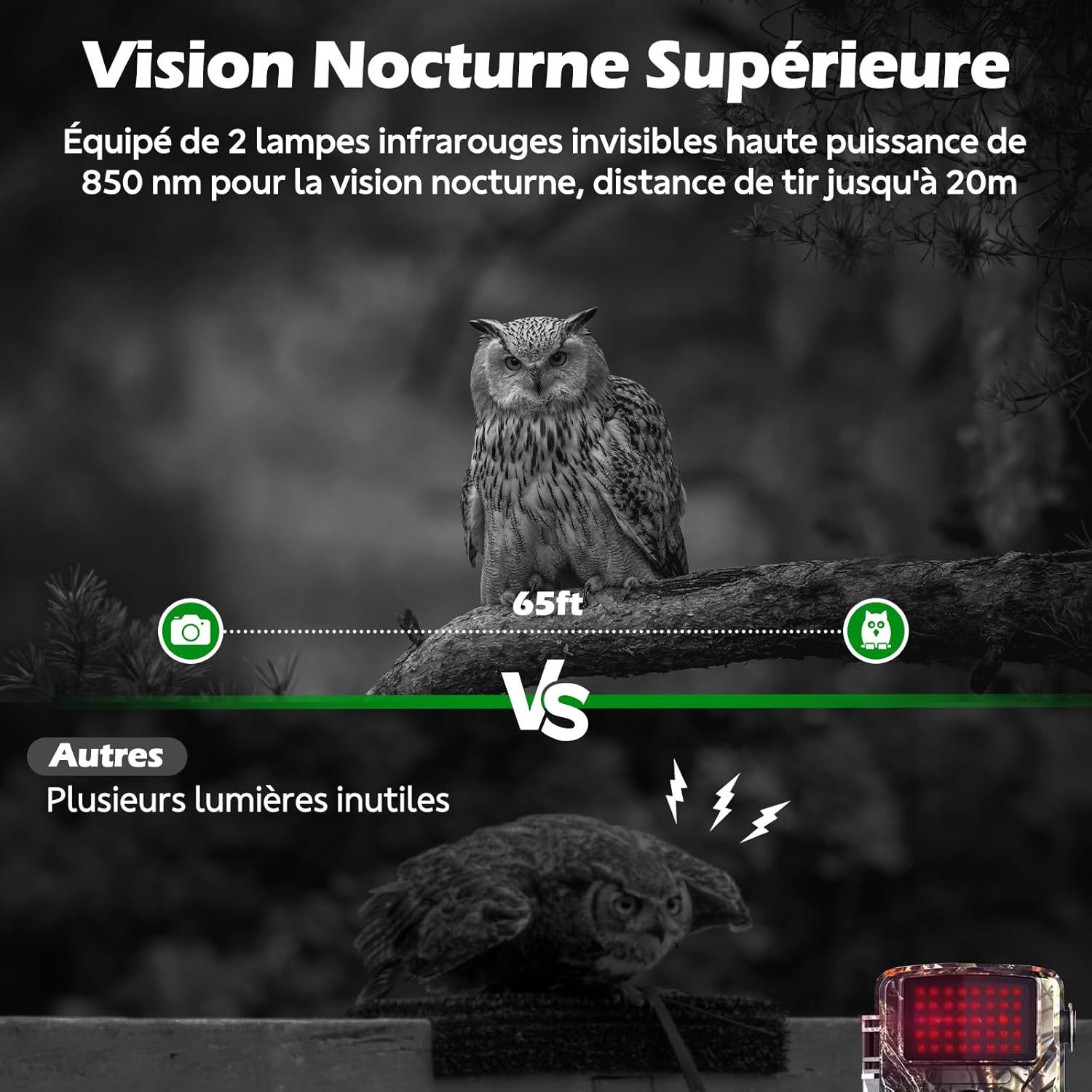
Figure 6.4: Superior night vision capability of the VOOPEAK TC31A, capturing clear images in darkness using invisible infrared light.
6.4 การบันทึกแบบวนซ้ำ
When enabled in the camera settings, loop recording automatically overwrites the oldest files on the Micro SD card when it becomes full, ensuring continuous operation without manual intervention.

Figure 6.5: Loop recording ensures continuous capture by overwriting the oldest fileเมื่อการ์ด SD เต็ม
7. การบำรุงรักษา
- การทำความสะอาด: Use a soft, dry cloth to clean the camera lens and PIR sensor. Do not use abrasive cleaners or solvents.
- การเปลี่ยนแบตเตอรี่: Replace all 8 AA batteries when the low battery indicator appears on the screen or in the app.
- การจัดการการ์ด SD: Regularly check the SD card capacity. Enable loop recording or manually delete old fileเพื่อให้แน่ใจว่ามีการบันทึกอย่างต่อเนื่อง
- อัพเดตเฟิร์มแวร์: Check the "TrailCam Go" app or VOOPEAK's official webเข้าชมเว็บไซต์เพื่อตรวจสอบการอัปเดตเฟิร์มแวร์ที่มีให้ใช้งาน เพื่อให้มั่นใจได้ถึงประสิทธิภาพสูงสุดและคุณสมบัติใหม่ๆ
8 การแก้ไขปัญหา
| ปัญหา | สาเหตุที่เป็นไปได้ | สารละลาย |
|---|---|---|
| กล้องไม่สามารถเปิดได้ | แบตเตอรี่เหลือน้อยหรือติดตั้งไม่ถูกต้อง | เปลี่ยนด้วยแบตเตอรี่ AA ใหม่ โดยตรวจสอบให้แน่ใจว่าใส่ขั้วถูกต้อง |
| ไม่มีการถ่ายภาพ/วิดีโอ | SD card full, incorrectly inserted, or corrupted. PIR sensitivity too low. Camera in OFF mode. | Check/replace SD card. Format SD card via camera menu. Increase PIR sensitivity. Ensure camera is in ON mode. |
| No 4G signal or remote access. | SIM card not activated. Poor cellular coverage. Data plan expired. | Verify SIM activation and data plan status in the app. Relocate camera to an area with better signal. |
| Blurry images/videos. | Lens is dirty. Camera is too close/far from subject. | Clean the lens. Adjust camera position relative to the subject. |
| ทริกเกอร์ผิดพลาด | PIR sensitivity too high. Heat sources or moving branches in detection zone. | Decrease PIR sensitivity. Clear detection zone of obstructions. |
9. ข้อมูลจำเพาะ
| ชื่อรุ่น | TC31A 4G Trail Camera |
| ยี่ห้อ | วูปปีค |
| เทคโนโลยีการเชื่อมต่อ | Wireless (4G Cellular) |
| ความละเอียดของภาพ | 32 ล้านพิกเซล |
| ความละเอียดวิดีโอ | 1080P HD @ 30fps |
| Viewอิงแองเกิล | 120 องศา |
| ช่วงการมองเห็นตอนกลางคืน | 20 เมตร (65 ฟุต) |
| ไฟ LED IR | 2 x 850nm (Invisible) |
| การตรวจจับการเคลื่อนไหว | เซ็นเซอร์ PIR |
| ความต้านทานต่อน้ำ | กันน้ำระดับ IP66 |
| แหล่งพลังงาน | แบตเตอรี่ AA 8 ก้อน (ไม่รวม) |
| พื้นที่จัดเก็บ | Micro SD Card (up to 64GB, not included), Cloud Storage via App |
| วิธีการควบคุม | Integrated LCD Screen, Smartphone App ("TrailCam Go") |
| ขนาด | 19.5 x 8.5 x 12.5 ซม. |
| อุณหภูมิในการทำงาน | -25°C ถึง 60°C |
10. การรับประกันและการสนับสนุน
The VOOPEAK TC31A 4G Trail Camera comes with a การรับประกันจากผู้ผลิต 1 ปี ตั้งแต่วันที่ซื้อสินค้า
For technical support, warranty claims, or any questions regarding your product, please contact VOOPEAK customer service through the "TrailCam Go" application or visit the official VOOPEAK website. Please have your model number (TC31A) and purchase details ready when contacting support.
11. แหล่งข้อมูลวิดีโอ
For visual guidance on setup and operation, please refer to official VOOPEAK video tutorials. If available, relevant videos will be embedded below.
Note: No specific video URLs with "creator_type":"Seller" were found in the provided product data. Please check the VOOPEAK official website or product page for available video resources.