
1. บทนำ
ขอบคุณสำหรับการซื้อasing the Sharp PS-916 Bluetooth Party Speaker System. This system includes two identical portable Bluetooth speakers designed to deliver powerful audio with versatile connectivity options. Please read this manual carefully before using the product to ensure proper operation and to maximize your listening experience.
เนื้อหาแพ็คเกจ:
- 2 x Sharp PS-916 Party Speakers
- 1 x สายชาร์จ
- 1 x รีโมทคอนโทรล
- 1 x คู่มือผู้ใช้

Image: The Sharp PS-916 system includes two speakers for a complete stereo experience.
2. การตั้งค่า
2.1 การชาร์จลำโพง
The PS-916 speakers are equipped with rechargeable batteries, providing up to 12 hours of playback. Before initial use, fully charge both speakers.
- Connect the charging cable to the DC IN port on the rear of each speaker.
- Plug the other end of the charging cable into a suitable power adapter (not included) or USB power source.
- ไฟแสดงสถานะการชาร์จจะสว่างขึ้น และจะเปลี่ยนสีหรือดับลงเมื่อการชาร์จเสร็จสมบูรณ์
2.2 การเปิด/ปิดเครื่อง
To power on or off each speaker, press and hold the ON/STAND BY INPUT ปุ่มที่อยู่บนแผงควบคุม
2.3 การจับคู่บลูทูธ (ลำโพงเดี่ยว)
- Ensure the speaker is powered on and in Bluetooth mode. The Bluetooth indicator will flash, indicating it is ready for pairing.
- บนอุปกรณ์มือถือของคุณ เปิดใช้งาน Bluetooth และค้นหาอุปกรณ์ที่มีอยู่
- Select "Sharp PS-916" from the list of devices.
- เมื่อเชื่อมต่อแล้ว ไฟแสดงสถานะบลูทูธจะหยุดกะพริบและติดสว่างค้าง
2.4 ระบบเสียงสเตอริโอไร้สายแท้ (TWS) (ลำโพงสองตัว)
TWS allows you to connect two PS-916 speakers wirelessly for a stereo sound experience.
- Power on both PS-916 speakers.
- Ensure neither speaker is currently connected to a Bluetooth device.
- บนลำโพงตัวใดตัวหนึ่ง (ซึ่งจะเป็นลำโพงหลัก) ให้กดปุ่ม ทไวซ์ กดปุ่ม ลำโพงจะเข้าสู่โหมดจับคู่ TWS
- The primary speaker will automatically search for the secondary speaker. Once connected, you will hear an audible confirmation, and the TWS indicator lights on both speakers will illuminate.
- ทีนี้ ให้เชื่อมต่ออุปกรณ์มือถือของคุณกับลำโพงหลักผ่านบลูทูธตามที่อธิบายไว้ในหัวข้อ 2.3 เสียงจะเล่นผ่านลำโพงทั้งสองตัวในระบบสเตอริโอ
3. ปฏิบัติการ
3.1 แผงควบคุมโอเวอร์view

Image: Main control panel for the Sharp PS-916 speaker.
- ON/STAND BY INPUT: Power on/off, switch input modes (Bluetooth, USB, TF, AUX, FM).
- PLAY/PAUSE (►/∕∕): เล่นหรือหยุดชั่วคราวการเล่นเสียง
- PREVIOUS (◀◀): ข้ามไปยังแทร็กก่อนหน้า
- NEXT (▶▶): ข้ามไปยังแทร็กถัดไป
- ปุ่มปรับระดับเสียง: หมุนเพื่อปรับระดับเสียงหลัก
- ทีดับบลิวเอส: Initiate or disconnect True Wireless Stereo pairing.
- อีควอไลเซอร์: Cycle through preset equalizer modes.
- เบส: Activate or deactivate bass boost.
- แสงสว่าง: Change or turn off the LED light effects.
- MIC CONTROL: Adjust microphone volume or echo (if applicable).
3.2 พอร์ตอินพุต
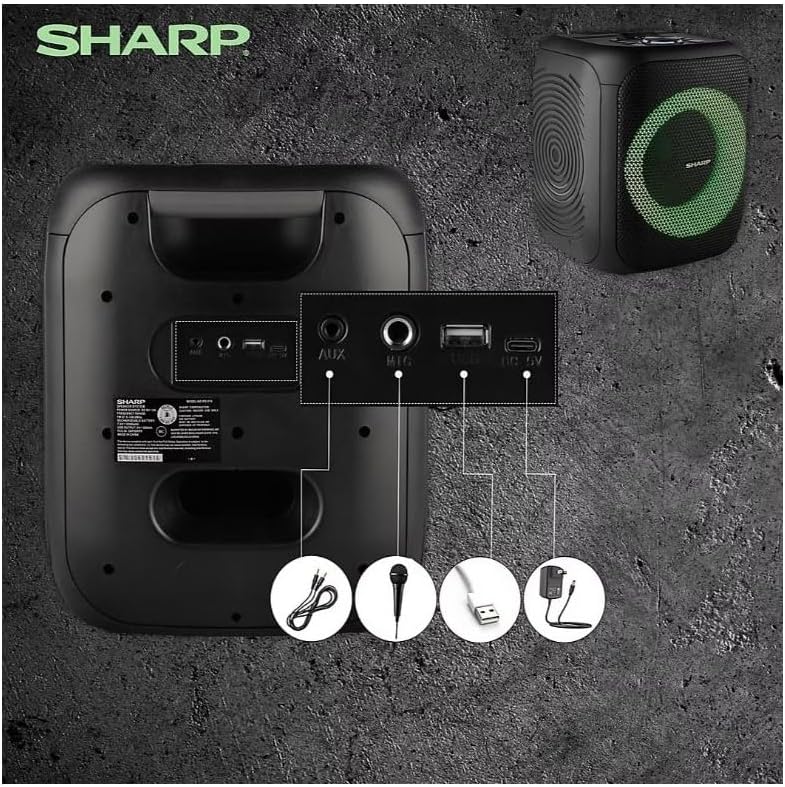
Image: Rear panel with various input and charging ports.
- ช่องรับสัญญาณเสียงเข้า: เชื่อมต่ออุปกรณ์เสียงภายนอกโดยใช้สายสัญญาณเสียงขนาด 3.5 มม.
- ไมค์ใน: Connect a microphone (sold separately) for karaoke or announcements.
- ยูเอสบี: เสียบแฟลชไดรฟ์ USB เพื่อเล่นไฟล์เสียง
- บัตร TF: เสียบการ์ด TF (microSD) เพื่อเล่นไฟล์เสียง
- DC IN: Connect the charging cable to power and charge the speaker.
3.3 Playing Audio from USB/TF Card
- Insert a USB flash drive or TF card into the corresponding port.
- กดปุ่ม ON/STAND BY INPUT button repeatedly until the display shows the USB or TF mode.
- การเล่นจะเริ่มต้นโดยอัตโนมัติ ใช้... เล่น/หยุดชั่วคราว, ก่อนหน้า, และ ต่อไป ปุ่มเพื่อควบคุมการเล่น
3.4 การใช้อินพุต AUX
- Connect one end of a 3.5mm audio cable to the AUX IN port on the speaker.
- ต่อปลายอีกด้านหนึ่งเข้ากับช่องเสียบหูฟังหรือช่องสัญญาณเสียงออกของอุปกรณ์ภายนอกของคุณ
- กดปุ่ม ON/STAND BY INPUT button repeatedly until the display shows AUX mode.
- ควบคุมการเล่นและระดับเสียงจากอุปกรณ์ภายนอกของคุณ
การใช้งานวิทยุ FM 3.5

Image: The PS-916 features an integrated FM Tuner.
- กดปุ่ม ON/STAND BY INPUT button repeatedly until the display shows FM mode.
- กดปุ่มค้างไว้ เล่น/หยุดชั่วคราว ปุ่มสแกนและบันทึกสถานี FM ที่มีอยู่โดยอัตโนมัติ
- ใช้ ก่อนหน้า และ ต่อไป ปุ่มเพื่อนำทางผ่านสถานีที่บันทึกไว้
3.6 เอฟเฟกต์แสง LED
กดปุ่ม แสงสว่าง button to cycle through different LED light modes or to turn the lights off.
4. การบำรุงรักษา
4.1 การทำความสะอาด
- ควรปิดลำโพงและถอดปลั๊กออกจากแหล่งจ่ายไฟก่อนทำความสะอาดทุกครั้ง
- ใช้ผ้าแห้งนุ่มเช็ดพื้นผิวภายนอก
- ห้ามใช้น้ำยาทำความสะอาดชนิดเหลว สเปรย์ หรือตัวทำละลาย เนื่องจากอาจทำให้พื้นผิวหรือชิ้นส่วนภายในเสียหายได้
4.2 พื้นที่จัดเก็บ
- เก็บลำโพงไว้ในที่แห้งและเย็น หลีกเลี่ยงแสงแดดโดยตรงและอุณหภูมิที่สูงหรือต่ำเกินไป
- หากเก็บรักษาเป็นเวลานาน ควรชาร์จแบตเตอรี่ให้ได้ประมาณ 50% ทุกๆ สองสามเดือน เพื่อรักษาสภาพแบตเตอรี่ให้ดีอยู่เสมอ
5 การแก้ไขปัญหา
If you encounter issues with your Sharp PS-916 speakers, please refer to the following common problems and solutions:
| ปัญหา | วิธีแก้ปัญหาที่เป็นไปได้ |
|---|---|
| ลำโพงไม่เปิดเครื่อง | ตรวจสอบให้แน่ใจว่าแบตเตอรี่ชาร์จเต็มแล้ว เสียบสายชาร์จแล้วลองใหม่อีกครั้ง |
| ไม่มีเสียงจากลำโพง | ตรวจสอบระดับเสียงทั้งบนลำโพงและอุปกรณ์ที่เชื่อมต่อ ตรวจสอบให้แน่ใจว่าได้เลือกโหมดอินพุตที่ถูกต้องแล้ว |
| ไม่สามารถจับคู่บลูทูธได้ | Ensure the speaker is in Bluetooth pairing mode (indicator flashing). Move your device closer to the speaker. Disconnect from other Bluetooth devices. |
| การจับคู่ TWS ล้มเหลว | Ensure both speakers are powered on and not connected to any other Bluetooth devices. Try initiating TWS pairing again. |
| เสียงเพี้ยน | ลดระดับเสียงทั้งบนลำโพงและอุปกรณ์ที่เชื่อมต่อ ตรวจสอบให้แน่ใจว่าแหล่งกำเนิดเสียงไม่ผิดเพี้ยน |
6. ข้อมูลจำเพาะ
| คุณสมบัติ | รายละเอียด |
|---|---|
| ยี่ห้อ | คม |
| ชื่อรุ่น | พีเอส-916 |
| การกำหนดค่าลำโพง | 8" Woofer, 1" Tweeter (per speaker) |
| กำลังไฟสูงสุด | 400 วัตต์ (ต่อลำโพง) |
| RMS กำลังขับ | 40 วัตต์ (ต่อลำโพง) |
| เทคโนโลยีการเชื่อมต่อ | บลูทูธ |
| อินพุตเพิ่มเติม | USB, TF Card, 3.5mm AUX, Microphone Input |
| อายุการใช้งานแบตเตอรี่ | นานถึง 12 ชั่วโมง |
| คุณสมบัติพิเศษ | True Wireless Stereo (TWS) Pairing, Bass Boost, LED Light Effects, FM Tuner |
| สี | สีดำ |
| น้ำหนักสินค้า | 6.5 ปอนด์ (ต่อลำโพงหนึ่งตัว) |
| ยูพีซี | 728434122111 |
| GTIN | 728434122111 |
7. การรับประกันและการสนับสนุน
7.1 ข้อมูลการรับประกัน
This Sharp PS-916 product comes with a 90-day limited warranty. This warranty covers manufacturing defects under normal use. It does not cover damage caused by misuse, accidents, unauthorized modifications, or normal wear and tear.
7.2 การสนับสนุนลูกค้า
For technical assistance, warranty claims, or further inquiries, please refer to the contact information provided with your purchase documentation or visit the official Sharp support webเว็บไซต์.