
JONR H2 PRO MAX
JONR H2 PRO MAX Wet Dry Vacuum Cleaner User Manual
Model: H2 PRO MAX
การแนะนำ
Thank you for choosing the JONR H2 PRO MAX Wet Dry Vacuum Cleaner. This manual provides essential information for the safe and efficient operation, maintenance, and troubleshooting of your appliance. Please read this manual thoroughly before using the product and retain it for future reference.
คำแนะนำด้านความปลอดภัยที่สำคัญ
WARNING: To reduce the risk of fire, electric shock, or injury, read all instructions before use.
- ควรใช้งานเครื่องบนพื้นผิวที่แห้งและเรียบเสมอกันเสมอ
- ห้ามจุ่มเครื่องลงในน้ำหรือของเหลวอื่นๆ
- เก็บผม เสื้อผ้าที่หลวม นิ้ว และส่วนต่างๆ ของร่างกายให้ห่างจากช่องเปิดและชิ้นส่วนที่เคลื่อนไหว
- ใช้เฉพาะตามที่อธิบายไว้ในคู่มือนี้เท่านั้น ใช้เฉพาะอุปกรณ์เสริมที่ผู้ผลิตแนะนำเท่านั้น
- ห้ามใช้หากสายไฟหรือปลั๊กชำรุด หากเครื่องใช้ไฟฟ้าทำงานผิดปกติ ตกหล่น เสียหาย ถูกทิ้งไว้กลางแจ้ง หรือตกน้ำ ให้ส่งคืนอุปกรณ์ไปยังศูนย์บริการ
- ห้ามจับปลั๊กหรือเครื่องใช้ไฟฟ้าขณะที่มือเปียก
- ห้ามใส่สิ่งของใดๆ เข้าไปในช่องเปิด ห้ามใช้ในขณะที่ช่องเปิดใดๆ ถูกปิดกั้น หลีกเลี่ยงฝุ่น เศษผ้า เส้นผม และสิ่งใดๆ ที่อาจขัดขวางการไหลเวียนของอากาศ
- ควรระมัดระวังเป็นพิเศษเมื่อทำความสะอาดบนบันได
- ห้ามใช้ตักของเหลวไวไฟหรือติดไฟได้ เช่น น้ำมันเบนซิน หรือใช้ในพื้นที่ที่อาจมีของเหลวเหล่านี้อยู่
- ห้ามหยิบจับสิ่งของที่กำลังเผาไหม้หรือมีควัน เช่น บุหรี่ ไม้ขีดไฟ หรือขี้เถ้าร้อน
- ป้องกันการสตาร์ทโดยไม่ได้ตั้งใจ ตรวจสอบให้แน่ใจว่าสวิตช์อยู่ในตำแหน่งปิดก่อนที่จะเชื่อมต่อกับก้อนแบตเตอรี่ ยกขึ้นหรือถือเครื่อง
- ชาร์จไฟด้วยเครื่องชาร์จที่ผู้ผลิตกำหนดเท่านั้น
- ภายใต้สภาวะที่ไม่เหมาะสม ของเหลวอาจไหลออกมาจากแบตเตอรี่ได้ หลีกเลี่ยงการสัมผัส หากสัมผัสโดยไม่ได้ตั้งใจ ให้ล้างด้วยน้ำ หากของเหลวเข้าตา ให้ไปพบแพทย์
เนื้อหาแพ็คเกจ
ตรวจสอบว่าส่วนประกอบทั้งหมดอยู่ครบและอยู่ในสภาพดีเมื่อแกะกล่อง
- JONR H2 PRO MAX Main Unit
- จัดการประกอบ
- แท่นชาร์จ
- อะแดปเตอร์แปลงไฟ
- Cleaning Solution (Starter Bottle)
- แปรงทำความสะอาด
- ที่ใส่อุปกรณ์เสริม
- คู่มือการใช้งาน
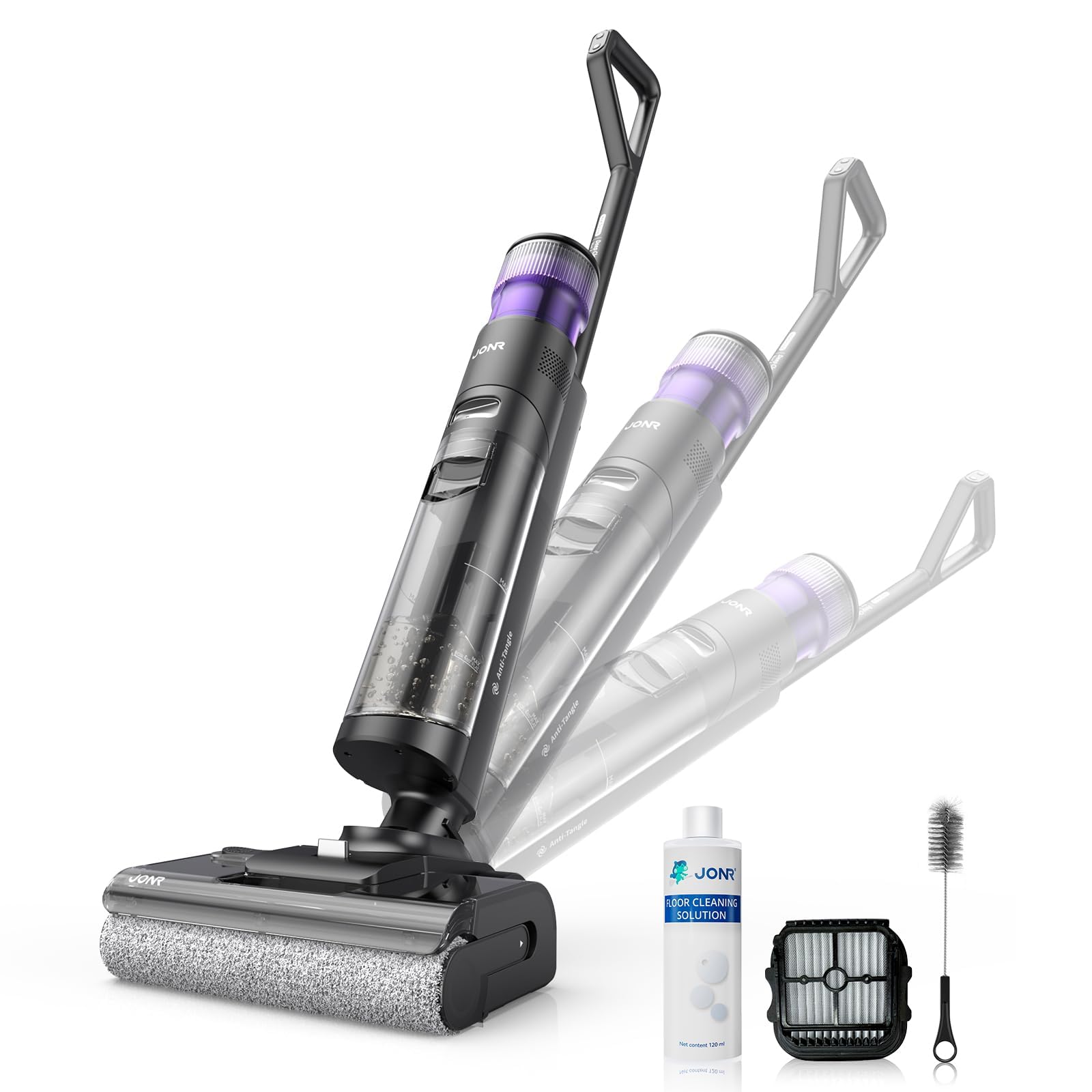
Image: JONR H2 PRO MAX Wet Dry Vacuum Cleaner and its included accessories. This image shows the main unit, handle, charging dock, and various cleaning tools.
แผนผังผลิตภัณฑ์
Familiarize yourself with the parts of your JONR H2 PRO MAX.
- ถังเก็บน้ำสะอาด (CWT)
- ถังเก็บน้ำสกปรก (DWT)
- จัดการกับปุ่มปลดล็อค
- หน้าจอแสดงผล
- ปุ่มเปิดปิด
- ปุ่มเลือกโหมด
- ปุ่มทำความสะอาดตัวเอง
- Brush Roll Cover
- แปรงม้วน
- ขั้วสัมผัสการชาร์จ
- แท่นชาร์จ

Image: Labeled diagram illustrating the main parts of the JONR H2 PRO MAX Wet Dry Vacuum Cleaner, including tanks, buttons, and brush roll area.
การตั้งค่า
1. ชุดด้ามจับ
- Insert the handle assembly into the main unit until you hear a click, ensuring it is securely locked.
- To disassemble, press the handle release button and pull the handle upwards.
2. การชาร์จแบตเตอรี่
- Place the main unit onto the charging dock, ensuring the charging contacts align.
- เชื่อมต่ออะแดปเตอร์ไฟฟ้าเข้ากับแท่นชาร์จและเสียบเข้ากับเต้ารับที่ผนัง
- หน้าจอแสดงผลจะแสดงสถานะการชาร์จ การชาร์จเต็มใช้เวลาประมาณ 4 ชั่วโมง
- For optimal battery life, fully charge the unit before first use.

Image: The JONR H2 PRO MAX Wet Dry Vacuum Cleaner positioned on its charging dock, with the power adapter connected.
3. Filling the Clean Water Tank (CWT)
- กดปุ่มปลดล็อค CWT แล้วถอดถังออก
- Open the tank cap and fill with clean tap water. For enhanced cleaning, add a small amount of JONR cleaning solution (do not exceed the MAX line).
- Close the cap securely and reinsert the CWT into the main unit until it clicks into place.
คำแนะนำการใช้งาน
1. เปิด/ปิดเครื่อง
- Press the Power Button to turn the unit on. The display screen will illuminate.
- Press the Power Button again to turn the unit off.
2. Selecting Cleaning Mode
The JONR H2 PRO MAX offers multiple cleaning modes:
- โหมดอัตโนมัติ: Default mode for general cleaning. The unit automatically adjusts suction and water flow based on floor dirt detection.
- โหมดสูงสุด: ให้แรงดูดและการไหลของน้ำสูงสุดสำหรับพื้นที่ที่สกปรกมาก
- โหมดการดูด: สำหรับดูดของเหลวโดยไม่ต้องจ่ายน้ำ
Press the Mode Selection Button to cycle through the available cleaning modes. The selected mode will be displayed on the screen.
3. Cleaning Your Floors
- Tilt the main unit back to engage the brush roll and start cleaning.
- Move the unit slowly forward and backward over the desired area.
- The unit will dispense water and cleaning solution, scrub the floor, and vacuum up dirty water simultaneously.
- The display screen provides real-time information such as battery level, current mode, and dirty water tank status.

Image: The JONR H2 PRO MAX Wet Dry Vacuum Cleaner actively cleaning a hard floor surface, demonstrating its wet and dry cleaning capabilities.
การซ่อมบำรุง
Regular maintenance ensures optimal performance and extends the lifespan of your JONR H2 PRO MAX.
1. Emptying and Cleaning the Dirty Water Tank (DWT)
- After each use, or when the DWT full indicator appears, remove the DWT.
- Open the DWT lid and carefully pour out the dirty water.
- Rinse the DWT thoroughly with clean water. Clean the filter inside the DWT if necessary.
- ปล่อยให้ DWT และตัวกรองแห้งสนิทก่อนประกอบกลับเข้าที่
2. ฟังก์ชั่นทำความสะอาดตัวเอง
- Place the unit on the charging dock. Ensure the CWT has sufficient clean water.
- Press the Self-Cleaning Button. The unit will perform an automatic cleaning cycle for the brush roll and internal pipes.
- After the self-cleaning cycle, empty and clean the DWT.
- The hot air drying function will then activate to dry the brush roll, preventing odors.

Image: The JONR H2 PRO MAX Wet Dry Vacuum Cleaner on its charging dock, with indicators suggesting the self-cleaning cycle is active.
3. การทำความสะอาดแปรงม้วน
- Turn off the unit and remove it from the charging dock.
- Open the brush roll cover.
- Remove the brush roll. Use the provided cleaning brush to remove any hair, debris, or tangled material.
- ล้างม้วนแปรงใต้น้ำไหล
- Allow the brush roll to air dry completely before reinstalling. Ensure it is properly aligned.
4. การทำความสะอาดตัวกรอง
- The filter is located within the DWT. Remove it and rinse under clean water.
- ปล่อยให้ตัวกรองแห้งสนิทก่อนใส่กลับเข้าไป
- Replace the filter every 3-6 months, or as needed, for optimal performance.
การแก้ไขปัญหา
โปรดดูหัวข้อนี้เพื่อดูปัญหาทั่วไปและวิธีแก้ไข
| ปัญหา | สาเหตุที่เป็นไปได้ | สารละลาย |
|---|---|---|
| เครื่องไม่เปิด | แบตเตอรี่หมด | ชาร์จอุปกรณ์ให้เต็ม |
| เครื่องไม่เปิด | ไม่ได้กดปุ่มเปิด/ปิดอย่างถูกต้อง | ตรวจสอบให้แน่ใจว่าได้กดปุ่มเปิด/ปิดอย่างแน่นหนา |
| ดูดไม่ดี. | Dirty Water Tank (DWT) is full. | Empty and clean the DWT. |
| ดูดไม่ดี. | Brush roll or air path is clogged. | Clean the brush roll and check for blockages in the air path. |
| ดูดไม่ดี. | ตัวกรองสกปรกหรืออุดตัน | ทำความสะอาดหรือเปลี่ยนตัวกรอง |
| น้ำไม่ได้จ่าย | Clean Water Tank (CWT) is empty. | Refill the CWT. |
| น้ำไม่ได้จ่าย | CWT not installed correctly. | Ensure the CWT is securely in place. |
| Unit leaks water. | Tanks not properly sealed or installed. | Check that both CWT and DWT are correctly installed and their caps are sealed. |
| กลิ่นไม่พึงประสงค์ | Dirty Water Tank (DWT) needs cleaning. | Empty and thoroughly clean the DWT after each use. Run self-cleaning cycle. |
ข้อมูลจำเพาะ
| ชื่อรุ่น | H2 PRO MAX |
| ยี่ห้อ | จอนอาร์ |
| แหล่งพลังงาน | ใช้พลังงานจากแบตเตอรี่ (ไร้สาย) |
| ประเภทแบตเตอรี่ | ลิเธียมไอออน |
| เวลาในการชาร์จ | ประมาณ 4 ชั่วโมง |
| วัดtage | 200 วัตต์ |
| ความจุถังน้ำสะอาด | 850 มิลลิลิตร |
| ระดับเสียง | 80 เดซิเบล |
| ขนาดสินค้า | ยาว 10.6 นิ้ว x กว้าง 9 นิ้ว x สูง 44 นิ้ว |
| น้ำหนักสินค้า | 16.97 ปอนด์ |
| ประเภทตัวกรอง | ฟองน้ำ |
| คุณสมบัติพิเศษ | Hot Air Drying, Tangle-Free Brush Roll, Smart Hard Floor Cleaner |
การรับประกันและการสนับสนุน
JONR products are manufactured to high-quality standards. For warranty information, technical support, or service inquiries, please contact JONR customer service.
Please visit the official JONR website or refer to your purchase documentation for specific warranty terms and contact details.
หมายเหตุ: เก็บใบเสร็จรับเงินไว้เป็นหลักฐานการซื้อสำหรับการเรียกร้องการรับประกัน
Ask a question about this manual
Ask about setup, troubleshooting, compatibility, parts, safety, or missing instructions. Manuals+ will review the question and use this page’s manual context to help answer it.