
1. บทนำ
Thank you for choosing the Anmite 14 inch Portable Touch Monitor. This manual provides essential information for the proper setup, operation, and maintenance of your device. Please read this manual thoroughly before using the monitor to ensure optimal performance and to prevent damage.

The Anmite 14 inch Portable Touch Monitor, highlighting its touch screen capabilities and vibrant display.
2. ข้อมูลด้านความปลอดภัย
- อย่าให้จอภาพโดนฝน ความชื้น หรืออุณหภูมิที่สูงหรือต่ำเกินไป
- หลีกเลี่ยงการวางจอภาพใกล้แหล่งความร้อนหรือแสงแดดโดยตรง
- โปรดใช้เฉพาะอะแดปเตอร์แปลงไฟและสายเคเบิลที่ผู้ผลิตจัดหาให้หรือแนะนำเท่านั้น
- อย่าพยายามถอดประกอบหรือซ่อมแซมจอภาพด้วยตนเอง แนะนำให้ส่งช่างผู้ชำนาญการเข้าไปรับบริการทั้งหมด
- เช็ดหน้าจอด้วยผ้าเนื้อนุ่มที่ไม่เป็นขุย หลีกเลี่ยงการใช้สารเคมีรุนแรงหรือวัสดุที่มีฤทธิ์กัดกร่อน
3. เนื้อหาบรรจุภัณฑ์
ตรวจสอบว่ามีรายการทั้งหมดอยู่ในแพ็คเกจ:
- Anmite Portable Monitor x 1
- Mini-HDMI to HDMI cable x 1
- สายเคเบิล Type-C ถึง Type-C x 1
- Type-C to USB-A cable x 1
- คู่มือผู้ใช้ x 1

The Anmite portable monitor and its included accessories, as found in the product packaging.
4. สินค้าหมดview
4.1. มิติทางกายภาพ

Detailed dimensions of the portable monitor, illustrating its compact size and weight for portability.
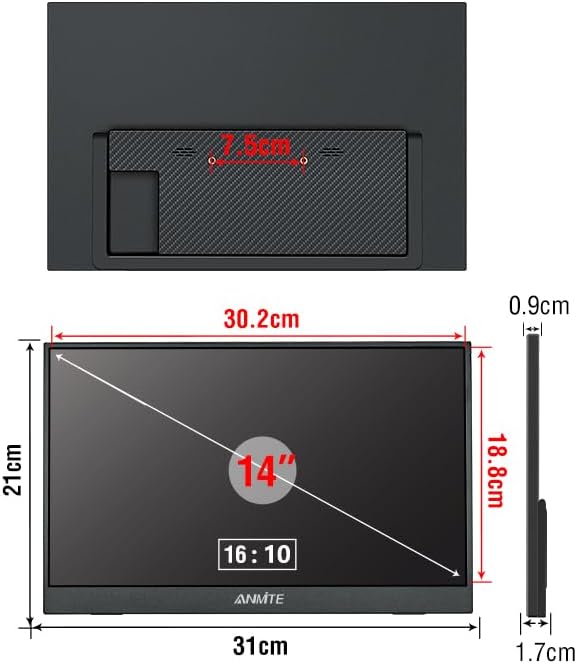
หลัง view of the monitor, showing the integrated stand mechanism and overall dimensions.
4.2. พอร์ตและส่วนควบคุม
The monitor features various input and output ports for connectivity:
- มินิ-HDMI: สำหรับการรับสัญญาณวิดีโอจากอุปกรณ์ที่มีช่องต่อ HDMI
- พอร์ต Type-C (ใช้งานได้ครบทุกฟังก์ชัน): For video, audio, data, and power input from compatible devices.
- Type-C: Additional Type-C port, typically for power input.
- อินเทอร์เฟซเสียง 3.5 มม.: สำหรับเชื่อมต่อหูฟังหรือลำโพงภายนอก
- ลำโพงในตัว: สำหรับเอาต์พุตเสียง
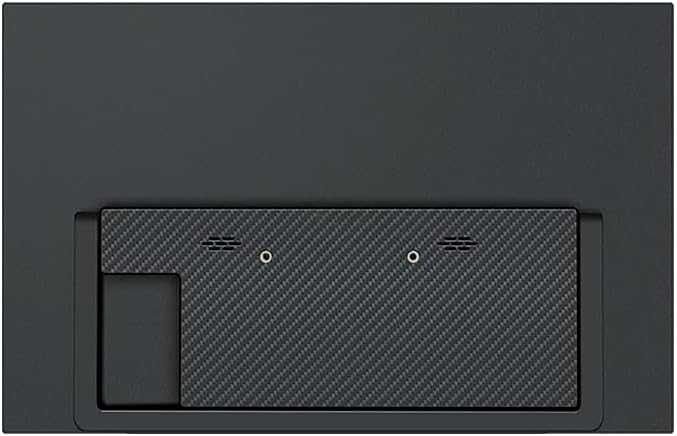
Rear panel detailing the various input ports (Mini-HDMI, Type-C) and built-in speaker locations.
5. การตั้งค่า
5.1. Positioning the Monitor
The monitor includes an integrated stand for easy positioning. Extend the stand from the back of the monitor to achieve your desired viewมุมอิง

The monitor with its integrated stand deployed, demonstrating how it can be positioned for use.
5.2. การเชื่อมต่อกับอุปกรณ์
The monitor supports connectivity via Mini-HDMI and Type-C (Full Function) ports.
- For Type-C Connection: Use the provided Type-C to Type-C cable. Connect one end to the monitor's Full Function Type-C port and the other end to a compatible device's Full Function Type-C port. สำคัญ: Ensure your device's Type-C port supports video output. If it is only for charging, the monitor will not display an image.
- For HDMI Connection: Use the provided Mini-HDMI to HDMI cable. Connect the Mini-HDMI end to the monitor and the HDMI end to your device. You may need to use the Type-C to USB-A cable connected to the monitor's power-only Type-C port and a USB power source (e.g., a wall adapter or your device's USB port) for power.
After connecting, the monitor should automatically detect the signal. If not, you may need to adjust display settings on your connected device.
This video demonstrates the Anmite 14 inch Portable Monitor in use, showcasing its display quality and portability.
6. การใช้งานจอภาพ
6.1. เปิด/ปิดเครื่อง
The monitor typically powers on automatically when connected to a power source and a signal-providing device. To power off, disconnect the power cable.
6.2. Touch Screen Functionality
This version of the Anmite 14 inch monitor features a touch screen. When connected to a compatible device (e.g., Windows laptop, certain Android phones) via a Full Function Type-C cable, the touch input will be recognized. Ensure your operating system supports external touch displays.
6.3. การตั้งค่าการแสดงผล
Display settings such as brightness, contrast, and color modes are typically controlled via the On-Screen Display (OSD) menu, accessed by buttons on the monitor (refer to physical overview for button locations). Advanced display settings, including resolution and refresh rate, are managed through the operating system settings of your connected device.
This video highlights the touch screen functionality and various connectivity options of the Anmite 14 inch Portable Touch Monitor.
7. การบำรุงรักษา
- การทำความสะอาดหน้าจอ: เช็ดหน้าจอเบาๆ ด้วยผ้านุ่ม แห้ง และไม่เป็นขุย สำหรับรอยฝังแน่น ให้เช็ดเบาๆampen the cloth with water or a screen-cleaning solution designed for electronics. Do not spray liquids directly onto the screen.
- การทำความสะอาด Casing: ใช้ผ้าแห้งนุ่มเช็ดจอภาพasing.
- พื้นที่จัดเก็บ: When not in use for extended periods, store the monitor in a cool, dry place, preferably in its original packaging or a protective sleeve to prevent dust and scratches.
8 การแก้ไขปัญหา
| ปัญหา | สาเหตุที่เป็นไปได้ | สารละลาย |
|---|---|---|
| ไม่มีการแสดงผล/ข้อความ "ไม่มีสัญญาณ" |
|
|
| หน้าจอสัมผัสไม่ตอบสนอง |
|
|
| หน้าจอแสดงผลกระพริบหรือไม่เสถียร |
|
|
9. ข้อมูลจำเพาะ
| คุณสมบัติ | รายละเอียด |
|---|---|
| หมายเลขรุ่น | A140W05T |
| ขนาดหน้าจอ | 14 นิ้ว |
| ประเภทแผง | ไอพีเอส |
| อัตราส่วนภาพ | 16:10 น. |
| ปณิธาน | 1920 x 1200 (UXGA Wide) |
| สีจอแสดงผล | 16.7เมตร |
| มุมมองภาพ | H: 178 ° V: 178 ° |
| อัตราส่วนคอนทราสต์ | 1000:1 น. |
| ความสว่าง | 300 ซีดี/ตรม. |
| ช่วงสี | 100% |
| อัตราการรีเฟรช | 60 เฮิรตซ์ |
| เวลาตอบสนอง | 5 มิลลิวินาที |
| อินเตอร์เฟซการป้อนข้อมูล | Mini-HDMI, Type-C (Full Function), Type-C |
| อินเทอร์เฟซเอาท์พุต | อินเทอร์เฟซเสียง 3.5 มม |
| ลำโพง | Built-in (1W*2) |
| การใช้พลังงาน | 12 วัตต์ |
| เล่มที่tage | 5 โวลต์ (กระแสตรง) |
| น้ำหนักสุทธิ | 0.6 กก. (900 มิลลิกรัม) |
| ขนาด (D x W x H) | 1.3"D x 9.33"W x 13.97"H (324*2.3*5-13 mm) |
| คุณสมบัติเพิ่มเติม | Built-In Speakers, Portable, Touchscreen, HDR, FreeSync |
10. การรับประกันและการสนับสนุน
For warranty information and technical support, please contact the manufacturer, Shenzhen Anmite Technology Co., Ltd., or your retailer. Keep your purchase receipt as proof of purchase.
For further assistance, you may refer to the contact information provided on the product packaging or the official Anmite webเว็บไซต์.

Product packaging labels showing manufacturer details, certifications, and energy efficiency information.