
การแนะนำ
This manual provides detailed instructions for the installation, operation, and maintenance of the Soundstream MPQ-6BX 1/2 DIN 5-Band Car Audio Equalizer with Digital Bass Reconstruction. Please read this manual thoroughly before using the product to ensure proper function and to prevent damage.
ข้อมูลด้านความปลอดภัย
- แหล่งจ่ายไฟ: Ensure the unit is connected to a 12V DC negative ground power supply.
- การเดินสายไฟ: All wiring should be performed with the vehicle's ignition turned off to prevent electrical shorts.
- การติดตั้ง: Mount the unit securely to prevent movement during vehicle operation. Avoid mounting in locations exposed to direct sunlight, excessive heat, or moisture.
- การระบายอากาศ : ตรวจสอบให้แน่ใจว่ามีการระบายอากาศเพียงพอรอบๆ เครื่องเพื่อป้องกันความร้อนสูงเกินไป
- การติดตั้งโดยมืออาชีพ: If you are unsure about any installation steps, consult a qualified car audio professional.
สินค้าเกินview
The Soundstream MPQ-6BX is a compact 1/2 DIN 5-band equalizer designed to enhance your car audio system. It features digital bass reconstruction, a selectable subsonic filter, and flexible input/output options for comprehensive sound control.
คุณสมบัติหลัก:
- 5-Band Equalization: Provides ±18 dB adjustment at 50 Hz, 200 Hz, 1 kHz, 5 kHz, and 20 kHz for precise frequency tuning.
- การสร้างเสียงเบสแบบดิจิทัล: Restores low frequencies often lost during audio compression, enhancing bass impact.
- ตัวกรองเปรี้ยงปร้าง: Selectable 35–80Hz filter protects subwoofers from unwanted ultra-low frequencies.
- อินพุตที่หลากหลาย: Includes AUX, low-level RCA, and high-level speaker inputs for compatibility with various head units.
- High Output Preampเครื่องฟอก: Delivers 7V RMS / 12V peak preamplifier outputs with ultra-low 0.01% Total Harmonic Distortion (THD) and a 110 dB Signal-to-Noise Ratio (SNR).
- การออกแบบที่กะทัดรัด: 1/2 DIN size (7" W x 5.1" D x 1.2" H) for easy installation in tight spaces.
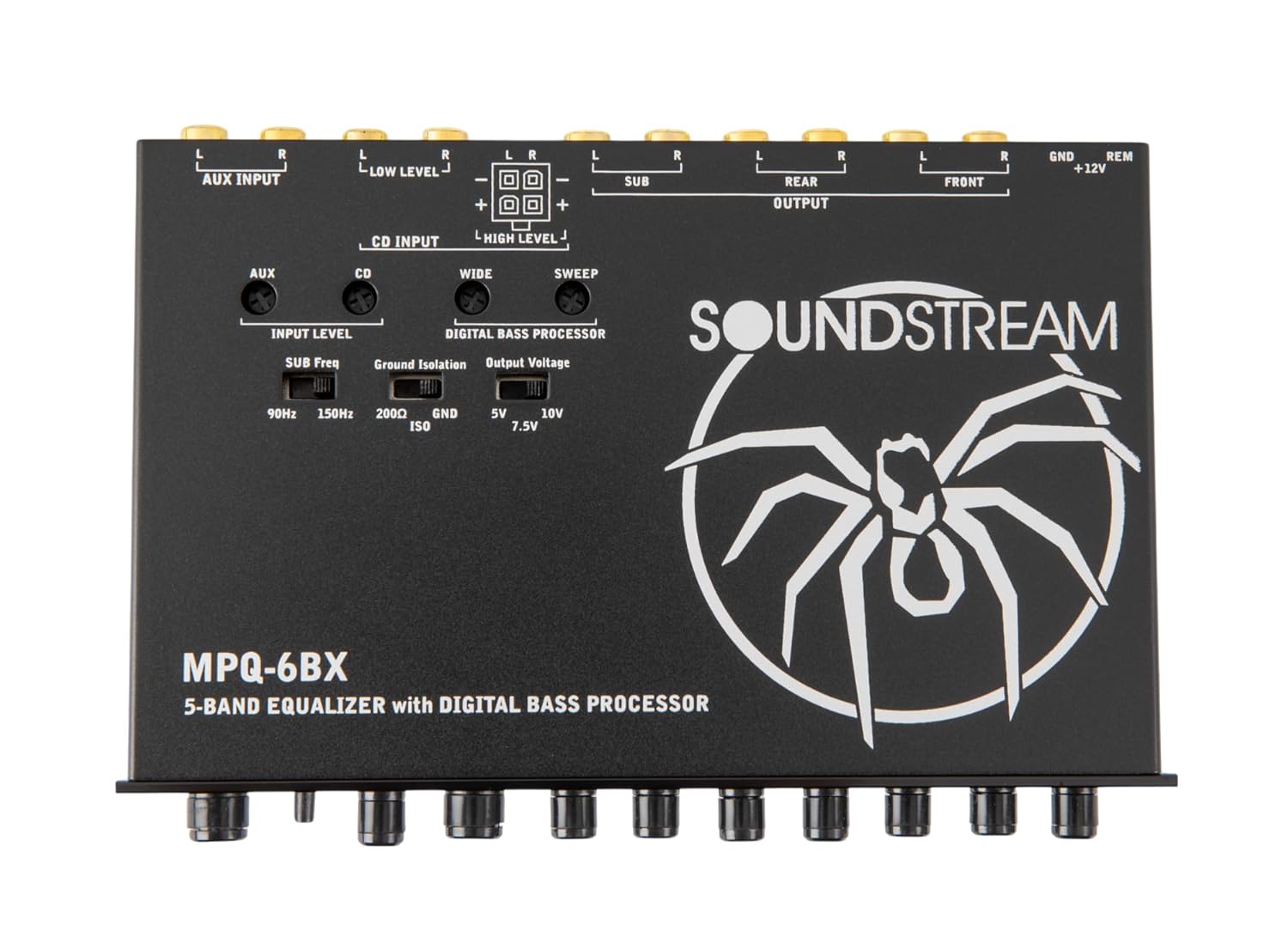
รูปที่ 1: มุม view of the Soundstream MPQ-6BX equalizer.
การติดตั้งและการตั้งค่า
Proper installation is crucial for optimal performance. Refer to the wiring diagram and follow these steps carefully.
เนื้อหาแพ็คเกจ:

Figure 2: Included components: MPQ-6BX equalizer, remote knob, and installation accessories.
- Soundstream MPQ-6BX Equalizer
- ปุ่มปรับเสียงเบสแบบรีโมท
- Installation Accessories (wiring harness, mounting hardware)
- คู่มือการใช้งาน
การติดตั้ง:
- Choose a suitable location in your vehicle, such as a 1/2 DIN dash opening or under the dashboard, ensuring it is away from heat sources and moisture.
- Ensure there is enough space for wiring connections and ventilation.
- ยึดอุปกรณ์ให้แน่นโดยใช้ฮาร์ดแวร์สำหรับติดตั้งที่ให้มา
การเชื่อมต่อสายไฟ:

Figure 3: Rear panel connections for power, inputs, and outputs.
- การเชื่อมต่อไฟฟ้า:
- เชื่อมต่อ +12โวลต์ wire to a constant 12V power source (e.g., battery positive terminal) with an inline fuse.
- เชื่อมต่อ ก.ย.ด. wire to a clean chassis ground point.
- เชื่อมต่อ รีเอ็ม (Remote) wire to the remote turn-on output of your head unit.
- การเชื่อมต่ออินพุต:
- อินพุต AUX: For external audio devices via RCA.
- อินพุต RCA ระดับต่ำ: เชื่อมต่อเข้ากับช่อง RCA pre-out ของเครื่องเล่นในรถของคุณ
- ช่องต่อลำโพงระดับสูง: Use for head units without RCA outputs. Connect directly to speaker wires.
- การเชื่อมต่อขาออก:
- เชื่อมต่อ ด้านหน้า, ด้านหลัง, และ ซับ RCA outputs to the corresponding inputs on your ampลิตเตอร์
คำแนะนำการใช้งาน
Familiarize yourself with the controls to optimize your audio experience.

Figure 4: Front panel controls of the MPQ-6BX equalizer.
แผงควบคุมด้านหน้า:
- ปริมาณหลัก: Adjusts the overall output level of the equalizer.
- เลือกอินพุต: Switches between CD (Low-Level RCA/High-Level) and AUX inputs.
- Fader (F/R): Balances the audio output between front and rear channels.
- Level (Digital Bass Processor): Adjusts the intensity of the digital bass reconstruction.
- Subsonic (35Hz/80Hz): Selects the cutoff frequency for the subsonic filter.
- EQ Bands (50Hz, 200Hz, 1kHz, 5kHz, 20kHz): Adjusts the gain (±18dB) for each frequency band.
Rear Panel Settings:

รูปที่ 5: ด้านบน view showing input level, ground isolation, and output voltagอีสวิตช์
- Input Level (90Hz/150Hz/200Hz): Adjusts the input sensitivity for the digital bass processor. Experiment to find the best setting for your source.
- Ground Isolation (200Ω/GND/ISO): Helps eliminate ground loop noise. Try different settings if you experience hum or hiss.
- ปริมาณการส่งออกtagอี (5V/7.5V/10V): Sets the maximum output voltagอีของพรีamplifier. Match this to the input sensitivity of your ampลิตเตอร์
การซ่อมบำรุง
The Soundstream MPQ-6BX is designed for reliable operation with minimal maintenance.
- การทำความสะอาด: ใช้ผ้านุ่มและแห้งเช็ดทำความสะอาดตัวเครื่อง ห้ามใช้น้ำยาทำความสะอาดที่มีฤทธิ์กัดกร่อนหรือตัวทำละลาย
- การเชื่อมต่อ: ตรวจสอบการเชื่อมต่อสายไฟทั้งหมดเป็นระยะๆ เพื่อให้แน่ใจว่ามีความปลอดภัยและไม่มีการกัดกร่อน
- สิ่งแวดล้อม: Ensure the unit remains in a well-ventilated area, free from excessive heat, dust, and moisture.
การแก้ไขปัญหา
| ปัญหา | สาเหตุที่เป็นไปได้ | สารละลาย |
|---|---|---|
| ไม่มีไฟฟ้า | ฟิวส์ขาด, การเดินสายไฟไม่ถูกต้อง, การเชื่อมต่อไฟหลวม | Check inline fuse, verify +12V, GND, and REM connections. Ensure connections are secure. |
| ไม่มีเสียงออก | Incorrect input selection, loose RCA connections, ampเครื่องขยายเสียงไม่ได้เปิดใช้งาน | Verify Input Select switch position. Check all RCA connections. Ensure ampเครื่องขยายเสียงเปิดใช้งานอยู่ |
| เสียงเพี้ยน | Input level too high, output voltage mismatch, EQ settings too extreme. | Reduce head unit volume. Adjust Input Level and Output Voltage switches. Reset EQ bands to flat and adjust gradually. |
| Engine noise/hum | Ground loop, poor ground connection. | Ensure a clean, secure ground connection. Experiment with the Ground Isolation switch (200Ω/GND/ISO). |
| เบสที่อ่อนแอ | Digital Bass Processor level too low, Subsonic filter set too high, EQ bass band reduced. | Increase Digital Bass Processor Level. Adjust Subsonic filter to a lower frequency or off. Increase 50Hz EQ band. |
ข้อมูลจำเพาะ
| หมายเลขรุ่น | MPQ-6BX |
| วงอีควอไลเซอร์ | 5 (50Hz, 200Hz, 1kHz, 5kHz, 20kHz) |
| EQ Adjustment Range | ±18เดซิเบล |
| ตัวกรองเปรี้ยงปร้าง | Selectable 35Hz - 80Hz |
| ปริมาณการส่งออกสูงสุดtage | 7V RMS / 12V Peak |
| ความเพี้ยนฮาร์มอนิกรวม (THD) | 0.01% |
| อัตราส่วนสัญญาณต่อเสียงรบกวน (SNR) | 110 เดซิเบล |
| อิมพีแดนซ์อินพุต | 20 kΩ (AUX/Low-Level), 60 Ω (High-Level) |
| อิมพีแดนซ์เอาต์พุต | 150 โอห์ม |
| การตอบสนองความถี่ | 20เฮิรตซ์ - 20กิโลเฮิรตซ์ |
| แหล่งจ่ายไฟ | 12V DC Negative Ground, PWM Switched |
| การบริโภคปัจจุบัน | 250มิลลิแอมป์ |
| ขนาด (กว้าง x ลึก x สูง) | 7" x 5.1" x 1.2" (17.78 ซม. x 12.95 ซม. x 3.05 ซม.) |
| น้ำหนัก | 1.7 ปอนด์ (0.77 กก.) |
การรับประกันและการสนับสนุน
For warranty information and technical support, please refer to the warranty card included with your product or visit the official Soundstream webไซต์ โปรดเก็บใบเสร็จรับเงินไว้เป็นหลักฐานการซื้อสำหรับการเรียกร้องการรับประกัน
ซาวด์สตรีมอย่างเป็นทางการ Webเว็บไซต์: www.soundstream.com