
1. บทนำ
This manual provides detailed instructions for the setup, operation, maintenance, and troubleshooting of your BMAX Mini PC B8A Pro. Please read this manual thoroughly before using the device to ensure optimal performance and longevity.
2. สินค้าหมดview
2.1 คุณสมบัติหลัก
- โปรเซสเซอร์: AMD Ryzen 7 8745HS (ความเร็วสูงสุด 4.9 GHz)
- กราฟิก: Integrated AMD Radeon 780M GPU
- หน่วยความจำ: แรม DDR5 ขนาด 16GB (สามารถเพิ่มได้สูงสุดถึง 256GB)
- พื้นที่จัดเก็บ: 512GB NVMe PCIe 4.0 x4 SSD (expandable up to 4TB)
- การสนับสนุนการแสดงผล: Triple display output (DP 2.1, HDMI 2.1, Type-C) with up to 8K resolution support
- การเชื่อมต่อ: Wi-Fi 6, Bluetooth 5.2, 2.5Gbps LAN
- ระบบปฏิบัติการ: ติดตั้ง Windows 11 Pro มาให้แล้ว
- ระบบระบายความร้อน : "Space Station" cooling with smart turbo fan and dual copper heat pipes
2.2 ส่วนประกอบและพอร์ตของผลิตภัณฑ์
The BMAX Mini PC B8A Pro is designed for efficient performance in a compact form factor. Below are illustrations of its key components and available ports.

รูปที่ 1 : ด้านหน้า view of the BMAX Mini PC B8A Pro.

Figure 2: Front and rear ports of the BMAX Mini PC B8A Pro.
- พอร์ตด้านหน้า: Clear CMOS port, 3.5mm Headset Jack, Type-C port (full-featured), 2x USB 3.0 ports, Power Button.
- พอร์ตด้านหลัง: 2.5G LAN port, 2x USB 2.0 ports, HDMI 2.1 port, DP 2.1 port, Power In port (DC 19V/6.32A).
2.3 การแกะกล่องและอุปกรณ์เสริมที่มาพร้อมกล่อง
The BMAX Mini PC B8A Pro comes with essential accessories to get you started. The unboxing video below demonstrates the contents of the package.
Video 1: Unboxing the BMAX Mini PC B8A Pro, showing the mini PC, power adapter, HDMI cable, VESA mount, and screws.
โดยทั่วไปแพ็คเกจจะประกอบด้วย:
- BMAX Mini PC B8A Pro unit
- อะแดปเตอร์แปลงไฟ
- สาย HDMI
- Metal Bracket (for VESA mounting)
- สกรูสำหรับติดตั้ง
- คู่มือการใช้งาน / ใบรับประกัน
3. คู่มือการติดตั้ง
3.1 การเชื่อมต่อเริ่มต้น
- Connect your monitor(s) to the Mini PC using the HDMI, DP, or Type-C ports.
- เชื่อมต่อแป้นพิมพ์และเมาส์เข้ากับพอร์ต USB ที่ว่างอยู่
- Plug the power adapter into the DC In port on the Mini PC, then connect it to a power outlet.
3.2 การเปิดเครื่องและการตั้งค่า Windows เบื้องต้น
Press the Power Button on the front of the Mini PC to turn it on. The device comes with Windows 11 Pro pre-installed. For the first boot, Windows will guide you through the initial setup process. It is recommended to connect to an Ethernet cable or Wi-Fi during this process to ensure faster updates and setup completion.
ข้อเตือนใจที่สำคัญ:
- When turning on the computer for the first time, do not connect it to Ethernet or Wi-Fi. This can avoid some settings to make the computer enter Windows faster.
- The update of Windows will take some time; please wait patiently for the process to be completed. Do not cut off the power during the process to prevent damage to your files.
3.3 การเชื่อมต่อเครือข่าย
- การเชื่อมต่อแบบมีสาย: Connect an Ethernet cable to the 2.5Gbps LAN port on the rear of the Mini PC.
- การเชื่อมต่อแบบไร้สาย: The Mini PC supports Wi-Fi 6. During Windows setup or via Windows settings, connect to your preferred Wi-Fi network.
3.4 การตั้งค่าจอแสดงผลสามจอ
The BMAX Mini PC B8A Pro supports connecting up to three displays simultaneously using its DP 2.1, HDMI 2.1, and full-featured Type-C ports. This allows for extended desktop environments for enhanced productivity or immersive entertainment.

รูปที่ 3: อดีตample of a triple display setup with the BMAX Mini PC B8A Pro.
Video 2: Demonstrates the BMAX Mini PC B8A Pro's features, including its triple display capability.
4. คู่มือการใช้งาน
4.1 การทำงานพื้นฐาน
Once the initial setup is complete, your BMAX Mini PC B8A Pro is ready for use. Navigate Windows 11 Pro as you would on any desktop computer. The powerful AMD Ryzen 7 8745HS processor and Radeon 780M GPU provide excellent performance for various tasks.

Figure 4: Key features of the AMD Ryzen 7 8745HS processor.
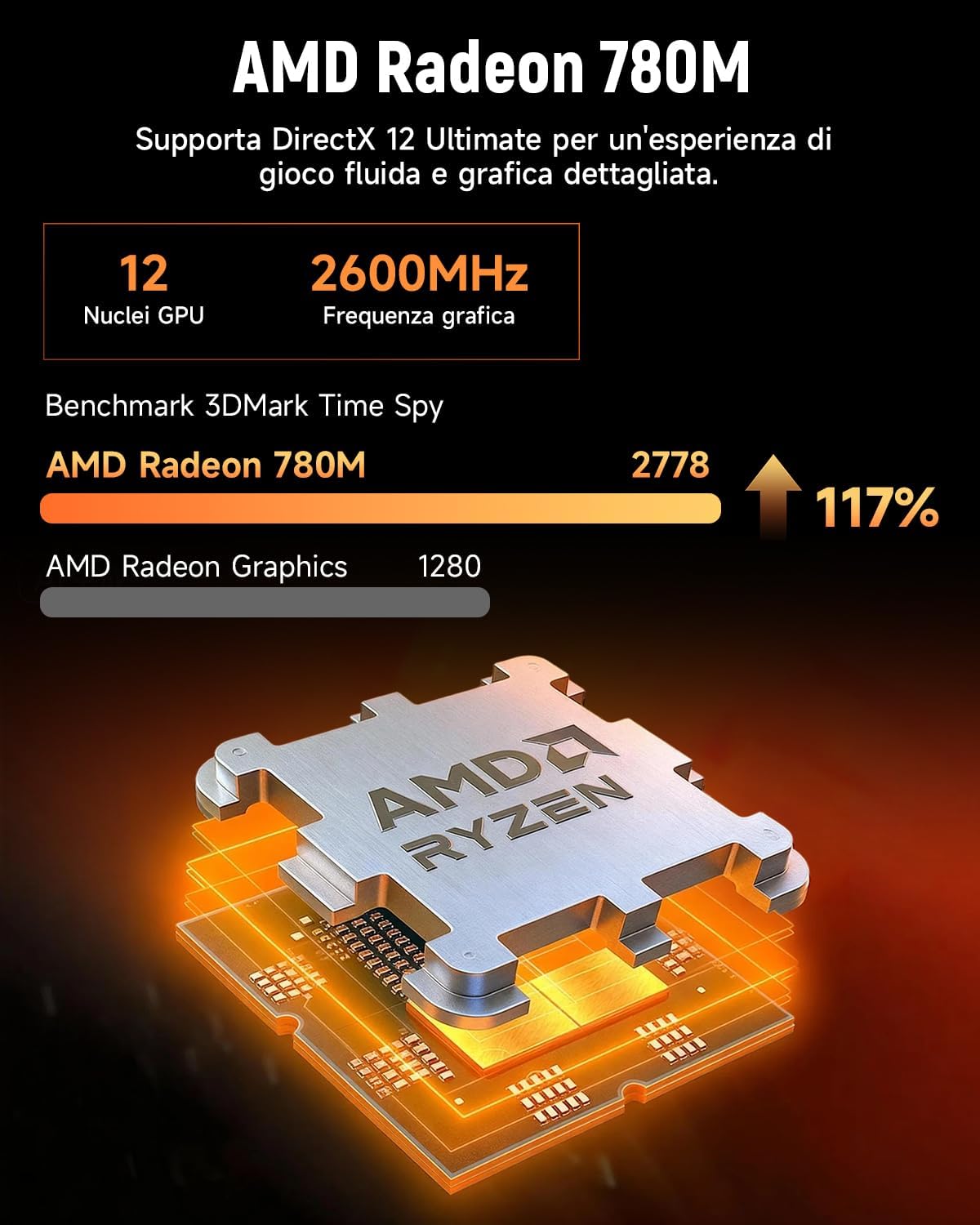
Figure 5: Key features of the AMD Radeon 780M GPU.
4.2 สถานการณ์การใช้งาน
The BMAX Mini PC B8A Pro is versatile and suitable for:
- การเล่นเกม: Enjoy casual gaming with the integrated Radeon 780M GPU.
- Work & Productivity: Ideal for intensive work, office applications, and creative tasks.
- Multimedia & Home Theater: Supports 4K video playback and can serve as a home media center.
- Education & Design: Capable of handling educational software and design applications.

Figure 6: Various applications of the BMAX Mini PC B8A Pro, including design, education, gaming, business, and home theater.
5. การบำรุงรักษา
5.1 ระบบทำความเย็น
The Mini PC features an efficient "Space Station" cooling system with a smart turbo fan and dual copper heat pipes to dissipate heat effectively, ensuring sustained performance without overheating.
5.2 การขยายพื้นที่จัดเก็บข้อมูลและหน่วยความจำ
The B8A Pro is equipped with a 512GB NVMe PCIe 4.0 x4 SSD and 16GB DDR5 RAM. Both are expandable for increased performance and storage capacity.

Figure 7: Details on DDR5 memory and NVMe SSD, showing expansion slots.
Video 3: Demonstrates how to access the internal components for SSD and RAM upgrades.
To expand storage or memory:
- ปิดเครื่องมินิพีซีและถอดสายเคเบิลทั้งหมดออก
- Unscrew the four screws on the bottom cover.
- Carefully lift the bottom cover.
- Locate the SSD slot and DDR5 memory slots.
- Install your new SSD or RAM modules according to their respective installation guides.
- ประกอบฝาครอบด้านล่างกลับเข้าไปและขันสกรูให้แน่น
5.3 การทำความสะอาดทั่วไป
Regularly clean the exterior of the Mini PC with a soft, dry cloth. Ensure the cooling vents are free from dust and debris to maintain optimal airflow and prevent overheating.
6 การแก้ไขปัญหา
- ไม่มีไฟฟ้า: ตรวจสอบให้แน่ใจว่าอะแดปเตอร์ไฟฟ้าเชื่อมต่อกับมินิพีซีและเต้ารับไฟฟ้าที่ใช้งานได้แน่นหนา
- ไม่มีจอแสดงผล: Check all display cable connections (HDMI, DP, Type-C) to your monitor(s) and ensure the monitor is set to the correct input source.
- ปัญหาเครือข่าย: For wired connections, check the Ethernet cable. For Wi-Fi, ensure the Wi-Fi adapter is enabled and connected to the correct network.
- Windows Damaged/Recovery: If Windows is damaged, press the F9 key during startup to enter the BMAX Smart Recovery environment to reset Windows. This can help resolve software issues without losing your files.
7. ข้อมูลจำเพาะ
| คุณสมบัติ | ข้อมูลจำเพาะ |
|---|---|
| ยี่ห้อ | บีแม็กซ์ |
| ระบบปฏิบัติการ | วินโดวส์ 11 โปร |
| รุ่นซีพียู | Ryzen 7 8745HS |
| ความเร็วซีพียู | 4.9 กิกะเฮิรตซ์ |
| ขนาดแคช | 16MB |
| โคโปรเซสเซอร์กราฟิก | การ์ดจอ AMD Radeon 780M |
| Graphics Description | บูรณาการ |
| ความจุหน่วยความจำ | แรม 16GB DDR5 |
| ความจุในการเก็บข้อมูล | 512GB NVMe SSD ความจุ |
| การใช้ผลิตภัณฑ์เฉพาะ | Photo Editing, Gaming, Work |
| PC Design Type | มินิพีซี |
8. การรับประกันและการสนับสนุน
Your BMAX Mini PC B8A Pro comes with a standard manufacturer's warranty. For detailed warranty information, please refer to the warranty card included in your package or visit the official BMAX website. For technical support, troubleshooting assistance, or service inquiries, please contact BMAX customer support through their official channels.