
การแนะนำ
The STF Elite On-Ear Wireless Headphones offer versatile audio connectivity and comfortable listening. This manual provides essential information for setting up, operating, maintaining, and troubleshooting your headphones to ensure optimal performance.
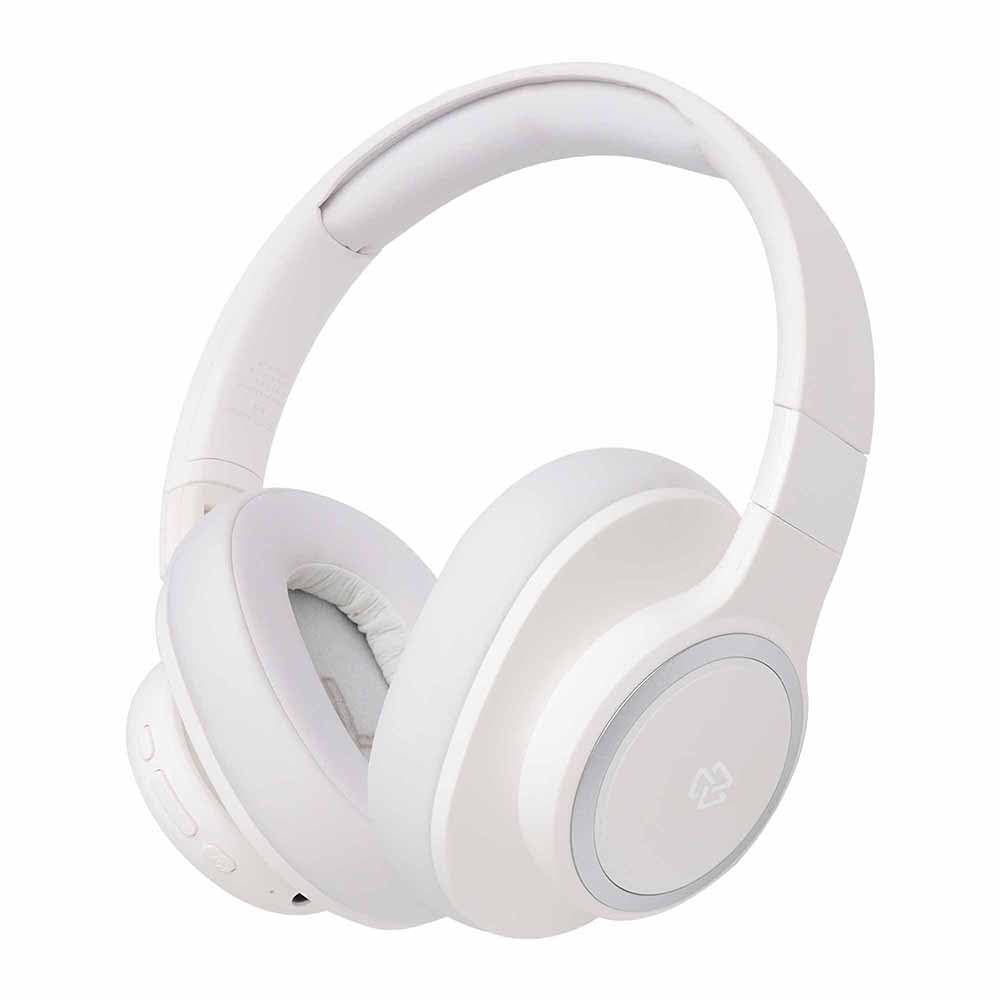
ภาพ: ด้านหน้า view of the STF Elite On-Ear Wireless Headphones in white.
การตั้งค่า
1. การชาร์จหูฟัง
Before first use, fully charge the headphones. Use the provided Type-C charging cable to connect the headphones to a compatible USB power source (e.g., computer USB port, USB wall adapter).
- การชาร์จเต็มจะใช้เวลาประมาณ 2 ชั่วโมง
- ไฟ LED จะแสดงสถานะการชาร์จ (เช่น สีแดงเมื่อกำลังชาร์จ สีน้ำเงินเมื่อชาร์จเต็มแล้ว)
- A fully charged battery provides up to 7 hours of continuous use.

ภาพ: ด้านข้าง view of the STF Elite headphones, highlighting the charging port and control buttons.
2. การจับคู่บลูทู ธ
- ตรวจสอบให้แน่ใจว่าหูฟังปิดอยู่
- กดปุ่มเปิด/ปิดค้างไว้จนกว่าไฟ LED จะกะพริบเป็นสีน้ำเงินและสีแดงสลับกัน ซึ่งแสดงว่าเข้าสู่โหมดจับคู่แล้ว
- บนอุปกรณ์ของคุณ (สมาร์ทโฟน แท็บเล็ต คอมพิวเตอร์) เปิดใช้งาน Bluetooth และค้นหาอุปกรณ์ที่มีอยู่
- Select "STF Elite" from the list of found devices.
- เมื่อเชื่อมต่อแล้ว ไฟ LED แสดงสถานะจะกะพริบเป็นสีน้ำเงินช้าๆ หรืออาจติดสว่างเป็นสีน้ำเงินตลอดเวลา
- หูฟังจะพยายามเชื่อมต่อกับอุปกรณ์ที่จับคู่ไว้ครั้งสุดท้ายโดยอัตโนมัติเมื่อเปิดเครื่อง
3. Auxiliary (Wired) Connection
To use the headphones with a wired connection, connect one end of the provided 3.5mm audio cable to the auxiliary input port on the headphones and the other end to your audio device's 3.5mm output jack. The headphones will automatically switch to auxiliary mode.
4. การเล่นไฟล์จากการ์ด microSD
Insert a MicroSD card (with audio files) into the designated slot on the headphones. The headphones will automatically detect the card and begin playing audio files. Use the control buttons to manage playback.
คำแนะนำการใช้งาน
เปิด/ปิดเครื่อง
- เปิดเครื่อง: กดปุ่มเปิด/ปิดค้างไว้ประมาณ 3 วินาที จนกว่าไฟแสดงสถานะ LED จะสว่างขึ้น
- หมดแรง: กดปุ่มเปิด/ปิดค้างไว้ประมาณ 3 วินาที จนกระทั่งไฟแสดงสถานะ LED ดับลง
การควบคุมการเล่นเพลง
- เล่น/หยุดชั่วคราว: กดปุ่มมัลติฟังก์ชัน (โดยปกติจะเป็นปุ่มเปิด/ปิด หรือปุ่มเล่น/หยุดชั่วคราวโดยเฉพาะ) หนึ่งครั้ง
- ปรับระดับเสียงขึ้น: กดปุ่มเพิ่มระดับเสียง (+)
- ลดเสียงลง: กดปุ่มลดระดับเสียง (-)
- เพลงถัดไป: กดปุ่มเพิ่มระดับเสียง (+) ค้างไว้
- แทร็กก่อนหน้า: กดปุ่มลดระดับเสียง (-) ค้างไว้
การจัดการการโทร
- รับ/วางสาย: กดปุ่มมัลติฟังก์ชั่นหนึ่งครั้ง
- ปฏิเสธสาย: กดปุ่มมัลติฟังก์ชันค้างไว้ประมาณ 2 วินาที
- โทรซ้ำหมายเลขล่าสุด: กดปุ่มมัลติฟังก์ชั่นสองครั้ง
การสลับโหมด
The headphones support Bluetooth, Auxiliary, and MicroSD playback modes. The headphones will automatically switch to Auxiliary mode when the 3.5mm cable is connected. To switch between Bluetooth and MicroSD modes, use the dedicated mode button if available, or disconnect the auxiliary cable to revert to wireless modes.
การซ่อมบำรุง
- การทำความสะอาด: Use a soft, dry cloth to clean the headphone surfaces and earcups. Do not use abrasive cleaners or immerse the headphones in water.
- พื้นที่จัดเก็บ: เมื่อไม่ใช้งาน ให้เก็บหูฟังไว้ในที่แห้งและเย็น หลีกเลี่ยงแสงแดดโดยตรงและอุณหภูมิที่สูงหรือต่ำเกินไป ดีไซน์แบบพับได้ช่วยให้จัดเก็บได้อย่างกะทัดรัด
- การดูแลแบตเตอรี่ เพื่อยืดอายุการใช้งานแบตเตอรี่ ควรหลีกเลี่ยงการใช้หูฟังจนหมดบ่อย ควรชาร์จหูฟังเป็นประจำ แม้จะไม่ได้ใช้งานเป็นเวลานานก็ตาม
การแก้ไขปัญหา
ไม่มีไฟฟ้า
- Ensure the headphones are fully charged. Connect them to a power source using the Type-C cable and check the charging indicator.
ไม่สามารถจับคู่ผ่านบลูทูธได้
- ตรวจสอบให้แน่ใจว่าหูฟังอยู่ในโหมดจับคู่ (ไฟ LED กระพริบเป็นสีน้ำเงินและสีแดง)
- ตรวจสอบให้แน่ใจว่าได้เปิดใช้งานบลูทูธบนอุปกรณ์ของคุณแล้ว และอยู่ห่างจากหูฟังไม่เกิน 10 เมตร
- ปิดและเปิดฟังก์ชันบลูทูธบนอุปกรณ์ของคุณใหม่อีกครั้ง
- If previously paired, try "forgetting" or "unpairing" "STF Elite" from your device's Bluetooth list and then re-pair.
- Ensure no other Bluetooth devices are actively connected to the headphones.
ไม่มีเสียง
- ตรวจสอบระดับเสียงทั้งบนหูฟังและอุปกรณ์ที่เชื่อมต่อของคุณ
- If using Bluetooth, ensure the headphones are properly paired and connected.
- If using the auxiliary cable, ensure it is fully inserted into both the headphones and the audio source.
- If using a MicroSD card, ensure it is inserted correctly and contains compatible audio files.
- ลองรีสตาร์ททั้งหูฟังและอุปกรณ์ต้นทางเสียงดู
คุณภาพเสียงไม่ดี
- If using Bluetooth, ensure there are no obstructions between the headphones and your device, and that you are within the 10-meter range.
- ลองเล่นไฟล์เสียงอื่นดู file or from a different source to rule out source issues.
- Ensure the auxiliary cable is not damaged and is securely connected.
ข้อมูลจำเพาะ
| แบบอย่าง | ผู้ลากมากดี |
| เวอร์ชันบลูทูธ | 5.3 |
| ช่วงบลูทูธ | สูงสุด 10 เมตร |
| ขนาดไดร์เวอร์ | 40 มม. |
| การตอบสนองความถี่ | 20 เฮิรตซ์ - 20 กิโลเฮิรตซ์ |
| อิมพีแดนซ์ | 32 โอห์ม |
| ระดับความดันเสียง (SPL) | 100 เดซิเบล |
| ความจุของแบตเตอรี่ | 200 มิลลิแอมป์ |
| เวลาการเล่น | นานถึง 7 ชั่วโมง |
| เวลาในการชาร์จ | ประมาณ 2 ชั่วโมง |
| พอร์ตชาร์จ | ประเภทซี |
| ตัวเลือกการเชื่อมต่อ | Bluetooth, 3.5mm Aux, MicroSD |
| ไมโครโฟน | บูรณาการ |
| น้ำหนัก | 280 กรัม |
การรับประกันและการสนับสนุน
The STF Elite On-Ear Wireless Headphones come with a รับประกัน 1 ปี นับจากวันที่ซื้อสินค้า การรับประกันนี้ครอบคลุมข้อบกพร่องจากการผลิตภายใต้การใช้งานปกติ ไม่ครอบคลุมความเสียหายที่เกิดจากการใช้งานผิดวิธี อุบัติเหตุ การดัดแปลงโดยไม่ได้รับอนุญาต หรือการสึกหรอตามปกติ
For warranty claims, technical support, or further assistance, please contact STF customer service through their official webหรือร้านค้าที่ซื้อผลิตภัณฑ์ โปรดเก็บหลักฐานการซื้อไว้เพื่อยืนยันการรับประกัน