
1. บทนำและเรื่องอื่นๆview
The GEYA GPS6-VA5 is an advanced adjustable over and under voltage protection device designed to safeguard electrical equipment from voltage fluctuations. It features a digital display for real-time monitoring of voltage and current, and offers customizable protection parameters. This device is suitable for various applications requiring reliable power protection.
This manual provides essential information for the safe and effective installation, operation, and maintenance of your GEYA GPS6-VA5 protection device.
2. ข้อมูลด้านความปลอดภัย
คำเตือน: Electrical installation and maintenance should only be performed by qualified personnel. Failure to follow these instructions may result in electric shock, fire, or serious injury.
- ควรตัดกระแสไฟออกจากวงจรทุกครั้งก่อนทำการติดตั้ง เดินสาย หรือซ่อมบำรุงอุปกรณ์
- Ensure all wiring connections are secure and comply with local electrical codes and standards.
- ห้ามใช้งานอุปกรณ์หากพบว่าได้รับความเสียหาย
- ตรวจสอบปริมาณtage and current ratings of your system are compatible with this device.
3. คุณสมบัติของผลิตภัณฑ์
- จอแสดงผลดิจิตอลอัจฉริยะ: Clear LED display shows real-time voltage, current, and fault status for quick monitoring.
- Advanced Over & Under Voltagการป้องกันอี: Equipped with factory default settings of 275V overvoltage and 175V undervoltage, ensuring device safety. These settings are adjustable.
- การติดตามปัจจุบัน: Displays current values, providing comprehensive electrical oversight.
- Adjustable Reset Time: Offers a factory default reset time of 30 seconds, adjustable from 2 to 900 seconds to suit specific application needs.
- การออกแบบที่กะทัดรัด: Ultra-small size for efficient space utilization.
- การติดตั้งราง DIN: Designed for easy integration with 35mm DIN rail systems, simplifying installation.
4. การตั้งค่าและการติดตั้ง
The GEYA GPS6-VA5 is designed for 35mm DIN rail mounting. Ensure the mounting location is dry, well-ventilated, and free from excessive vibration or heat.
4.1 การติดตั้ง
Attach the device securely to a standard 35mm DIN rail. The device features a clip mechanism for easy installation and removal.

Image: Dimensions of the GEYA GPS6-VA5 device and an illustration of 35mm DIN rail mounting.
4.2 การเดินสายไฟ
Connect the device according to the wiring diagram provided. Ensure correct polarity and secure connections for both input (Line and Neutral) and output to the load.
- Connect the incoming Line (L) and Neutral (N) wires to the designated input terminals.
- Connect the load's Line (L) and Neutral (N) wires to the designated output terminals.
- Tighten all screw terminals firmly to prevent loose connections.
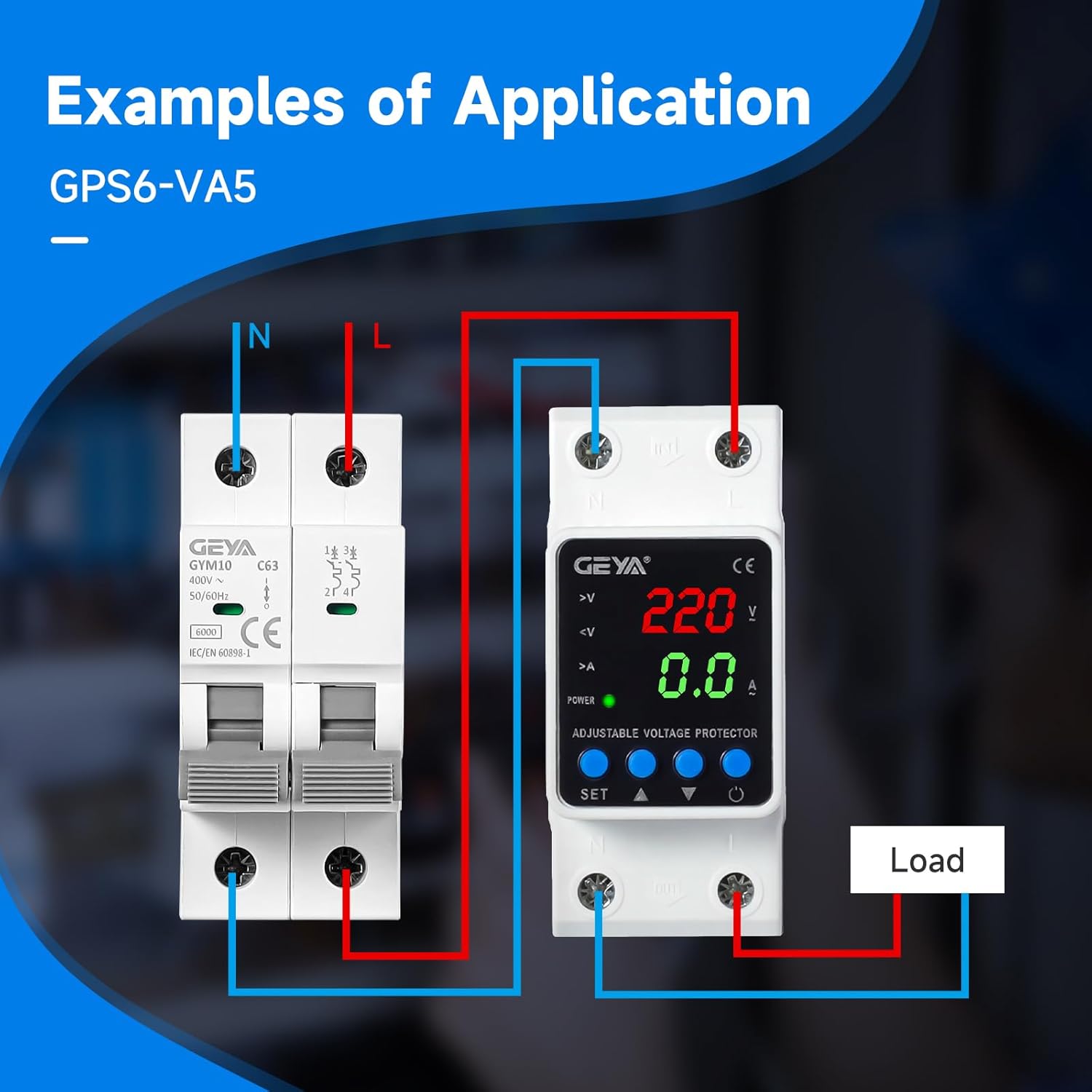
ภาพ: อดีตample wiring diagram showing connections for the GEYA GPS6-VA5 with an external circuit breaker and load.
5. คู่มือการใช้งาน
Once installed and powered on, the device will display real-time voltage and current readings. The LED indicators provide status information.
5.1 จอแสดงผลแบบดิจิตอลview
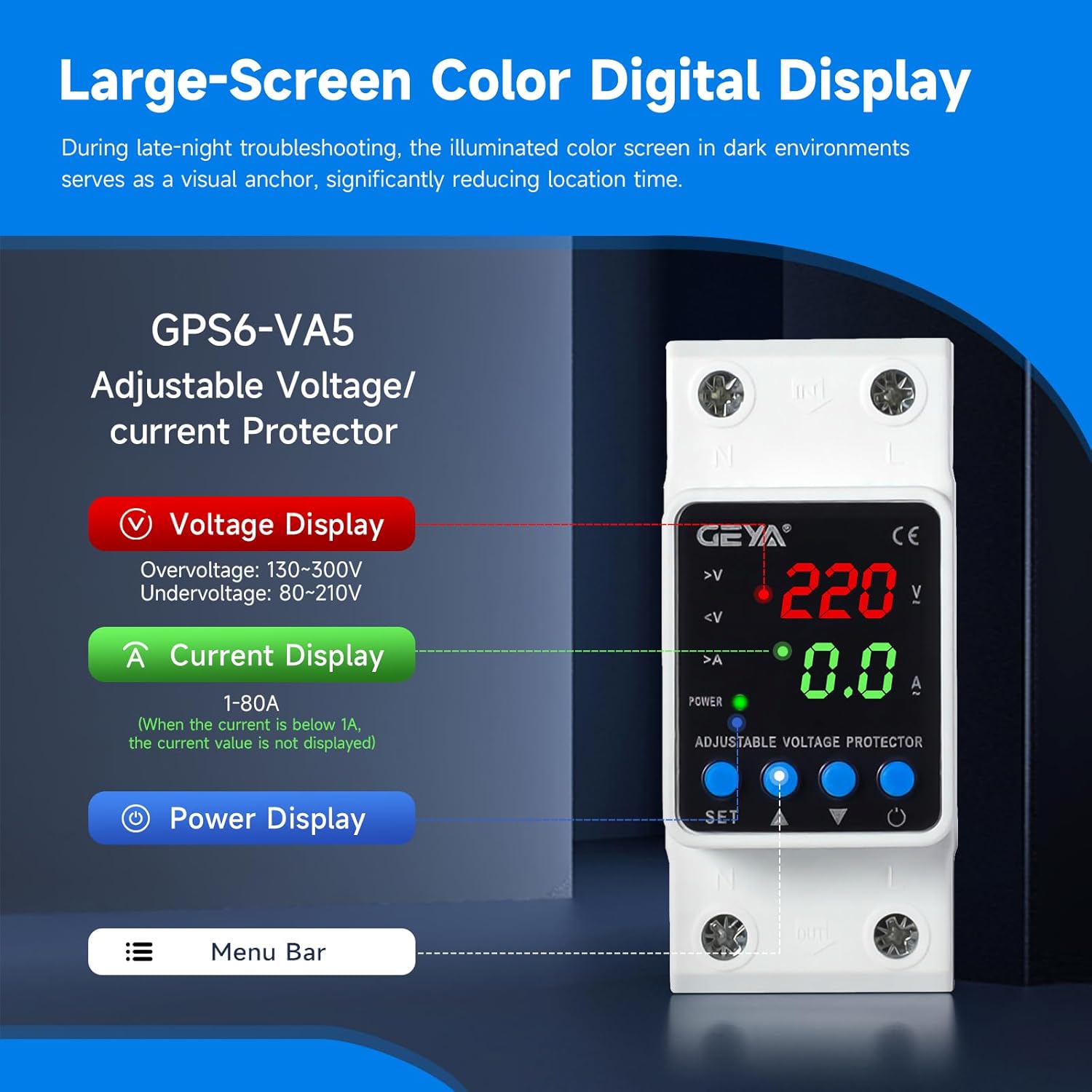
Image: Close-up of the GEYA GPS6-VA5 digital display, highlighting voltage, current, and power indicators, along with control buttons.
- เล่มที่tagอี แสดงผล: แสดงปริมาณกระแสไฟฟ้าtage (V). Overvoltage range: 130-300V, Undervoltagช่วงอี: 80-210V.
- จอแสดงผลปัจจุบัน: Shows the current (A) flowing through the device (1-80A). If current is below 1A, the value may not be displayed.
- จอแสดงผลพลังงาน: ระบุสถานะพลังงาน
- ตัวบ่งชี้: LEDs for overvoltage (>V), undervoltage (<V), and overcurrent (>A) provide quick visual status.
5.2 การปรับการตั้งค่า
The device features 'SET', 'Up Arrow', and 'Down Arrow' buttons for adjusting protection parameters. Refer to the detailed instructions below for specific parameter adjustments.
- Press the 'SET' button to enter the setting mode.
- Use the 'Up Arrow' and 'Down Arrow' buttons to navigate through different parameters (e.g., overvoltage เกณฑ์, อันเดอร์โวลtage threshold, reset time).
- Press 'SET' again to select a parameter, then use 'Up Arrow' and 'Down Arrow' to adjust its value.
- Press 'SET' to confirm the new value and move to the next parameter or exit setting mode.
บันทึก: Factory default settings are 275V for overvoltage, 175V for undervoltage, and a 30-second reset time. These can be adjusted within the specified ranges.
6. การบำรุงรักษา
The GEYA GPS6-VA5 is designed for minimal maintenance. Regular checks can help ensure its continued reliable operation.
- การทำความสะอาด: Periodically wipe the device with a soft, dry cloth to remove dust. Do not use abrasive cleaners or solvents.
- ตรวจสอบการเชื่อมต่อ: ตรวจสอบการเชื่อมต่อสายไฟทั้งหมดเป็นประจำทุกปี เพื่อให้แน่ใจว่ายังคงแน่นหนาและปราศจากสนิม
- สภาพแวดล้อม : ตรวจสอบให้แน่ใจว่าสภาพแวดล้อมการทำงานยังคงอยู่ในช่วงอุณหภูมิและความชื้นที่กำหนด
- ไม่มีชิ้นส่วนที่ผู้ใช้สามารถซ่อมบำรุงได้: Do not attempt to open or repair the device. Refer any issues to qualified service personnel.
7 การแก้ไขปัญหา
If you encounter issues with your GEYA GPS6-VA5 device, refer to the following common troubleshooting steps:
- ไม่มีจอแสดงผล/ไม่มีพลังงาน:
- ตรวจสอบแหล่งจ่ายไฟหลักของอุปกรณ์
- Verify all input wiring connections are secure.
- Device Not Tripping on Fault:
- Confirm that the overvoltage/อันเดอร์โวลtage thresholds are set correctly and within the expected range for your application.
- Ensure the fault condition (e.g., voltage outside set limits) is present and sustained long enough to trigger the trip delay.
- Device Tripping Unexpectedly:
- Check the actual line voltage and current to ensure they are within normal operating parameters.
- Review the set overvoltage, อันเดอร์โวลtage, and overcurrent thresholds. Adjust if necessary.
- Inspect for intermittent power fluctuations in your electrical system.
- การอ่านไม่ถูกต้อง:
- Ensure wiring is correct and connections are tight.
- Compare readings with a calibrated multimeter if possible.
If the problem persists after attempting these steps, contact GEYA customer support or a qualified electrician.
8. ข้อมูลจำเพาะ
| พารามิเตอร์ | ค่า |
|---|---|
| ชื่อยี่ห้อ | เกย่า |
| หมายเลขรุ่น | GPS6-VA5-2P-40A-220V |
| จัดอันดับอุปทานVoltage | AC220V (L-N) |
| ความถี่ที่กำหนด | 50/60เฮิรตซ์ |
| คะแนนปัจจุบัน | 40 Amps |
| คอยล์ Voltage | 220 โวลต์ (AC) |
| ปริมาณการสลับขั้นต่ำtage | 130 โวลต์ (AC) |
| โหมดการทำงาน | อัตโนมัติ |
| ประเภทการติดตั้ง | ราง DIN |
| ประเภทขั้วต่อ | สกรู |
| วัสดุติดต่อ | เงิน |
| ประเภทการติดต่อ | เปิดปกติ |
| รีเซ็ตเวลา | 2-900s (Factory default: 30s) |
| การรับรอง | CE |
9. การรับประกันและการสนับสนุน
For warranty information or technical support, please contact GEYA customer service. Keep your purchase receipt as proof of purchase.
For further assistance, visit the official GEYA webไซต์หรือติดต่อตัวแทนจำหน่ายในพื้นที่ของคุณ