
1. บทนำ
The Tiksounds S12 is a portable Bluetooth speaker designed for versatile audio playback. It features Bluetooth 5.4 connectivity, 15W audio output, IPX7 waterproofing, True Wireless Stereo (TWS) pairing, and integrated LED lighting. This manual provides instructions for the proper setup, operation, and maintenance of your S12 speaker.
2. เนื้อหาบรรจุภัณฑ์
- Tiksounds S12 Portable Bluetooth Speaker
- สายไฟ
- คู่มือการใช้งาน (เอกสารนี้)
3. คุณสมบัติของผลิตภัณฑ์
- กำลังขับเสียง 15 วัตต์: Delivers clear sound for an enhanced listening experience.
- การเชื่อมต่อบลูทูธ 5.4: Provides a fast and stable wireless connection with compatible devices.
- ระดับการกันน้ำ IPX7: Protects the speaker from water immersion up to 1 meter for 30 minutes, suitable for outdoor use.
- สเตอริโอไร้สายจริง (TWS): Allows two S12 speakers to be paired together for 360° stereo sound.
- ไฟ LED แบบบูรณาการ: Features colorful LED lights that can pulse with music, enhancing the atmosphere.
- เวลาเล่นยาวนาน: Up to 12 hours of music playback on a single charge (at 50% volume).
- การออกแบบพกพา: Compact and lightweight (approximately 382g) for easy transport.
4. การควบคุมและตัวชี้วัด
The speaker features intuitive controls and LED indicators for easy operation.

Image: Speaker button layout and functions. This diagram illustrates the various buttons on the speaker and their corresponding actions, including single presses and long presses for power, volume, track control, light modes, and TWS pairing.
| ปุ่ม | การกระทำ | การทำงาน |
|---|---|---|
| Power Button (◯) | กดค้างไว้ (2 วินาที) | เปิด/ปิดเครื่อง |
| Power Button (◯) | กดครั้งเดียว | เล่น/หยุดเพลง, รับ/วางสาย |
| Power Button (◯) | กดค้างไว้ (1.5 วินาที) | ปฏิเสธการรับสาย |
| เพิ่มระดับเสียง (+) | กดครั้งเดียว | เพิ่มปริมาณ |
| เพิ่มระดับเสียง (+) | กดค้างไว้ (2 วินาที) | เพลงถัดไป |
| ลดเสียงลง (-) | กดครั้งเดียว | ลดระดับเสียง |
| ลดเสียงลง (-) | กดค้างไว้ (2 วินาที) | เพลงก่อนหน้า |
| Light Mode Button (☀) | กดครั้งเดียว | เปลี่ยนโหมดแสง |
| Light Mode Button (☀) | กดค้างไว้ (3 วินาที) | เปิด/ปิดไฟ |
| TWS Button (TWS) | กดสองครั้ง | เริ่มต้นการจับคู่ TWS |
5. การตั้งค่า
5.1. ชาร์จลำโพง
Before first use, fully charge the speaker. Use the provided power cable to connect the speaker to a compatible USB power source. The charging indicator will show the charging status. A full charge typically takes 3-4 hours.

Image: Speaker dimensions and battery specifications. This image highlights the compact size of the speaker (8cm x 11.3cm) and its 1800mAh battery, which charges in 3-4 hours.
5.2. เปิด/ปิดเครื่อง
- To power on, press and hold the Power Button (◯) for 2 seconds.
- To power off, press and hold the Power Button (◯) for 2 seconds again.
5.3. การจับคู่บลูทู ธ
- ตรวจสอบให้แน่ใจว่าลำโพงเปิดอยู่และอยู่ในโหมดจับคู่บลูทูธ (ระบุด้วยไฟ LED กะพริบ)
- บนอุปกรณ์ของคุณ (สมาร์ทโฟน แท็บเล็ต แล็ปท็อป) ให้เปิดใช้งาน Bluetooth
- ค้นหา available Bluetooth devices and select "S12" from the list.
- Once connected, the speaker will indicate a successful pairing, and the LED will stop flashing.

Image: Multiple connection options. This image demonstrates the speaker's compatibility with various devices such as pads, PCs, and TVs, highlighting its versatile connectivity.
5.4. การจับคู่ True Wireless Stereo (TWS)
To achieve 360° stereo sound, you can pair two Tiksounds S12 speakers together.
- ตรวจสอบให้แน่ใจว่าลำโพง S12 ทั้งสองตัวเปิดอยู่และไม่ได้เชื่อมต่อกับอุปกรณ์ Bluetooth อื่นใด
- On one of the speakers, double-press the TWS Button. The speaker will enter TWS pairing mode.
- The two speakers will automatically search for and connect to each other. A successful connection will be indicated by an audible prompt.
- Once TWS paired, connect your device to one of the speakers via Bluetooth as described in section 5.3. Both speakers will now play audio in stereo.

Image: True Wireless Stereo (TWS) setup. This image illustrates two S12 speakers connected wirelessly to a laptop, demonstrating the TWS feature for a 360-degree audio experience.
6. คู่มือการใช้งาน
6.1. การเล่นเพลง
- เล่น/หยุดชั่วคราว: Single press the Power Button (◯).
- ปรับระดับเสียงขึ้น: กดปุ่มเพิ่มระดับเสียง (+) หนึ่งครั้ง
- ลดเสียงลง: กดปุ่มลดระดับเสียง (-) หนึ่งครั้ง
- เพลงถัดไป: กดปุ่มเพิ่มระดับเสียง (+) ค้างไว้ 2 วินาที
- แทร็กก่อนหน้า: กดปุ่มลดระดับเสียง (-) ค้างไว้ 2 วินาที
6.2. การจัดการการโทร
- รับ/วางสาย: Single press the Power Button (◯).
- ปฏิเสธสาย: Press and hold the Power Button (◯) for 1.5 seconds.
6.3. โหมดไฟ LED
The speaker features multiple LED light modes.
- เปลี่ยนโหมดแสง: Single press the Light Mode Button (☀).
- เปิด/ปิดไฟ: Press and hold the Light Mode Button (☀) for 3 seconds.
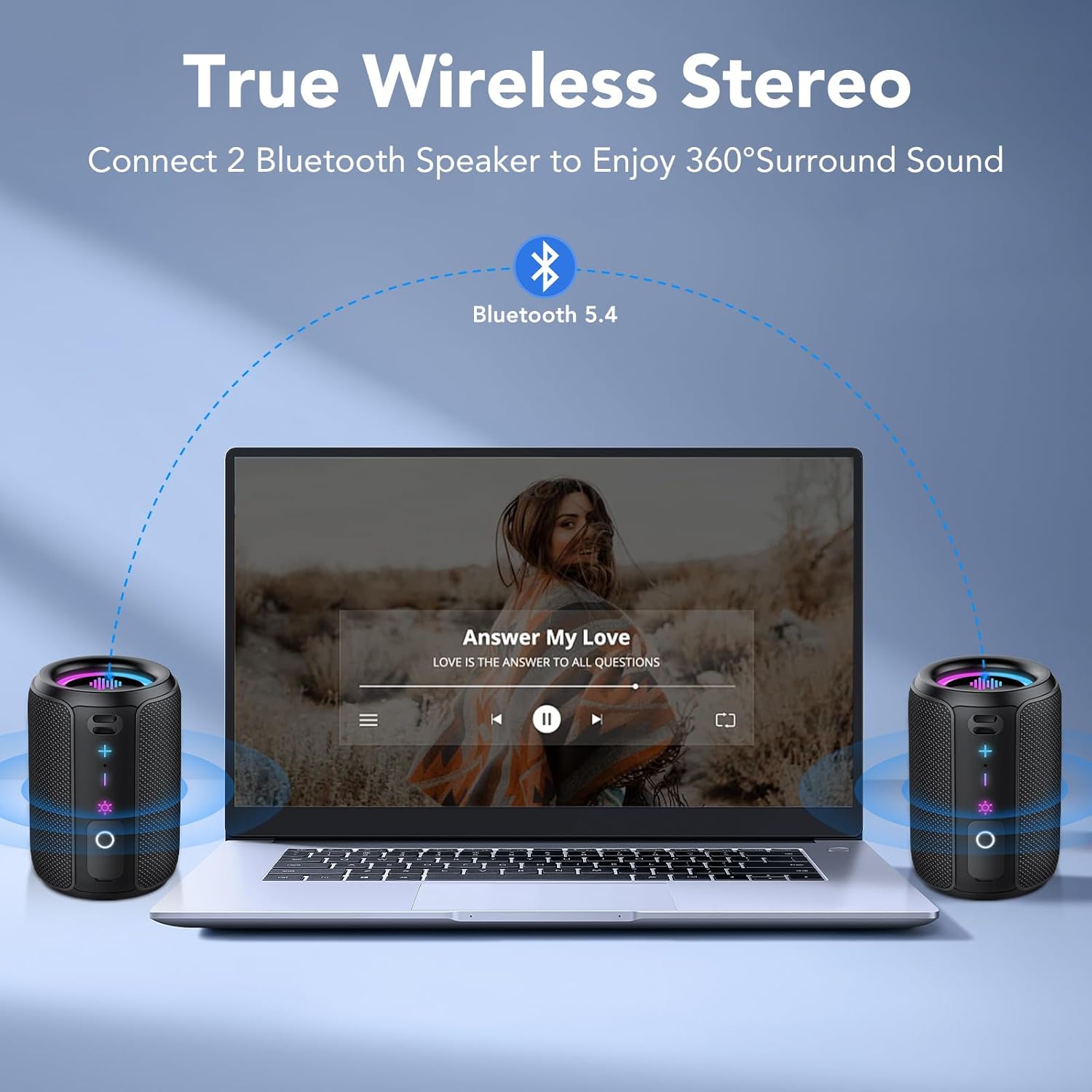
Image: RGB Colorful Lighting. This image displays three S12 speakers showcasing their dynamic RGB lighting, which can synchronize with music.
7. การบำรุงรักษา
- การทำความสะอาด: เช็ดลำโพงด้วย d . นุ่มๆamp ผ้า ห้ามใช้สารทำความสะอาดที่มีฤทธิ์กัดกร่อนหรือตัวทำละลาย
- ความต้านทานน้ำ: While IPX7 rated, ensure the charging port cover is securely closed before exposing the speaker to water. Do not intentionally submerge the speaker for extended periods or beyond specified depths.
- พื้นที่จัดเก็บ: เก็บลำโพงไว้ในที่แห้งและเย็น หลีกเลี่ยงแสงแดดโดยตรงและอุณหภูมิที่สูงหรือต่ำเกินไป
- การดูแลแบตเตอรี่ เพื่อยืดอายุการใช้งานแบตเตอรี่ ควรหลีกเลี่ยงการปล่อยประจุแบตเตอรี่จนหมดบ่อยๆ ควรชาร์จลำโพงเป็นประจำ แม้จะไม่ได้ใช้งานเป็นเวลานานก็ตาม
8 การแก้ไขปัญหา
| ปัญหา | สาเหตุที่เป็นไปได้ | สารละลาย |
|---|---|---|
| ลำโพงไม่เปิดเครื่อง | แบตเตอรี่อ่อน | ชาร์จลำโพงให้เต็ม |
| ไม่มีเสียง. | Volume too low; not paired; incorrect audio source. | Increase volume on speaker and device. Ensure successful Bluetooth pairing. Check device's audio output settings. |
| การจับคู่บลูทูธล้มเหลว | ลำโพงไม่อยู่ในโหมดจับคู่; บลูทูธของอุปกรณ์ปิดอยู่; อยู่ห่างกันเกินไป | Ensure speaker is in pairing mode. Turn device Bluetooth off and on. Move speaker closer to device (within 10 meters). Forget "S12" on device and re-pair. |
| คุณภาพเสียงไม่ดีหรือผิดเพี้ยน | Low battery; device too far; interference. | Charge the speaker. Move device closer. Avoid obstacles between speaker and device. Reduce volume if distortion occurs at high levels. |
| การจับคู่ TWS ล้มเหลว | Speakers already paired to other devices; not in TWS mode. | Ensure both speakers are disconnected from other devices. Double-press TWS button on one speaker to initiate pairing. |
9. ข้อมูลจำเพาะ
| คุณสมบัติ | ข้อมูลจำเพาะ |
|---|---|
| ชื่อรุ่น | S12 |
| กำลังขับ | 15 Watios |
| เวอร์ชันบลูทูธ | 5.4 |
| ความจุของแบตเตอรี่ | 1800 มิลลิแอมป์ |
| เวลาการเล่น | สูงสุด 12 ชั่วโมง (ที่ระดับเสียง 50%) |
| เวลาในการชาร์จ | 3-4 ชั่วโมง |
| ระดับการกันน้ำ | IPX7 |
| ขนาด (D x W x H) | 8 x 8 x 11 ซม. |
| น้ำหนัก | ประมาณ 382กรัม |
| ช่วงบลูทูธ | สูงสุด 10 เมตร |
| การตอบสนองความถี่ | ความถี่ 20 กิโลเฮิรตซ์ |
10. การรับประกันและการสนับสนุน
For warranty information, please refer to the documentation provided with your purchase or contact your retailer. For technical support or further assistance, please contact Tiksounds customer service through their official webเว็บไซต์หรือแพลตฟอร์มที่ซื้อผลิตภัณฑ์นั้น