
1. บทนำ
The ACECONN Pi2 Linux 4K HD Super Box TV Box is a versatile streaming device designed for high-definition media consumption. It operates on a Linux system, offering a customizable, stable, and secure platform for your entertainment needs. This device supports 4K UHD resolution and a wide array of video formats, ensuring a premium viewการสร้างประสบการณ์
คุณสมบัติที่สำคัญ ได้แก่:
- Linux system for high customization, stability, and security.
- Supports 4K UHD resolution and multiple video formats for high-definition quality.
- Compatible with various connection methods such as HDMI and RCA.
- Multiple USB ports for media playback and software updates.
- Supports network and USB dual upgrades for convenient software maintenance.

Image: The ACECONN Pi2 Linux 4K HD Super Box TV Box and its remote control.
2. คู่มือการติดตั้ง
2.1 เนื้อหาบรรจุภัณฑ์
ก่อนเริ่ม โปรดตรวจสอบให้แน่ใจว่ามีสิ่งของครบถ้วนในบรรจุภัณฑ์:
- ACECONN Pi2 TV Box
- หน่วยควบคุมระยะไกล (RCU)
- Power Adapter (US type)
- สาย HDMI
- Extender IR
- คู่มือการใช้งาน

Image: All components included in the ACECONN Pi2 package.
2.2 การเชื่อมต่ออุปกรณ์
- การเชื่อมต่อไฟฟ้า: Connect the provided power adapter to the DC IN port on the TV Box and then plug it into a power outlet.
- การเชื่อมต่อ HDMI: Use the HDMI cable to connect the HDMI OUT port on the TV Box to an HDMI IN port on your television or display. Note the HDMI input number on your TV.
- การเชื่อมต่อเครือข่าย (ทางเลือก):
- อีเธอร์เน็ต: สำหรับการเชื่อมต่อแบบใช้สาย ให้เชื่อมต่อสายอีเธอร์เน็ตจากเราเตอร์ไปยังพอร์ต LAN บนกล่องรับสัญญาณทีวี
- ไวไฟ : For a wireless connection, you will configure Wi-Fi settings after the initial power-on.
- อุปกรณ์ USB (ทางเลือก): You can connect USB storage devices or other peripherals to the available USB ports.
2.3 เปิดเครื่องครั้งแรก
After connecting all necessary cables, turn on your television and select the correct HDMI input. The ACECONN Pi2 TV Box should power on automatically or can be powered on using the remote control. Follow any on-screen prompts for initial setup, such as language selection and network configuration.
3. คู่มือการใช้งาน
3.1 ส่วนต่อประสานผู้ใช้จบลงแล้วview
Upon startup, you will see the main user interface, which provides access to various applications and settings. The interface is designed for easy navigation using the provided remote control.
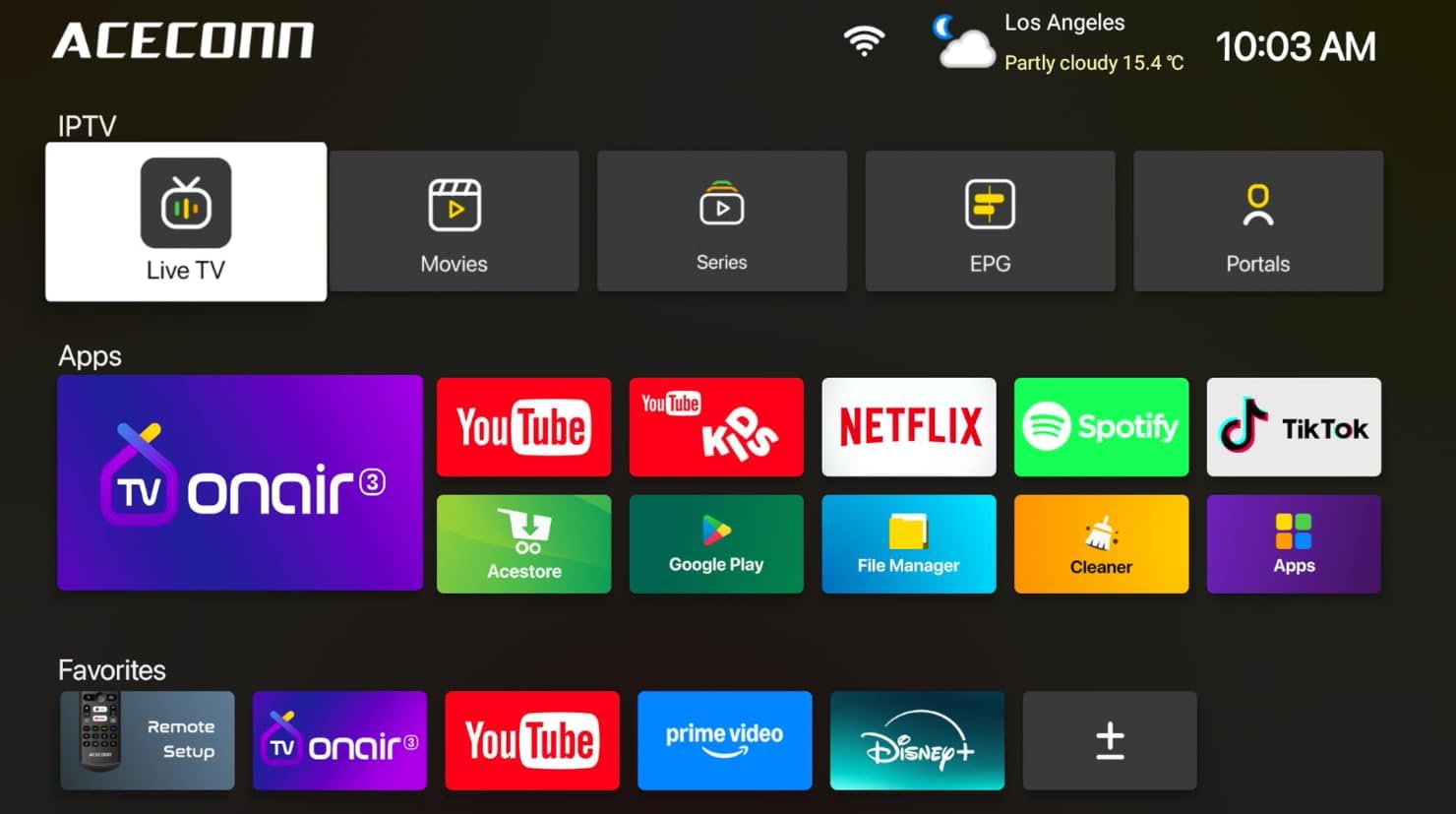
Image: Main user interface of the ACECONN Pi2, displaying various content categories and applications.
3.2 Navigation and Remote Control
Use the directional buttons on the remote control to navigate through menus and select items. The 'OK' button confirms selections, and the 'Back' button returns to the previous screen. Familiarize yourself with the remote's layout for optimal control.
3.3 การเล่นสื่อ
The Pi2 supports various media playback options:
- สตรีมมิ่ง: Access pre-installed or downloaded streaming applications for online content.
- การเล่นในเครื่อง: Connect a USB hard drive or flash drive to play downloaded 4K content directly. The device supports full format compatibility including MKV, MP4, and AVI.
- Personal Media Library: Utilize applications like Kodi to organize and play your media collection.

Image: The ACECONN Pi2 supports various media consumption scenarios, including family streaming, personal media organization, and local file การเล่นซ้ำ
3.4 การตั้งค่าเครือข่าย
ในการเชื่อมต่อกับเครือข่าย:
- Navigate to the 'Settings' menu from the home screen.
- Select 'Network' or 'Wi-Fi' settings.
- For Wi-Fi, select your network from the list and enter the password. For Ethernet, ensure the cable is connected; the device should automatically connect.
3.5 การตั้งค่าระบบ
The 'Settings' menu allows you to customize various aspects of your device:
- แสดง: Adjust resolution, screen scaling, and HDR settings. The device supports 4K@60fps with HDR 10+ for an enhanced visual experience.
- เสียง: Configure audio output options.
- Language & Input: Change the system language and keyboard settings.
- การควบคุมโดยผู้ปกครอง: Utilize the built-in parental control features to manage content access.
- เกี่ยวกับ: View device information, including the Linux 4.9 kernel version.

Image: The ACECONN Pi2 offers advanced 4K decoding, HDR 10+ dynamic color, and broad media format compatibility.
4. การบำรุงรักษา
4.1 การทำความสะอาด
To maintain the device's appearance and performance, gently wipe the exterior with a soft, dry cloth. Avoid using liquid cleaners or abrasive materials.
4.2 Software Updates (OTA Updates)
The ACECONN Pi2 supports Over-The-Air (OTA) updates, as well as updates via USB. Regularly checking for and installing updates ensures you have the latest features, drivers, and security enhancements. This contributes to the device's rugged 24/7 stability.
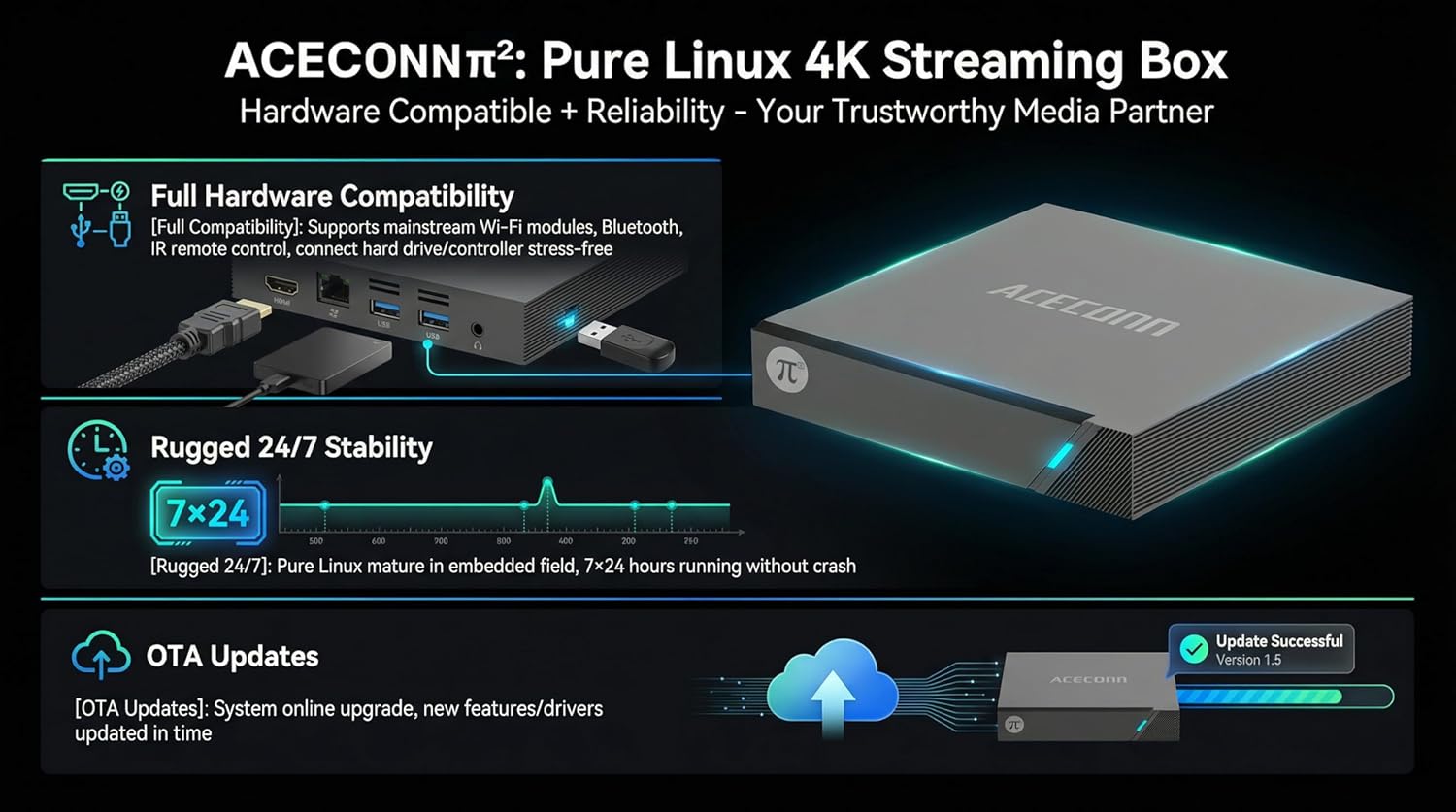
Image: The ACECONN Pi2 features full hardware compatibility, robust stability, and convenient OTA updates.
5 การแก้ไขปัญหา
If you encounter issues with your ACECONN Pi2, refer to the following common problems and solutions:
- ไม่มีไฟฟ้า:
- ตรวจสอบให้แน่ใจว่าอะแดปเตอร์ไฟฟ้าเชื่อมต่อกับอุปกรณ์และเต้ารับไฟฟ้าที่ใช้งานได้อย่างปลอดภัย
- ลองใช้เต้ารับไฟอื่น
- ไม่มีสัญญาณทางทีวี:
- Verify the HDMI cable is firmly connected to both the TV Box and the TV.
- ตรวจสอบว่าทีวีของคุณตั้งค่าเป็นแหล่งอินพุต HDMI ที่ถูกต้อง
- ลองใช้สาย HDMI เส้นอื่น หรือพอร์ต HDMI อื่นบนทีวีของคุณดู
- รีโมทคอนโทรลไม่ตอบสนอง:
- Ensure the batteries in the remote control are correctly inserted and not depleted. Replace if necessary.
- เล็งรีโมทไปที่ตัวรับสัญญาณอินฟราเรดของกล่องทีวีโดยตรง
- ปัญหาการเชื่อมต่อเครือข่าย:
- For Wi-Fi, re-enter the password in network settings. Ensure your router is working correctly.
- For Ethernet, check the cable connection to both the TV Box and the router.
- รีสตาร์ทเราเตอร์และกล่องทีวีของคุณ
- ระบบทำงานช้าหรือค้าง:
- รีสตาร์ทกล่องทีวี
- ตรวจสอบให้แน่ใจว่าอุปกรณ์มีการระบายอากาศเพียงพอ
- ตรวจสอบและติดตั้งการอัพเดตซอฟต์แวร์ที่มีอยู่
6. ข้อมูลจำเพาะ
| คุณสมบัติ | ข้อมูลจำเพาะ |
|---|---|
| หมายเลขรุ่น | พี2 |
| ยี่ห้อ | เอซีคอนน์ |
| ขนาดสินค้า | 11 x 11 x 2 ซม. |
| น้ำหนักสินค้า | 0.5 กิโลกรัม |
| เทคโนโลยีการเชื่อมต่อ | บลูทูธ, อีเทอร์เน็ต, HDMI, USB, Wi-Fi |
| ประเภทขั้วต่อ | HDMI |
| ปณิธาน | 4K |
| ความละเอียดเอาท์พุทวิดีโอ | 3840 พิกเซล |
| ประเภทตัวควบคุม | การควบคุมแอพ, การควบคุมระยะไกล |
| ความจุของหน่วยความจำ | 8GB |
| คุณสมบัติพิเศษ | การควบคุมโดยผู้ปกครอง |
| ระบบปฏิบัติการ | Linux 4.9 Kernel |
7. การรับประกันและการสนับสนุน
7.1 ข้อมูลการรับประกัน
This ACECONN Pi2 Linux 4K HD Super Box TV Box comes with a การรับประกันจากผู้ผลิต 1 ปี นับจากวันที่ซื้อ โปรดเก็บหลักฐานการซื้อไว้เพื่อใช้ในการเคลมประกัน
7.2 การสนับสนุนลูกค้า
For technical assistance or warranty inquiries, please contact the manufacturer:
- ผู้ผลิต: shenzhenshiniulinkejiyouxiangongsi
- อีเมล: zengkkoo@gmail.com