
1. บทนำ
Thank you for choosing the Audio Array AI-13 4-Channel Hybrid USB Audio Mixer. This compact mixer is designed for a variety of audio applications, including podcasting, streaming, live sessions, and home studio setups. It features 4 analog and 2 digital channels, supporting microphones, instruments, and playback devices in a streamlined interface. This manual provides detailed instructions for setup, operation, maintenance, and troubleshooting to ensure optimal performance of your device.

Image 1.1: User operating the AI-13 mixer in a studio environment.
2. คุณสมบัติของผลิตภัณฑ์
The Audio Array AI-13 mixer offers a range of features for versatile audio control:
- Hybrid 4-Channel Control: Combines 4 analog and 2 digital channels for flexible input management.
- Studio-Ready Inputs: Dual XLR mic inputs with switchable +48V phantom power for condenser microphones, plus Hi-Z support for guitars and instruments.
- Built-in 2-Band EQ: Each channel includes a 2-band equalizer for precise sound shaping.
- ประสิทธิภาพเสียงรบกวนต่ำ: Features a signal-to-noise ratio of ≥90dB for clean audio with minimal interference.
- USB Recording & Monitoring: Integrated USB return, RCA REC output, and headphone monitoring for recording and playback.
- Portable USB-C Power: Lightweight design powered via USB-C, suitable for mobile and desktop setups.
- พื้นฐานคุณภาพสูงamps: Mic and line preamps deliver a 20Hz–20kHz frequency response and up to 100dB dynamic range.
- ระบบเสียงหูฟังทรงพลัง: 200mW headphone output for clear and accurate monitoring.

ภาพที่ 2.1: จบแล้วview of the AI-13 mixer's multi-functionality.

Image 2.2: Key features of the AI-13 mixer.
3. การตั้งค่า
Follow these steps to set up your Audio Array AI-13 mixer:
- การเชื่อมต่อไฟฟ้า: Connect the mixer to a power source using the provided USB-C cable. Ensure the power source provides stable 5V power.
- การเชื่อมต่อไมโครโฟน/เครื่องดนตรี:
- For microphones, connect XLR cables to the CH1 or CH2 inputs. Activate +48V phantom power if using condenser microphones.
- For instruments (e.g., guitar), connect to the Hi-Z inputs.
- การเชื่อมต่อเอาท์พุต: Connect your headphones to the PHONES jack for monitoring. Connect main outputs to your amplifier or recording device as needed.
- การเชื่อมต่อ USB: For computer recording or playback, connect the mixer to your computer via the USB port.
4. Controls and Routing
Understanding the controls is essential for effective use of your mixer.

Image 4.1: Routing functionality overview of the AI-13 mixer.

Image 4.2: Detailed routing and control labels.
4.1 ส่วนป้อนข้อมูล
- สวิตช์ HI-Z: Engages high impedance input for instruments like guitars.
- พลังแฟนทอม +48V: Activates phantom power for condenser microphones on XLR inputs.
- กำไรลูกบิด: ปรับระดับสัญญาณอินพุตสำหรับแต่ละช่องสัญญาณ
- อีควอไลเซอร์ระดับสูง/ต่ำ: 2-band equalizer to adjust treble and bass frequencies for each channel.
- EFF (Effect Send): ควบคุมปริมาณสัญญาณที่ส่งไปยังโปรเซสเซอร์เอฟเฟ็กต์ในตัว
- ปุ่มปรับระดับ: Adjusts the output volume for individual channels.
4.2 Output & Monitoring Section
- MAIN Volume Knob: ควบคุมปริมาณเอาต์พุตรวมของมิกเซอร์
- PHONES Volume Knob: ปรับระดับเสียงเอาต์พุตหูฟัง
- REC Output (RCA): Provides an output for recording devices.
- USB Return: Allows audio playback from a connected computer.
4.3 USB/MP3 Player Controls

Image 4.3: USB/MP3 player controls.
- ปุ่มโหมด: Short press to switch mode (USB/Bluetooth). Long press for recording.
- ปุ่มเล่น/หยุดชั่วคราว: Short press to play or pause. Long press for cycle conversion.
- PREVIOUS/VOL- Button: กดสั้นสำหรับเพลงก่อนหน้า กดค้างเพื่อลดระดับเสียง
- NEXT/VOL+ Button: กดสั้นๆสำหรับเพลงถัดไป กดค้างเพื่อเพิ่มระดับเสียง

Image 4.4: TAPE OUT and USB PC connection controls.
- TAPE OUT Jacks: Used for connecting to recording applications.
- USB PC Interface: When pressed, the device connects to MP3. Otherwise, it connects to a PC for playing computer songs and recordings.
5. ตัวเลือกการเชื่อมต่อ
The AI-13 mixer offers diverse connectivity for various audio sources and destinations.

ภาพที่ 5.1: จบแล้วview of connectivity options.

ภาพที่ 5.2: รายละเอียด view of input and output connections.
- ข้อมูลอินพุต: XLR (for microphones), TRS (for stereo line-in), Hi-Z (for instruments), USB (for digital audio from PC/pendrive).
- เอาท์พุต: Main TRS Out, RCA REC Out, Headphone Out (TRS), Amp ออก.
- ดิจิตอล: USB-C for power and data, USB 2.0 for pendrive.
6. เอฟเฟกต์ DSP
The AI-13 includes built-in Digital Signal Processing (DSP) effects to enhance your audio.

Image 6.1: Built-in DSP effects section.
- เสียงสะท้อน: Adds spatial depth to your sound.
- ล่าช้า: สร้างเอฟเฟ็กต์เสียงสะท้อน
- Use the dedicated knobs to adjust the repeat and delay parameters of the effects.
7. ข้อกำหนดด้านพลังงาน
The AI-13 mixer is designed for efficient power consumption and is powered via USB-C.
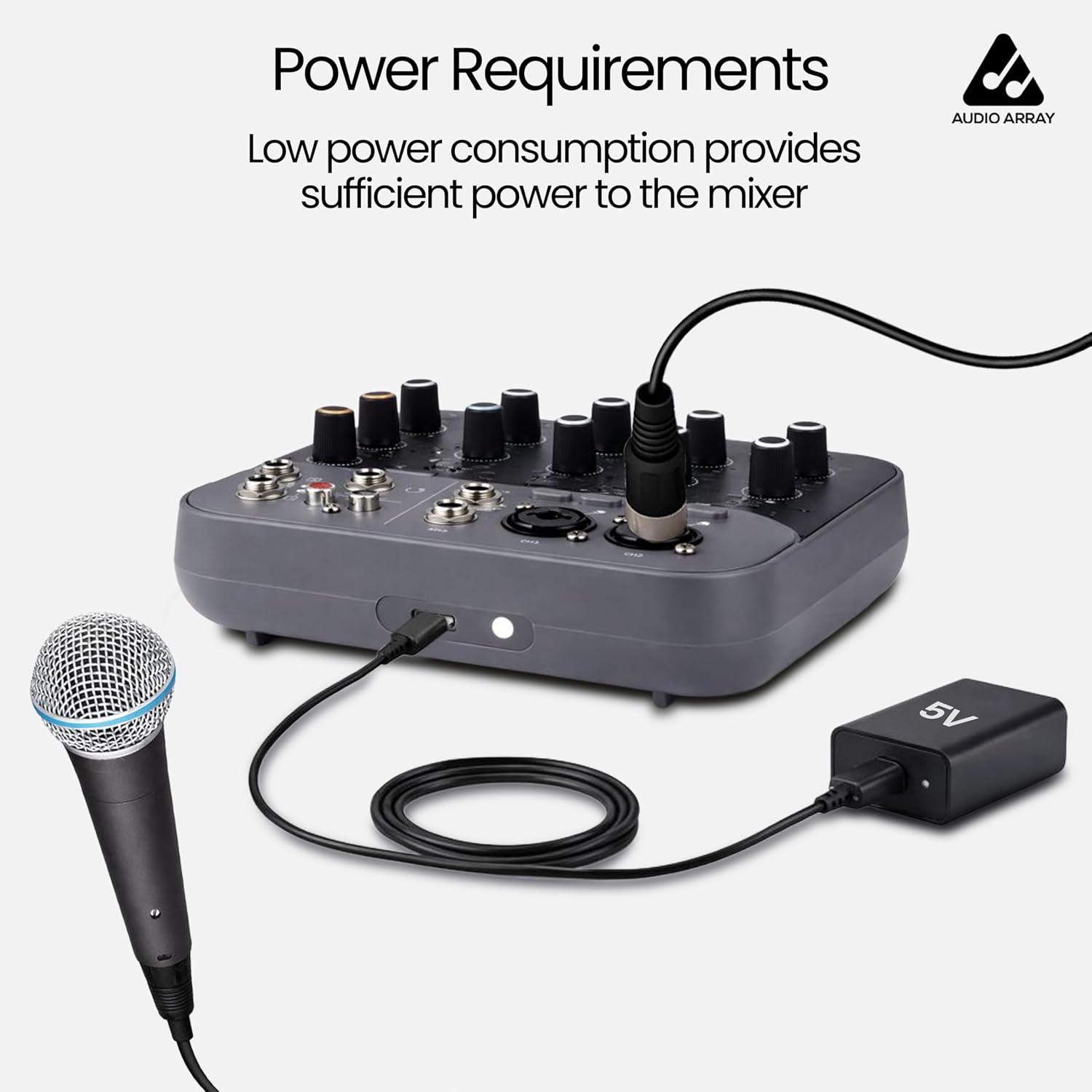
Image 7.1: Power connection via USB-C.
- แหล่งพลังงาน: USB Type-C (5V).
- Ensure you use a compatible 5V USB power adapter or a power bank for stable operation.
8. อุปกรณ์ที่รองรับ
The AI-13 mixer is compatible with a wide range of audio and computing devices.

Image 8.1: Compatible devices overview.

Image 8.2: Expanded view of compatible devices in a studio setting.
- ไมโครโฟน: Dynamic and Condenser (with +48V phantom power).
- เครื่องดนตรี: Guitars, keyboards, etc.
- อุปกรณ์เล่น: MP3 players, USB pendrives, smartphones (via Bluetooth or USB).
- อุปกรณ์ส่งออก: Amplifiers, powered speakers, headphones, recording interfaces.
- คอมพิวเตอร์: Laptops, desktops for USB audio interface functionality.
9. การตรวจสอบแบบเรียลไทม์
The AI-13 allows for real-time monitoring of your audio output.

Image 9.1: Real-time monitoring setup.
Connect your headphones to the PHONES jack to monitor your mix in real-time. This allows you to hear the sound feedback and make adjustments as needed during recording or live sessions.
10. คู่มือการใช้งาน
General guidelines for operating your mixer:
- เปิดเครื่อง: Connect the USB-C power cable. The mixer will power on automatically.
- ปรับระดับเกนอินพุต: For each connected microphone or instrument, slowly increase the GAIN knob until the signal is strong but does not clip (indicated by the CLIP LED).
- Apply EQ: Use the HIGH and LOW EQ knobs to shape the tone of each channel.
- Add Effects: Turn the EFF knob on a channel to send signal to the built-in effects. Adjust the REPEAT and DELAY knobs in the master section to control the effect parameters.
- ตั้งค่าระดับเสียงของแต่ละช่องสัญญาณ: Use the LEVEL knobs for each channel to balance the mix.
- ปริมาณหลัก: Adjust the MAIN volume knob for the overall output level.
- Monitor with Headphones: Use the PHONES volume knob to set your monitoring level.
- USB/Bluetooth Playback: Use the MP3 player controls to play audio from a USB drive or a Bluetooth-connected device.
11. การบำรุงรักษา
Proper maintenance ensures the longevity and performance of your mixer:
- การทำความสะอาด: Use a soft, dry cloth to clean the exterior of the mixer. Avoid liquid cleaners or abrasive materials.
- พื้นที่จัดเก็บ: เก็บเครื่องผสมไว้ในที่แห้งและเย็น หลีกเลี่ยงแสงแดดโดยตรงและอุณหภูมิที่สูงหรือต่ำเกินไป
- การดูแลสายเคเบิล: Handle cables carefully. Avoid bending or twisting them excessively, which can damage internal wiring.
- การระบายอากาศ : ตรวจสอบให้แน่ใจว่ามีการระบายอากาศที่เหมาะสมรอบๆ เครื่องผสมเพื่อป้องกันความร้อนสูงเกินไป
12 การแก้ไขปัญหา
If you encounter issues with your AI-13 mixer, refer to the following common problems and solutions:
| ปัญหา | สาเหตุที่เป็นไปได้ | สารละลาย |
|---|---|---|
| ไม่มีไฟฟ้า | Faulty USB-C cable or power adapter; loose connection. | Check USB-C cable and power adapter. Try a different 5V USB-C power source. Ensure connections are secure. |
| ไม่มีเสียงออก | Volume knobs too low; incorrect input/output connections; muted channels. | Increase MAIN and PHONES volume. Verify all cables are correctly connected. Check channel LEVEL knobs. |
| ไมโครโฟนไม่ทำงาน | Phantom power off (for condenser mics); incorrect gain; faulty mic/cable. | Activate +48V phantom power if using a condenser microphone. Increase GAIN knob. Test with a different microphone or cable. |
| เสียงบิดเบี้ยว | Input gain too high; output volume too high. | Reduce input GAIN. Lower channel LEVEL and MAIN volume. |
| การบันทึกผ่าน USB ไม่ทำงาน | Incorrect USB PC mode; driver issues; software settings. | Ensure the USB PC button is correctly set. Check computer's sound settings and recording software. |
13. ข้อมูลจำเพาะ
Detailed technical specifications for the Audio Array AI-13 mixer:

Image 13.1: General specifications.

Image 13.2: Detailed audio specifications.
| คุณสมบัติ | รายละเอียด |
|---|---|
| ยี่ห้อ | อาร์เรย์เสียง |
| หมายเลขรุ่น | เอไอ-13 |
| จำนวนช่องสัญญาณ | 4 |
| ขนาดสินค้า (ลึก x กว้าง x สูง) | 16D x 14W x 4H เซนติเมตร |
| น้ำหนักสินค้า | 680 กรัม |
| เทคโนโลยีการเชื่อมต่อ | XLR / TRS In, TRS / TS In, RCA REC Out, Main TRS Out, Headphones, USB 2.0 Pendrive, Wired Headphone, USB Type C |
| ประเภทแหล่งพลังงาน | ยูเอสบี ไทป์ซี |
| การตอบสนองความถี่ | 20 เฮิรตซ์ - 20 กิโลเฮิรตซ์ |
| ประเภทขั้วต่อเอาท์พุต | 1 x Main Output, 2 x TRS, 1 x Phone (TRS), REC, RCA |
| อินพุตเสียง | 2 x XLR, 4 x TRS |
| ระดับเสียง | 90 เดซิเบล |
| ประเทศต้นกำเนิด | จีน |
14. การรับประกัน
The Audio Array AI-13 mixer comes with a manufacturer's warranty.
- ระยะเวลารับประกัน: รับประกันจากผู้ผลิต 1 ปี
- For warranty claims or service, please contact Audio Array customer support.
15. การสนับสนุน
For any assistance, feedback, or technical support, please contact Audio Array using the details below:

Image 15.1: Service details and contact information.

Image 15.2: Customer Support contact details.
- โทรศัพท์: +91 79961 35111
- วอทส์แอป: +91 72082 64674
- อีเมล: support@audioarray.in
- ที่อยู่: Cambium Retail Private Limited, 109, Hubtown Solaris, Professor NS Phadke Rd, Andheri East, Mumbai, Maharashtra 400069, India.
You can also scan the QR codes in Image 15.1 for direct access to support channels.