
1. สินค้าหมดview
The Samsung Galaxy S26 is an unlocked Android smartphone featuring a powerful processor, Galaxy AI capabilities, an immersive display, and a durable battery. This manual provides essential information for setting up, operating, and maintaining your device.

Figure 1: Samsung Galaxy S26 in Sky Blue. This image displays the front and rear of the Samsung Galaxy S26 smartphone in Sky Blue color, highlighting its sleek design and camera module.
2. อะไรอยู่ในกล่อง
ตรวจสอบว่ามีรายการทั้งหมดอยู่ในบรรจุภัณฑ์ผลิตภัณฑ์ของคุณ:
- สมาร์ทโฟน Samsung Galaxy S26
- สาย USB (Type-C ถึง Type-C)
- ตัวดันถาดซิม
- คู่มือเริ่มต้นอย่างรวดเร็ว
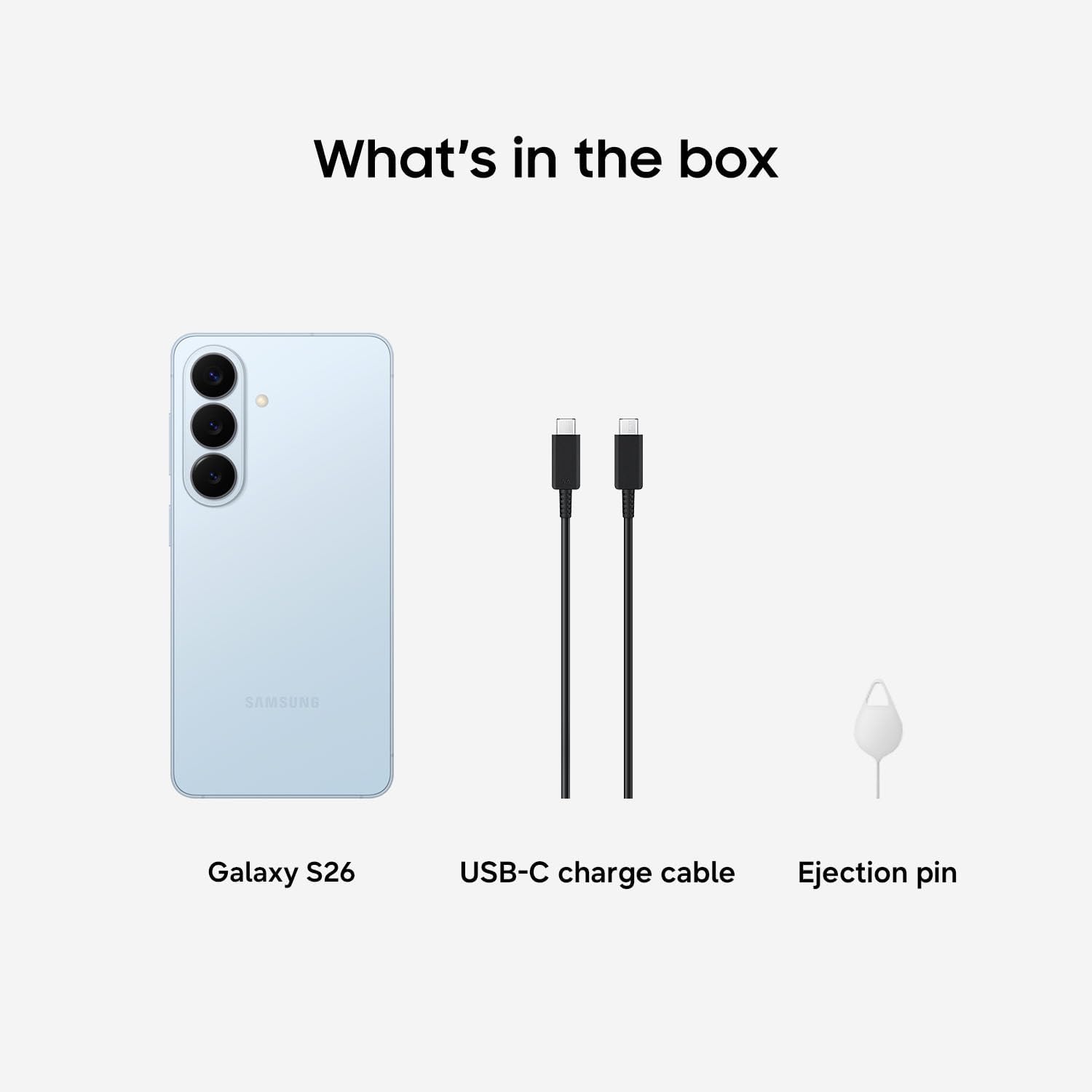
Figure 2: Box contents for the Samsung Galaxy S26. This image shows the Galaxy S26 smartphone, a USB-C charge cable, and an ejection pin, representing the items included in the product box.
3. การตั้งค่า
3.1 การติดตั้งซิมการ์ด
- ค้นหาถาดใส่การ์ด SIM ที่ด้านข้างอุปกรณ์ของคุณ
- ใส่เครื่องมือถอดถาดซิมเข้าไปในรูเล็ก ๆ ข้างถาดแล้วกดเบา ๆ จนกว่าถาดจะดีดออกมา
- Place your Nano SIM card into the tray with the gold contacts facing down.
- ใส่ถาดซิมกลับเข้าไปในอุปกรณ์อย่างระมัดระวัง
3.2 การเปิดเครื่องครั้งแรกและการตั้งค่า
- กดปุ่มเปิด/ปิดเครื่องค้างไว้จนกว่าโลโก้ Samsung จะปรากฏขึ้น
- Follow the on-screen prompts to select your language, connect to a Wi-Fi network, and sign in to your Samsung and Google accounts.
- Configure biometric security features such as fingerprint recognition.
3.3 การชาร์จอุปกรณ์
Use the provided USB Type-C cable to charge your Galaxy S26. The device supports up to 25W wired charging. For optimal charging speed, use a Samsung-approved charger (sold separately).
4. การใช้งานอุปกรณ์ของคุณ
4.1 การนำทางพื้นฐาน
The Galaxy S26 features a 6.3-inch AMOLED display with a 120Hz refresh rate for smooth interactions. Navigate using touch gestures (tap, swipe, pinch) and the physical buttons (Power/Side key, Volume keys).
4.2 การใช้งานกล้อง
Your Galaxy S26 is equipped with advanced camera features:
- กล้องหลัง: 50MP Main, 12MP Ultra Wide, 10MP Telephoto (3x Optical Zoom).
- กล้องหน้า: 12MP Selfie Camera with Wider Selfie Capture for group shots.
- การช่วยเหลือด้านภาพถ่าย: Utilize Galaxy AI to magically edit photos, fill in missing elements, and blend objects.
- Creative Studio: Generate playful illustrations and 3D cartoons for custom wallpapers and stickers.
- ฮอไรซันล็อค: Super Steady Video with Horizontal Lock keeps your shots level even if you rotate 360 degrees.
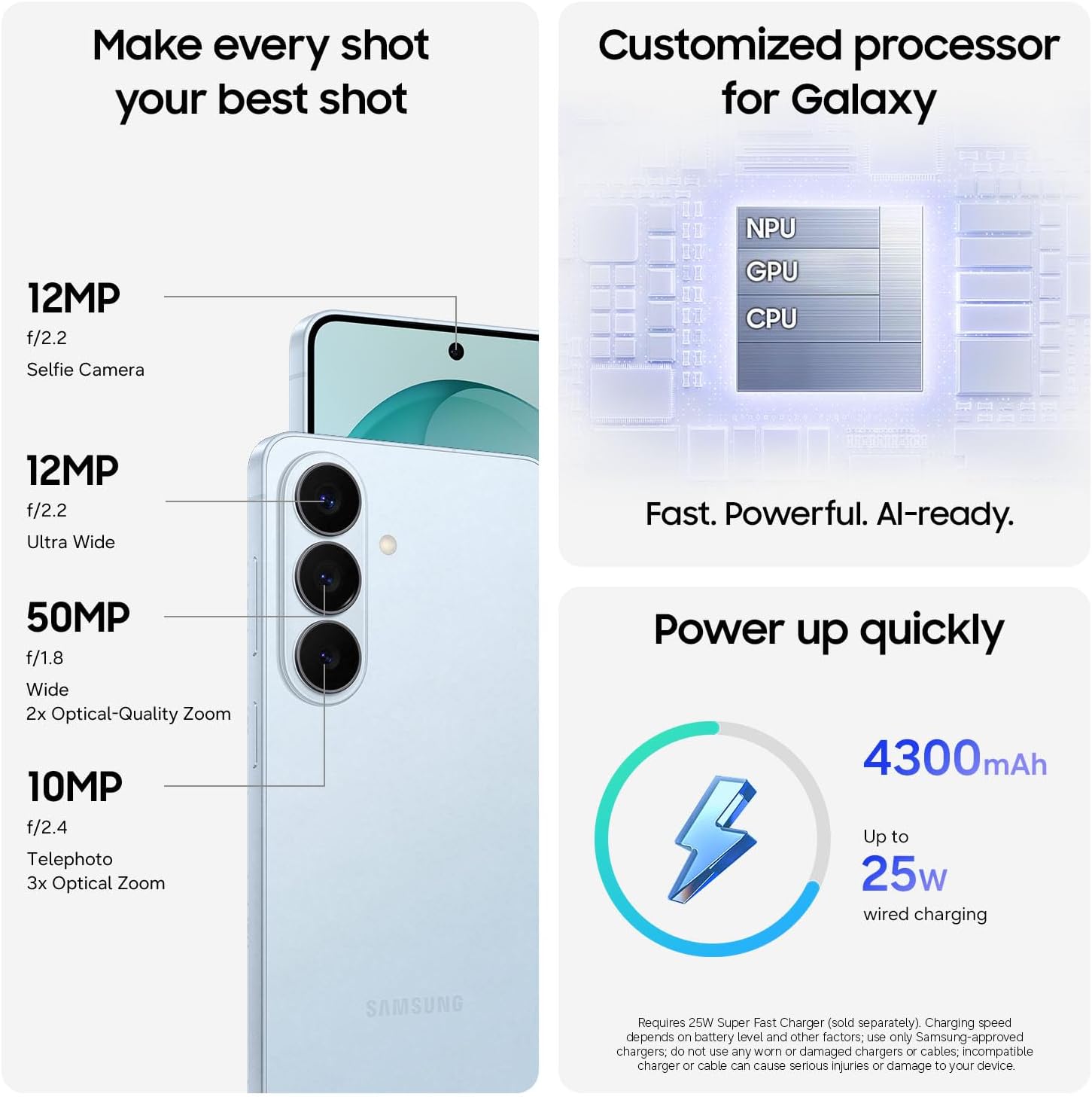
Figure 3: Detailed camera specifications for the Samsung Galaxy S26. This image illustrates the 12MP Selfie Camera, 12MP Ultra Wide, 50MP Wide (2x Optical-Quality Zoom), and 10MP Telephoto (3x Optical Zoom) lenses on the device.
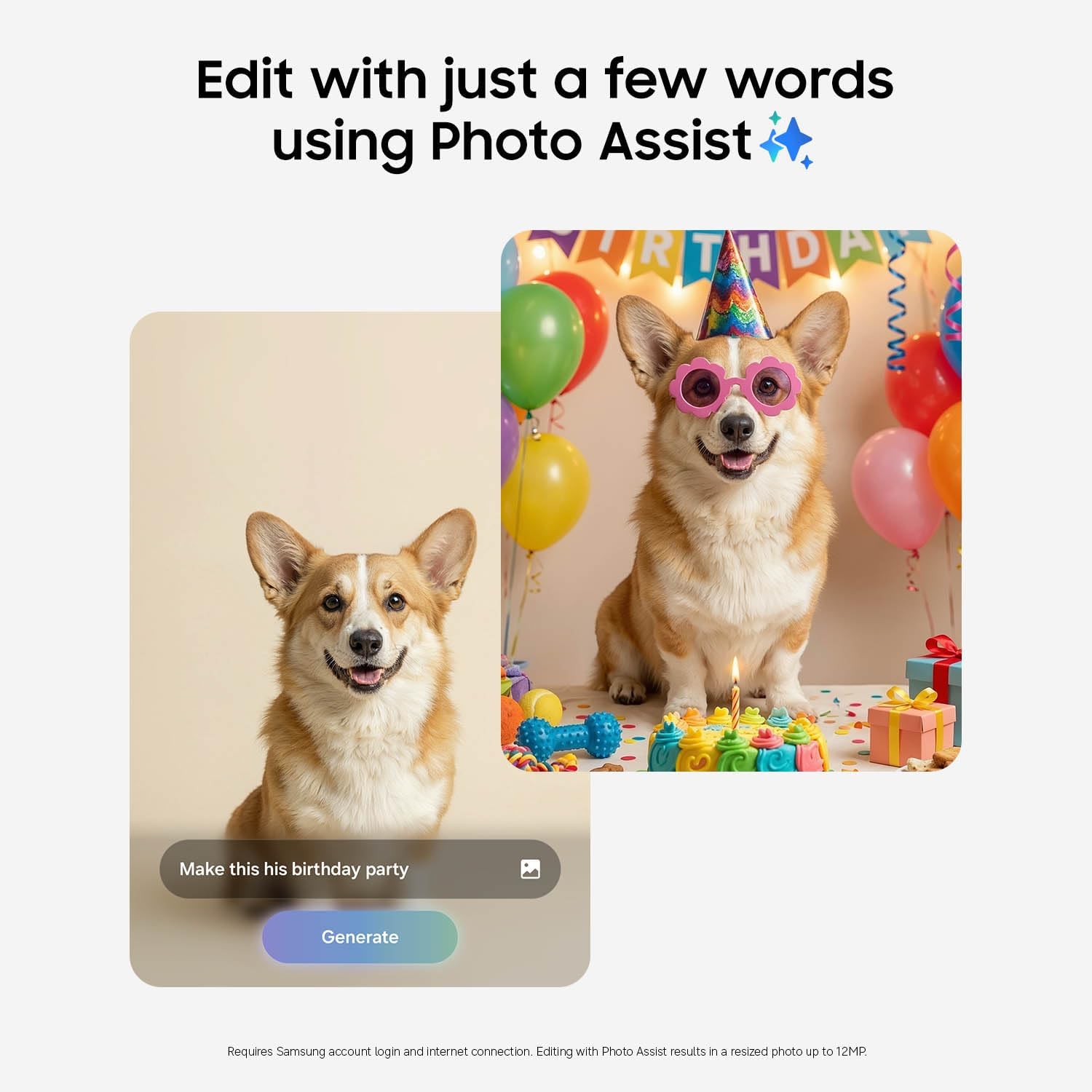
Figure 4: Demonstration of the Photo Assist AI feature. This image shows a split screen with a dog's photo on the left and a generated birthday party scene with the dog on the right, illustrating the AI's ability to edit photos based on text input.
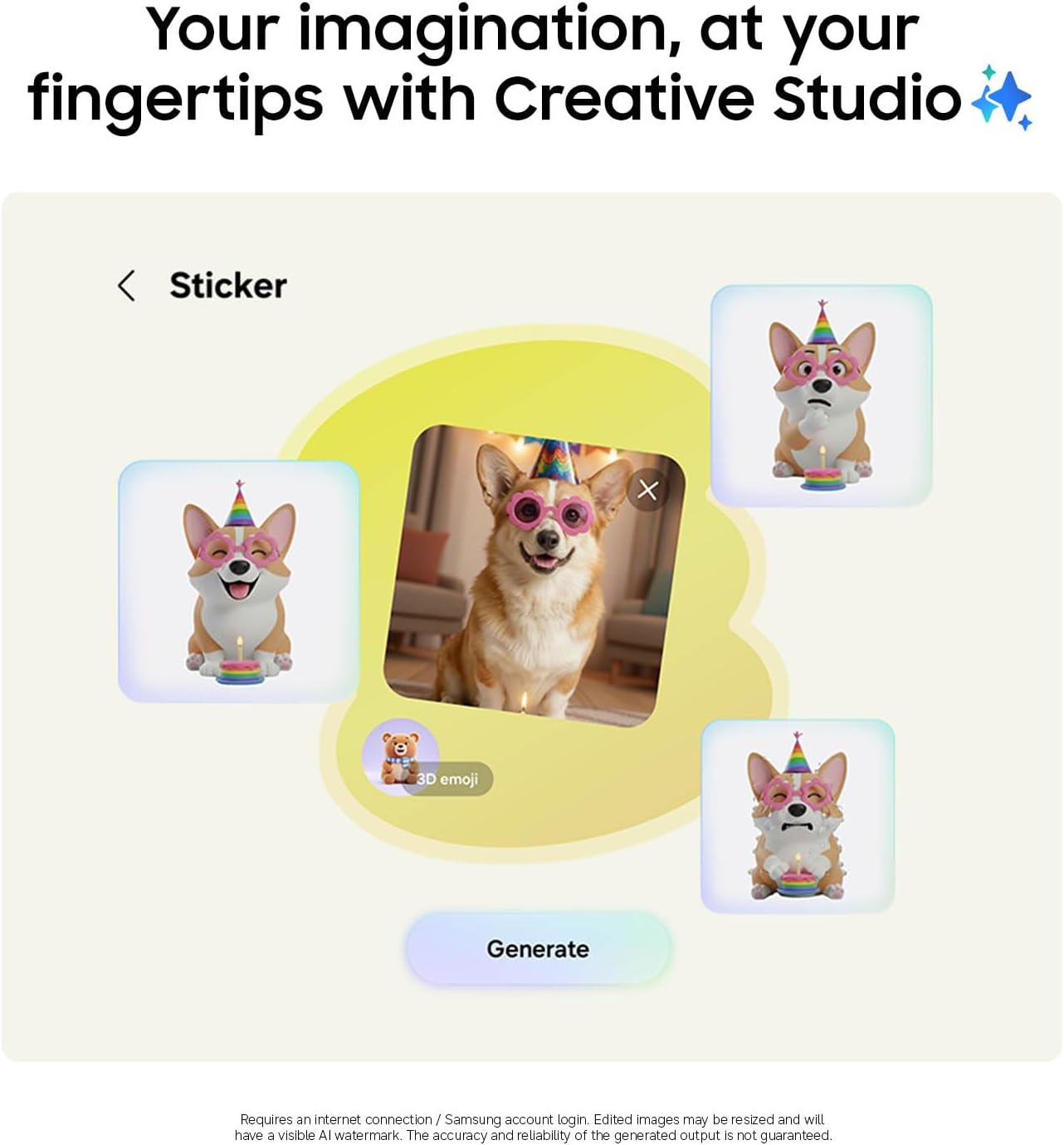
Figure 5: Demonstration of the Creative Studio AI feature. This image displays a smartphone screen showing a 'Sticker' interface with a dog's photo and various 3D emoji stickers, highlighting the ability to create custom visual elements.
4.3 ฟีเจอร์ AI ของ Galaxy
- Now Nudge: Galaxy AI works behind the scenes to prioritize apps, reminders, and notifications, providing relevant information when needed.
- Voice AI: The S26 Series supports multiple Voice AI models including Gemini, Perplexity, and Bixby for enhanced smart assistance.

Figure 6: Illustration of the Now Nudge AI feature. This image shows a smartphone displaying a messaging app with a conversation about photos from Seoul, and a smart suggestion pop-up to share Seoul photos, demonstrating contextual AI assistance.
4.4 การเชื่อมต่อ
Your device supports 5G cellular technology, Wi-Fi, Bluetooth 5.4, and NFC for seamless connectivity.
กระเป๋าสตางค์ Samsung 4.5
Securely store payment cards, boarding passes, and more digitally with Samsung Wallet. Requires a compatible NFC card from a participating bank.

Figure 7: Various screens demonstrating the features of Samsung Wallet. This image shows different interfaces for payment cards, memberships, boarding passes, and digital assets within the Samsung Wallet application.
4.6 Pairing with Galaxy Buds4 Pro
Pair your Galaxy S26 with Galaxy Buds4 Pro (sold separately) to experience Hi-Res Audio and hear translations hands-free. Initial setup is required via settings or the Samsung Wear app.

Figure 8: Samsung Galaxy S26 smartphone shown alongside open Galaxy Buds4 Pro case and earbuds. This image highlights the seamless pairing and audio experience between the phone and the earbuds.
4.7 Privacy Display
The Galaxy S26 features a privacy display that prevents others from viewing your screen content from an angle. This feature can be configured to activate for specific apps, notifications, or when a PIN/pattern/password is required.
Video 1: Demonstration of the Samsung Galaxy S26 Privacy Display feature. This video shows how the screen content becomes obscured when viewed from an angle, enhancing user privacy.
5. การบำรุงรักษา
5.1 การดูแลแบตเตอรี่
The Galaxy S26 is equipped with a 4300 mAh battery. To prolong battery life, avoid extreme temperatures and fully discharging the device regularly. Utilize the Fast Charging feature for quick power-ups.
5.2 ความต้านทานต่อน้ำ
Your device is water-resistant. Avoid submerging it in water deeper than 1.5 meters for more than 30 minutes, and do not expose it to pressurized water or liquids other than fresh water.
5.3 การทำความสะอาด
ในการทำความสะอาดอุปกรณ์ของคุณ ให้เช็ดเบาๆ ด้วยผ้านุ่มที่ไม่เป็นขุย หลีกเลี่ยงการใช้สารเคมีรุนแรงหรือวัสดุที่มีฤทธิ์กัดกร่อน
5.4 การอัปเดตซอฟต์แวร์
Keep your device's software up to date to ensure optimal performance and security. Samsung provides 7 years of operating system updates for the Galaxy S26, running on Android 16 with One UI 8.5.
6 การแก้ไขปัญหา
หากคุณพบปัญหาเกี่ยวกับอุปกรณ์ของคุณ ลองทำดังต่อไปนี้:
- เริ่มต้นใหม่อีกครั้ง: การรีสตาร์ทเพียงครั้งเดียวสามารถแก้ไขข้อผิดพลาดซอฟต์แวร์เล็กๆ น้อยๆ ได้หลายประการ
- ตรวจสอบการเชื่อมต่อ: Ensure Wi-Fi, Bluetooth, or cellular connections are active and stable.
- อัพเดตซอฟต์แวร์: โปรดตรวจสอบให้แน่ใจว่าอุปกรณ์ของคุณใช้ซอฟต์แวร์เวอร์ชันล่าสุด
- รีเซ็ตเป็นค่าเริ่มต้นจากโรงงาน: As a last resort, a factory reset can resolve persistent issues, but will erase all data. Back up your data before proceeding.
7. ข้อมูลจำเพาะ
| คุณสมบัติ | รายละเอียด |
|---|---|
| ยี่ห้อ | ซัมซุง |
| ชื่อรุ่น | ซัมซุง กาแล็คซี่ เอส 26 |
| ระบบปฏิบัติการ | ระบบปฏิบัติการ Android 16, One UI 8.5 |
| ขนาดหน่วยความจำ RAM ที่ติดตั้ง | 12GB |
| ความจุของหน่วยความจำ | 256GB |
| ขนาดหน้าจอ | 6.3 นิ้ว |
| อัตราการรีเฟรช | 120 เฮิรตซ์ |
| สี | สีฟ้า |
| เทคโนโลยีเซลลูล่าร์ | 5G |
| เทคโนโลยีการเชื่อมต่อ | 5G, บลูทูธ, NFC, USB, Wi-Fi |
| จำนวนช่องใส่ซิมการ์ด | ซิมเดี่ยว |
| ประเภทขั้วต่อ | USB ประเภท C |
| คุณสมบัติการรักษาความปลอดภัยไบโอเมตริก | การจดจำลายนิ้วมือ |
| ระดับความต้านทานต่อน้ำ | ทนน้ำ |
| แจ็คหูฟัง | ยูเอสบี-ซี |
| Front Photo Sensor Resolution | 12 MP |
| Rear Facing Camera Photo Sensor Resolution | 10.0, 12.0, 50.0 MP |
| Number of Rear Facing Cameras | 3 |
| ความจุของแบตเตอรี่ | 4300 มิลลิวินาทีamp ชั่วโมง |
| ประเภทจอภาพ | อโมเลด |
| รุ่นปี | 2026 |
| ขนาดรายการ | 5.89 x 2.82 x 0.28 นิ้ว |
| ยูพีซี | 198957241123 |
8. การรับประกันและการสนับสนุน
Your Samsung Galaxy S26 comes with a 1-Year Manufacturer Warranty. For detailed terms and conditions, please refer to the warranty card included in your product packaging or visit the official Samsung webเว็บไซต์.
8.1 Samsung Care+ Device Protection
Consider enhancing your device protection with Samsung Care+, which offers coverage for unlimited drops, spills, mechanical breakdowns, theft, and loss. Various plans are available, including 2-Year Samsung Care+ Device Protection (one-time payment) or Samsung Care+ Device Protection Monthly (monthly payment).


