
1. บทนำ
Thank you for choosing the Cooler Master ELITE Gold 1000W Power Supply Unit. This manual provides essential information for the safe and efficient installation, operation, and maintenance of your new power supply. The ELITE Gold 1000W is designed for daily gaming and PC building enthusiasts, fully supporting the latest ATX 3.1 standard and offering flexible compatibility with RTX 50 series GPUs and future upgrades.
2. ข้อมูลด้านความปลอดภัย
Please read and understand all safety instructions before installing or operating this product. Failure to do so may result in personal injury or damage to the product or connected devices.
- อันตรายจากไฟฟ้าช็อต: ห้ามเปิดชุดจ่ายไฟasinก. ปริมาตรสูงtages are present inside, even when the unit is turned off. There are no user-serviceable parts inside.
- การต่อสายดินที่ถูกต้อง: Ensure the power supply is properly grounded using the provided power cord.
- การระบายอากาศ : Do not block any ventilation openings of the power supply. Ensure adequate airflow around the unit to prevent overheating.
- ความชื้น: อย่าให้แหล่งจ่ายไฟโดนน้ำหรือความชื้นมากเกินไป
- แหล่งพลังงาน: Connect the power supply only to a power source with the correct voltage and frequency as indicated on the unit's label.
- การจัดการสายเคเบิล: จัดวางสายเคเบิลอย่างระมัดระวังเพื่อป้องกันการหนีบหรือความเสียหาย
- อุณหภูมิ: Operate the power supply within the specified temperature range (up to 40°C high-load environments).
3. เนื้อหาบรรจุภัณฑ์
ตรวจสอบว่ามีรายการทั้งหมดอยู่ในแพ็คเกจของคุณ:
- Cooler Master ELITE Gold 1000W Power Supply Unit
- Modular Cable Set (including 12+4 Pin, ATX24 Pin, EPS 4+4 Pin, EPS 8 Pin, SATA + Peripheral 4 Pin connectors)
- AC Power Cord (A/JP cord)
- สกรูยึด
- คู่มือการใช้งาน
4. การตั้งค่าและการติดตั้ง
Follow these steps to install your Cooler Master ELITE Gold 1000W Power Supply Unit:
- เตรียมระบบของคุณ:
Before installation, ensure your computer is completely powered off and unplugged from the wall outlet. Discharge any residual power by pressing the power button a few times.
- Install the PSU into the PC Case:
Position the ELITE Gold 1000W PSU into the designated power supply bay in your PC case. The compact design (under 150mm) facilitates easy installation in various PC cases. Secure the PSU with the provided mounting screws.

Image: The Cooler Master ELITE Gold 1000W Power Supply Unit installed within a computer chassis, viewed from above, highlighting its compact form factor and top-mounted fan grill.
- เชื่อมต่อสายเคเบิลโมดูลาร์:
The ELITE Gold 1000W features a full modular design. Connect only the necessary cables to the power supply unit first. Refer to the labels on the PSU for correct connector types (e.g., 10P MB, 18P MB, 8P PCI-E/CPU, 12V-2x6, 6P SATA/HDD).

ภาพ: รายละเอียด view of the Cooler Master ELITE Gold 1000W Power Supply Unit's modular cable interface, clearly showing labeled ports for various component connections such as motherboard, CPU, PCIe, and SATA/HDD.

Image: The Cooler Master ELITE Gold 1000W Power Supply Unit with its full suite of modular cables securely connected and neatly routed, demonstrating the full modular design.
- เชื่อมต่อกับส่วนประกอบ:
- เมนบอร์ด : เชื่อมต่อสายเคเบิล ATX 24 พินเข้ากับเมนบอร์ดของคุณ
- ซีพียู: Connect the 4+4 pin or 8-pin EPS cable(s) to your motherboard's CPU power connector(s).
- การ์ดจอ (GPU): Connect the appropriate PCIe power cables (e.g., 8-pin, 12+4 pin for ATX 3.1/PCIe Gen 5.1) to your graphics card(s). This unit is optimized for RTX 50 series GPUs.
- อุปกรณ์จัดเก็บข้อมูล: เชื่อมต่อสายไฟ SATA เข้ากับ SSD, HDD และไดรฟ์ออปติคัลของคุณ
- อุปกรณ์ต่อพ่วง: Connect peripheral 4-pin cables to any other devices requiring power.
- เชื่อมต่อไฟ AC:
Connect the provided AC power cord to the power supply unit and then to a grounded wall outlet. Ensure the power switch on the PSU is in the OFF position before connecting to the wall outlet.
5. คู่มือการใช้งาน
หลังจากติดตั้งเสร็จเรียบร้อยแล้ว โปรดทำตามขั้นตอนต่อไปนี้เพื่อใช้งานระบบของคุณ:
- เปิดเครื่อง:
Flip the power switch on the back of the power supply unit to the ON (I) position.
- การเริ่มต้นระบบ:
Press the power button on your computer case to start your system. The ELITE Gold 1000W will provide stable and efficient power, thanks to its 80 Plus Gold certification and quiet, long-life rifle bearing fan.
- หมดแรง:
To power off your system, shut down your operating system normally. For complete power disconnection, flip the power switch on the back of the power supply unit to the OFF (O) position and unplug the AC power cord.
6. การบำรุงรักษา
การบำรุงรักษาอย่างถูกต้องจะช่วยให้หน่วยจ่ายไฟของคุณมีอายุการใช้งานยาวนานและทำงานได้อย่างมีประสิทธิภาพสูงสุด
- การทำความสะอาดฝุ่น: ควรทำความสะอาดฝุ่นจากพัดลมและตะแกรงระบายอากาศของแหล่งจ่ายไฟเป็นระยะ โดยใช้ลมเป่าอัดแรงดันสูง ตรวจสอบให้แน่ใจว่าระบบปิดเครื่องและถอดปลั๊กออกก่อนทำความสะอาด
- การระบายอากาศ : ตรวจสอบให้แน่ใจว่าเคสพีซีมีการไหลเวียนของอากาศที่เพียงพอ และช่องรับและระบายของพัดลมแหล่งจ่ายไฟไม่ถูกปิดกั้น
- การตรวจสอบสายเคเบิล: Regularly check all modular cables for any signs of wear, fraying, or damage. Replace damaged cables immediately.
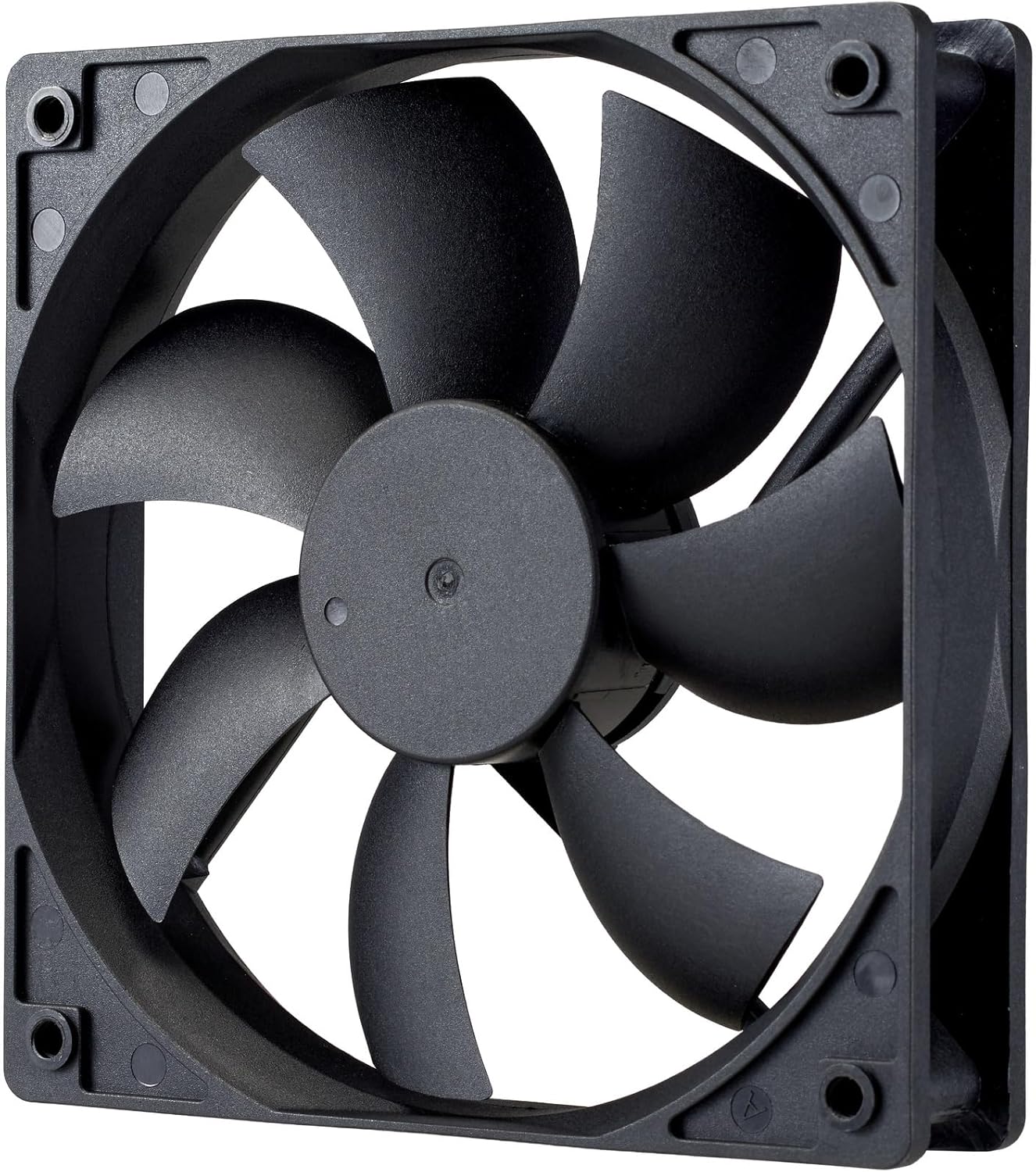
ภาพ: ภาพระยะใกล้ view of the power supply's cooling fan, featuring five blades designed for efficient airflow and quiet operation.
7 การแก้ไขปัญหา
If you encounter issues with your power supply, refer to the following troubleshooting steps:
- ไม่มีไฟฟ้า:
- ตรวจสอบให้แน่ใจว่าสายไฟ AC เชื่อมต่อกับแหล่งจ่ายไฟและเต้ารับที่ผนังอย่างแน่นหนา
- Verify that the power switch on the back of the PSU is in the ON (I) position.
- Check all modular cables (24-pin ATX, EPS, PCIe) are firmly seated in both the PSU and the respective components.
- ทดสอบปลั๊กไฟด้วยอุปกรณ์อื่นเพื่อให้แน่ใจว่าใช้งานได้ปกติ
- ระบบไม่เสถียร/ปิดเครื่องเองโดยไม่ทราบสาเหตุ:
- Ensure adequate ventilation within your PC case to prevent overheating.
- ตรวจสอบให้แน่ใจว่าความต้องการพลังงานของระบบของคุณไม่เกินความจุ 1000 วัตต์ของแหล่งจ่ายไฟ (PSU)
- ตรวจสอบดูว่ามีสายเคเบิลหลวมหรือไม่
- เสียงที่ผิดปกติ:
- A quiet rifle bearing fan is designed for minimal noise. If you hear unusual grinding or rattling, ensure no cables are obstructing the fan.
- หากยังมีเสียงดังอยู่ โปรดติดต่อฝ่ายสนับสนุนของ Cooler Master
If these steps do not resolve the issue, please contact Cooler Master customer support for further assistance.
8. ข้อมูลจำเพาะ
Detailed technical specifications for the Cooler Master ELITE Gold 1000W Power Supply Unit:
| ชื่อรุ่น | ELITE Gold |
| หมายเลขรุ่นของผู้ผลิต | MPX-A005-AFAG-BJP |
| ยี่ห้อ | คูลเลอร์มาสเตอร์ |
| เอาท์พุต วัดtage | 1000 วัตต์ |
| ใบรับรอง 80 PLUS | ทอง |
| เวอร์ชั่น ATX | เอทีเอ็กซ์ 3.1 |
| เวอร์ชัน PCIe | PCIe เจเนอเรชั่น 5.1 |
| ฟอร์มแฟกเตอร์ | เอทีเอ็กซ์ |
| การออกแบบพลังงาน | โมดูลาร์เต็มรูปแบบ |
| ประเภทของขั้วต่อ | 12+4 Pin, ATX24 Pin, EPS 4+4 Pin, EPS 8 Pin, SATA + Peripheral 4 Pin |
| จำนวนแฟนคลับ | 1 (Rifle Bearing Fan) |
| ปริมาณอินพุตสูงสุดtage | 240 โวลต์ (AC) |
| ปริมาณอินพุตขั้นต่ำtage | 100 โวลต์ (AC) |
| ขนาดสินค้า (กว้าง x ยาว x สูง) | 14 x 15 x 8.6 ซม. |
| น้ำหนักผลิตภัณฑ์ | 2230 กรัม |
| อุณหภูมิในการทำงาน | สูงถึง 40°C |

ภาพ: ด้านบน view of the Cooler Master ELITE Gold 1000W Power Supply Unit, showcasing its branding and honeycomb-patterned ventilation.

Image: The official 80 PLUS GOLD certification logo, indicating high power efficiency.
9. การรับประกันและการสนับสนุน
The Cooler Master ELITE Gold 1000W Power Supply Unit comes with a รับประกัน 5 ปี ตั้งแต่วันที่ซื้อ การรับประกันนี้ครอบคลุมถึงข้อบกพร่องในวัสดุและฝีมือการผลิตภายใต้การใช้งานปกติ
For technical support, warranty claims, or further assistance, please visit the official Cooler Master website or contact your local Cooler Master distributor. Please have your product model number (MPX-A005-AFAG-BJP) and proof of purchase ready when contacting support.