การแนะนำ
Thank you for choosing the Generic K54 Wireless Earbuds. These earbuds are designed to provide a superior audio experience with HD decoding technology, deep bass, and stereo surround sound. Featuring a convenient digital display for battery levels and an ergonomic design for comfortable wear, the K54 earbuds offer seamless Bluetooth connectivity for various devices. Please read this manual carefully to ensure proper use and optimal performance of your new earbuds.
เนื้อหาแพ็คเกจ
กรุณาตรวจสอบแพ็คเกจสำหรับรายการต่อไปนี้:
- K54 Wireless Earbuds (Left and Right)
- เคสชาร์จไฟ
- สายชาร์จแบบ USB Type-C
- คู่มือการใช้งาน
- Multiple sizes of ear tips (typically included for comfortable fit)
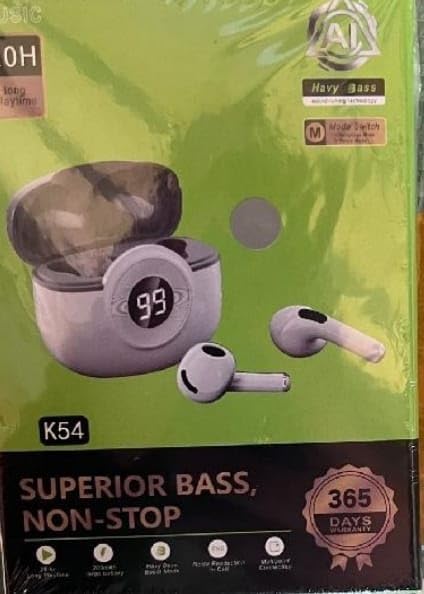
Image: The K54 Wireless Earbuds packaging, displaying the earbuds, charging case, and key features like 'Superior Bass' and '365 Days Warranty'.
การตั้งค่า
1. การชาร์จหูฟังและเคส
ก่อนใช้งานครั้งแรก ควรชาร์จหูฟังและเคสชาร์จให้เต็ม
- ใส่หูฟังลงในกล่องชาร์จ ตรวจสอบให้แน่ใจว่าใส่หูฟังเข้าที่อย่างถูกต้อง
- เสียบสายชาร์จ USB Type-C เข้ากับพอร์ตชาร์จบนเคส และเสียบปลายอีกด้านหนึ่งเข้ากับอะแดปเตอร์แปลงไฟ USB (ไม่ได้รวมอยู่ในชุด) หรือพอร์ต USB ของคอมพิวเตอร์
- จอแสดงผลดิจิทัลบนเคสชาร์จจะแสดงเปอร์เซ็นต์แบตเตอรี่tage, indicating charging status. The earbuds will also show a charging indicator (usually a light) while charging.
- เวลาในการชาร์จประมาณ 1.5 ชั่วโมงเมื่อชาร์จเต็ม
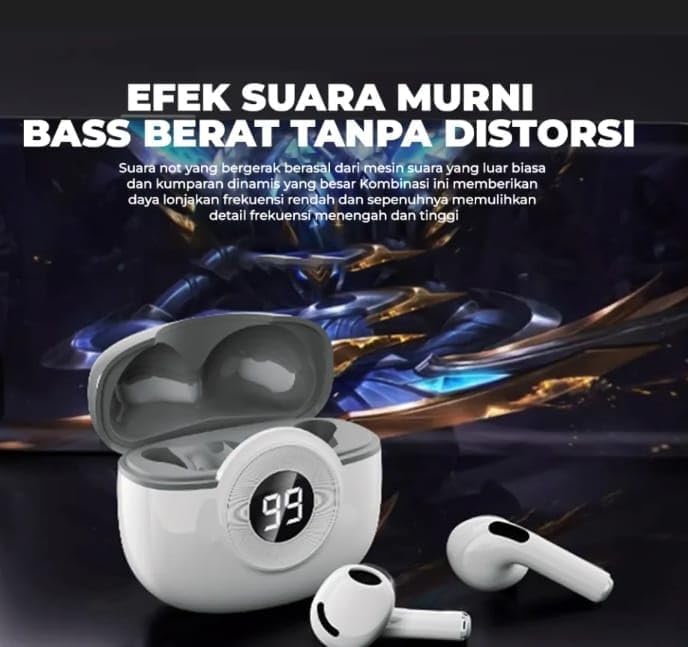
Image: The K54 Wireless Earbuds resting in their charging case. The case features a digital LED display showing '99', indicating a full battery charge. The earbuds are white.
2. การจับคู่กับอุปกรณ์
Follow these steps to pair your K54 Wireless Earbuds with your smartphone or other Bluetooth-enabled device:
- ตรวจสอบให้แน่ใจว่าได้ชาร์จเอียร์บัดแล้ว
- เปิดกล่องชาร์จ หูฟังจะเข้าสู่โหมดจับคู่โดยอัตโนมัติ (โดยจะมีไฟกะพริบที่หูฟัง)
- บนอุปกรณ์ของคุณ ไปที่การตั้งค่าบลูทูธ และเปิดบลูทูธ
- ค้นหา available devices. You should see "K54" or a similar name appear in the list.
- Select "K54" to connect. Once connected, the earbuds will indicate successful pairing (e.g., a voice prompt or steady light).
- เมื่อนำเอียร์บัดออกจากเคส เอียร์บัดจะเชื่อมต่อกับอุปกรณ์ที่จับคู่ไว้ครั้งล่าสุดโดยอัตโนมัติ หากเปิดใช้งาน Bluetooth บนอุปกรณ์
คำแนะนำการใช้งาน
การสวมหูฟัง
Gently insert the earbuds into your ears. Adjust them for a comfortable and secure fit. The ergonomic design is intended for stable wear during various activities.
การควบคุมแบบสัมผัส
The K54 earbuds feature touch controls for easy management of music and calls. Specific functions may vary slightly depending on your device and operating system.
| การกระทำ | การทำงาน |
|---|---|
| แตะครั้งเดียว (ซ้าย/ขวา) | เล่น/หยุดเพลง, รับ/วางสาย |
| แตะสองครั้ง (หูฟังข้างขวา) | เพลงถัดไป |
| แตะสองครั้ง (หูฟังข้างซ้าย) | เพลงก่อนหน้า |
| แตะสามครั้ง (ซ้าย/ขวา) | เปิดใช้งาน Voice Assistant (Siri, Google Assistant) |
| Long Press (Left/Right, 2 seconds) | ปฏิเสธการรับสาย |
| Long Press (Left/Right, 3 seconds) | เปิด/ปิดเครื่อง (เมื่อไม่อยู่ในเคส) |
การซ่อมบำรุง
Proper maintenance ensures the longevity and optimal performance of your K54 Wireless Earbuds.
- การทำความสะอาด: Regularly clean the earbuds and charging case with a soft, dry, lint-free cloth. Do not use abrasive cleaners or immerse in water.
- พื้นที่จัดเก็บ: เมื่อไม่ได้ใช้งาน ให้เก็บหูฟังไว้ในกล่องชาร์จเพื่อปกป้องหูฟังและชาร์จไฟให้หูฟังอยู่เสมอ
- หลีกเลี่ยงเงื่อนไขที่รุนแรง: Do not expose the earbuds to extreme temperatures, humidity, or direct sunlight. The earbuds are ไม่กันน้ำ.
- การชาร์จ: ใช้เฉพาะสาย USB Type-C ที่ให้มาในการชาร์จเท่านั้น
การแก้ไขปัญหา
If you encounter issues with your K54 Wireless Earbuds, please refer to the following common solutions:
- หูฟังไม่จับคู่:
- ตรวจสอบให้แน่ใจว่าได้ชาร์จหูฟังเอียร์บัดทั้งสองข้างแล้ว
- ปิดและเปิดบลูทูธของอุปกรณ์ของคุณ
- Forget "K54" from your device's Bluetooth list and try pairing again.
- ใส่หูฟังกลับเข้าไปในเคส ปิดฝา รอสองสามวินาที แล้วเปิดเพื่อเข้าสู่โหมดจับคู่อีกครั้ง
- มีหูฟังเพียงข้างเดียวที่ใช้งานได้:
- ตรวจสอบให้แน่ใจว่าได้ชาร์จหูฟังเอียร์บัดทั้งสองข้างแล้ว
- Place both earbuds back into the charging case, close the lid, then take them out together.
- Try resetting the earbuds (refer to specific reset instructions if available, otherwise, a full charge and re-pairing often resolves this).
- ไม่มีเสียงหรือระดับเสียงต่ำ:
- ตรวจสอบระดับเสียงทั้งบนอุปกรณ์และหูฟังของคุณ
- ตรวจสอบให้แน่ใจว่าหูฟังเชื่อมต่อกับอุปกรณ์ของคุณอย่างถูกต้อง
- ทำความสะอาดเศษสิ่งสกปรกออกจากตาข่ายของลำโพงหูฟัง
- กล่องชาร์จไม่ชาร์จ:
- ตรวจสอบให้แน่ใจว่าสาย USB Type-C เชื่อมต่อกับเคสและแหล่งจ่ายไฟอย่างแน่นหนาแล้ว
- ลองใช้พอร์ต USB หรืออะแดปเตอร์จ่ายไฟอื่น
ข้อมูลจำเพาะ
| คุณสมบัติ | รายละเอียด |
|---|---|
| หมายเลขรุ่น | เค54 |
| การเชื่อมต่อ | ไร้สายบลูทู ธ |
| เวอร์ชันบลูทูธ | 5.0 |
| การวางตำแหน่งหู | ในหู |
| วิธีการควบคุม | ปุ่มกดสัมผัส |
| เวลาในการชาร์จ | ประมาณ 1.5 ชั่วโมง |
| น้ำหนักสินค้า | 45 กรัม |
| วัสดุ | พลาสติก |
| สี | สีขาว |
| ระดับความต้านทานต่อน้ำ | ไม่ทนน้ำ |
| คุณสมบัติพิเศษ | Digital Display, HD Decoding, LED Battery Indicator, Superior Bass, Surround Sound |
| อิมพีแดนซ์ | 32 โอห์ม |
| การตอบสนองความถี่ | 20 Hz (Note: This value typically represents the lower limit of a frequency range) |
| ความไวต่อความรู้สึก | 98 เดซิเบล |
| พอร์ตชาร์จ | พอร์ต USB Type-C (สำหรับชาร์จเคส) |
ข้อมูลการรับประกัน
The Generic K54 Wireless Earbuds come with a manufacturer's limited warranty. Please refer to the terms and conditions provided at the time of purchase for full details.
- ระยะเวลารับประกัน: 6 months limited warranty (as per product specifications).
- การรับประกันนี้ครอบคลุมเฉพาะข้อบกพร่องจากการผลิตเท่านั้น ไม่ครอบคลุมความเสียหายที่เกิดจากการใช้งานผิดวิธี อุบัติเหตุ การดัดแปลงโดยไม่ได้รับอนุญาต หรือการสึกหรอตามปกติ
- โปรดเก็บหลักฐานการซื้อของคุณไว้เพื่อเรียกร้องการรับประกัน
การสนับสนุนลูกค้า
For further assistance, technical support, or warranty inquiries, please contact your retailer or the manufacturer's customer service. Contact information is typically available on the product packaging or the retailer's webเว็บไซต์.
Note: As this is a generic product, specific manufacturer contact details are not provided here.