
1. บทนำ
Thank you for choosing the plplaaoo Smart WiFi Programmable Thermostat. This device is designed to provide precise and efficient temperature control for your home's 16A electric floor heating system. With its digital touch screen and WiFi connectivity, you can manage your home's climate remotely via a mobile application, set custom schedules, and share control with family members. Please read this manual thoroughly before installation and operation to ensure proper use and safety.
2. ข้อมูลด้านความปลอดภัย
- อันตรายจากไฟฟ้า: Installation must be performed by a qualified electrician. Disconnect power at the circuit breaker before installation or maintenance.
- ตรวจสอบให้แน่ใจว่าสายไฟทั้งหมดเป็นไปตามกฎและข้อบังคับด้านไฟฟ้าในท้องถิ่น
- Do not install the thermostat in areas with excessive moisture, direct sunlight, or extreme temperatures.
- This thermostat is designed for 100-250VAC, 50/60Hz electric floor heating systems. Verify your system's compatibility.
- เก็บอุปกรณ์ให้ห่างจากเด็ก
3. เนื้อหาบรรจุภัณฑ์
กรุณาตรวจสอบแพ็คเกจสำหรับรายการต่อไปนี้:
- Smart WiFi Programmable Thermostat (ME82 LED 7 WiFi)
- สกรูยึด
- คู่มือการใช้งาน (เอกสารนี้)
- C-wire adapter (if applicable for your system)
4. สินค้าหมดview
The plplaaoo Smart Thermostat features a sleek black design with a responsive LED touch display. It provides clear temperature readouts and intuitive controls for easy operation.
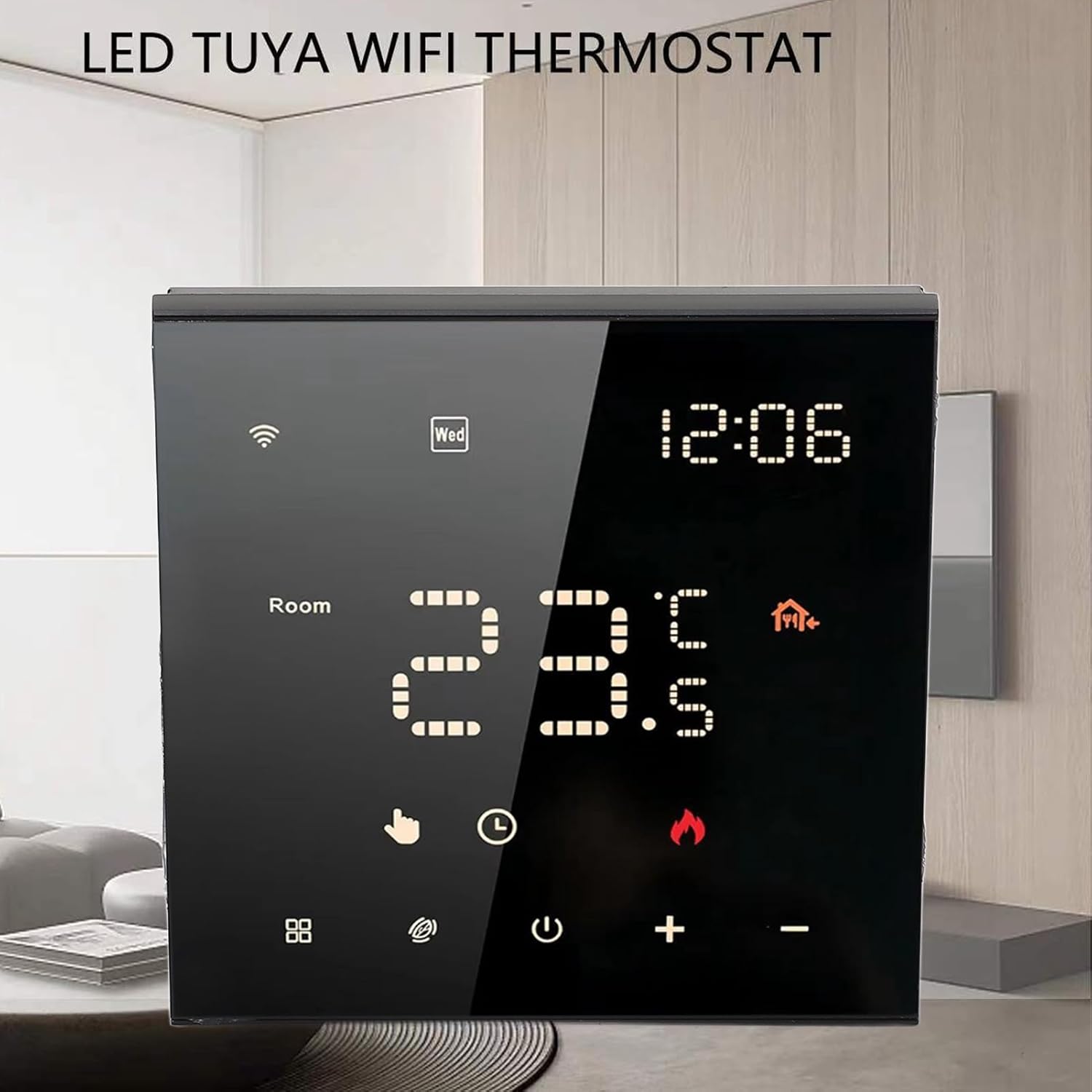
รูปที่ 4.1 : ด้านหน้า view of the thermostat with its LED display.

Figure 4.2: Detail of the touch-sensitive control buttons.

รูปที่ 4.3: ด้านหลัง view of the thermostat with wiring connections.
5. การตั้งค่าและการติดตั้ง
Professional installation is recommended for this device. Ensure power is disconnected before beginning installation.
5.1 Wiring Diagram (Refer to Figure 4.3)
- L1, N1: Power input for the thermostat (100-250VAC).
- N, L: Load connections for your electric floor heating system.
- 1 ก.ค. 2: External sensor connections (if applicable).
- 3 ก.ค. 4: Additional control connections (if applicable).
Connect the wires from your electric floor heating system and power supply to the corresponding terminals on the back of the thermostat. Ensure all connections are secure.
5.2 การติดตั้ง
- Install the backplate of the thermostat into a standard electrical wall box.
- Secure the backplate using the provided mounting screws.
- Carefully attach the front panel of the thermostat to the backplate, ensuring it clicks into place.
5.3 การเปิดเครื่องครั้งแรก
Once installed, restore power at the circuit breaker. The thermostat display should light up. Follow the on-screen prompts for initial setup, including time and date.
6. คู่มือการใช้งาน
6.1 Digital Touch Screen Operation
The thermostat features a responsive LED touch display for direct control:
- ปุ่มเปิด/ปิด: กดเพื่อเปิดหรือปิดเทอร์โมสตัท
- ปุ่ม '+' / '-': Adjust the target temperature up or down.
- ปุ่มโหมด (ถ้ามี): Cycle through different operating modes (e.g., Manual, Program).
- ไอคอน WiFi: Indicates WiFi connection status. A blinking icon usually means it's in pairing mode.
6.2 Smart App Control (WiFi Connectivity)
Control your thermostat remotely using the dedicated mobile application. This feature allows you to adjust settings from anywhere, monitor energy usage, and manage schedules.
- ดาวน์โหลดแอป: ค้นหา the 'Smart Life' or 'Tuya Smart' app in your mobile app store (iOS or Android).
- ลงทะเบียน/เข้าสู่ระบบ: สร้างบัญชีหรือเข้าสู่ระบบหากคุณมีบัญชีอยู่แล้ว
- เพิ่มอุปกรณ์: Follow the in-app instructions to add your thermostat. This typically involves putting the thermostat into pairing mode (often by holding a specific button or following a sequence) and connecting it to your home WiFi network.
- รีโมทคอนโทรล: Once connected, you can adjust temperature, change modes, and set schedules directly from the app.

Figure 6.1: Remote control via mobile application.
6.3 7-Day Programmable Schedule
Optimize comfort and energy efficiency by setting a customized weekly schedule. You can program different temperatures for various times of the day (e.g., waking up, leaving home, returning, sleeping) for each day of the week.
- Access the scheduling feature through the mobile app or directly on the thermostat's touch screen (refer to the on-screen menu for 'Program' or 'Schedule').
- Set desired temperatures and times for up to 6 periods per day.
- Save your schedule. The thermostat will automatically adjust the temperature according to your programmed settings.
6.4 Family Sharing Feature
The mobile app allows you to grant access to other family members or guests, enabling multiple users to control the thermostat. This is ideal for households with varying schedules or rental properties.
- In the mobile app, navigate to the device settings for your thermostat.
- Look for a 'Share Device' or 'Family Management' option.
- Invite other users by entering their app account details. They will then have control over the thermostat.
7. การบำรุงรักษา
เพื่อให้แน่ใจว่าเทอร์โมสตัทของคุณมีประสิทธิภาพสูงสุดและมีอายุการใช้งานยาวนาน ให้ทำดังนี้:
- การทำความสะอาด: Gently wipe the screen and body with a soft, dry cloth. Do not use abrasive cleaners, solvents, or spray directly onto the device.
- หลีกเลี่ยงสิ่งกีดขวาง: Ensure no objects block the thermostat's internal temperature sensor (if visible) to maintain accurate readings.
- การอัปเดตซอฟต์แวร์: Periodically check the mobile app for any available firmware updates for your thermostat to ensure you have the latest features and bug fixes.
8 การแก้ไขปัญหา
หากคุณพบปัญหาเกี่ยวกับเทอร์โมสตัท โปรดดูปัญหาทั่วไปและวิธีแก้ไขต่อไปนี้:
| ปัญหา | สาเหตุที่เป็นไปได้ | สารละลาย |
|---|---|---|
| เทอร์โมสตัทไม่มีไฟ/หน้าจอว่างเปล่า | ไม่มีไฟจากเบรกเกอร์ สายไฟไม่ถูกต้อง | Check circuit breaker. Verify wiring connections (consult an electrician if unsure). |
| ระบบทำความร้อนไม่ทำงาน | Incorrect wiring; thermostat in OFF mode; system malfunction. | Ensure thermostat is ON and in heating mode. Check wiring. Consult HVAC professional. |
| ปัญหาการเชื่อมต่อ WiFi | Incorrect WiFi password; router too far; 5GHz network. | Ensure correct 2.4GHz WiFi network and password. Move router closer or use a WiFi extender. Re-pair the device via the app. |
| การอ่านอุณหภูมิไม่แม่นยำ | การอุดตันของเซ็นเซอร์ ตำแหน่งของเทอร์โมสตัท | Ensure no drafts or heat sources directly affect the thermostat. Verify sensor connections if external. |
9. ข้อมูลจำเพาะ
- ประเภทสินค้า: เทอร์โมสตัทอัจฉริยะ
- วัสดุเปลือก: พีซีทนไฟ
- แบบอย่าง: ME82 LED 7 WiFi
- แหล่งจ่ายไฟ: 100-250VAC, 50/60เฮิรตซ์
- Room Temperature Range: 5°C~70°F (41°F~158°F)
- ความแม่นยำในการแสดงอุณหภูมิ: ±0.5℃
- น้ำหนักสินค้า: 9.4 ออนซ์ (ประมาณ 266 กรัม)
- ขนาดแพ็คเกจ: 3.94 x 3.94 x 2.76 นิ้ว (ประมาณ 10 x 10 x 7 ซม.)
10. การรับประกันและการสนับสนุน
For warranty information or technical support, please refer to the purchase platform or contact plplaaoo customer service directly. Keep your purchase receipt as proof of purchase.
หากต้องการความช่วยเหลือเพิ่มเติม โปรดไปที่ plplaaoo Store on Amazon.