
1. บทนำ
Thank you for choosing the URBN 10000mAh Sleek MagSafe Power Bank. This device is designed to provide convenient and efficient charging for your compatible smartphones and other devices, featuring both 15W MagSafe wireless charging and 20W wired Power Delivery. Please read this manual carefully before use to ensure optimal performance and safety.
2. ข้อมูลด้านความปลอดภัยที่สำคัญ
เพื่อป้องกันการบาดเจ็บหรือความเสียหายต่ออุปกรณ์ของคุณ โปรดปฏิบัติตามข้อควรระวังด้านความปลอดภัยดังต่อไปนี้:
- ห้ามให้พาวเวอร์แบงค์สัมผัสกับอุณหภูมิที่สูงหรือต่ำมาก (เกิน 45°C หรือต่ำกว่า 0°C) แสงแดดโดยตรง หรือเปลวไฟ
- ห้ามถอดประกอบ ซ่อมแซม หรือดัดแปลงพาวเวอร์แบงค์ การกระทำดังกล่าวจะทำให้การรับประกันเป็นโมฆะและอาจก่อให้เกิดอันตรายได้
- ควรเก็บพาวเวอร์แบงค์ให้ห่างจากน้ำ ความชื้น และวัสดุที่มีฤทธิ์กัดกร่อน
- Do not drop, hit, or apply strong impact to the power bank.
- เก็บให้พ้นจากมือเด็ก
- ใช้เฉพาะสายชาร์จและอะแดปเตอร์ที่ผ่านการรับรองเท่านั้น
- If the power bank swells, emits an odor, or becomes hot during charging or discharge, discontinue use immediately.
- ทิ้งพาวเวอร์แบงค์อย่างมีความรับผิดชอบตามกฎระเบียบท้องถิ่น

Figure 2.1: Battery Health Protection. The URBN power bank incorporates multiple safety features such as overvoltage, overcurrent, short circuit, battery temperature, overcharge, and chip shutdown thermal protection to ensure safe operation and protect your devices.
3. เนื้อหาบรรจุภัณฑ์
กรุณาทำเครื่องหมายในช่องสำหรับรายการต่อไปนี้:
- 1 × URBN 10000mAh MagSafe Power Bank
- 1 × Detachable Type-C Charging Cable
- 1 × คู่มือผู้ใช้ (เอกสารนี้)
4. สินค้าหมดview
The URBN 10000mAh MagSafe Power Bank is a versatile charging solution. Familiarize yourself with its components:
รูปที่ 4.1: คุณสมบัติหลัก This image highlights the main functionalities and components of the power bank, including its charging capabilities, physical features, and safety protections.
คุณสมบัติ:
- ความจุสูง 10000mAh: สามารถชาร์จสมาร์ทโฟนส่วนใหญ่ได้หลายครั้ง
- 15W MagSafe Wireless Charging: Strong magnetic alignment for compatible iPhones (iPhone 12 series and newer).
- 20W Fast Wired Charging: Power Delivery (PD) and Quick Charge (QC) compatible via USB-C ports.
- ขาตั้งในตัว: ช่วยให้ใช้งานได้โดยไม่ต้องใช้มือ viewขณะชาร์จ
- เอาต์พุตสามเท่า: Simultaneous charging via wireless and dual wired ports.
- สายเคเบิล Type-C แบบถอดออกได้: For convenient wired charging and recharging.
- การชาร์จแบบพาสทรู: ชาร์จพาวเวอร์แบงค์และอุปกรณ์พร้อมกันได้
- แรงยึดเกาะแม่เหล็กสูง: Ensures secure attachment for MagSafe-compatible devices.
- Battery Health Protection: Integrated safety mechanisms for device and power bank protection.
- แม็กTag Ring Included: Enables MagSafe-style magnetic attachment for non-MagSafe compatible phones.
5. การตั้งค่า
5.1 การชาร์จ Power Bank ครั้งแรก
Before first use, fully charge your URBN power bank. Connect the provided Type-C cable to the power bank's USB-C port and the other end to a compatible USB wall adapter (not included). The LED indicators will show the charging progress. Once all indicators are solid, the power bank is fully charged.
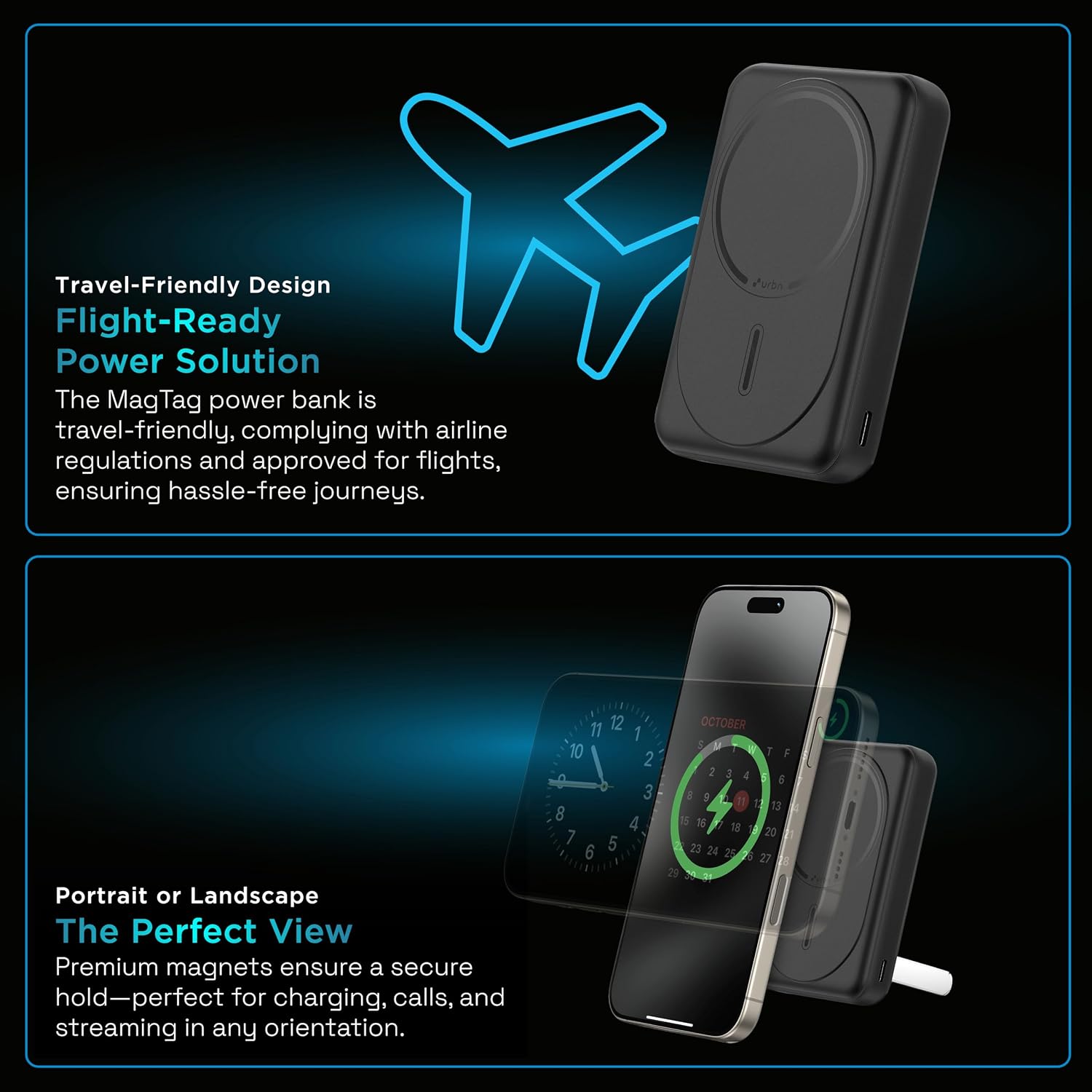
Figure 5.1: Recharging the Power Bank. Connect the power bank to a wall adapter using the USB-C cable for recharging. The image also demonstrates pass-through charging.
5.2 Installing the MagTag Ring (for non-MagSafe phones)
If your smartphone is not MagSafe compatible (e.g., Android phones or older iPhones), you can use the included MagTag ring to enable magnetic attachment for wireless charging.
- ทำความสะอาดด้านหลังของโทรศัพท์หรือเคสโทรศัพท์ให้สะอาดหมดจด
- Use the provided applicator tool to correctly position the MagTag ring on the back of your device or case. Ensure it is centered for optimal magnetic alignment.
- Press firmly to secure the ring. Allow adhesive to set for a few minutes before use.

Figure 5.2: MagTag Ring Installation. แม็กTag ring allows non-MagSafe devices to utilize the magnetic attachment feature of the power bank. An applicator is included for effortless setup.
6. คู่มือการใช้งาน
6.1 การชาร์จไร้สาย (MagSafe)
For MagSafe-compatible iPhones (iPhone 12 series and newer) or devices with an installed MagTag แหวน:
- Align your device with the wireless charging pad on the power bank.
- The magnets will snap your device into place, ensuring proper alignment.
- Wireless charging will begin automatically. The power bank's LED indicators may illuminate to show activity.

Figure 6.1: Wireless Charging in Action. This image illustrates the 15W wireless charging capability, showing an iPhone magnetically attached to the power bank.
6.2 การชาร์จแบบมีสาย
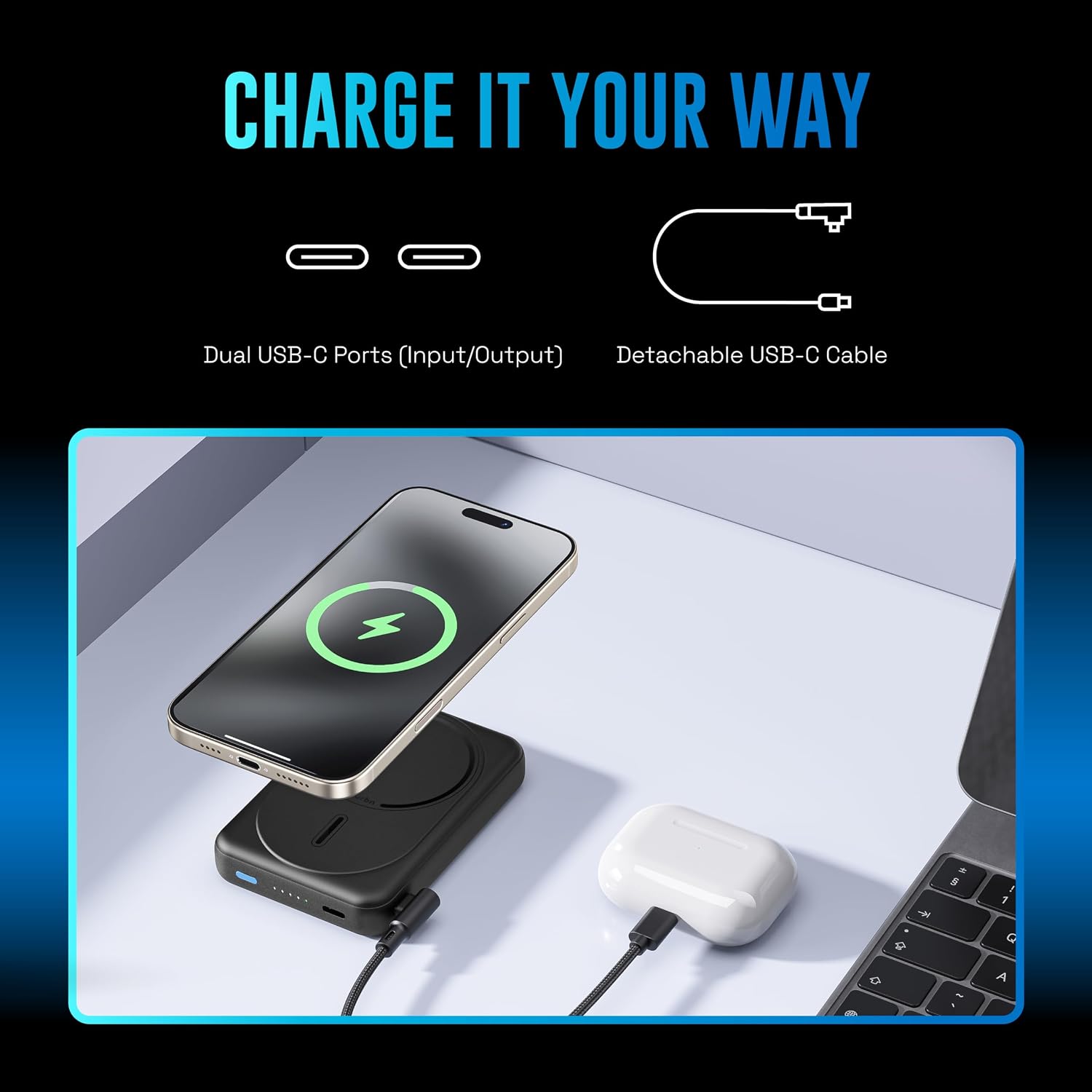
The power bank features dual USB-C ports for wired charging.
- Connect one end of the provided Type-C cable (or your device's charging cable) to one of the power bank's USB-C ports.
- Connect the other end to your smartphone, tablet, earbuds, or other compatible device.
- Charging will begin automatically. The power bank supports up to 20W Power Delivery for fast charging compatible devices.
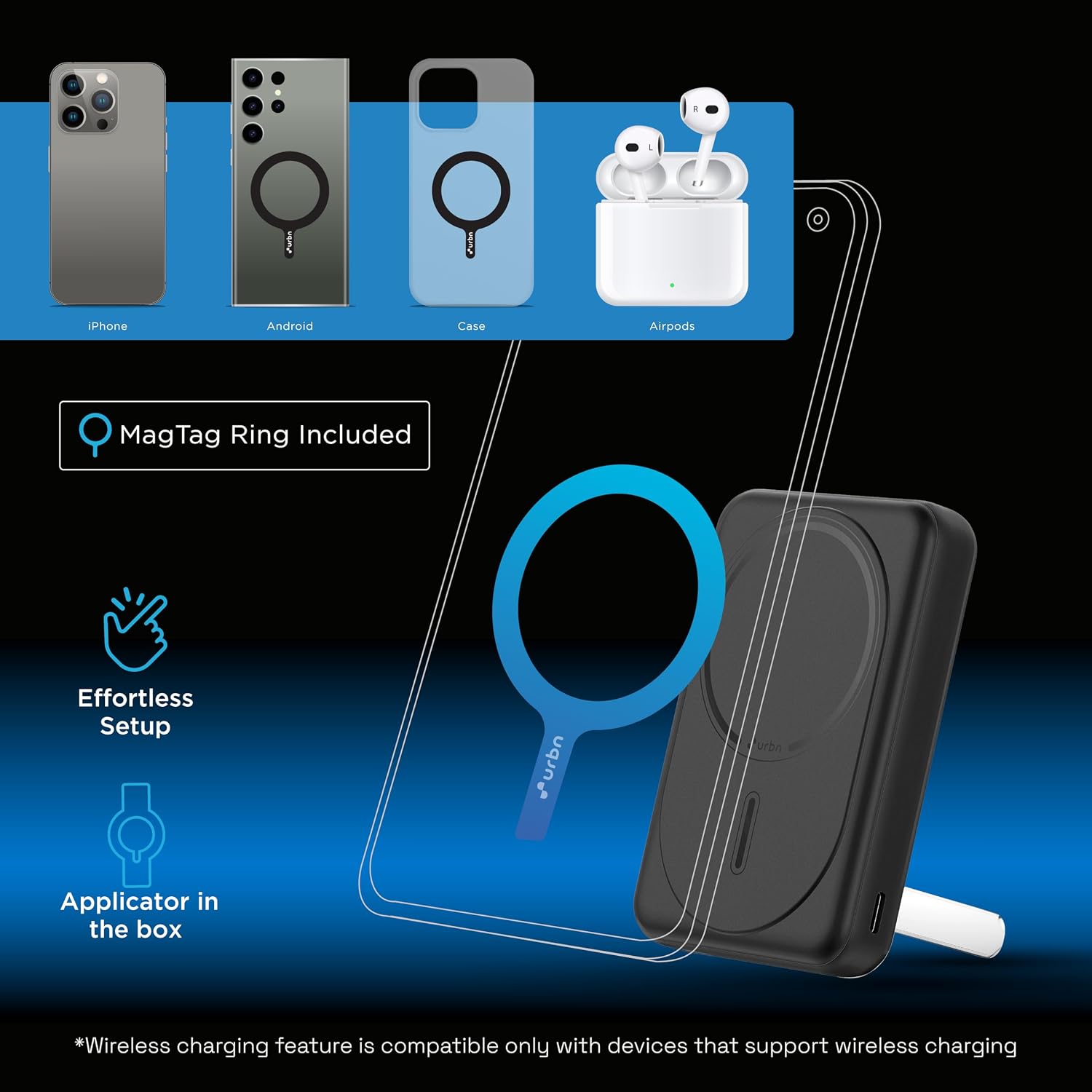
Figure 6.2: Charging Multiple Devices. The power bank can charge a smartphone wirelessly and another device, such as AirPods, via its USB-C port simultaneously.
6.3 การชาร์จแบบผ่าน
The power bank supports pass-through charging, allowing you to charge the power bank itself while it simultaneously charges another device.
- Connect the power bank to a wall adapter for recharging (as described in Section 5.1).
- While the power bank is recharging, connect your device (via wireless or wired connection) to the power bank.
- Both the power bank and your connected device will charge.
6.4 การใช้งานขาตั้งในตัว
ขาตั้งในตัวช่วยให้ใช้งานได้สะดวกโดยไม่ต้องใช้มือ viewing of your device while it charges.
- Gently pull out the kickstand from the back of the power bank.
- Place your MagSafe-compatible phone (or phone with MagTag ring) onto the power bank.
- ปรับขาตั้งให้ได้ตำแหน่งที่ต้องการ viewing angle for portrait or landscape orientation.
Figure 6.3: Kickstand Functionality. The kickstand allows for stable viewing of your device in both portrait and landscape modes while charging.
7. การบำรุงรักษา
- การทำความสะอาด: Use a soft, dry cloth to clean the surface of the power bank. Do not use harsh chemicals or abrasive cleaners.
- พื้นที่จัดเก็บ: เก็บพาวเวอร์แบงค์ไว้ในที่แห้งและเย็น หลีกเลี่ยงแสงแดดโดยตรงและอุณหภูมิที่สูงหรือต่ำเกินไป หากเก็บรักษาเป็นเวลานาน ควรชาร์จพาวเวอร์แบงค์ให้ได้ประมาณ 50% ทุกๆ สามเดือน เพื่อรักษาสภาพแบตเตอรี่ให้ใช้งานได้นาน
- การดูแลสายเคเบิล: Handle the charging cable gently. Avoid bending or twisting it excessively to prevent damage.
8 การแก้ไขปัญหา
| ปัญหา | สาเหตุที่เป็นไปได้ | สารละลาย |
|---|---|---|
| พาวเวอร์แบงค์ชาร์จไม่เข้า | Cable or adapter faulty; power bank fully discharged; loose connection. | Try a different cable/adapter; ensure connections are secure; allow a few minutes for charging to initiate if fully discharged. |
| อุปกรณ์ไม่ชาร์จแบบไร้สาย | Misalignment; device not MagSafe compatible; thick phone case; foreign objects between device and power bank. | Ensure proper alignment; use MagTag ring for non-MagSafe devices; remove thick cases or metal objects. |
| Device not charging via cable | Cable faulty; device port dirty; power bank low on charge. | Try a different cable; clean device port; recharge power bank. |
| ชาร์จช้า | Using non-PD/QC adapter/cable; device not supporting fast charging; multiple devices charging simultaneously. | Use a 20W PD compatible adapter/cable; ensure device supports fast charging; charge one device at a time for maximum speed. |
9. ข้อมูลจำเพาะ
| ชื่อรุ่น | Slide Power Bank |
| หมายเลขรุ่น | UPR117 |
| ความจุของแบตเตอรี่ | 10000mAh |
| เอาท์พุทชาร์จไร้สาย | กำลังไฟสูงสุด 15 วัตต์ (ใช้งานร่วมกับ MagSafe ได้) |
| เอาท์พุตการชาร์จแบบมีสาย | Up to 20W Power Delivery (USB-C) |
| อินพุต (USB-C) | จ่ายพลังงานได้สูงสุดถึง 20W |
| ประเภทขั้วต่อ | USB ประเภท C |
| คุณสมบัติพิเศษ | Auto Shut-Off, Built-In Cable, Fast Charging, Over Charging Protection, Pocket Size, Built-in Kickstand, Strong Magnetic Hold, MagTag Ring Included |
| ขนาด (ยาว x กว้าง x หนา) | 13L x 6.8W x 2Th Centimeters |
| น้ำหนัก | 181 กรัม |
| อุปกรณ์ที่รองรับ | MagSafe iPhones (12 series and newer), Android smartphones (with MagTag ring), tablets, earbuds, smartwatches |
10. การรับประกันและการสนับสนุน
Your URBN 10000mAh Sleek MagSafe Power Bank is covered by a รับประกันการเปลี่ยนสินค้า 6 เดือน ตั้งแต่วันที่ซื้อสินค้า
For warranty claims, technical support, or any inquiries, please contact URBN customer service. Please retain your purchase receipt as proof of purchase for warranty validation.
ผู้ผลิต: ACETRON TECH VENTURES PVT LTD, Veeflex Electrikials Private Limited, Rajprabha Enclave, Building No. 6, Unit No. 209&210, 1st Floor, Bhoidapada, Sativali Road, Vasai (E) Pin code : - 401208
แพ็คเกอร์: ACETRON TECH VENTURES PVT LTD Rajprabha Enclave, Building No. 6, Unit No. 111&112, 1st Floor, Bhoidapada, Sativali Road, Vasai (E) Pin code : - 401208