
MAXLANDER ML8G601
MAXLANDER ML8G601 40V Cordless Tiller Cultivator Instruction Manual
Model: ML8G601 | Brand: MAXLANDER
1. ข้อมูลด้านความปลอดภัย
คำเตือน: อ่านและทำความเข้าใจคำแนะนำทั้งหมดก่อนใช้ผลิตภัณฑ์นี้ การไม่ปฏิบัติตามคำแนะนำทั้งหมดที่ระบุไว้ด้านล่างอาจส่งผลให้เกิดไฟฟ้าช็อต ไฟไหม้ และ/หรือบาดเจ็บสาหัส
- Always wear appropriate safety gear, including gloves and eye protection, when operating the tiller.
- ให้มือและส่วนอื่น ๆ ของร่างกายอยู่ห่างจากชิ้นส่วนที่กำลังเคลื่อนไหว
- Do not operate the tiller in wet or damp เงื่อนไข.
- Always turn off and unplug the tiller before performing any maintenance or cleaning.
- Always follow the double start button safety feature to prevent accidental start-up.
- Ensure the work area is clear of debris, rocks, and other obstacles that could be thrown by the tines.
- ให้เด็กและผู้เห็นเหตุการณ์อยู่ห่างจากพื้นที่ปฏิบัติงานในระยะที่ปลอดภัย
2. สินค้าหมดview
The MAXLANDER ML8G601 is a 40V cordless tiller cultivator designed for efficient garden preparation. It features a powerful brushless motor and durable steel tines for effective soil cultivation.
คุณสมบัติหลัก:
- การออกแบบไร้สาย: Freedom of movement without the limitations of power cords. Includes 2x4.0Ah batteries and a fast charger.
- Brushless Powerful Motor: Provides robust power to break up hard soil with 280 RPM.
- Working Size & 4 Steel Tines: Cultivates an area 12-inches wide and up to 8-inches deep.
- ที่จับพับได้: Designed for convenient storage and transport.
- การป้องกันความปลอดภัยสองชั้น: Requires both the safety button and trigger to be pressed for operation, preventing accidental starts.
ส่วนประกอบ:

Figure 2.1: Key Components of the MAXLANDER Tiller
3. การตั้งค่า
3.1 การประกอบ
Follow these steps to assemble your MAXLANDER Tiller Cultivator:
- แกะกล่อง: นำส่วนประกอบทั้งหมดออกจากบรรจุภัณฑ์อย่างระมัดระวัง
- ติดล้อ: Secure the wheels to the main unit using the provided pins and caps.
- Install Lower Handle: Connect the lower handle section to the main body.
- Install Upper Handle: Attach the upper handle section to the lower handle.
- สายเคเบิลที่ปลอดภัย: Use the provided clips to secure the power cable along the handle.
- ปรับความสูงของด้ามจับ: The handle height can be adjusted to your preference for comfortable operation.

Figure 3.1: Unboxing the Tiller

Figure 3.2: Attaching the Wheels

Figure 3.3: Installing the Lower Handle

Figure 3.4: Installing the Upper Handle

Figure 3.5: Securing the Power Cable

Figure 3.6: Handle Height Adjustment
3.2 การติดตั้งและการชาร์จแบตเตอรี่
The tiller operates on two 40V batteries. Ensure batteries are fully charged before use.
- การชาร์จ: Use the provided fast charger to charge both 4.0Ah batteries.
- การติดตั้ง: Insert the charged batteries into the designated battery compartments on the tiller. Ensure they click securely into place.

Figure 3.7: Batteries and Fast Charger

รูปที่ 3.8: การติดตั้งแบตเตอรี่
3.3 คู่มือวิดีโอการประกอบ
Video 3.1: MAXLANDER Cordless Tiller Assembly Guide. This video demonstrates the step-by-step assembly process for the tiller, including attaching wheels, handles, and installing batteries.
4. คู่มือการใช้งาน
4.1 การเริ่มต้นและการหยุด
- เริ่ม: Ensure batteries are installed. Press and hold the safety button, then squeeze the trigger switch. The tines will begin to rotate.
- วิธีหยุด: Release the trigger switch. The tines will stop rotating.
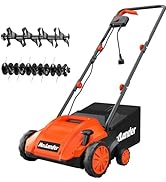
Figure 4.1: Easy Push Button Start
4.2 Tilling Techniques
เพื่อผลลัพธ์ที่ดีที่สุด ให้ปฏิบัติตามหลักเกณฑ์เหล่านี้:
- Begin tilling in an area with softer soil, gradually moving to harder sections.
- Allow the tiller to work at its own pace. Do not force it into the soil.
- For deeper cultivation, make multiple passes over the same area, gradually increasing ความลึก
- Overlap each pass slightly to ensure even tilling.

Figure 4.2: Tiller in Operation

Figure 4.3: Tilling Depth and Effectiveness
5. การบำรุงรักษา
Regular maintenance ensures optimal performance and extends the life of your tiller.
- การทำความสะอาด: After each use, remove any soil, debris, or tangled weeds from the tines and housing. Use a stiff brush or cloth. Do not use water directly on electrical components.
- การตรวจสอบไทน์: Periodically inspect the steel tines for wear, damage, or bending. Replace worn or damaged tines immediately to maintain performance and safety.
- การดูแลแบตเตอรี่ เก็บแบตเตอรี่ไว้ในที่แห้งและเย็น หลีกเลี่ยงแสงแดดโดยตรง อย่าเก็บแบตเตอรี่ที่หมดประจุเป็นเวลานาน
- พื้นที่จัดเก็บ: Clean the tiller thoroughly before storing. The folding handle allows for compact storage. Store in a dry, secure location out of reach of children.

Figure 5.1: Folding Handle for Easy Storage
6 การแก้ไขปัญหา
| ปัญหา | สาเหตุที่เป็นไปได้ | สารละลาย |
|---|---|---|
| เครื่องไถพรวนสตาร์ทไม่ติด | 1. Batteries not charged 2. Safety button/trigger not engaged correctly 3. Batteries not properly inserted | 1. Charge batteries fully 2. Ensure both safety button and trigger are pressed simultaneously 3. Reinsert batteries firmly until they click |
| Tines stop during operation | 1. Overload due to hard soil/obstruction 2. แบตเตอรี่เหลือน้อย | 1. Release trigger, clear obstruction, restart. Reduce tilling depth. 2. Recharge or replace batteries |
| ประสิทธิภาพการไถพรวนต่ำ | 1. Worn or damaged tines 2. Incorrect tilling depth | 1. Inspect and replace tines if necessary 2. Adjust tilling depth for optimal results |
7. ข้อมูลจำเพาะ
| คุณสมบัติ | ข้อมูลจำเพาะ |
|---|---|
| ยี่ห้อ | MAXLANDER |
| หมายเลขรุ่น | ML8G601 |
| แหล่งพลังงาน | Battery Powered (2x40V) |
| ประเภทมอเตอร์ | ไร้แปรงถ่าน |
| Tine Speed | 280 รอบต่อนาที |
| ความกว้างในการทำงาน | 12 นิ้ว |
| ความลึกการทำงาน | สูงถึง 8 นิ้ว |
| จำนวนงา | 4 Steel Tines |
| ขนาดสินค้า | ลึก 14 นิ้ว x กว้าง 54 นิ้ว x สูง 11 นิ้ว |
| วัสดุ | เหล็ก |
| สี | ปะการัง |
8. การรับประกันและการสนับสนุน
For warranty information, technical support, or to order replacement parts, please refer to the contact information provided in your product packaging or visit the official MAXLANDER webไซต์ โปรดเก็บใบเสร็จรับเงินไว้เป็นหลักฐานการซื้อสำหรับการเรียกร้องการรับประกัน
Ask a question about this manual
Ask about setup, troubleshooting, compatibility, parts, safety, or missing instructions. Manuals+ will review the question and use this page’s manual context to help answer it.