
1. สินค้าหมดview
The HONOR Magic8 Lite 5G is a robust and feature-rich smartphone designed for durability and high performance. It boasts industry-leading resistance to drops, water, and dust, a long-lasting battery, a high-resolution camera, and an immersive display, all powered by an efficient processor with advanced AI capabilities.
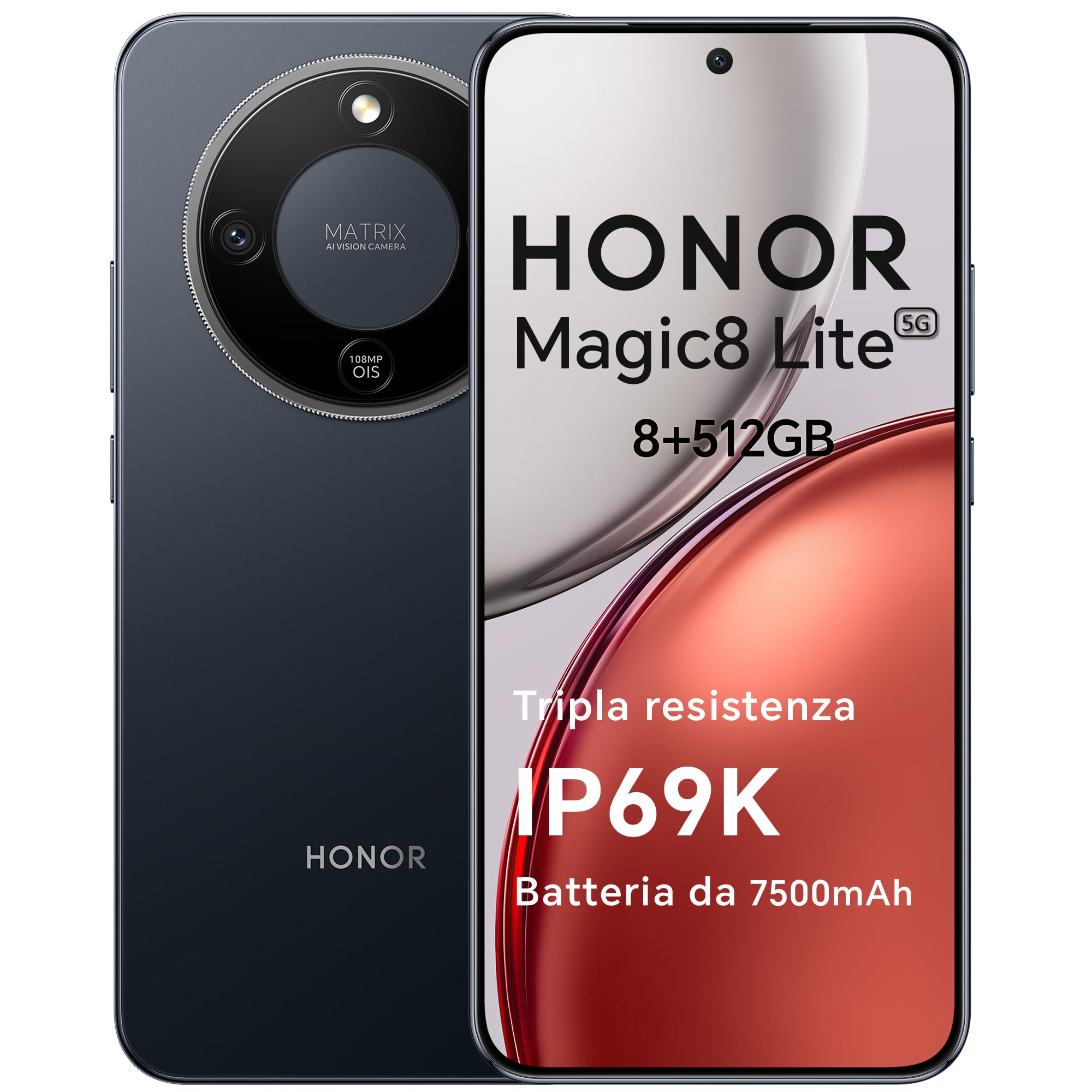
Figure 1: HONOR Magic8 Lite 5G Smartphone, Midnight Black variant.
คุณสมบัติหลัก:
- Triple Resistance: SGS Five-Star Overall Drop Resistance (up to 2.5 meters), IP69K and IP68 water and dust resistance.
- แบตเตอรี่ใช้งานได้ยาวนาน: 7500 mAh silicon-carbon battery with up to 3 days of autonomy and 66W SuperCharge. Functions as a portable power bank.
- ระบบกล้องขั้นสูง: 108 MP Ultra-Sensing Camera with Optical Image Stabilization (OIS) and Electronic Image Stabilization (EIS) for clear photos and stable 4K videos. Includes AI photography features.
- จอแสดงผลที่สมจริง: 6.79-inch 1.5K OLED display with 6000 nits peak brightness, 120 Hz refresh rate, and HONOR Eye Comfort Display technology.
- ประสิทธิภาพอันทรงพลัง: Snapdragon 6 Gen 4 (4nm) mobile platform for smooth multitasking and gaming, integrated with Google Gemini and other AI functionalities.
2. การตั้งค่าอุปกรณ์
2.1 เนื้อหาบรรจุภัณฑ์
ตรวจสอบว่าแพ็คเกจของคุณมีรายการต่อไปนี้:
- HONOR Magic8 Lite 5G สมาร์ทโฟน
- สาย USB-C
- Power Adapter (66W SuperCharge)
- เครื่องมือถอดซิม
- คู่มือเริ่มต้นอย่างรวดเร็ว
- บัตรรับประกัน
2.2 การใส่ซิมการ์ด
- ค้นหาถาดใส่การ์ด SIM ที่ด้านข้างอุปกรณ์ของคุณ
- ใส่เครื่องมือถอดซิมเข้าไปในรูเล็ก ๆ ข้างถาดแล้วกดให้แน่นจนกว่าถาดจะดีดออกมา
- Place your Nano-SIM card(s) into the designated slots on the tray. Ensure the gold contacts face downwards. The device supports Dual SIM functionality.
- ใส่ถาดใส่การ์ด SIM กลับเข้าไปในโทรศัพท์อย่างระมัดระวัง
The device also supports eSIM functionality. Refer to your carrier for activation details.
2.3 การชาร์จและเปิดเครื่องครั้งแรก
- Connect the USB-C cable to the phone's charging port and the other end to the 66W power adapter. Plug the adapter into a power outlet.
- ควรชาร์จโทรศัพท์อย่างน้อย 15 นาทีก่อนใช้งานครั้งแรก
- To power on, press and hold the Power button (located on the side) until the HONOR logo appears on the screen.
- ปฏิบัติตามคำแนะนำบนหน้าจอเพื่อทำการตั้งค่าเบื้องต้นให้เสร็จสมบูรณ์ รวมถึงการเลือกภาษา การเชื่อมต่อ Wi-Fi และการตั้งค่าบัญชี Google

Figure 2: The 7500mAh silicon-carbon battery provides extended usage.
3. คู่มือการใช้งาน
3.1 การนำทางพื้นฐาน
- หน้าจอสัมผัส: แตะเพื่อเลือก ปัดเพื่อเลื่อน บีบเพื่อซูม
- หน้าจอหลัก: เข้าถึงแอป วิดเจ็ต และการแจ้งเตือน
- ท่าทาง: Customize navigation gestures in Settings for a fluid experience.
3.2 การใช้งานกล้อง
The HONOR Magic8 Lite 5G features a 108 MP Ultra-Sensing Camera with OIS and EIS for superior image and video capture.
- เปิดแอปกล้องจากหน้าจอหลักหรือหน้าจอล็อกของคุณ
- Select your desired mode (Photo, Video, Portrait, Night, Pro, etc.).
- แตะปุ่มชัตเตอร์เพื่อถ่ายภาพหรือเริ่ม/หยุดการบันทึกวิดีโอ
- Utilize AI features like AI Eraser, AI Cutout, and AI Outpainting for enhanced photo editing.
- For underwater photography, ensure the device is properly sealed and use the dedicated underwater mode.

รูปที่ 3: อดีตamples of high-quality images captured by the 108 MP camera.
3.3 การจัดการแบตเตอรี่
The 7500 mAh battery is designed for extended use. To optimize battery life:
- เปิดใช้งานโหมดประหยัดพลังงานเมื่อแบตเตอรี่เหลือน้อย
- ปรับการตั้งค่าความสว่างหน้าจอและเวลาหมดเวลาหน้าจอ
- Close background apps not in use.
- The device supports reverse charging, allowing it to act as a power bank for other devices. Connect the devices using a compatible USB-C cable.

Figure 4: The device can charge other accessories, acting as a power bank.
3.4 คุณสมบัติการแสดงผล
The 6.79-inch 1.5K OLED display offers vibrant visuals and eye comfort features.
- โหมดสบายตา: Reduces blue light to prevent eye strain. Activate it in Display Settings.
- อัตราการรีเฟรชแบบไดนามิก: The 120 Hz adaptive refresh rate adjusts automatically for smooth scrolling and power efficiency.
- ความสว่างสูง: With 6000 nits peak brightness, the display remains clear even in direct sunlight.

Figure 5: The 1.5K OLED display offers exceptional clarity and color.
3.5 AI Features and Google Gemini
The device integrates advanced AI functionalities and Google Gemini for enhanced user experience.
- Google เจมินี่: Interact with Gemini for real-time translation, information retrieval, and more.
- เครื่องมือช่วยเขียนด้วย AI: Utilize AI to assist with text composition and productivity tasks.
- ประตูเวทย์มนตร์: A shortcut for AI-powered tasks.

Figure 6: Google Gemini integration for intelligent assistance.
3.6 ฟังก์ชัน NFC
The HONOR Magic8 Lite 5G supports Near Field Communication (NFC) for quick and secure transactions and data exchange.
- Enable NFC in your phone's Settings.
- Tap your phone to compatible NFC readers for mobile payments or to share content with other NFC-enabled devices.
4. การบำรุงรักษา
4.1 การทำความสะอาดอุปกรณ์ของคุณ
Despite its IP69K and IP68 ratings for water and dust resistance, proper cleaning helps maintain your device's longevity.
- ใช้ผ้านุ่มที่ไม่เป็นขุยเช็ดหน้าจอและตัวเครื่อง
- หลีกเลี่ยงการใช้สารเคมีรุนแรง วัสดุที่มีฤทธิ์กัดกร่อน หรืออากาศอัด
- If the device gets wet, wipe it dry with a clean cloth before charging or opening any ports.
4.2 การอัปเดตซอฟต์แวร์
Regular software updates provide security patches, new features, and performance improvements. Ensure your device is connected to Wi-Fi and has sufficient battery before initiating an update.
- นำทางไปที่ การตั้งค่า > ระบบและการอัปเดต > การอัปเดตซอฟต์แวร์ เพื่อตรวจสอบการอัปเดตที่มีอยู่
4.3 การดูแลแบตเตอรี่
The 7500 mAh battery is designed for a long lifespan. To maximize its performance:
- Avoid extreme temperatures (below -30°C or above 55°C) as they can degrade battery performance.
- ใช้เฉพาะที่ชาร์จและสายเคเบิลที่ได้รับการรับรองจาก HONOR เท่านั้น
- หลีกเลี่ยงการระบายแบตเตอรี่จนหมดบ่อยครั้ง

Figure 7: The device is designed to operate in a wide range of temperatures.
5 การแก้ไขปัญหา
This section addresses common issues you might encounter with your HONOR Magic8 Lite 5G.
5.1 อุปกรณ์ไม่เปิด
- ตรวจสอบให้แน่ใจว่าแบตเตอรี่ชาร์จเต็มแล้ว เสียบที่ชาร์จและรอสักครู่ก่อนลองเปิดเครื่องอีกครั้ง
- กดปุ่มเปิด/ปิดค้างไว้อย่างน้อย 10-15 วินาทีเพื่อบังคับให้รีสตาร์ท
5.2 ปัญหาการชาร์จ
- ตรวจสอบว่าสายชาร์จและอะแดปเตอร์เชื่อมต่อแน่นดีแล้วหรือไม่
- Try using a different HONOR-approved charger and cable.
- ตรวจสอบพอร์ตการชาร์จว่ามีเศษซากหรือความเสียหายใดๆ
5.3 กล้องไม่ทำงาน
- รีสตาร์ทอุปกรณ์
- Clear the cache and data of the Camera app in การตั้งค่า > แอป > กล้อง > พื้นที่จัดเก็บข้อมูล.
- Ensure no other apps are currently using the camera.
5.4 Water/Dust Exposure
While the device is highly resistant, prolonged exposure or exposure to high-pressure jets (beyond IP69K/IP68 limits) can cause damage.
- If the device gets wet, dry it thoroughly before charging.
- Do not intentionally submerge the device in water beyond specified depths or for extended periods.
- If you suspect water damage, contact customer support.

Figure 8: The device is designed with advanced water resistance.
For other issues, refer to the official HONOR support webเว็บไซต์หรือติดต่อฝ่ายบริการลูกค้า
6. ข้อมูลจำเพาะ
| คุณสมบัติ | ข้อมูลจำเพาะ |
|---|---|
| ยี่ห้อ | ให้เกียรติ |
| แบบอย่าง | เมจิก 8 ไลท์ |
| แรม | 8GB |
| การจัดเก็บข้อมูลภายใน | 512GB |
| สี | มิดไนท์แบล็ก |
| ความจุของแบตเตอรี่ | 7500 มิลลิแอมป์ |
| แสดง | 6.79-inch 1.5K AMOLED, 120Hz, 6000 nits peak brightness |
| กล้องหลัง | 108 MP พร้อม OIS |
| โปรเซสเซอร์ | Snapdragon 6 Gen 4 (4nm) |
| กันน้ำและกันฝุ่น | IP69K, IP68 |
| ความต้านทานการตก | SGS Five-Star Overall Drop Resistance (up to 2.5m) |
| การเชื่อมต่อ | 5G, Dual SIM, NFC |
| ต้นทาง | จีน |
| ASIN | B0G43TWKGS |

Figure 9: Detailed product information sheet.
For more detailed energy efficiency information, please refer to the EPREL database: https://eprel.ec.europa.eu/qr/2515767
7. การรับประกันและการสนับสนุน
7.1 ข้อมูลการรับประกัน
Warranty terms and conditions are typically provided with your purchase documentation. Please retain your proof of purchase for warranty claims. For specific warranty details, refer to the warranty card included in your product package or visit the official HONOR webเว็บไซต์สำหรับภูมิภาคของคุณ
7.2 การสนับสนุนลูกค้า
For technical assistance, service, or further inquiries, please contact HONOR customer support:
- เป็นทางการ Webเว็บไซต์: https://www.honor.com/de/
- Self-Repair Support: https://www.honor.com/de/support/self-repair/
- การสนับสนุนทางอีเมล์: support@honor.com