
การแนะนำ
Thank you for choosing the TESSAN 13-in-1 Tower Power Strip. This manual provides essential information for the safe and efficient use of your device. Please read these instructions carefully before use and retain them for future reference.
This power strip is designed to provide multiple power outlets and USB charging ports in a compact tower design, featuring surge protection and individual switches for enhanced control and safety.
คุณสมบัติผลิตภัณฑ์
- การเชื่อมต่อ 13-in-1: Features 8 Schuko outlets and 5 USB ports (3 USB-C, 2 USB-A) to power and charge multiple devices simultaneously.
- สวิตช์ส่วนบุคคล: Four independent switches allow you to control power to specific sections of the Schuko outlets, saving energy and preventing frequent plugging/unplugging.
- การป้องกันไฟกระชาก: Integrated surge protection safeguards your connected devices from voltagอีแหลม
- Compact Tower Design: Space-saving vertical design with a stable base and non-slip pads.
- 2-Meter Extension Cable: ให้ความยืดหยุ่นในการวางตำแหน่ง
- การชาร์จ USB: 3 USB-C ports (up to 15W) and 2 USB-A ports (up to 12W) for various USB-powered devices.

ภาพ: เหนือview of the TESSAN 13-in-1 Tower Power Strip, highlighting its 8 Schuko outlets, 3 USB-C ports, 2 USB-A ports, 3680W maximum power, and 2-meter cable length. A smartphone is shown charging via a USB-C port.
คำแนะนำเพื่อความปลอดภัย
เพื่อให้การใช้งานปลอดภัย โปรดปฏิบัติตามข้อควรปฏิบัติด้านความปลอดภัยดังต่อไปนี้:
- ห้ามใช้กำลังไฟเกิน 3680 วัตต์
- ห้ามต่อปลั๊กพ่วงหลายตัวเข้าด้วยกันแบบอนุกรม
- ห้ามใช้ในที่เปียกหรือ damp สภาพแวดล้อม
- เก็บให้พ้นจากมือเด็ก
- ห้ามถอดประกอบหรือดัดแปลงอุปกรณ์
- Ensure plugs are fully inserted into the outlets.
- If the surge protection indicator light is off, the surge protection may no longer be active.
การตั้งค่า
- แกะ: แกะปลั๊กพ่วงออกจากบรรจุภัณฑ์อย่างระมัดระวัง
- การจัดวาง: Place the power strip on a stable, flat surface. Ensure adequate ventilation around the unit. The compact tower design is suitable for various locations such as desks, workshops, or hotel rooms.
- เชื่อมต่อกับเต้ารับไฟฟ้า: Plug the power strip's 2-meter extension cable into a grounded wall outlet.
- เปิดเครื่อง: Press the main power switch (if available, otherwise individual switches control sections). The surge protection indicator light should illuminate, indicating active protection.

Image: The TESSAN Tower Power Strip positioned on a side table, demonstrating its compact size and the reach of its 2-meter extension cable. Dimensions of 18 cm height and 11.5 cm width are indicated.
คำแนะนำการใช้งาน
Using Schuko Outlets:
- Insert the plug of your device into one of the 8 Schuko outlets. The outlets are spaced 5.4 cm apart to accommodate most plugs.
- สวิตช์ส่วนบุคคล: The power strip features 4 individual switches, each controlling two Schuko outlets on one side of the tower. Press a switch to turn on or off the corresponding outlets. An indicator light on the switch will show its status.
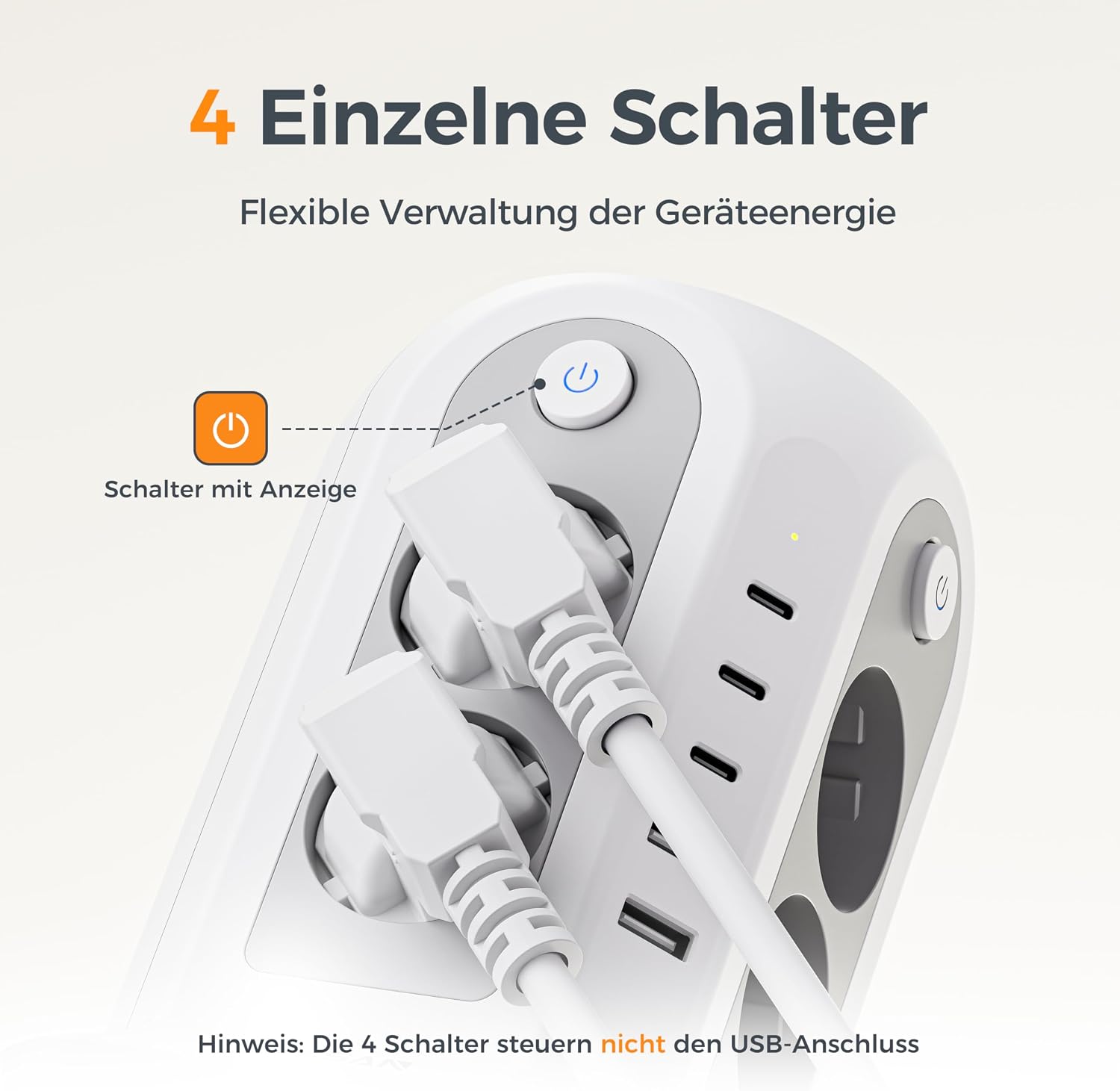
ภาพ: รายละเอียด view of an individual power switch on the TESSAN Tower Power Strip, complete with an illuminated indicator. A crucial note clarifies that these switches manage only the Schuko outlets and not the USB ports.
การใช้พอร์ต USB:
- Connect your USB-powered devices (smartphones, tablets, smartwatches, etc.) to the available USB-C (3 ports, up to 15W) or USB-A (2 ports, up to 12W) ports.
- The USB ports are always active when the power strip is plugged in and do not depend on the individual Schuko outlet switches.
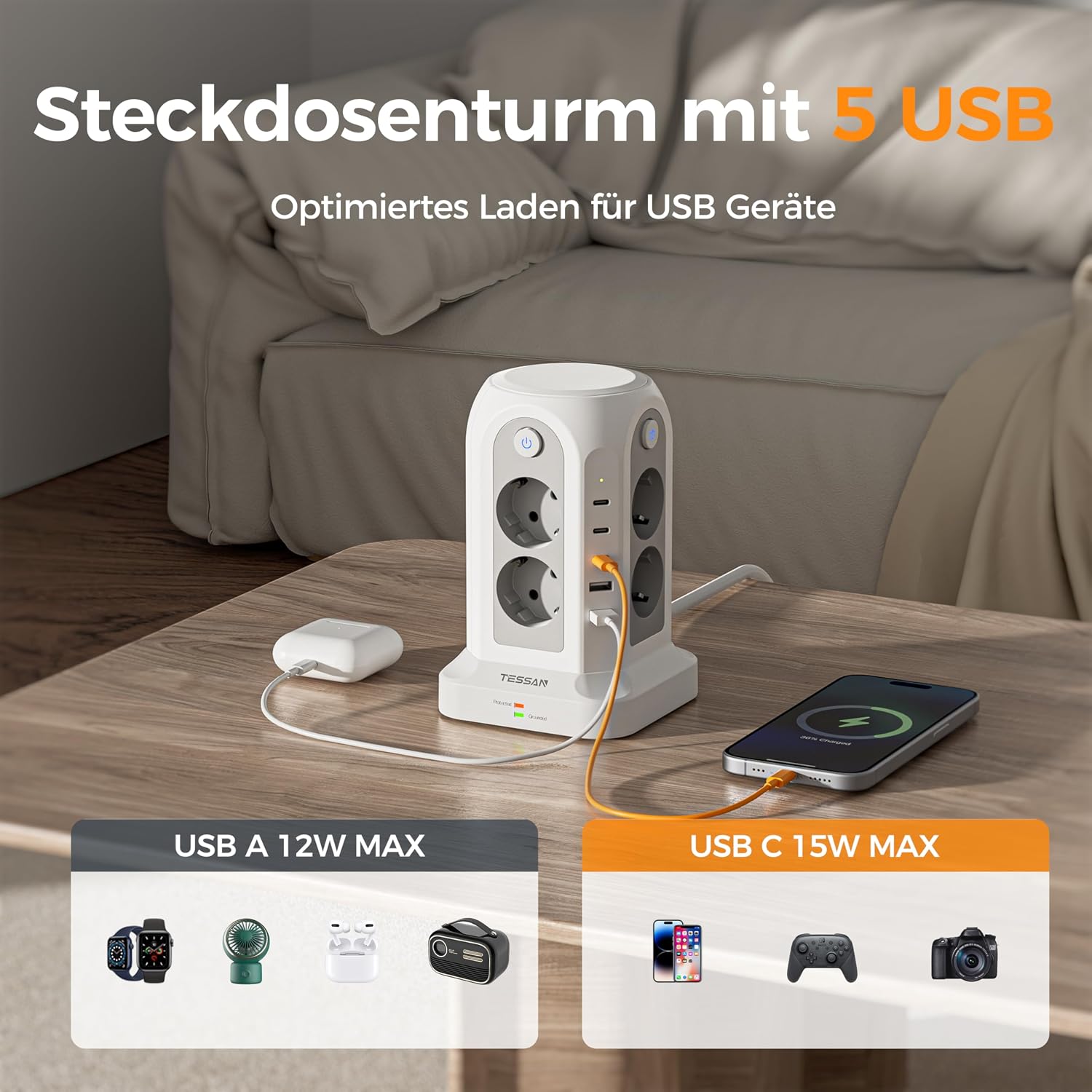
Image: The TESSAN Tower Power Strip actively charging multiple devices via its 5 USB ports, including 3 USB-C and 2 USB-A. The image highlights the maximum power output for each USB type: 12W for USB-A and 15W for USB-C.
การป้องกันไฟกระชาก:
- The power strip includes an integrated surge protector. A dedicated indicator light (often green) will be illuminated when the surge protection is active and functioning correctly.
- If this light is off, the surge protection may have been compromised and the unit should be replaced to ensure continued protection for your devices.

Image: The TESSAN Tower Power Strip on a desk, visually emphasizing its surge protection feature with a glowing blue shield graphic. This illustrates the multi-protection capabilities for connected devices.
การซ่อมบำรุง
- การทำความสะอาด: ถอดปลั๊กรางปลั๊กไฟออกจากเต้ารับก่อนทำความสะอาด ใช้ผ้าแห้งและนุ่มเช็ดทำความสะอาดพื้นผิว ห้ามใช้น้ำยาทำความสะอาดหรือวัสดุที่มีฤทธิ์กัดกร่อน
- พื้นที่จัดเก็บ: เมื่อไม่ได้ใช้งานเป็นเวลานาน ควรเก็บปลั๊กพ่วงไว้ในที่แห้งและเย็น หลีกเลี่ยงแสงแดดโดยตรงและความชื้น
- การตรวจสอบ: Periodically inspect the power cord and the unit for any signs of damage. If damage is found, discontinue use and replace the unit.
การแก้ไขปัญหา
| ปัญหา | สาเหตุที่เป็นไปได้ | สารละลาย |
|---|---|---|
| ไม่มีไฟเข้าปลั๊กไฟ/พอร์ต USB | Power strip not plugged in; wall outlet not working; individual switch off; overload. | Ensure power strip is fully plugged into a working wall outlet. Check if individual switches are ON. Reduce connected devices if overloaded. |
| ไฟแสดงสถานะการป้องกันไฟกระชากดับลง | ระบบป้องกันไฟกระชากถูกเปิดใช้งานแล้วและไม่สามารถใช้งานได้อีกต่อไป | รางปลั๊กไฟนี้ช่วยปกป้องอุปกรณ์ของคุณจากไฟกระชาก ควรติดตั้งรางปลั๊กไฟกลับเข้าที่เดิมเพื่อให้มั่นใจได้ว่าจะมีระบบป้องกันไฟกระชากอย่างต่อเนื่อง |
| อุปกรณ์ USB ชาร์จไฟไม่เข้า | Faulty USB cable; device not compatible; USB port damaged. | Try a different USB cable or device. Ensure the device is compatible with USB charging. |
ข้อมูลจำเพาะ
- แบบอย่าง: JA-EU02A
- ยี่ห้อ: เทสซาน
- ร้านค้าทั้งหมด: 13 (8 Schuko, 5 USB)
- พอร์ต USB: 3 x USB-C (up to 15W), 2 x USB-A (up to 12W)
- สวิตช์ส่วนบุคคล: 4 (controlling Schuko outlets)
- คุณสมบัติพิเศษ: ระบบป้องกันไฟกระชาก
- อัตราพลังงานสูงสุด: 3680วัตต์
- ความยาวสายเคเบิล: 2 เมตร
- ขนาด (ยาว x กว้าง x สูง): 11.5 ซม. x 11.5 ซม. x 17.9 ซม. (โดยประมาณ)
- ประเภทปลั๊ก: Type F (ชูโกะ)
- สี: สีเทา
- ผู้ผลิต: Jiaan Electrical Appliance(Dongguan)Co.,LTD
- ประเทศต้นกำเนิด: จีน
การรับประกันและการสนับสนุน
TESSAN products are designed and manufactured to the highest quality standards. This product comes with a standard manufacturer's warranty. For specific warranty details, please refer to the documentation provided with your purchase or contact TESSAN customer support.
If you encounter any issues or have questions regarding your TESSAN 13-in-1 Tower Power Strip, please contact our customer support team for assistance. Please have your model number (JA-EU02A) and purchase information ready.