
1. บทนำ
ขอบคุณสำหรับการซื้อasing the ULTIMEA Aura A60 U2621 7.1ch Dolby Atmos Soundbar System. This manual provides essential information for setting up, operating, and maintaining your new sound system. Please read this manual thoroughly before use to ensure proper functionality and to maximize your audio experience.

Figure 1.1: Immersive audio experience with the ULTIMEA Aura A60 system.
2. ข้อมูลด้านความปลอดภัย
เพื่อลดความเสี่ยงจากไฟฟ้าช็อต ไฟไหม้ หรือความเสียหายต่ออุปกรณ์ของคุณ โปรดปฏิบัติตามข้อควรระวังด้านความปลอดภัยดังต่อไปนี้:
- อย่าให้เครื่องนี้โดนฝนหรือความชื้น
- ห้ามวางวัตถุที่บรรจุของเหลว เช่น แจกัน บนเครื่อง
- ตรวจสอบให้แน่ใจว่ามีการระบายอากาศที่เหมาะสม อย่าปิดกั้นช่องระบายอากาศใดๆ
- ห้ามติดตั้งใกล้แหล่งความร้อน เช่น หม้อน้ำ เครื่องทำความร้อน เตา หรืออุปกรณ์อื่น ๆ (รวมถึง ampเครื่องให้ความร้อน) ที่ผลิตความร้อน
- ปกป้องสายไฟไม่ให้ถูกเหยียบหรือถูกหนีบ โดยเฉพาะที่ปลั๊ก เต้ารับไฟฟ้า และจุดที่สายไฟออกจากเครื่อง
- ใช้เฉพาะอุปกรณ์เสริม/สิ่งที่แนบตามที่ผู้ผลิตกำหนดเท่านั้น
- ถอดปลั๊กอุปกรณ์นี้ในระหว่างพายุฝนฟ้าคะนองหรือเมื่อไม่ได้ใช้งานเป็นเวลานาน
- ส่งต่อการบริการทั้งหมดไปยังบุคลากรบริการที่มีคุณสมบัติเหมาะสม
3. เนื้อหาบรรจุภัณฑ์
โปรดตรวจสอบว่าสินค้าทั้งหมดมีอยู่และอยู่ในสภาพดี:
- ULTIMEA Aura A60 Soundbar
- Wireless Subwoofer (4-inch, BassMX Technology)
- 4 x Surround Speakers (2 front, 2 rear)
- รีโมทคอนโทรล
- สาย HDMI
- อะแดปเตอร์แปลงไฟ/สายไฟ
- คู่มือการใช้งาน (เอกสารนี้)
4. สินค้าหมดview
The ULTIMEA Aura A60 U2621 is a 7.1ch Dolby Atmos soundbar system designed to deliver an immersive home theater audio experience. It features a main soundbar unit, a powerful wireless subwoofer with BassMX technology, and four surround speakers.
4.1 Main Soundbar Unit
The main soundbar unit houses 3 main channels for clear dialogue and primary audio. It serves as the central hub for all audio connections.

Figure 4.1: Main soundbar unit with front surround speakers.
4.2 ซับวูฟเฟอร์ไร้สาย
The dedicated 4-inch wireless subwoofer incorporates BassMX technology to enhance low frequencies, providing deep and resonant bass for a more impactful audio experience.

Figure 4.2: Wireless subwoofer with BassMX technology.
4.3 ลำโพงเซอร์ราวด์
The system includes four surround speakers: two front and two rear. The rear speakers connect wirelessly to the soundbar, minimizing cable clutter and allowing flexible placement to create an expansive acoustic space.

Figure 4.3: Diagram of 7.1ch sound distribution.
4.4 พอร์ตอินพุต/เอาต์พุต
The soundbar features multiple input options for versatile connectivity:
- HDMI eARC: For high-quality audio transmission and seamless TV integration.
- ออปติคอล: อินพุตเสียงดิจิตอล
- ช่องเสริม: อินพุตเสียงแบบอะนาล็อก
- ยูเอสบี: สำหรับการเล่นสื่อ
- บลูทูธ: การสตรีมเสียงแบบไร้สาย

Figure 4.4: Rear panel connections, including HDMI eARC.
5. การตั้งค่า
5.1 การจัดวางทางกายภาพ
การจัดวางส่วนประกอบของระบบเสียงอย่างเหมาะสมนั้นมีความสำคัญอย่างยิ่งต่อประสบการณ์ด้านเสียงที่ดีที่สุด
- ซาวด์บาร์: วางซาวด์บาร์ไว้ตรงกลางใต้โทรทัศน์ ตรวจสอบให้แน่ใจว่าไม่มีสิ่งใดมาบดบัง
- ซับวูฟเฟอร์: Position the wireless subwoofer on the floor near the soundbar. Experiment with placement to find the best bass response for your room.
- Front Surround Speakers: Place the two wired front surround speakers to the left and right of your TV, ideally at ear level when seated.
- ลำโพงเซอร์ราวด์ด้านหลัง: Position the two wireless rear surround speakers behind your primary listening position, to the left and right. These speakers will automatically connect wirelessly to the soundbar once powered on.

Figure 5.1: Recommended speaker placement for Dolby Atmos.
5.2 การเชื่อมต่อ
Follow these steps to connect your soundbar system:
- การเชื่อมต่อไฟฟ้า: Connect the power cables to the soundbar, subwoofer, and surround speakers, then plug them into a power outlet.
- HDMI eARC (แนะนำ): Connect one end of the provided HDMI cable to the HDMI eARC port on your soundbar and the other end to the HDMI eARC/ARC port on your TV. This connection supports Dolby Atmos and allows for TV remote control of the soundbar.
- การเชื่อมต่อแบบออปติคอล (ทางเลือก): If your TV does not have an HDMI eARC/ARC port, connect an optical cable (not included) from your TV's optical output to the OPTICAL input on the soundbar.
- AUX Connection (Alternative): For analog audio sources, connect a 3.5mm AUX cable (not included) from your device's audio output to the AUX input on the soundbar.
- การเชื่อมต่อ USB: Insert a USB drive into the USB port on the soundbar for direct media playback.
- การจับคู่บลูทู ธ : To connect a Bluetooth device, select the Bluetooth input on the soundbar. On your device, search for 'ULTIMEA Aura A60' and pair.
6. คู่มือการใช้งาน
6.1 เปิด/ปิดเครื่อง
กดปุ่มเปิด/ปิดบนซาวด์บาร์หรือรีโมทคอนโทรลเพื่อเปิดหรือปิดระบบ
6.2 การเลือกอินพุต
Use the 'Input' button on the remote control or the soundbar to cycle through available input sources: HDMI eARC, Optical, AUX, USB, and Bluetooth.

Figure 6.1: Remote control for easy operation.
6.3 การควบคุมระดับเสียง
Adjust the master volume using the 'Volume Up' and 'Volume Down' buttons on the remote control or the soundbar. You can also adjust subwoofer and surround speaker levels independently.
6.4 Sound Modes and EQ Presets
The Aura A60 offers various sound modes and EQ presets to optimize audio for different content and preferences.
- Dedicated Modes: Select from 6 specialized modes: Movie, Music, Voice, Sports, Game, and Night.
- ที่ตั้งไว้ล่วงหน้า EQ: Access 121 professional EQ presets for genres like Bass, Pop, Classical, and Rock via the ULTIMEA app.

Figure 6.2: 121 preset EQ matrix for customized audio.
การควบคุมแอพ 6.5 ตัว
Download the ULTIMEA app to your smartphone for advanced control and customization options, including a 10-band EQ and access to all EQ presets.
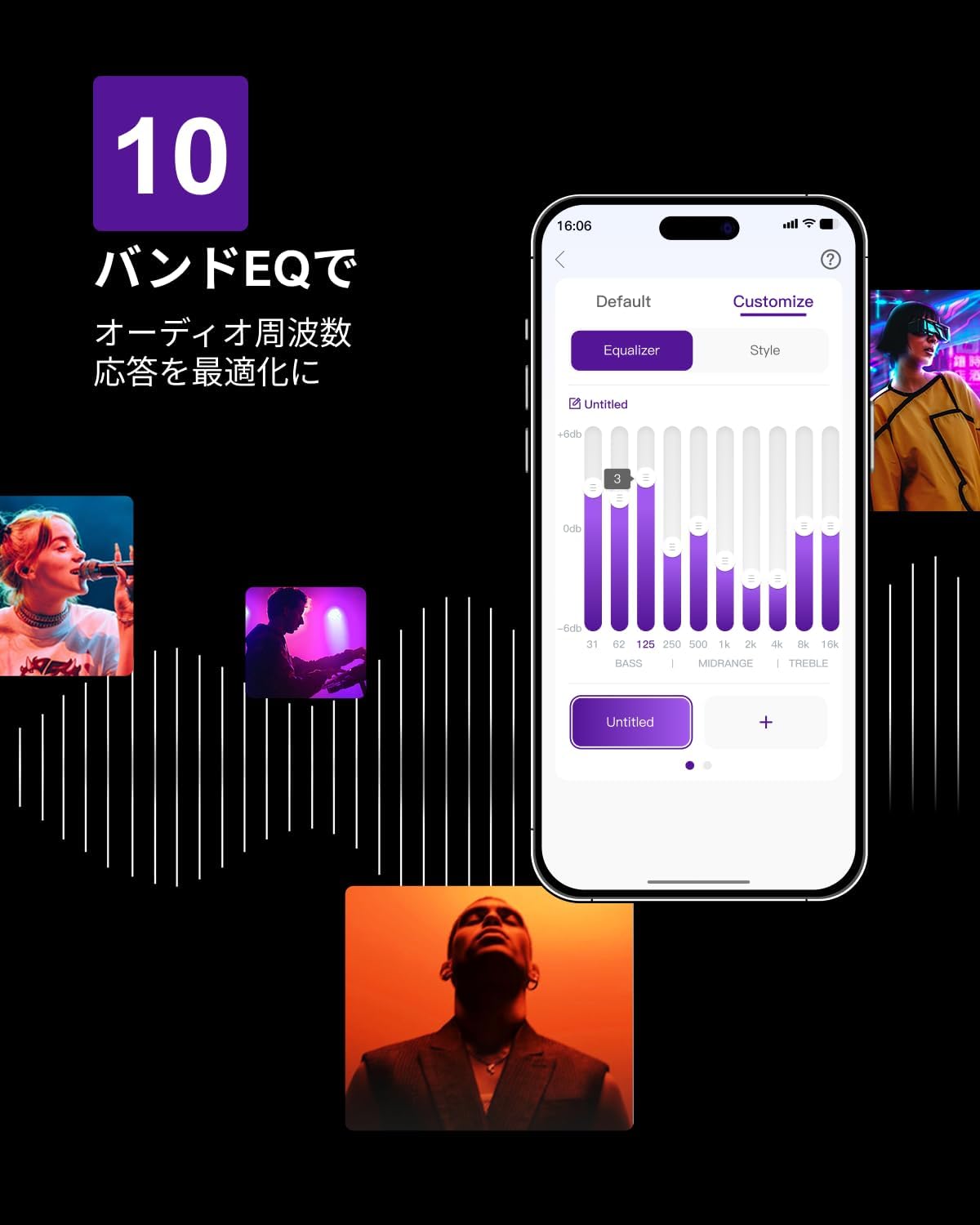
Figure 6.3: ULTIMEA mobile application interface.
7. การบำรุงรักษา
To ensure the longevity and optimal performance of your ULTIMEA Aura A60 soundbar system, follow these simple maintenance guidelines:
- การทำความสะอาด: Use a soft, dry cloth to wipe the surfaces of the soundbar, subwoofer, and speakers. Do not use liquid cleaners or abrasive materials, as they may damage the finish.
- การระบายอากาศ : Ensure that all ventilation openings remain clear and unobstructed to prevent overheating.
- พื้นที่จัดเก็บ: หากจะเก็บรักษาระบบไว้เป็นเวลานาน ควรตัดการเชื่อมต่อจากแหล่งจ่ายไฟและเก็บไว้ในที่แห้งและเย็น หลีกเลี่ยงแสงแดดโดยตรงและอุณหภูมิที่สูงหรือต่ำเกินไป
8 การแก้ไขปัญหา
หากคุณพบปัญหาเกี่ยวกับระบบซาวด์บาร์ โปรดดูปัญหาทั่วไปและวิธีแก้ไขต่อไปนี้:
| ปัญหา | สาเหตุที่เป็นไปได้ | สารละลาย |
|---|---|---|
| ไม่มีเสียงออกจากซาวด์บาร์ | เลือกอินพุตไม่ถูกต้อง ระดับเสียงต่ำเกินไป และสายเคเบิลไม่ได้เชื่อมต่ออย่างถูกต้อง | Verify the correct input source. Increase volume. Check all cable connections (HDMI, Optical, AUX). Ensure the soundbar is powered on. |
| No sound from subwoofer/surround speakers. | Subwoofer/speakers not paired or powered on, volume too low. | Ensure subwoofer and surround speakers are powered on. They should automatically pair. If not, refer to the pairing instructions in the full manual (if available) or contact support. Increase their individual volume levels. |
| คุณภาพเสียงผิดเพี้ยนหรือไม่ดี | Incorrect audio settings, poor source quality, interference. | Adjust EQ settings or try different sound modes. Ensure the audio source is high quality. Check for nearby electronic devices causing interference. |
| ปัญหาการเชื่อมต่อบลูทูธ | Device out of range, not in pairing mode, interference. | Ensure the soundbar is in Bluetooth pairing mode. Move your device closer to the soundbar. Disconnect and re-pair the device. |
If the problem persists after trying these solutions, please contact ULTIMEA customer support.
9. ข้อมูลจำเพาะ
| คุณสมบัติ | รายละเอียด |
|---|---|
| ยี่ห้อ | ล่าสุด |
| ชื่อรุ่น | ออร่า A60 |
| หมายเลขรุ่น | ยู2621 |
| ประเภทลำโพง | Soundbar with 7.1ch Surround Sound |
| เทคโนโลยีเสียง | Dolby Atmos, BassMX Technology |
| การเชื่อมต่อ | HDMI eARC, Bluetooth, Optical, AUX, USB |
| ซับวูฟเฟอร์ | 4-inch Wired Subwoofer (integrated BassMX) |
| ลำโพงเซอร์ราวด์ | 4 (2 wired front, 2 wireless rear) |
| ควบคุม | Remote Control, ULTIMEA App |
| สี | สีดำ |
| ขนาด (D x W x H) | 9 cm x 40 cm x 7 cm (Soundbar, approximate) |
| ประเทศต้นกำเนิด | จีน |
10. การรับประกันและการสนับสนุน
ULTIMEA is committed to providing high-quality products and customer satisfaction. Your Aura A60 U2621 soundbar system comes with comprehensive support.
10.1 ข้อมูลการรับประกัน
Specific warranty details may vary by region. Please refer to the warranty card included with your product or visit the official ULTIMEA webเว็บไซต์สำหรับข้อกำหนดและเงื่อนไขการรับประกันล่าสุด
10.2 การสนับสนุนลูกค้า
For any questions, technical assistance, or troubleshooting not covered in this manual, please contact our dedicated support team:
- 365-Day Support: Our expert staff is available year-round to assist you.
- แชทสด: Instant responses are available via live chat on our webเว็บไซต์.
- การส่งคืน: We offer a 30-day return policy with free shipping for your peace of mind.

365-Day Expert Support

Instant Live Chat

การคืนสินค้าฟรีภายใน 30 วัน
หากต้องการความช่วยเหลือเพิ่มเติม โปรดไปที่ ULTIMEA Brand Store.