
1. บทนำ
The KONNWEI MAXOBD OBD2 Scanner is a professional diagnostic tool designed to read and clear diagnostic trouble codes (DTCs) from your vehicle's engine control unit (ECU). It provides access to various vehicle systems, allowing users to monitor live data, perform I/M readiness tests, and retrieve vehicle information. This manual provides detailed instructions for the proper use and maintenance of your MAXOBD scanner.
2. ข้อมูลด้านความปลอดภัย
Before operating the MAXOBD OBD2 Scanner, please read and understand all safety messages and instructions in this manual. Failure to do so may result in personal injury or damage to the vehicle or the scanner.
- ควรทดสอบรถยนต์ในสภาพแวดล้อมที่ปลอดภัยเสมอ
- สวมอุปกรณ์ป้องกันดวงตาที่ตรงตามมาตรฐาน ANSI
- เก็บเสื้อผ้า ผม มือ เครื่องมือ อุปกรณ์ทดสอบ ฯลฯ ให้ห่างจากชิ้นส่วนที่เคลื่อนไหวหรือเครื่องยนต์ร้อนจัด
- ควบคุมรถในพื้นที่ทำงานที่มีการระบายอากาศดี ก๊าซไอเสียเป็นพิษ
- ใส่เกียร์ P (สำหรับเกียร์อัตโนมัติ) หรือเกียร์ NEUTRAL (สำหรับเกียร์ธรรมดา) และตรวจสอบให้แน่ใจว่าได้ใส่เบรกมือไว้
- Keep a fire extinguisher suitable for gasoline/electrical fires nearby.
- ห้ามเชื่อมต่อหรือถอดอุปกรณ์ทดสอบใดๆ ในขณะที่สตาร์ทเครื่องยนต์หรือเครื่องยนต์กำลังทำงาน
3. สินค้าหมดview
The MAXOBD scanner features a clear display and intuitive button layout for easy navigation and operation. It connects directly to your vehicle's OBD-II port to retrieve diagnostic information.
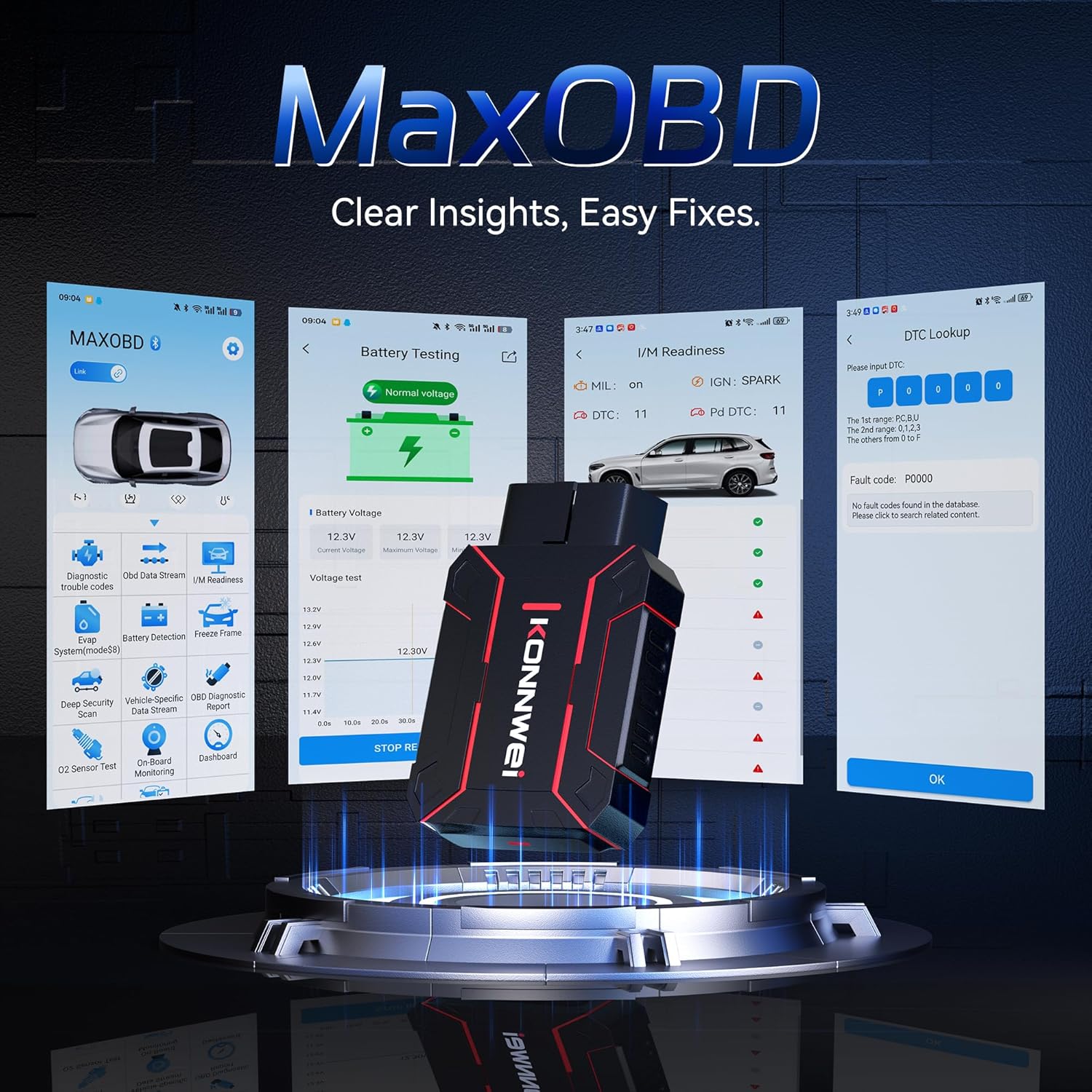
Image: The KONNWEI MAXOBD OBD2 Scanner device, illustrating its physical form and various diagnostic screen interfaces such as battery testing, I/M readiness, and DTC lookup.
ส่วนประกอบหลัก:
- ขั้วต่อ OBD-II: Connects to the vehicle's Data Link Connector (DLC).
- จอแสดงผล LCD: แสดงผลการทดสอบและตัวเลือกเมนู
- ปุ่มนำทาง: ใช้สำหรับเลื่อนดูเมนูและเลือกตัวเลือกต่างๆ
- Enter/Exit Buttons: Confirm selections or return to previous screens.
4. การตั้งค่า
Follow these steps to set up your MAXOBD OBD2 Scanner:
- ค้นหาพอร์ต OBD-II ของรถยนต์: ขั้วต่อ Data Link Connector (DLC) แบบ 16 พิน มักจะอยู่ใต้แผงหน้าปัดฝั่งคนขับของรถ หากหาตำแหน่งที่แน่นอนไม่พบ โปรดดูคู่มือบริการของรถ
- เชื่อมต่อเครื่องสแกนเนอร์: Plug the MAXOBD scanner's OBD-II connector firmly into the vehicle's DLC. Ensure a secure connection.
- เปิดเครื่อง: Once connected, the scanner will automatically power on. If it does not, turn the vehicle's ignition to the 'ON' position (engine off).
5. คู่มือการใช้งาน
The MAXOBD scanner offers various diagnostic functions. Use the navigation buttons to move through menus and the Enter button to select options.

Image: A visual representation of a vehicle highlighting various systems (Engine, ABS, SAS, SRS, DPF, TPMS) that the MAXOBD scanner can perform a full system scan on.
ฟังก์ชั่นเมนูหลัก:
- อ่านรหัส: Retrieves Diagnostic Trouble Codes (DTCs) from the vehicle's ECU. These codes indicate specific issues detected by the vehicle's onboard diagnostic system.
- ลบรหัส: Clears all DTCs from the vehicle's ECU and turns off the Malfunction Indicator Lamp (MIL) โปรดตรวจสอบให้แน่ใจว่าได้แก้ไขปัญหาต้นเหตุแล้วก่อนที่จะล้างรหัสข้อผิดพลาด
- ความพร้อมของ I/M: ตรวจสอบสถานะของระบบตรวจสอบที่เกี่ยวข้องกับการปล่อยมลพิษเพื่อตรวจสอบว่าพร้อมสำหรับการทดสอบการปล่อยมลพิษหรือไม่
- กระแสข้อมูล: Displays real-time operational parameters from the vehicle's sensors and components. This can include engine RPM, vehicle speed, oxygen sensor readings, and more.
- ตรึงกรอบ: Captures a snapshot of sensor data at the moment a DTC was set. This data can help identify the conditions under which a fault occurred.
- การทดสอบเซ็นเซอร์ O2: Retrieves O2 sensor monitoring test results for the most recently completed tests from the vehicle's onboard computer.
- การทดสอบจอภาพออนบอร์ด: ดึงข้อมูลผลลัพธ์สำหรับส่วนประกอบและระบบส่งกำลังที่เกี่ยวข้องกับการปล่อยมลพิษ ซึ่งไม่ได้มีการตรวจสอบอย่างต่อเนื่อง
- การทดสอบระบบ EVAP: เริ่มการทดสอบการรั่วไหลของระบบควบคุมการปล่อยไอระเหยของรถยนต์
- ข้อมูลยานพาหนะ: แสดงหมายเลขประจำตัวรถ (VIN), รหัสการสอบเทียบ (CALID) และหมายเลขการตรวจสอบการสอบเทียบ (CVN)
Performing a Diagnostic Scan:
- Connect the scanner to the vehicle's DLC and turn the ignition to 'ON'.
- From the main menu, select 'Read Codes' and press Enter.
- The scanner will communicate with the vehicle and display any detected DTCs.
- Use the navigation buttons to scroll through the codes and their descriptions.
- To clear codes, return to the main menu, select 'Erase Codes', and confirm.
6. การบำรุงรักษา
Proper maintenance ensures the longevity and reliable operation of your MAXOBD scanner.
- การทำความสะอาด: ใช้แบบนุ่มๆamp ใช้ผ้าเช็ดทำความสะอาดภายนอกเครื่องสแกน ห้ามใช้สารทำความสะอาดที่มีฤทธิ์กัดกร่อนหรือตัวทำละลาย
- พื้นที่จัดเก็บ: Store the scanner in a dry, clean environment away from extreme temperatures and direct sunlight. Keep it in its original packaging or a protective case when not in use.
- การอัปเดตซอฟต์แวร์: ตรวจสอบเจ้าหน้าที่ KONNWEI เป็นระยะ website for available software updates to ensure your scanner has the latest vehicle compatibility and features. Follow the instructions provided on the website for updating the device.
7 การแก้ไขปัญหา
If you encounter issues with your MAXOBD scanner, refer to the following common problems and solutions:
| ปัญหา | สาเหตุที่เป็นไปได้ | สารละลาย |
|---|---|---|
| เครื่องสแกนเนอร์ไม่สามารถเปิดเครื่องได้ | Loose connection; vehicle ignition off; faulty OBD-II port. | Ensure the scanner is securely plugged into the DLC. Turn vehicle ignition to 'ON'. Test on another vehicle if possible. |
| ข้อความ "ข้อผิดพลาดลิงค์" หรือ "ข้อผิดพลาดในการสื่อสาร" | Loose connection; vehicle not OBD-II compliant; ignition off; communication protocol issue. | Verify connection. Ensure vehicle is OBD-II compliant (most vehicles 1996 and newer). Turn ignition to 'ON'. Try a different vehicle if available. |
| หน้าจอว่างเปล่าหรือค้าง | ความผิดพลาดของซอฟต์แวร์; ไฟฟ้าดับ | Disconnect and reconnect the scanner. If the issue persists, contact customer support. |
If the problem persists after attempting these solutions, please contact KONNWEI customer support for further assistance.
8. ข้อมูลจำเพาะ
- ยี่ห้อ: KONNWEI
- แบบอย่าง: maxobdTM
- แหล่งพลังงาน: Battery Powered (via OBD-II port)
- ระบบปฏิบัติการ: ลินุกซ์
- ขนาดหน้าจอ: 2.8 นิ้ว
- ประเภทความพอดีของยานยนต์: สามารถใช้ได้กับรถยนต์ทุกรุ่น (ที่รองรับระบบ OBD-II)
- ขนาดแพ็คเกจ: 10.04 x 7.28 x 2.76 นิ้ว
9. การรับประกันและการสนับสนุน
KONNWEI products are designed for reliability and performance. For warranty information, please refer to the documentation included with your purchase or visit the official KONNWEI website. For technical support, troubleshooting assistance, or any other inquiries, please contact KONNWEI customer service through their official channels.
KONNWEI Official Webเว็บไซต์: เยี่ยมชมร้านค้า KONNWEI บน Amazon