
1. บทนำ
Welcome to the user manual for your LOKLNEYK H610 S4 Motherboard. This guide provides detailed instructions for installation, operation, maintenance, and troubleshooting to ensure optimal performance and longevity of your system. Please read this manual thoroughly before beginning installation.
2. การตั้งค่า
2.1. เนื้อหาบรรจุภัณฑ์
ตรวจสอบว่าส่วนประกอบทั้งหมดอยู่ในกล่องเมนบอร์ดของคุณหรือไม่:
- LOKLNEYK H610 S4 Motherboard
- I / O Shield
- สายเคเบิลข้อมูล SATA (จำนวนอาจแตกต่างกันไป)
- คู่มือการใช้งาน (เอกสารนี้)
- แผ่นซีดี/แฟลชไดรฟ์ (หรือดูคำแนะนำในการดาวน์โหลด)
2.2. เค้าโครงเมนบอร์ด
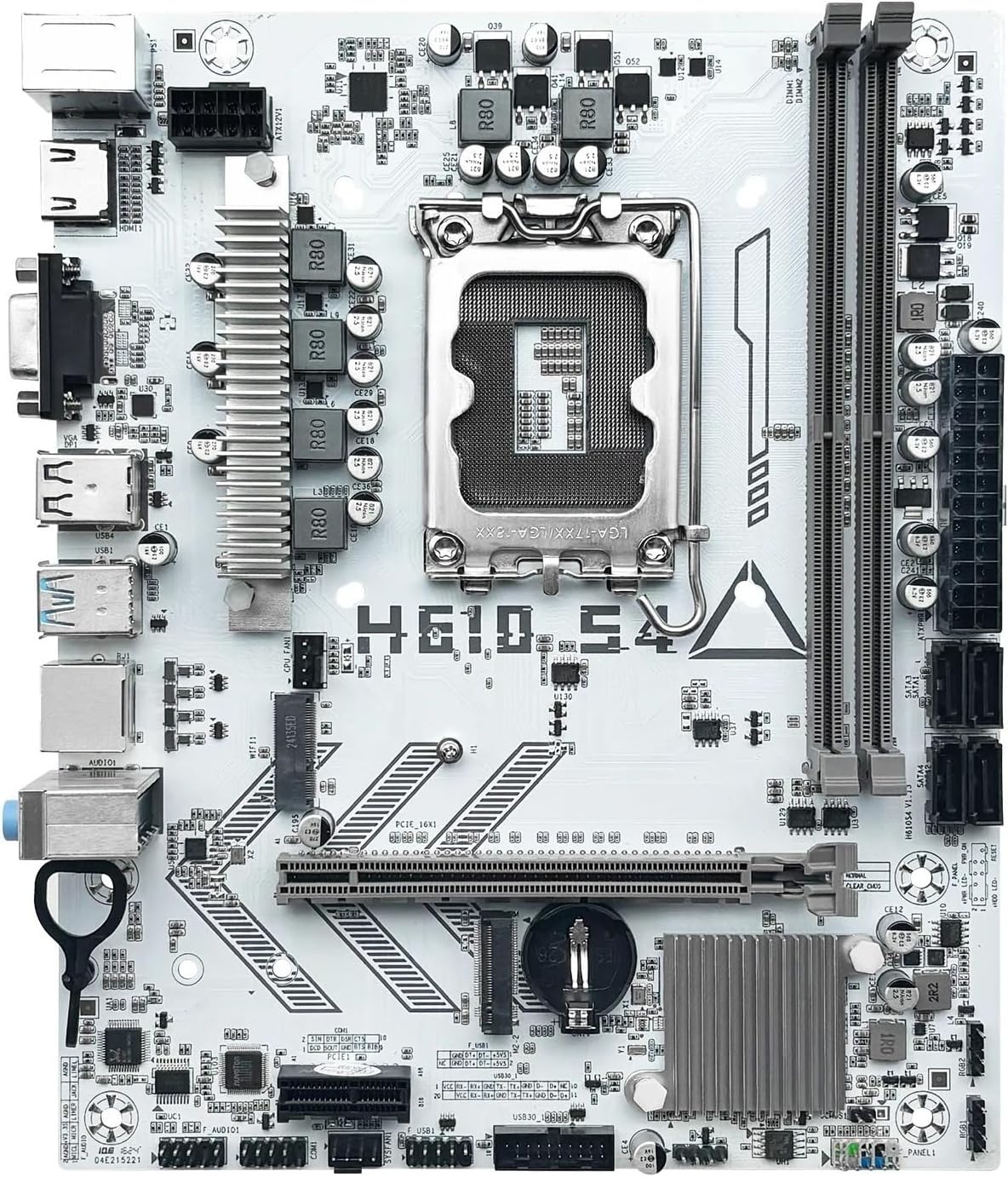
Familiarize yourself with the various components and connectors on the motherboard. Refer to the diagram below for a detailed overview of the H610 S4 motherboard's key areas.

Figure 1: Labeled diagram of the LOKLNEYK H610 S4 Motherboard, highlighting CPU socket, RAM slots, PCIe slots, M.2 slots, SATA ports, and various headers.
2.3. ขั้นตอนการติดตั้ง
ปฏิบัติตามขั้นตอนเหล่านี้เพื่อติดตั้งเมนบอร์ดและส่วนประกอบของคุณอย่างถูกต้อง:
- เตรียมโครงรถ: ติดตั้งแผ่นปิดพอร์ต I/O เข้ากับช่องเปิดด้านหลังของเคสคอมพิวเตอร์ของคุณ
- ติดตั้งเมนบอร์ด: วางเมนบอร์ดลงในเคสอย่างระมัดระวัง โดยจัดให้ตรงกับตัวรองรับ แล้วขันสกรูให้แน่น
- การติดตั้ง CPU (LGA 1700):
- Open the CPU socket lever and protective cover.
- Align the CPU's triangular mark with the mark on the socket.
- วาง CPU ลงในซ็อกเก็ตเบาๆ อย่าฝืน
- ปิดคันโยกเพื่อยึดซีพียูให้แน่น
- การติดตั้งตัวระบายความร้อน CPU: ติดตั้งพัดลมระบายความร้อน CPU ตามคำแนะนำของผู้ผลิต และตรวจสอบให้แน่ใจว่าได้ทาซิลิโคนระบายความร้อนอย่างถูกต้องแล้ว
- RAM Installation (DDR4):
- คลายคลิปที่ปลายทั้งสองด้านของช่องเสียบหน่วยความจำ DDR4
- Align the memory module's notch with the slot's key.
- กดปลายทั้งสองข้างของโมดูลลงให้แน่นจนกระทั่งคลิปล็อกเข้าที่
- Storage Installation (NVMe M.2 / SATA):
- For M.2 SSDs, insert the drive into the M.2 slot and secure it with the provided screw.
- For SATA drives, connect SATA data cables to the motherboard's SATA ports and to your drives. Connect power cables from your power supply to the drives.
- การติดตั้งการ์ด PCIe: Insert your graphics card or other PCIe expansion cards into the appropriate PCIe slots and secure them.
- การเชื่อมต่อแหล่งจ่ายไฟ: เชื่อมต่อขั้วต่อไฟ ATX 24 พิน และขั้วต่อไฟ CPU 8 พิน จากพาวเวอร์ซัพพลายเข้ากับเมนบอร์ด
- การเชื่อมต่อที่แผงด้านหน้า: Connect the front panel headers (power button, reset button, USB ports, audio jacks, LED indicators) to the corresponding pins on the motherboard. Refer to the motherboard layout diagram (Figure 1) for pin locations.
รูปที่ 2: เกินview of the LOKLNEYK H610 S4 Motherboard, showing the general layout of components.
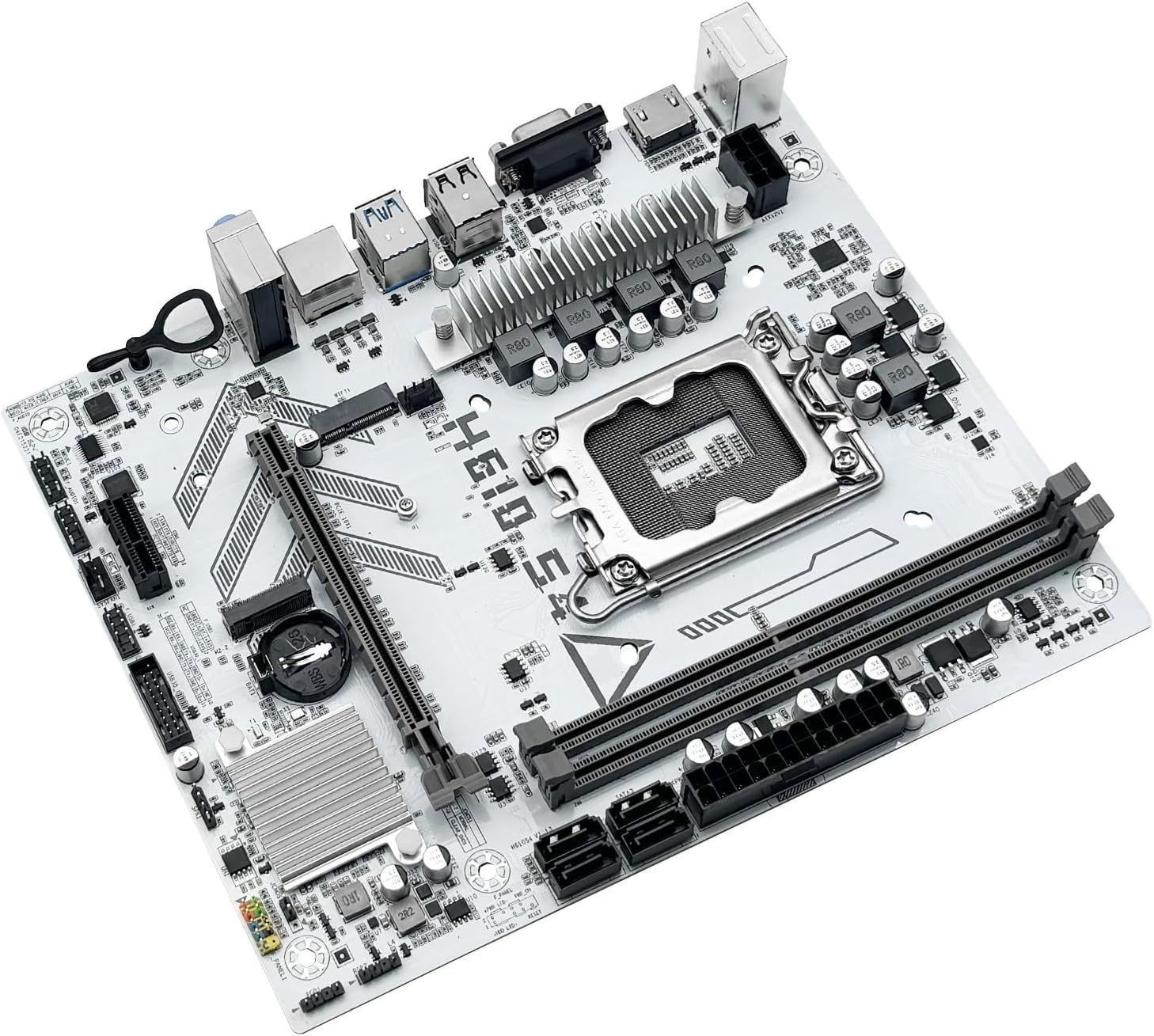
Figure 3: Rear I/O panel connectors and typical accessories like the I/O shield and SATA cables.
3. คู่มือการใช้งาน
3.1. การบูตครั้งแรก
After completing all hardware installations, connect your monitor, keyboard, and mouse. Power on your system. The system should display the BIOS/UEFI splash screen. If not, check all power connections and component seating.
3.2. การกำหนดค่า BIOS/UEFI
ในการเข้าสู่ยูทิลิตี้การตั้งค่า BIOS/UEFI ให้กดปุ่ม เดล or F2 key during the initial boot sequence. Here you can configure:
- Boot order for your operating system drive.
- การตั้งค่าวันที่และเวลา
- Memory profiles (e.g., XMP for DDR4).
- Fan speed controls.
- SATA mode (AHCI/RAID).
3.3. การติดตั้งไดร์เวอร์
After installing your operating system, it is crucial to install the latest drivers for your motherboard components. These include:
- ไดรเวอร์ชิปเซ็ต
- ไดรเวอร์ LAN (อีเธอร์เน็ต)
- ไดรเวอร์เสียง
- Graphics drivers (for integrated graphics or discrete GPU)
Drivers can typically be found on the LOKLNEYK official website or on the provided driver media.
4. การบำรุงรักษา
4.1. การทำความสะอาด
Regular cleaning helps maintain optimal performance and extends the lifespan of your motherboard. Use compressed air to remove dust from heatsinks, fans, and other components. Ensure the system is powered off and unplugged before cleaning.
4.2. การอัปเดต BIOS/UEFI
Periodically check the LOKLNEYK website for updated BIOS/UEFI versions. Updates can provide improved compatibility, stability, and new features. Follow the specific instructions provided by LOKLNEYK for updating the BIOS/UEFI to avoid system damage.
5 การแก้ไขปัญหา
หัวข้อนี้ให้แนวทางแก้ไขปัญหาทั่วไปที่คุณอาจพบเจอ
5.1. ปัญหาทั่วไปและวิธีแก้ไข
- ไม่มีไฟฟ้า:
- ตรวจสอบว่าได้ต่อแหล่งจ่ายไฟเข้ากับเมนบอร์ดอย่างถูกต้องหรือไม่ (ขั้วต่อ ATX 24 พิน และขั้วต่อ CPU 8 พิน)
- ตรวจสอบให้แน่ใจว่าสวิตช์จ่ายไฟอยู่ในตำแหน่ง 'เปิด'
- ตรวจสอบการเชื่อมต่อปุ่มเปิดปิดแผงด้านหน้า
- ไม่มีจอแสดงผล:
- Ensure the monitor cable is securely connected to the graphics card or motherboard (if using integrated graphics).
- ติดตั้งการ์ดจอและโมดูล RAM ใหม่
- ลองบูตด้วย RAM เพียงอันเดียว
- ความไม่เสถียรของระบบ/การขัดข้อง:
- ตรวจสอบอุณหภูมิ CPU และ GPU
- ตรวจสอบให้แน่ใจว่าไดร์เวอร์ทั้งหมดได้รับการอัปเดตแล้ว
- ตรวจสอบโมดูล RAM เพื่อหาข้อผิดพลาด
- ไม่พบอุปกรณ์บูต:
- Verify that your storage drive (SSD/HDD) is properly connected.
- Check BIOS/UEFI settings for correct boot order and SATA mode.
- ตรวจสอบให้แน่ใจว่าระบบปฏิบัติการได้รับการติดตั้งอย่างถูกต้องบนไดรฟ์แล้ว
For more complex issues, consult the LOKLNEYK support website or a qualified technician.
6. ข้อมูลจำเพาะ
Below are the technical specifications for the LOKLNEYK H610 S4 Motherboard:
| คุณสมบัติ | ข้อมูลจำเพาะ |
|---|---|
| ซ็อคเก็ตซีพียู | แอลจีเอ 1700 |
| Compatible CPUs | Intel Core 12th, 13th, 14th Generation i3, i5 Processors |
| ชิปเซ็ต | อินเทล H610 |
| สล็อตหน่วยความจำ | 2 x DDR4 DIMM |
| ความจุหน่วยความจำสูงสุด | 64GB |
| อินเทอร์เฟซการจัดเก็บข้อมูล | 2 x M.2 (NVMe 2280), 4 x SATA 3.0 |
| สล็อต PCIe | 1 x PCIe 4.0 x16, 1 x PCIe x1 |
| แลน | 1 x RJ45 กิกะบิตอีเธอร์เน็ต |
| พอร์ต USB | USB 3.0, USB 3.1 Gen1, USB 2.0 (Front & Rear) |
| เอาท์พุตวิดีโอ | hdmi, vga |
| เสียง | ระบบเสียงออนบอร์ด |
| ฟอร์มแฟกเตอร์ | Compact (180mm x 220mm) |

Figure 4: LOKLNEYK H610 S4 Motherboard showing its physical dimensions.
7. การรับประกันและการสนับสนุน
7.1. ข้อมูลการรับประกัน
Please refer to the warranty card included with your product or visit the official LOKLNEYK webดูรายละเอียดข้อกำหนดและเงื่อนไขการรับประกันได้ที่เว็บไซต์ เก็บหลักฐานการซื้อไว้เพื่อใช้ในการเรียกร้องการรับประกัน
7.2. การสนับสนุนด้านเทคนิค
If you encounter any issues that cannot be resolved using this manual, please visit the LOKLNEYK support webเว็บไซต์นี้รวบรวมคำถามที่พบบ่อย (FAQ) ดาวน์โหลดไดรเวอร์ และข้อมูลติดต่อสำหรับขอความช่วยเหลือด้านเทคนิค