
สินค้าเกินview
The Blaupunkt Bremen SQR 46 DAB Retro Car Stereo is a modern reinterpretation of the classic 1-DIN car radio from the 1980s. It combines vintage aesthetics with contemporary technology, offering a comprehensive in-car entertainment experience. This unit features Bluetooth connectivity, dual USB ports, SD card slot, AUX input, and AM/FM radio, along with DAB+ digital tuner capabilities. The package includes the receiver, a fully enclosed under-dash/overhead installation mounting kit, and a 22-inch radio antenna, providing a complete solution for various vehicle installations.
มีอะไรอยู่ในกล่อง
- Blaupunkt Bremen SQR 46 DAB Retro Car Stereo Receiver: The main head unit for audio playback and control.
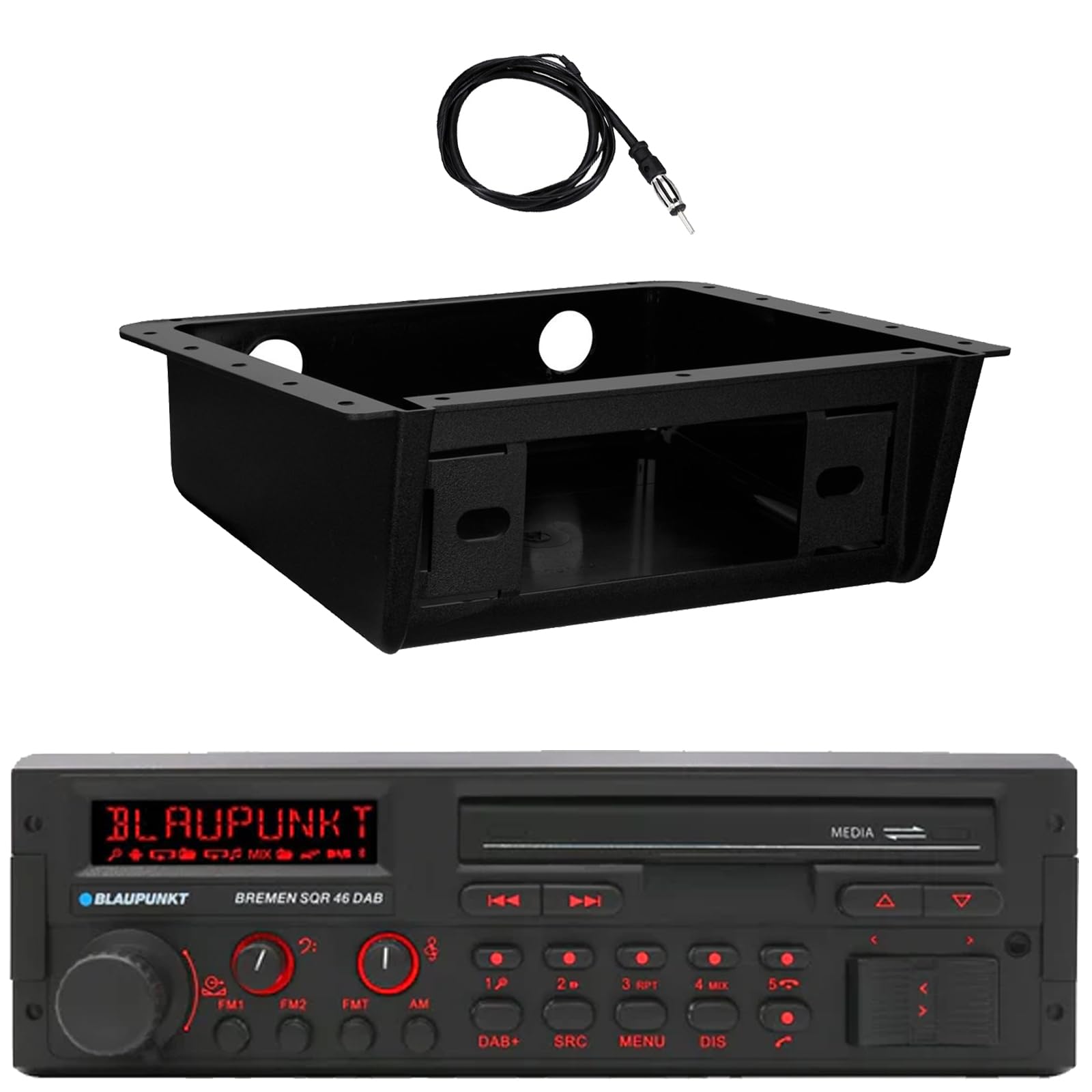
ภาพ: ด้านหน้า view of the Blaupunkt Bremen SQR 46 DAB car stereo receiver, showing the display, control knobs, and buttons.
- Fully Enclosed Under Dash/Overhead Installation Mounting Kit: A premium housing designed for secure installation of the receiver under the dashboard or overhead.

Image: Black, rectangular under-dash/overhead mounting kit, designed to house a single DIN car stereo.
- 22" Radio Antenna: A flexible marine-grade antenna for improved AM/FM radio reception.

Image: Coiled black wire antenna with a silver connector at one end.
การติดตั้งและการตั้งค่า
Proper installation is crucial for optimal performance. It is recommended that installation be performed by a qualified professional. This section provides general guidelines.
1. การติดตั้งเครื่องรับ
- Under Dash/Overhead Installation: The included mounting kit is designed to fully enclose the single DIN receiver. Secure the kit to a suitable flat surface under the dashboard or overhead using appropriate fasteners (not included).
- Insert the Blaupunkt Bremen SQR 46 receiver into the mounting kit. Ensure it is securely seated and locked into place.
- Alternatively, the unit can be installed in a standard single DIN opening in your vehicle's dashboard.
2. การเชื่อมต่อสายไฟ
- การเชื่อมต่อไฟฟ้า: Connect the yellow wire to a constant 12V power source, the red wire to a switched 12V accessory power source, and the black wire to a chassis ground.
- การเชื่อมต่อลำโพง: Connect the speaker wires to your vehicle's speakers, ensuring correct polarity for each speaker.
- การเชื่อมต่อเสาอากาศ: Connect the 22" radio antenna to the antenna input on the rear of the receiver. Route the antenna cable away from other wiring to minimize interference.
- อินพุตเสริม: If using external devices, connect them to the AUX-in port.
- อาร์ซีเอเอาท์พุท: สำหรับการเชื่อมต่อภายนอก amplifiers, use the RCA pre-outs.
3. เปิดเครื่องครั้งแรก
- หลังจากเชื่อมต่อสายไฟทั้งหมดเรียบร้อยแล้ว ให้สตาร์ทเครื่องยนต์รถของคุณ
- กดปุ่มเพาเวอร์บนเครื่องรับเพื่อเปิด
- Follow any on-screen prompts for initial setup, such as language selection or clock setting.
คำแนะนำการใช้งาน
การควบคุมพื้นฐาน
- ปุ่มเปิด/ปิด: กดเพื่อเปิดหรือปิดเครื่อง
- ปุ่มปรับระดับเสียง: หมุนเพื่อปรับระดับเสียง กดเพื่อปิด/เปิดเสียง
- ปุ่ม SRC (แหล่งที่มา): Press to cycle through available audio sources: AM, FM, DAB+, Bluetooth, USB, SD, AUX.
- ปุ่มเมนู: Access system settings and audio adjustments.
- DIS (Display) Button: Change display information or dim the display.
- Track/Tune Buttons (<< / >>): Use to skip tracks in media modes or tune radio frequencies.
Radio Operation (AM/FM/DAB+)
- กดปุ่ม เอสอาร์ซี ปุ่มจนกว่า AM, FM, หรือ แดบ+ ถูกเลือกแล้ว
- ใช้ Track/Tune buttons to manually tune frequencies or seek for the next strong station.
- สถานีที่ตั้งไว้ล่วงหน้า: Press and hold numbered buttons (1-6) to save the current station as a preset. Press briefly to recall a saved station.
การใช้งานบลูทูธ
- การจับคู่:
- ตรวจสอบให้แน่ใจว่าได้เปิดใช้งาน Bluetooth บนอุปกรณ์มือถือของคุณ
- เลือก บลูทูธ as the source on the receiver using the เอสอาร์ซี ปุ่ม.
- On your mobile device, search for available Bluetooth devices and select "Blaupunkt Bremen SQR 46".
- ยืนยันการจับคู่หากได้รับแจ้ง
- การสตรีมเสียง: เมื่อจับคู่แล้ว คุณสามารถสตรีมเสียงจากอุปกรณ์ของคุณได้ ใช้ Track/Tune buttons on the receiver to skip tracks.
- การโทรแบบแฮนด์ฟรี: When a call comes in, the unit will display caller information. Press the green call button to answer, or the red call button to reject/end.
การเล่นการ์ด USB/SD
- Insert a USB drive into one of the USB ports or an SD card into the SD card slot.
- The unit will automatically switch to the USB or SD source and begin playback. If not, press the เอสอาร์ซี ปุ่มเพื่อเลือกแหล่งที่มาที่ถูกต้อง
- ใช้ Track/Tune buttons to navigate through tracks.
อินพุต AUX
- Connect an external audio device (e.g., MP3 player) to the AUX-in port using a 3.5mm audio cable.
- เลือก อ๊อกซ์ as the source using the เอสอาร์ซี ปุ่ม.
- ควบคุมการเล่นจากอุปกรณ์ที่เชื่อมต่ออยู่
การตั้งค่าเสียง
- กดปุ่ม เมนู button to access audio settings such as Bass, Treble, Balance, Fader, and Equalizer presets.
- Rotate the volume knob to adjust values and press it to confirm selections.
การซ่อมบำรุง
- การทำความสะอาดหน่วย: ใช้ผ้าแห้งนุ่มเช็ดทำความสะอาดแผงด้านหน้าและหน้าจอ สำหรับคราบสกปรกที่ติดแน่น ให้ใช้ผ้าชุบน้ำหมาดๆ เช็ดเบาๆampชุบผ้าด้วยน้ำ หลีกเลี่ยงการใช้สารเคมีรุนแรง น้ำยาทำความสะอาดที่มีฤทธิ์กัดกร่อน หรือตัวทำละลาย
- พอร์ต USB/SD: ควรทำความสะอาดฝุ่นและสิ่งสกปรกบริเวณช่องเสียบ USB และช่องเสียบการ์ด SD ให้ปราศจากสิ่งสกปรก
- การดูแลทั่วไป: หลีกเลี่ยงการให้เครื่องสัมผัสกับอุณหภูมิที่สูงหรือต่ำเกินไป แสงแดดโดยตรงเป็นเวลานาน หรือความชื้นที่มากเกินไป
การแก้ไขปัญหา
| ปัญหา | สาเหตุที่เป็นไปได้ | สารละลาย |
|---|---|---|
| ไม่มีไฟฟ้า | สายไฟไม่ถูกต้อง ฟิวส์ขาด กุญแจสตาร์ทรถดับ | Check power and ground connections. Verify vehicle fuse and unit fuse. Ensure vehicle ignition is on. |
| ไม่มีเสียง | ระดับเสียงต่ำเกินไป ปิดเสียงแล้ว สายลำโพงไม่ถูกต้อง ไม่ได้เลือกแหล่งที่มา | เพิ่มระดับเสียง ปิดเสียง ตรวจสอบการเชื่อมต่อลำโพง เลือกแหล่งเสียงที่ถูกต้อง |
| บลูทูธไม่เชื่อมต่อ | อุปกรณ์ไม่อยู่ในโหมดจับคู่; หน่วยไม่ได้เชื่อมต่อบลูทูธ; มีสัญญาณรบกวน | Ensure Bluetooth is enabled on device and unit. Put device in pairing mode. Try re-pairing. Move closer to the unit. |
| การรับสัญญาณวิทยุไม่ดี | ไม่ได้เชื่อมต่อเสาอากาศ เสาอากาศเสียหาย พื้นที่สัญญาณอ่อน | Check antenna connection. Inspect antenna for damage. Try tuning to a stronger station or moving to a different location. |
| USB/SD เล่นไม่ได้ | ไม่ได้รับการสนับสนุน file format; Corrupted media; Incorrect source selected. | ทำให้มั่นใจ files are in a supported format (e.g., MP3, WMA). Try a different USB drive/SD card. Select USB/SD source. |
ข้อมูลจำเพาะ
| คุณสมบัติ | รายละเอียด |
|---|---|
| ยี่ห้อ | บลูพังค์ |
| หมายเลขรุ่น | Bremen SQR 46 |
| เทคโนโลยีการเชื่อมต่อ | อุปกรณ์เสริม, บลูทูธ |
| ประเภทตัวควบคุม | ปุ่มกด |
| คุณสมบัติพิเศษ | Built-In Bluetooth, USB, SD Card, AUX-in, DAB+ digital tuner |
| อุปกรณ์ที่รองรับ | Amplifier, Smartphones, USB drives, SD cards |
| โหมดเอาต์พุตเสียง | สเตอริโอ |
| ประเภทเอาต์พุตเสียง | RCA (6 channels) |
| จำนวนหน่วย | 1 (ตัวรับ) |
| ส่วนประกอบที่รวมอยู่ | Receiver, Stereo Install Kit, Radio Antenna |
ข้อมูลการรับประกัน
This Blaupunkt Bremen SQR 46 DAB Retro Car Stereo comes with a การรับประกันจากผู้ผลิต 1 ปี. This warranty covers defects in materials and workmanship under normal use. Please retain your proof of purchase for warranty claims. For detailed terms and conditions, refer to the warranty card included with your product or visit the official Blaupunkt webเว็บไซต์.
การสนับสนุนลูกค้า
For further assistance, technical support, or warranty inquiries, please contact Blaupunkt customer service. You can typically find contact information on the official Blaupunkt webไซต์หรือในเอกสารประกอบที่มาพร้อมกับผลิตภัณฑ์ของคุณ
เป็นทางการ Webเว็บไซต์: www.blaupunkt.com (Please note: This link is a general placeholder. Refer to your product's specific documentation for the most accurate support contact information.)


