
การแนะนำ
This manual provides comprehensive instructions for the INSIGNIA 4 ft Cat-6 Ethernet Cable (Grey). Designed for reliable and high-speed wired network connections, this cable is suitable for various applications including home, office, gaming, and streaming. Please read this manual carefully to ensure proper installation and optimal performance of your Ethernet cable.
สินค้าเกินview
The INSIGNIA 4 ft Cat-6 Ethernet Cable (Grey) is engineered to deliver stable and fast internet connectivity. It features:
- Fast & Reliable Wired Internet Connection: Improves network stability for work, streaming, and gaming, offering smooth, consistent internet performance where Wi-Fi may be weak or unstable.
- High-Speed Cat-6 Standard: Supports data transfer rates up to 5 Gigabits Per Second, suitable for modern network demands.
- โครงสร้างทนทาน: Features corrosion-resistant RJ45 connectors and a robust cable design for long-lasting performance.
- เข้ากันได้สากล: Works with a wide range of devices including laptops, desktop PCs, gaming consoles (Xbox, PlayStation), smart TVs, routers, and streaming boxes.
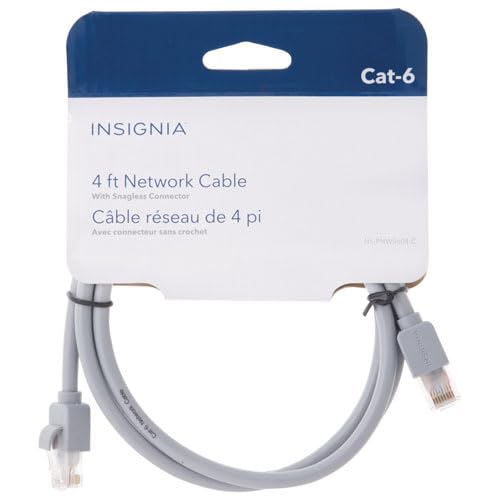
Image: Two RJ45 connectors of the INSIGNIA Cat-6 Ethernet cable. The connectors are grey with clear plastic clips, showing the internal wiring.
คำแนะนำการตั้งค่า
Connecting your INSIGNIA Cat-6 Ethernet cable is a straightforward process. Follow these steps for a secure connection:
- ระบุพอร์ต: Locate the Ethernet (RJ45) ports on your devices. These are typically rectangular with a small clip on one side. You will need one port on your internet source (e.g., router, modem) and one on your target device (e.g., computer, gaming console, smart TV).
- เชื่อมต่อปลายด้านแรกก่อน: Gently insert one end of the INSIGNIA Cat-6 Ethernet cable into an available Ethernet port on your router or modem. Ensure the clip clicks into place, indicating a secure connection.
- เชื่อมต่อปลายด้านที่สอง: Insert the other end of the Ethernet cable into the Ethernet port on your target device. Again, ensure the clip clicks securely.
- ตรวจสอบการเชื่อมต่อ: Most devices will automatically detect the wired connection. Look for an indicator light on the Ethernet port (if available) or check your device's network settings to confirm a successful wired connection.
บันทึก: Do not force the connector into the port. If it does not fit easily, check the orientation of the connector and the port.
คำแนะนำการใช้งาน
Once connected, the INSIGNIA Cat-6 Ethernet cable operates passively, providing a direct data link between your devices. No additional software or drivers are typically required for its function.
- การตรวจจับอัตโนมัติ: Modern operating systems and network devices are designed to automatically detect and utilize a wired Ethernet connection when available.
- การจัดลำดับความสำคัญ: Wired connections are generally prioritized over wireless (Wi-Fi) connections by most devices due to their superior speed and stability.
- ผลงาน: For optimal performance, ensure both connected devices support Gigabit Ethernet (1000 Mbps) or higher, to fully utilize the Cat-6 cable's capabilities.
การซ่อมบำรุง
To ensure the longevity and optimal performance of your INSIGNIA Cat-6 Ethernet cable, follow these simple maintenance guidelines:
- หลีกเลี่ยงการดัด: Do not excessively bend, crimp, or tightly coil the cable, as this can damage the internal wires and reduce performance.
- ป้องกันขั้วต่อ: Keep the RJ45 connectors clean and free from dust or debris. Avoid pulling the cable by the wire; always grasp the connector when plugging or unplugging.
- การจัดเก็บที่เหมาะสม: When not in use, store the cable loosely coiled in a dry, cool place away from direct sunlight or extreme temperatures.
- การตรวจร่างกาย: Periodically inspect the cable and connectors for any signs of wear, fraying, or damage. Replace the cable if significant damage is observed.
การแก้ไขปัญหา
If you encounter issues with your wired network connection, consider the following troubleshooting steps:
| ปัญหา | วิธีแก้ปัญหาที่เป็นไปได้ |
|---|---|
| ไม่มีการเชื่อมต่ออินเตอร์เน็ต |
|
| ความเร็วอินเตอร์เน็ตช้า |
|
| การเชื่อมต่อไม่ต่อเนื่อง |
|
ข้อมูลจำเพาะ
| คุณสมบัติ | รายละเอียด |
|---|---|
| ยี่ห้อ | INSIGNIA |
| แบบอย่าง | 4 ft Cat-6 Ethernet Cable (Grey) |
| ประเภทสายเคเบิล | Ethernet (Cat-6) |
| ประเภทขั้วต่อ | RJ45 (ตัวผู้ต่อตัวผู้) |
| ความยาว | 4 ฟุต |
| อัตราการถ่ายโอนข้อมูล | สูงสุด 5 กิกะบิตต่อวินาที |
| อุปกรณ์ที่รองรับ | Laptop, Desktop PC, Router, Modem, Gaming Consoles (Xbox, PlayStation), Smart TVs |
| น้ำหนักสินค้า | 70 กรัม |
| ยูพีซี | 600603276934 |
| ASIN | B0G2QXV9CG |
การรับประกันและการสนับสนุน
This INSIGNIA product comes with a รับประกันจำกัด 30 วัน. For warranty claims or technical support, please refer to the manufacturer's official webเข้าชมเว็บไซต์หรือติดต่อฝ่ายบริการลูกค้า เก็บใบเสร็จรับเงินไว้เพื่อใช้ยืนยันการรับประกัน
ผู้ผลิต: INSIGNIA
หากต้องการความช่วยเหลือเพิ่มเติม โปรดไปที่ ร้าน INSIGNIA บน Amazon.