
1. บทนำ
ขอบคุณสำหรับการซื้อasing the DEPSTECH DS620-TL Triple Lens Endoscope Camera. This device is designed for visual inspection in hard-to-reach areas, featuring a 1080P triple-lens camera, a 5-inch IPS monitor, and an IP67 waterproof semi-rigid cable. This manual provides essential information for safe and effective use of your endoscope camera.
2. สินค้าหมดview
2.1 คุณสมบัติหลัก
- 1080P Triple Lens Camera: Equipped with three cameras (front, side B, side C) for multi-angle inspection.
- 5-inch IPS Monitor: Provides clear, real-time images with excellent color reproduction.
- หัววัดกันน้ำ IP67: The 7.9mm diameter semi-rigid cable is waterproof, suitable for wet environments.
- ไฟ LED ปรับได้: Features 8+1+1 high-brightness LED chips with adjustable intensity for optimal illumination.
- 5M Semi-Rigid Cable: Offers flexibility and durability for navigating various spaces.
- แบตเตอรี่แบบชาร์จไฟได้: Built-in battery provides approximately 2-3 hours of continuous operation.
2.2 เนื้อหาบรรจุภัณฑ์
ตรวจสอบให้แน่ใจว่ามีรายการทั้งหมดอยู่ในบรรจุภัณฑ์:
- DEPSTECH DS620-TL Endoscope Camera
- สายชาร์จ Type-C
- อุปกรณ์ยึดแบบตะขอและแม่เหล็ก
- Storage Drawstring Bag
- คู่มือการใช้งาน

รูปที่ 2.2: อุปกรณ์เสริมที่มาพร้อมในชุดและตัวเครื่องหลัก
3. ข้อมูลด้านความปลอดภัย
- ห้ามใช้อุปกรณ์ในสภาพแวดล้อมที่มีก๊าซไวไฟหรือระเบิดได้
- เก็บอุปกรณ์ให้ห่างจากสนามแม่เหล็กไฟฟ้าที่มีความแรง
- Avoid direct exposure of the camera lens to strong light sources.
- ห้ามถอดประกอบหรือดัดแปลงอุปกรณ์ด้วยตนเอง การซ่อมแซมควรดำเนินการโดยบุคลากรที่ได้รับอนุญาตเท่านั้น
- โปรดตรวจสอบให้แน่ใจว่าอุปกรณ์ชาร์จเต็มแล้วก่อนใช้งาน เพื่อหลีกเลี่ยงการหยุดชะงักระหว่างการตรวจสอบ
- Clean the probe and lens after each use, especially after contact with liquids or corrosive substances.
4. การตั้งค่า
4.1 การชาร์จอุปกรณ์
Connect the provided Type-C charging cable to the device's charging port and a suitable USB power adapter (not included). The charging indicator will show the charging status. A full charge typically takes 2-3 hours.
4.2 การใส่การ์ด Micro SD
To save photos and videos, a Micro SD card (Class 10/Class 10 or higher, 8-32GB) is required (not included). Locate the Micro SD card slot on the side of the monitor unit and insert the card until it clicks into place.
4.3 การติดอุปกรณ์เสริม
The endoscope comes with hook and magnet attachments. These can be screwed onto the tip of the camera probe for retrieving small objects or maneuvering in tight spaces.

Figure 4.3: Magnet and hook attachments for the probe.
5. คู่มือการใช้งาน
5.1 การเปิด/ปิดเครื่อง
Press and hold the power button (usually located on the side or front panel) for a few seconds to turn the device on. The screen will display the DEPSTECH logo. To power off, press and hold the power button again.

Figure 5.1: Monitor button layout and functions.
5.2 Switching Lenses
The DS620-TL features a triple-lens system. Press the lens switch button (often labeled with a camera icon or 'M') to cycle between Front Camera A, Side Camera B, and Side Camera C. This allows for comprehensive viewing without repositioning the probe.

Figure 5.2: Triple lens camera detail.
5.3 การปรับความสว่าง LED
Use the up/down arrow buttons on the monitor to adjust the brightness of the LED lights on the camera probe. There are multiple levels of brightness to suit different inspection environments.
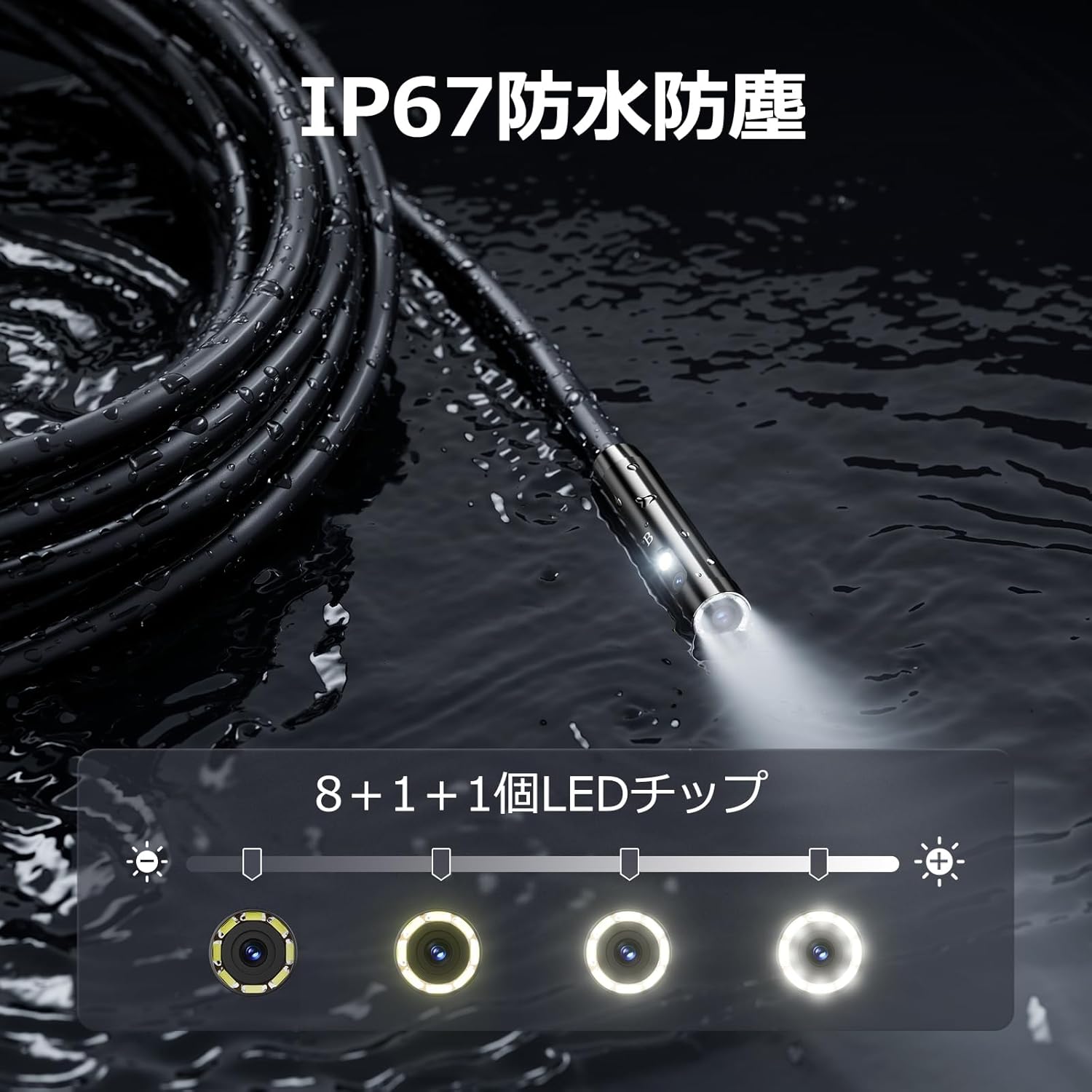
Figure 5.3: IP67 waterproof probe with adjustable LED illumination.
5.4 การถ่ายภาพและบันทึกวิดีโอ
Press the photo/video button (usually a camera icon) to capture a still image. To record video, press and hold the photo/video button; press again to stop recording. Ensure a Micro SD card is inserted to save your media.

Figure 5.4: Monitor interface for photo and video capture.
5.5 การหมุนหน้าจอ
Press the screen rotation button (often a circular arrow icon) to rotate the image on the monitor by 180 degrees. This is useful when the probe is in an inverted position.
5.6 การประยุกต์ใช้ในทางปฏิบัติ
The DS620-TL is suitable for various tasks including home appliance maintenance, pipe inspection, wall wiring checks, and automotive repairs.

Figure 5.6: Various inspection scenarios for the endoscope.
5.7 วิดีโอสาธิตผลิตภัณฑ์
Video 5.7: A demonstration of the DEPSTECH DS620-TL endoscope camera in use, showcasing คุณสมบัติและการใช้งานของมัน
6. การบำรุงรักษา
6.1 การทำความสะอาดหัววัดและเลนส์
After each use, especially in dirty or wet conditions, gently wipe the camera probe and lens with a soft, dry cloth. For stubborn dirt, a slightly damp cloth can be used, followed by drying. Do not use abrasive cleaners or solvents.
6.2 พื้นที่จัดเก็บ
Store the endoscope camera in a cool, dry place, away from direct sunlight and extreme temperatures. Use the provided drawstring bag for protection. Ensure the cable is coiled neatly without sharp bends.
6.3 การดูแลแบตเตอรี่
To prolong battery life, avoid fully discharging the device frequently. If storing for an extended period, charge the battery to approximately 50% every three months.
7 การแก้ไขปัญหา
7.1 ไม่มีภาพปรากฏบนหน้าจอ
- ตรวจสอบให้แน่ใจว่าอุปกรณ์เปิดอยู่และชาร์จจนเต็มแล้ว
- Check if the camera cable is securely connected to the monitor unit.
- Adjust the LED brightness to ensure adequate lighting in the inspection area.
7.2 Cannot Record Photos/Videos
- Verify that a compatible Micro SD card (Class 10/Class 10 or higher, 8-32GB) is inserted correctly.
- ตรวจสอบว่าการ์ด Micro SD มีพื้นที่ว่างเพียงพอหรือไม่
- Ensure the Micro SD card is not locked (read-only).
- Try formatting the Micro SD card (this will erase all data).
7.3 อุปกรณ์ไม่ชาร์จ
- Ensure the Type-C charging cable is properly connected to both the device and the power source.
- Try using a different USB power adapter or charging cable.
- ตรวจสอบพอร์ตการชาร์จว่ามีเศษหรือความเสียหายหรือไม่
If you encounter issues not listed here or if the problem persists, please contact DEPSTECH customer support.
8. ข้อมูลจำเพาะ
| คุณสมบัติ | ข้อมูลจำเพาะ |
|---|---|
| ยี่ห้อ | ดีพสเทค |
| ชื่อรุ่น | DS620TL-JP |
| สี | สีดำ |
| ระดับการกันน้ำ | IP67 |
| ประเภทสื่อ | SD Memory Card (8-32GB, Class 10/Class 10 or higher recommended) |
| File รูปแบบ | MP4, MOV, AVI, JPEG, RAW |
| รูปแบบการจับภาพวิดีโอ | เอ็มพี 4 |
| Viewประเภทตัวค้นหา | ไอพีเอส |
| ประเภทเซนเซอร์ | ซีมอส |
| ความละเอียดของเซนเซอร์ภาพ | 2.1 MP |
| ฟังก์ชั่นโฟกัส | โฟกัสคงที่ |
| โฟกัสอัตโนมัติ | เลขที่ |
| อายุการใช้งานแบตเตอรี่โดยเฉลี่ย | 2 ชั่วโมง |
| ส่วนประกอบที่รวมอยู่ | Type-C Cable, Attachments, Storage Drawstring Bag |
| การรับประกันจากผู้ผลิต | 2 ปี |
| ประเทศต้นกำเนิด | จีน |
9. การรับประกันและการสนับสนุน
9.1 การรับประกันของผู้ผลิต
The DEPSTECH DS620-TL comes with a 24-month manufacturer warranty. Your order number serves as proof of purchase for warranty claims.
9.2 การสนับสนุนลูกค้า
For any inquiries, technical assistance, or warranty claims, please contact our dedicated support team:
- อีเมล: support@depstech.com
- เวลาตอบสนอง: We aim to respond to all inquiries within 24 hours. For requests submitted on weekends or holidays, a response will be provided on the next business day.

Figure 9.2: DEPSTECH support details.