
1. บทนำและเรื่องอื่นๆview
The EPOS Impact 500 ANC Wireless Headset is engineered for professionals requiring clear communication and focus in diverse work environments. This on-ear Bluetooth headset integrates hybrid Active Noise Cancellation (ANC) to minimize distractions and features EPOS AI™ microphones for natural voice clarity during conversations. It offers versatile connectivity via dual USB-C and USB-A options, ensuring compatibility with various devices. Certified for Microsoft Teams Open Office and other UC platforms, it provides a seamless experience for remote and office collaboration. Key benefits include extended battery life, talk-through mode for quick interactions, and EPOS BrainAdapt™ technology designed to reduce listening fatigue.
2. อะไรอยู่ในกล่อง
Upon unboxing your EPOS Impact 500 ANC Wireless Headset, you will find the following components:
- EPOS Impact 500 ANC Wireless Headset
- สายชาร์จ USB-C ถึง USB-C (1.2 ม.)
- BTD 900c USB-C Dongle
- อะแดปเตอร์ USB-C ถึง USB-A
- Sustainable Carry Pouch
- คู่มือความปลอดภัย
- เอกสารการปฏิบัติตาม
- คู่มือแนะนำ

Image: All items included in the EPOS Impact 500 ANC Wireless Headset package.
3. การตั้งค่า
3.1 การชาร์จชุดหูฟัง
Before initial use, fully charge your headset. Connect the provided USB-C to USB-C charging cable to the charging port on the headset and to a compatible USB-C power source. If your device only has USB-A ports, use the included USB-C to USB-A adapter with the charging cable. The LED indicator on the headset will show charging status.
3.2 การเชื่อมต่อกับอุปกรณ์ของคุณ
The headset offers flexible connectivity options:
- บลูทู ธ ไร้สาย: Power on the headset. Activate Bluetooth on your device (laptop, tablet, smartphone). Put the headset into pairing mode (refer to the Quick Guide for specific button presses). Select "EPOS Impact 500" from your device's Bluetooth list.
- USB-C Dongle (BTD 900c): Insert the BTD 900c USB-C dongle directly into a USB-C port on your computer. The headset will automatically connect to the dongle. If your computer only has USB-A ports, attach the USB-C to USB-A adapter to the dongle before inserting it.
3.3 การปรับชุดหูฟัง
Adjust the headband for a comfortable fit. The earcups are designed to rest gently on your ears. Position the boom microphone approximately 2-3 cm from the corner of your mouth for optimal voice pickup. The boom mic can be rotated up or down.

Image: The EPOS Impact 500 headset with its adjustable boom microphone.
4. คู่มือการใช้งาน
4.1 การควบคุมขั้นพื้นฐาน
- เปิด/ปิดเครื่อง: Use the dedicated power switch located on one of the earcups.
- การปรับระดับเสียง: Use the volume up and down buttons on the earcup to control audio levels.
- การจัดการการโทร: A multi-function button is available for answering/ending calls.
- ปิดเสียง/เปิดเสียงไมโครโฟน: Lift the boom microphone up to mute and lower it down to unmute.
4.2 ระบบตัดเสียงรบกวนแบบแอคทีฟ (ANC)
The hybrid ANC feature can be activated to reduce background noise, allowing for greater focus during calls and work. Refer to the Quick Guide for specific button controls to toggle ANC on or off.
4.3 Talk-Through Mode
For quick conversations with colleagues without removing the headset, activate Talk-Through mode. This feature allows ambient sounds to pass through, enabling effortless interaction. Consult the Quick Guide for activation instructions.
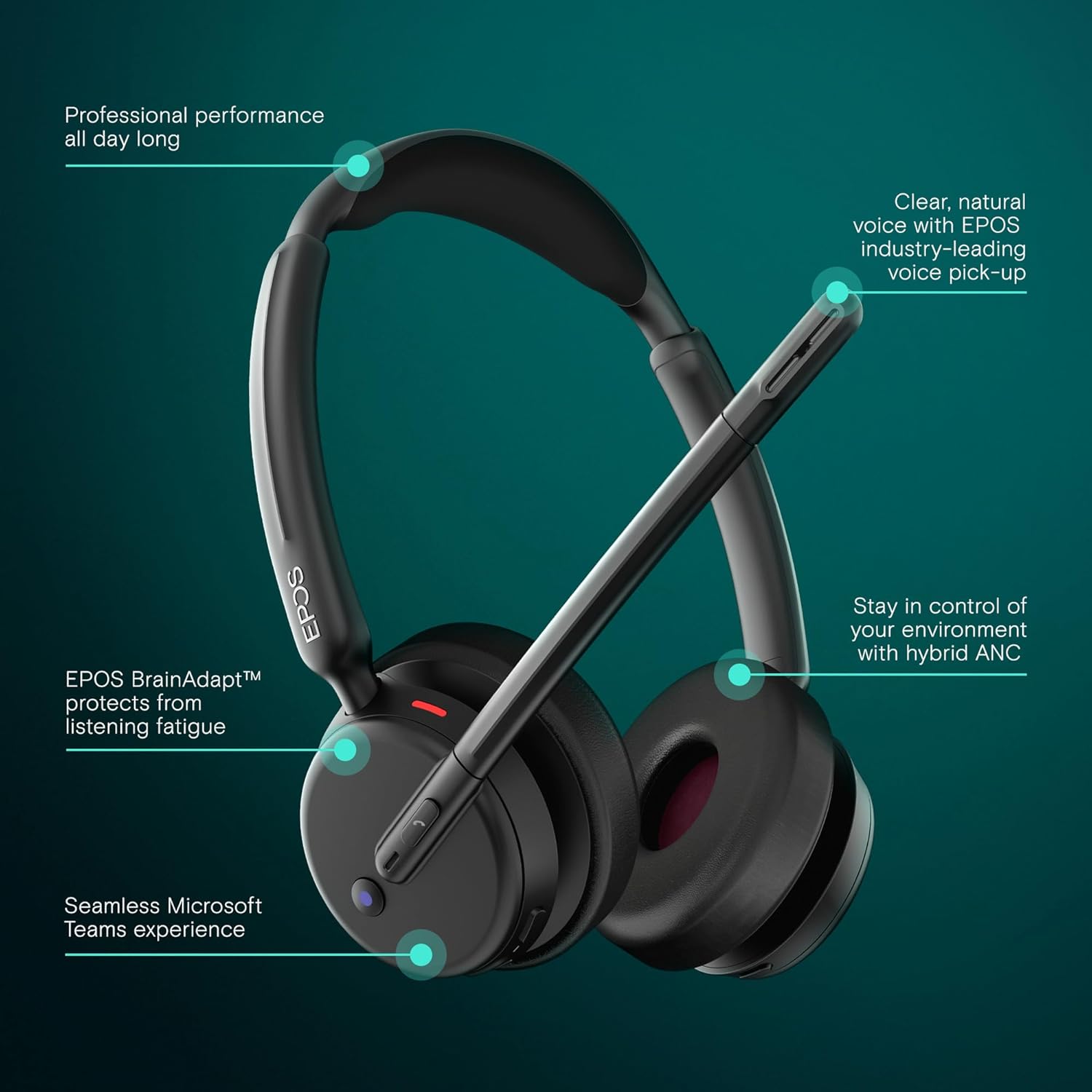
Image: Visual representation of the headset's main operational features.
5. คุณสมบัติหลัก
- ระบบตัดเสียงรบกวนแบบไฮบริด: Adaptively reduces background noise for crystal-clear calls and enhanced focus.
- EPOS AI™ Voice Technology: Advanced microphones isolate your voice from surrounding noise, ensuring natural and professional-sounding calls.
- EPOS BrainAdapt™ Technology: Designed to protect your brain from fatigue caused by poor audio and noise, boosting focus and productivity during long calls.
- Microsoft Teams Certified & UC Compatible: Optimized for Microsoft Teams and compatible with leading Unified Communications platforms like Zoom and Google Meet for effortless collaboration.
- การเชื่อมต่อแบบ Dual Connectivity ที่ราบรื่น: Includes both USB-C and USB-A options with the BTD 900c dongle and adapter for instant plug-and-play connection to various devices.
- อายุการใช้งานแบตเตอรี่ที่ยาวนานขึ้น: Offers up to 35 hours of talk time, supporting long hybrid workdays without frequent recharging.
- ดีไซน์แบบครอบหู น้ำหนักเบา: Provides all-day comfort with soft leatherette cushions, minimizing listening fatigue.
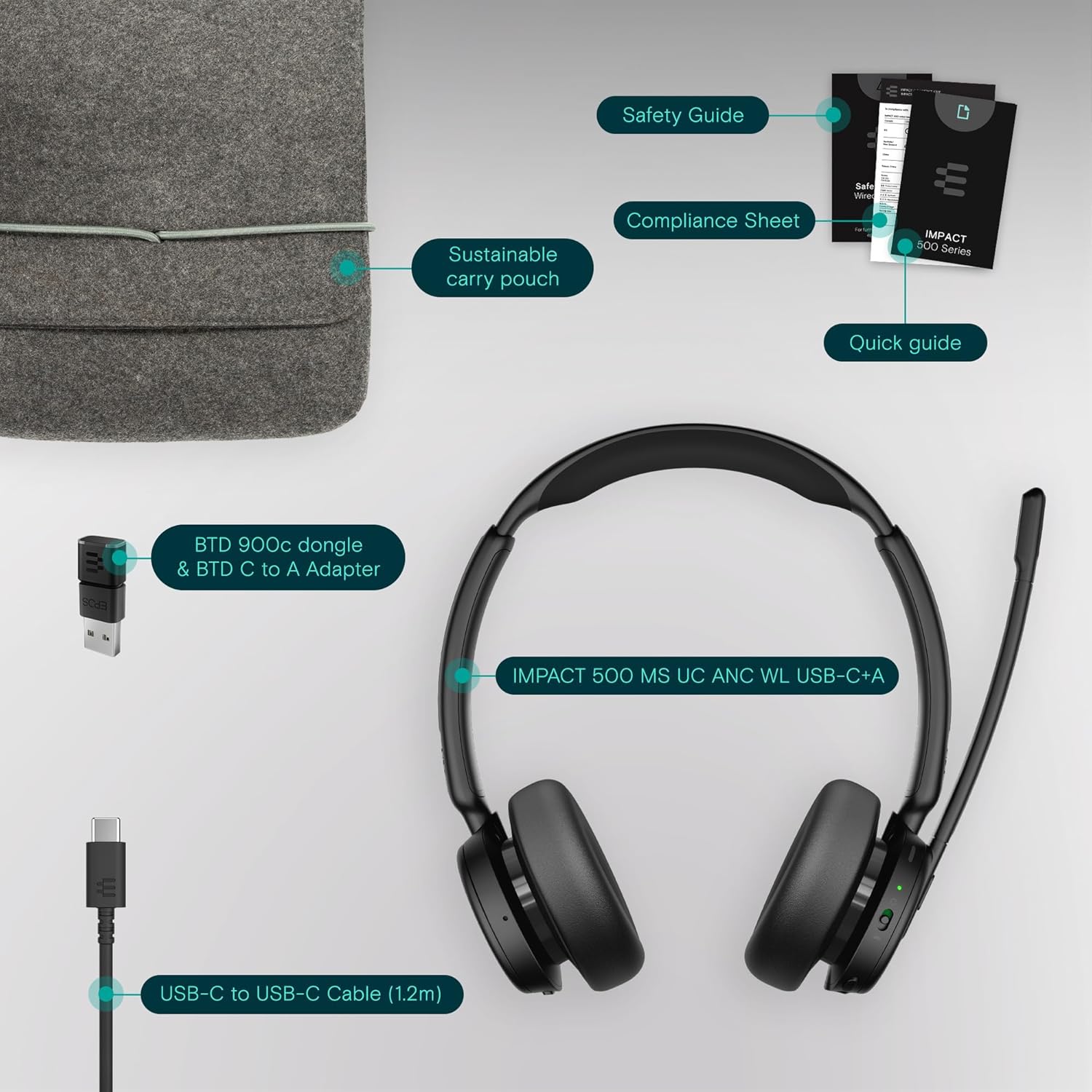
Image: User wearing the headset in a professional setting, highlighting comfort and clarity.
6. การบำรุงรักษา
To ensure the longevity and optimal performance of your EPOS Impact 500 ANC Wireless Headset, follow these maintenance guidelines:
- การทำความสะอาด: ใช้ผ้านุ่มและแห้งเช็ดทำความสะอาดหูฟัง สำหรับที่ครอบหู ให้เช็ดเบาๆ ด้วยผ้านุ่มๆamp cloth if necessary, avoiding excessive moisture. Do not use harsh chemicals or abrasive materials.
- พื้นที่จัดเก็บ: When not in use, store the headset in the provided sustainable carry pouch to protect it from dust, scratches, and impacts.
- อุณหภูมิ: Avoid exposing the headset to extreme temperatures (hot or cold) or direct sunlight for extended periods.
- ความชื้น: เก็บหูฟังให้ห่างจากน้ำและความชื้นสูง
7 การแก้ไขปัญหา
หากคุณพบปัญหาเกี่ยวกับชุดหูฟัง โปรดลองทำตามขั้นตอนการแก้ไขปัญหาต่อไปนี้:
- ไม่มีไฟฟ้า: Ensure the headset is fully charged using the provided USB-C cable and a reliable power source.
- ไม่มีเสียง/ไมโครโฟนไม่ทำงาน:
- Check if the headset is properly paired with your device via Bluetooth or connected via the USB dongle.
- Verify that the headset is selected as the default audio input/output device in your computer's sound settings or communication application (e.g., Microsoft Teams, Zoom).
- Ensure the microphone boom is lowered and not muted.
- รีสตาร์ทอุปกรณ์และชุดหูฟังของคุณ
- คุณภาพเสียงไม่ดี:
- Move closer to your connected device to ensure a strong Bluetooth signal.
- ตรวจสอบสัญญาณรบกวนจากอุปกรณ์ไร้สายอื่นๆ
- Ensure the microphone is correctly positioned near your mouth.
- ระบบ ANC ไม่ทำงาน: Ensure the ANC feature is activated. Refer to the Quick Guide for specific controls.
- Connectivity Issues with Dongle: Try inserting the USB dongle into a different USB port on your computer. Ensure the dongle is fully inserted.
For further assistance, consult the comprehensive user manual available on the EPOS webไซต์หรือติดต่อฝ่ายสนับสนุนลูกค้า EPOS
8. ข้อมูลจำเพาะ
| คุณสมบัติ | รายละเอียด |
|---|---|
| ยี่ห้อ | อีพอส |
| ชื่อรุ่น | อิมแพ็ค 500 |
| หมายเลขรุ่น | 1001490 |
| สี | สีดำ |
| การวางตำแหน่งหู | บนหู |
| การควบคุมเสียงรบกวน | ระบบตัดเสียงรบกวนแบบไฮบริด |
| เทคโนโลยีการเชื่อมต่อ | ไร้สาย (Bluetooth) |
| เวอร์ชันบลูทูธ | 5.0 |
| วิธีการควบคุม | สัมผัส |
| อายุการใช้งานแบตเตอรี่โดยเฉลี่ย | 35 ชั่วโมง |
| น้ำหนักสินค้า | 391 กรัม |
| วัสดุของตู้หุ้ม | หนังเทียม |
| ช่วงความถี่ | 20 เฮิรตซ์ - 20,000 เฮิรตซ์ |
| คุณสมบัติเพิ่มเติม | Noise Cancellation, AI Voice Technology, BrainAdapt Technology |
| อุปกรณ์ที่รองรับ | แล็ปท็อป เดสก์ท็อป แท็บเล็ต โทรศัพท์ ลำโพงอัจฉริยะ โทรทัศน์ โทรศัพท์มือถือ |
9. การรับประกันและการสนับสนุน
The EPOS Impact 500 ANC Wireless Headset comes with a การรับประกันจากผู้ผลิต 2 ปี. For warranty claims, technical support, or additional product information, please visit the official EPOS webหรือติดต่อฝ่ายบริการลูกค้า โปรดเก็บหลักฐานการซื้อไว้เพื่อใช้ยืนยันการรับประกัน