
1. บทนำ
Thank you for choosing the AOPUTTRIVER AP-5000N Pinless Moisture Meter. This device is designed for non-destructive measurement of moisture content in various materials such as lumber, drywall, firewood, and masonry. Its advanced sensing technology provides accurate readings without damaging the surface of the material. This manual provides detailed instructions for proper setup, operation, and maintenance to ensure optimal performance and longevity of your device.

Image 1.1: The AP-5000N moisture meter is versatile, suitable for measuring moisture in walls, wood floors, raw wood, and other building materials.
2. ข้อมูลด้านความปลอดภัย
- อ่านคำแนะนำทั้งหมดอย่างละเอียดก่อนใช้อุปกรณ์
- Do not attempt to disassemble or modify the meter. This may cause damage and void the warranty.
- ควรเก็บอุปกรณ์ให้ห่างจากน้ำและสภาพแวดล้อมที่มีความชื้นสูงเพื่อป้องกันความเสียหาย
- Store the meter in a dry, cool place when not in use.
- ทิ้งแบตเตอรี่ตามระเบียบข้อบังคับในท้องถิ่น
3. เนื้อหาบรรจุภัณฑ์
ตรวจสอบว่ามีรายการทั้งหมดอยู่ในแพ็คเกจ:
- AP-5000N Pinless Moisture Meter
- คู่มือการใช้งาน
- สายเคเบิลข้อมูล Type-C
- ไขควงขนาดเล็ก (สำหรับช่องใส่แบตเตอรี่ หากมี)
- กระเป๋าเก็บของ

Image 3.1: Contents of the AP-5000N package, including the meter, storage pouch, Type-C cable, and screwdriver.
4. สินค้าหมดview
Familiarize yourself with the components and controls of your AP-5000N moisture meter:

ภาพที่ 4.1: ด้านหน้า view of the AP-5000N meter with key features labeled.
- ไฟแสดงสถานะ LED: Displays Dry, Mid, or Wet status.
- Dry Indicator: Green light for low moisture.
- Flashlight Indicator: Indicates flashlight is active.
- โหมดผนัง: Setting for wall materials.
- Softwood Mode: Setting for softwood materials.
- Measurement Reading Display: Digital percentagการอ่านข้อมูล
- ปุ่มเปิด/ปิด: เพื่อเปิดหรือปิดอุปกรณ์
- Reading Hold Button: หยุดการอ่านค่าปัจจุบันบนจอแสดงผล
- MID Indicator: Yellow light for medium moisture.
- Wet Indicator: Red light for high moisture.
- Masonry Mode: Setting for masonry materials.
- โหมดไม้เนื้อแข็ง: Setting for hardwood materials.
- Measurement Reading Analog Display: Bar graph for visual moisture level.
- ปุ่มเลือกโหมด: Cycles through material modes.
- Flashlight On/Off Button: เปิดใช้งานไฟฉายในตัว
5. การตั้งค่า
5.1. การติดตั้งแบตเตอรี่
The AP-5000N typically uses AAA batteries (not always included). Locate the battery compartment on the back of the device. Use the provided small screwdriver to open the compartment, insert the batteries according to the polarity indicators, and then securely close the compartment.
5.2. เปิดเครื่องครั้งแรก
กดปุ่ม ปุ่มเปิด/ปิดเครื่อง to turn on the device. The LCD display will illuminate, and the meter will perform a brief self-test before entering measurement mode.
6. คู่มือการใช้งาน
6.1. เปิด/ปิดเครื่อง
- การเปิดเครื่อง: กดปุ่ม ปุ่มเปิด/ปิดเครื่อง.
- วิธีปิด: กดค้างไว้ ปุ่มเปิด/ปิดเครื่อง for a few seconds, or the device will automatically power off after a period of inactivity to conserve battery life.
6.2. การเลือกโหมด
The meter offers different modes for various materials to ensure accurate readings. To select a mode:
- กดปุ่ม ปุ่มเลือกโหมด ซ้ำแล้วซ้ำเล่า
- The LCD display will show the name of the currently selected material (e.g., WALL, MASONRY, SOFTWOOD, HARDWOOD).
- Choose the mode that best matches the material you are testing.
6.3. การวัด
The AP-5000N uses non-destructive sensing technology, allowing measurements up to 20mm (0.75 inches) deep without damaging the surface.
- โปรดตรวจสอบให้แน่ใจว่าได้เลือกโหมดวัสดุที่ถูกต้องแล้ว
- Gently press the sensing area on the back of the hygrometer flat against the surface of the material you wish to measure.
- The moisture reading will be displayed on the LCD screen.

Image 6.1: The meter can detect moisture up to 19mm (0.75 inches) deep into materials.
6.4. การทำความเข้าใจเนื้อหาที่อ่าน
The meter provides moisture readings through a digital LCD display, a tri-color LED bar graph, and an audible alarm.
- จอแสดงผล LCD: แสดงเปอร์เซ็นต์ความชื้นที่แน่นอนtage.
- Tri-color LED Bar Graph:
- Green (DRY): บ่งชี้ว่าระดับความชื้นต่ำ
- Yellow (MID): บ่งชี้ระดับความชื้นปานกลาง
- Red (WET): Indicates high moisture levels.
- เสียงปลุก: The meter will beep and the LED bar will turn red when the humidity exceeds the system's preset wet threshold for the selected material.
- ฟังก์ชั่นค้างไว้: กดปุ่ม Reading Hold Button to freeze the current reading on the display for easier recording. Press it again to release the hold.
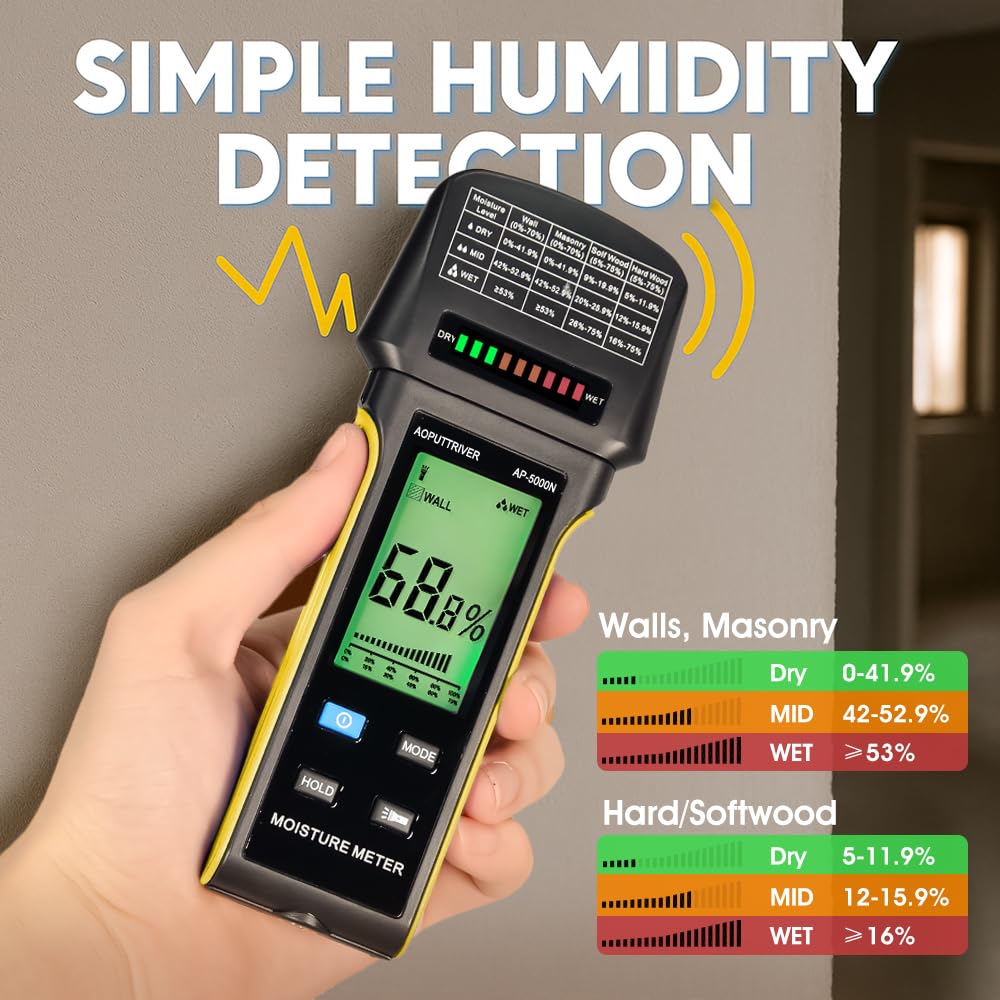
Image 6.2: The display shows digital readings and a color-coded bar graph for quick moisture assessment. Reference the table on the meter for specific ranges.
6.5. ฟังก์ชั่นไฟฉาย
The meter includes a built-in flashlight for use in dimly lit areas.
- วิธีเปิดไฟฉาย: กดปุ่ม ปุ่มเปิด/ปิดไฟฉาย.
- วิธีปิดไฟฉาย: กดปุ่ม ปุ่มเปิด/ปิดไฟฉาย อีกครั้ง.

Image 6.3: The integrated flashlight assists in reading the display and inspecting surfaces in low-light conditions.
7. การบำรุงรักษา
- การทำความสะอาด: เช็ดอุปกรณ์ด้วยผ้านุ่มและแห้ง ห้ามใช้น้ำยาทำความสะอาดที่มีฤทธิ์กัดกร่อนหรือตัวทำละลาย
- พื้นที่จัดเก็บ: When not in use for extended periods, remove the batteries to prevent leakage. Store the meter in its protective pouch in a cool, dry place, away from direct sunlight and extreme temperatures.
8 การแก้ไขปัญหา
- อุปกรณ์ไม่เปิดเครื่อง: ตรวจสอบการติดตั้งแบตเตอรี่และให้แน่ใจว่าแบตเตอรี่ไม่หมด เปลี่ยนแบตเตอรี่หากจำเป็น
- การอ่านค่าที่ไม่ถูกต้อง: Ensure the correct material mode is selected. Make sure the sensing area is flat against the surface and free from dirt or obstructions.
- จอภาพมืดหรือกะพริบ: แบตเตอรี่อาจอ่อน โปรดเปลี่ยนแบตเตอรี่
- ไม่ต้องอ่าน: Ensure the device is properly pressed against the material. The material might be too thin or outside the measurement range.
9. ข้อมูลจำเพาะ
- แบบอย่าง: AP-5000N
- หลักการวัด: Pinless, Non-Destructive Electromagnetic Sensing
- ความลึกของการตรวจจับ: สูงสุด 20 มม. (0.75 นิ้ว)
- แสดง: Large Backlit LCD with Tri-color LED Bar Graph
- โหมดการวัด: Wall, Masonry, Hardwood, Softwood
- คุณสมบัติ: Audible Alarm, Low Battery Alarm, Auto Power Off, Hold Function, Flashlight
- แหล่งพลังงาน: (Typically AAA batteries, user to confirm from device)
- ยี่ห้อ: AOPUTRIVER
10. การรับประกันและการสนับสนุน
For any questions regarding your AOPUTTRIVER AP-5000N Pinless Moisture Meter, please refer to the contact information provided with your purchase or visit the official AOPUTTRIVER website for support. Please retain your proof of purchase for warranty claims.