
1. บทนำ
The FOXWELL NT201 is an On-Board Diagnostics II (OBDII) and European On-Board Diagnostics (EOBD) scanner designed to diagnose engine-related issues in vehicles. This device allows users to read and clear diagnostic trouble codes (DTCs), view live data streams, perform I/M readiness tests, and more. This manual provides detailed instructions for the proper use and maintenance of your NT201 scanner and its accompanying portable carrying case.
2. ข้อมูลด้านความปลอดภัย
ควรปฏิบัติตามข้อควรระวังด้านความปลอดภัยเสมอเมื่อทำงานกับรถยนต์ การใช้เครื่องมือวินิจฉัยอย่างไม่ถูกต้องอาจนำไปสู่การบาดเจ็บส่วนบุคคลหรือความเสียหายต่อรถยนต์ โปรดอ่านและปฏิบัติตามคำแนะนำเหล่านี้:
- ตรวจสอบให้แน่ใจว่ารถจอดอยู่บนพื้นราบและดึงเบรกมือไว้
- สวมอุปกรณ์ป้องกันดวงตาที่เหมาะสม
- Keep clothing, hair, hands, tools, and test equipment away from moving engine parts.
- Operate the vehicle in a well-ventilated area to prevent carbon monoxide poisoning.
- อย่าเชื่อมต่อหรือถอดอุปกรณ์ทดสอบในขณะที่สวิตช์กุญแจเปิดอยู่หรือเครื่องยนต์กำลังทำงาน
- Keep the scanner dry and clean. Avoid exposure to extreme temperatures.
3. เนื้อหาบรรจุภัณฑ์
ตรวจสอบว่ามีรายการทั้งหมดอยู่ในแพ็คเกจของคุณ:
- FOXWELL NT201 OBD2 Scanner Unit
- Integrated OBDII Cable
- กระเป๋าใส่อุปกรณ์พกพา
- คู่มือการใช้งาน (เอกสารนี้)
4. สินค้าหมดview
The NT201 scanner features a clear display and intuitive button layout for easy navigation and operation.

รูปที่ 4.1: ด้านหน้า view of the FOXWELL NT201 OBD2 Scanner. This image displays the scanner's screen, which shows 'I/M Readiness' status indicators, and the control buttons including ESC, UP, DOWN, and ENTER, along with the I/M readiness hotkey.
4.1. เค้าโครงอุปกรณ์
- จอแสดงผล LCD: Shows test results, menu options, and operational information.
- ปุ่ม ESC: Exits current screen or returns to the previous menu.
- ปุ่มขึ้น/ลง: Navigates through menu options or data.
- ปุ่ม ENTER: ยืนยันการเลือกหรือเข้าสู่เมนู
- I/M Readiness Hotkey: Provides quick access to the I/M Readiness status.
- ขั้วต่อ OBDII: Connects the scanner to the vehicle's Data Link Connector (DLC).
5. การตั้งค่า
To begin using your NT201 scanner, follow these steps:
- ค้นหาขั้วต่อข้อมูล (DLC) 16 พินของรถยนต์ โดยปกติจะอยู่ใต้แผงหน้าปัดด้านคนขับ
- หมุนกุญแจรถไปที่ตำแหน่ง 'เปิด' (เครื่องยนต์ดับ)
- Plug the NT201's OBDII connector into the vehicle's DLC. The scanner will power on automatically.
- The scanner will perform a system check and display the main menu.
6. คู่มือการใช้งาน
6.1. Read and Clear Fault Codes
This function allows you to retrieve Diagnostic Trouble Codes (DTCs) from the vehicle's engine control unit (ECU) and clear them after repairs.
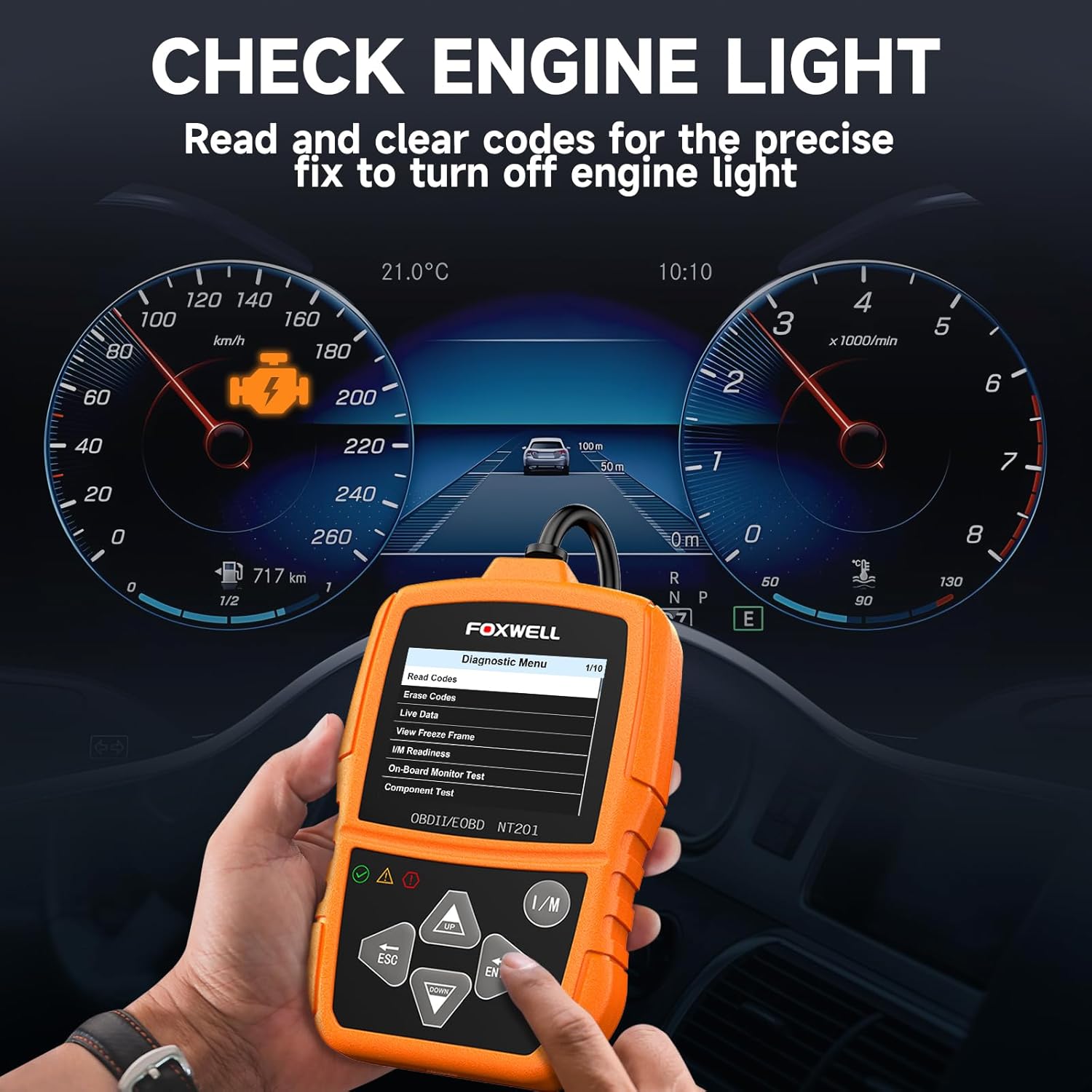
รูปที่ 6.1: The FOXWELL NT201 scanner in use, displaying the diagnostic menu with 'Read Codes' highlighted. A vehicle dashboard is visible in the background, showing the check engine light illuminated.
- จากเมนูหลัก ให้ใช้ ขึ้น/ลง buttons to select "Diagnostic Menu" and press เข้า.
- เลือก "อ่านรหัส" เพื่อ view current, pending, and permanent DTCs. The scanner will display the codes and their definitions.
- After addressing the underlying issue, select "Erase Codes" from the Diagnostic Menu and press เข้า. Confirm the action when prompted. This will turn off the Malfunction Indicator Lamp (MIL) or 'Check Engine Light'.
6.2. สตรีมข้อมูลสด
View real-time operational parameters of the vehicle's engine, such as engine RPM, vehicle speed, coolant temperature, and more.

รูปที่ 6.2: The FOXWELL NT201 scanner displaying a live data stream. The screen shows various parameters like Engine RPM and Vehicle Speed Sensor data, presented both numerically and graphically, with a car interior visible in the background.
- From the Diagnostic Menu, select "Live Data" and press เข้า.
- คุณสามารถทำได้ view data in text format or graphical format. Use the ขึ้น/ลง ปุ่มสำหรับเลื่อนดูค่าพารามิเตอร์ต่างๆ
- กด เข้า to select a parameter for detailed viewing or graphing.
6.3. One-Key I/M Readiness Test
Quickly check the vehicle's emission readiness status to determine if it's ready for an emissions test.

รูปที่ 6.3: The FOXWELL NT201 scanner with its 'I/M' hotkey prominently displayed and highlighted, indicating its function for a quick smog check. An exhaust pipe is visible in the background, suggesting emissions testing.
- With the scanner connected and powered on, press the dedicated ฉัน ปุ่มลัด
- The scanner will display the status of various emission-related monitors (e.g., MIL, MIS, FUE, CCM, CAT, O2S, EGR).
- Green indicates the monitor has completed its test, Yellow indicates pending, and Red indicates not ready or a fault.
6.4. การทดสอบเซ็นเซอร์ O2
This function retrieves O2 sensor monitor test results for the most recently completed tests from the vehicle's on-board computer. This helps in diagnosing fuel efficiency and emission-related issues.
- From the Diagnostic Menu, select "O2 Sensor Test" and press เข้า.
- ทำตามคำแนะนำบนหน้าจอเพื่อ view ผลการทดสอบ
7. การบำรุงรักษา
7.1. การทำความสะอาดสแกนเนอร์
ใช้แบบนุ่มๆamp cloth to clean the scanner's exterior. Do not use abrasive cleaners or solvents. Keep the screen free of dust and smudges for optimal visibility.
7.2. การจัดเก็บ
When not in use, store the NT201 scanner in its portable carrying case to protect it from dust, moisture, and physical damage. Store in a cool, dry place away from direct sunlight.

รูปที่ 7.1: An open portable carrying case designed for the FOXWELL NT201 scanner, showing the scanner and its cable neatly organized within the case's compartments. The case provides organized protection for the device.

รูปที่ 7.2: A diagram illustrating the dimensions of the portable carrying case, showing its length, width, and height. This case is suitable for the FOXWELL NT201 and similar diagnostic tools.
8 การแก้ไขปัญหา
If you encounter issues with your NT201 scanner, refer to the following common problems and solutions:
| ปัญหา | สาเหตุที่เป็นไปได้ | สารละลาย |
|---|---|---|
| เครื่องสแกนเนอร์ไม่สามารถเปิดเครื่องได้ | Loose connection to DLC; Vehicle ignition not ON; Vehicle battery low. | Ensure the OBDII cable is securely connected. Turn vehicle ignition to 'ON'. Check vehicle battery voltage. |
| เกิดข้อผิดพลาดในการสื่อสารกับยานพาหนะ | Incorrect protocol; Faulty DLC; Vehicle not OBDII compliant. | Verify vehicle is OBDII compliant (1996 or newer for most regions). Check DLC for damage. Try on another compliant vehicle. |
| Screen display is dim or unreadable. | Environmental conditions; Screen damage. | Move to a better lit area. If damaged, contact support. |
9. ข้อมูลจำเพาะ
- แสดง: จอ LCD พร้อมไฟแบ็คไลท์
- อุณหภูมิในการทำงาน: 0 ถึง 60°C (32 ถึง 140°F)
- อุณหภูมิในการจัดเก็บ: -20 ถึง 70°C (-4 ถึง 158°F)
- พลังงานภายนอก: แหล่งจ่ายไฟ 8.0 ถึง 18.0 โวลต์ มาจากแบตเตอรี่รถยนต์
- โปรโตคอลที่รองรับ: KWP2000, J1850 VPW, ISO9141, J1850 PWM, CAN
- ความเข้ากันได้: Most 1996 and newer OBDII compliant vehicles (cars, light trucks, SUVs, minivans, hybrids). Does not support electric vehicles or 24V heavy-duty trucks.
10. การรับประกันและการสนับสนุน
For warranty information or technical support, please refer to the FOXWELL official webหรือติดต่อฝ่ายบริการลูกค้าโดยตรง เก็บใบเสร็จรับเงินไว้เพื่อใช้ในการเคลมประกัน
FOXWELL Official Webเว็บไซต์: www.foxwelltech.com