
XDuoo MX-02
คู่มือผู้ใช้เครื่องส่งสัญญาณบลูทูธ XDuoo MX-02 HD
รุ่น: MX-02
1. บทนำ
The XDuoo MX-02 is a versatile HD Bluetooth 5.4 transmitter designed to convert various wired audio sources into high-quality wireless Bluetooth signals. It supports multiple input interfaces and advanced Bluetooth codecs, providing an enhanced audio experience for a wide range of devices.
This manual provides detailed instructions for setting up, operating, and maintaining your MX-02 device. Please read it thoroughly before use to ensure optimal performance and longevity.
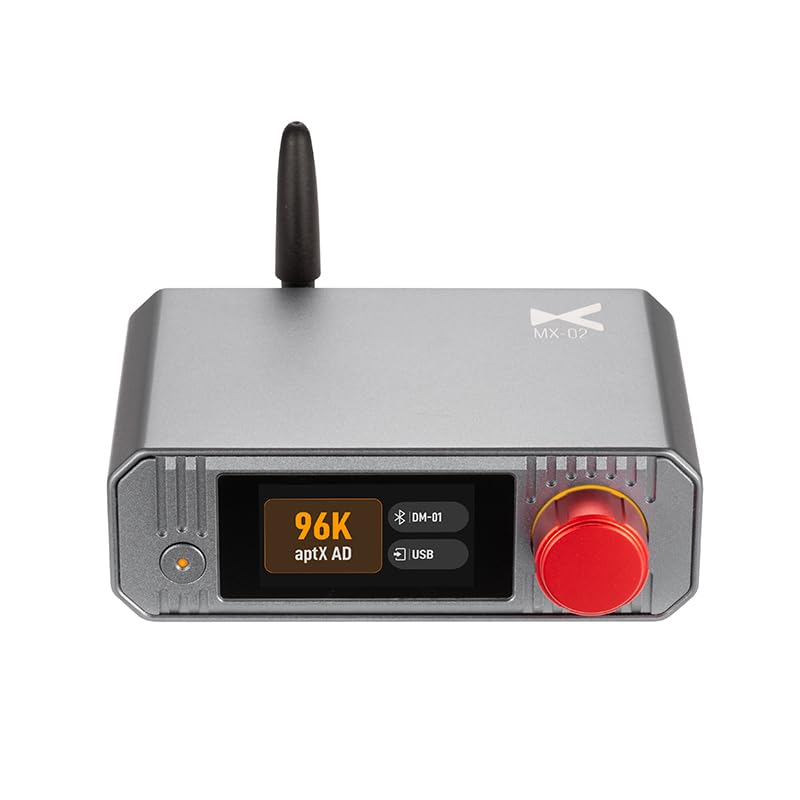
รูปที่ 1: ด้านหน้า view of the XDuoo MX-02 HD Bluetooth Transmitter, showing the display and control knob.
2. คุณสมบัติหลัก
- อินเทอร์เฟซอินพุตหลายแบบ: USB, Optical, Coaxial, and Line input for broad compatibility with audio devices.
- รองรับเสียงความละเอียดสูง: Coaxial and Optical inputs support up to 24bit/192kHz. USB input supports up to 24bit/96kHz.
- บลูทูธขั้นสูง 5.4: Ensures stable connection, extended transmission range (approx. 50m unobstructed), and low latency.
- Versatile Bluetooth Codec Support: Includes SBC, aptX, aptX HD, aptX Adaptive (with Low Latency, High Quality, Lossless options), LC3, and aptX Lite.
- Low Transmission Latency: Less than 20ms, with even lower latency in Game Mode.
- High-Definition TFT Color Display: Provides intuitive operation and settings management.
3. เนื้อหาบรรจุภัณฑ์
กรุณาตรวจสอบแพ็คเกจสำหรับรายการต่อไปนี้:
- XDuoo MX-02 HD Bluetooth Transmitter Unit
- สายไฟ USB-C
- เสาอากาศบลูทูธ
- คู่มือการใช้งาน (เอกสารนี้)
- (Additional cables or accessories may vary by region or retailer)
4. อุปกรณ์โอเวอร์view
4.1 แผงด้านหน้า
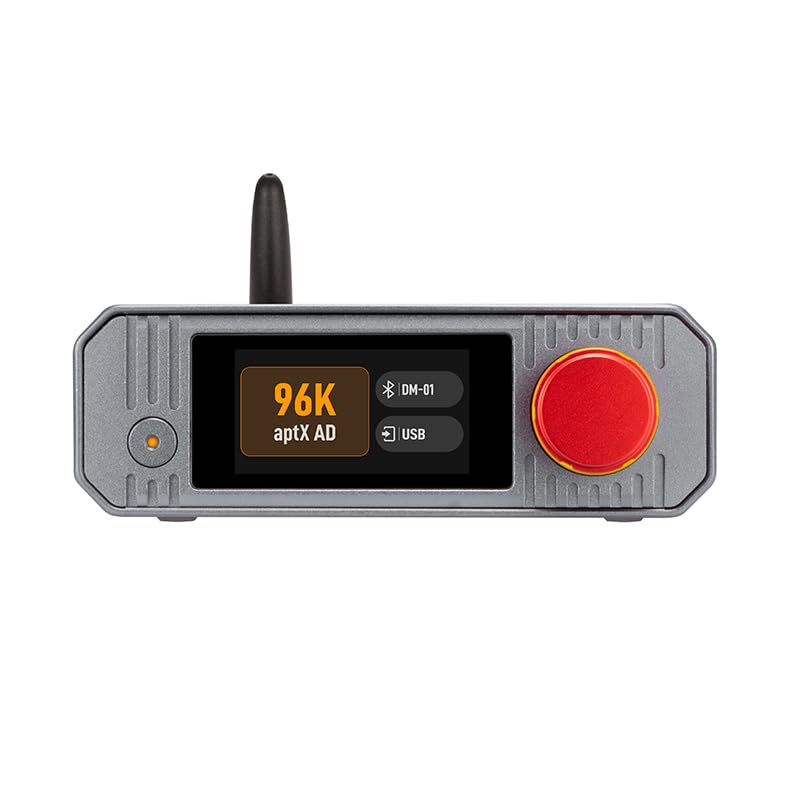
รูปที่ 2: Front panel of the MX-02, highlighting the display screen and multi-function knob.
- หน้าจอแสดงผล: Shows current status, input source, Bluetooth codec, connected devices, and menu options.
- ลูกบิดมัลติฟังก์ชั่น: Rotate to navigate menus or adjust settings; press to confirm selection or power on/off.
- ไฟแสดงสถานะ: Provides status feedback (e.g., power, Bluetooth pairing).
4.2 แผงด้านหลัง
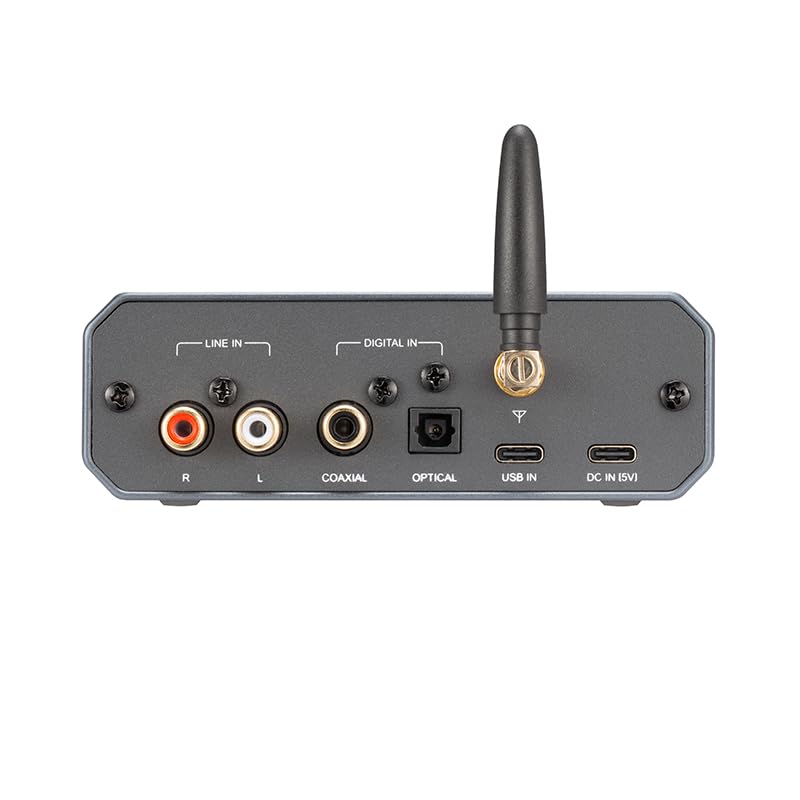
รูปที่ 3: Rear panel of the MX-02, showing all input and power ports.
- สายต่อเข้า (RCA): Analog audio input (Left/Right).
- อินพุตโคแอกเชียล: อินพุตเสียงดิจิตอล
- อินพุตออปติคัล: สัญญาณเสียงดิจิตอล (TOSLINK)
- USB เข้า: USB audio input (Type-B).
- ขั้วต่อเสาอากาศ: For attaching the Bluetooth antenna.
- อินพุต DC (5V): กำลังไฟเข้า USB-C
5. คำแนะนำในการตั้งค่า
5.1 การเชื่อมต่อเริ่มต้น
- ติดเสาอากาศ: Screw the provided Bluetooth antenna onto the antenna connector on the rear panel of the MX-02. Ensure it is securely fastened.
- การเชื่อมต่อไฟฟ้า: Connect the USB-C power cable to the "DC IN (5V)" port on the rear of the MX-02 and plug the other end into a 5V USB power adapter (not included) or a compatible USB port.
- เปิดเครื่อง: Press and hold the multi-function knob on the front panel for a few seconds until the display screen illuminates.
5.2 การเชื่อมต่อแหล่งเสียง
The MX-02 supports various audio input methods. Choose the appropriate connection for your source device:
- ช่องต่อ USB: Connect a USB cable from your computer, PS5, or Nintendo Switch to the "USB IN" port on the MX-02. The MX-02 will be recognized as an audio output device.
- อินพุตโคแอกเชียล: Use a coaxial cable to connect your CD player, TV, or other device with a coaxial output to the "COAXIAL" port on the MX-02.
- อินพุตออปติคัล: Use an optical (TOSLINK) cable to connect your TV, CD player, or other device with an optical output to the "OPTICAL" port on the MX-02.
- อินพุตไลน์ (RCA): Use RCA cables to connect analog audio sources (e.g., turntable pre-amp, older CD players) to the "LINE IN (R/L)" ports on the MX-02.

รูปที่ 4: Example setup showing the MX-02 connecting a TV and turntable to wireless headphones/speakers.
This image illustrates how the MX-02 can convert wired audio from devices like a television or a turntable into a Bluetooth signal for wireless transmission.
6. คู่มือการใช้งาน
6.1 การเลือกแหล่งข้อมูลอินพุต
After powering on, the MX-02 display will show the current input source. To change the input:
- Rotate the multi-function knob to navigate through the available input options (USB, Coaxial, Optical, Line).
- Press the knob to select the desired input source.
6.2 การจับคู่บลูทูธ
To transmit audio wirelessly, you need to pair the MX-02 with your Bluetooth receiving device (headphones, speakers, etc.):
- Ensure your Bluetooth receiving device is in pairing mode. Refer to your device's manual for instructions.
- On the MX-02, navigate to the Bluetooth pairing menu using the multi-function knob.
- เลือก "ค้นหา Devices" or a similar option. The MX-02 will scan for nearby Bluetooth devices.
- Once your device appears on the MX-02 display, select it and confirm pairing.
- A successful connection will be indicated on the MX-02 display.
6.3 Managing Bluetooth Codecs
The MX-02 allows you to select preferred Bluetooth audio codecs to optimize for sound quality or low latency:

รูปที่ 5: The MX-02's high-definition color display showing options for Bluetooth audio codec selection and other settings.
This image demonstrates the intuitive menu system for configuring Bluetooth codecs and other operational parameters.
- Access the "Bluetooth Audio Codec" menu via the multi-function knob.
- Rotate the knob to highlight the desired codec (e.g., aptX HD for high quality, aptX Adaptive for balanced performance, aptX Low Latency or LC3 for gaming).
- Press the knob to confirm your selection. The MX-02 will attempt to use this codec with the connected device.
Note: The actual codec used depends on the capabilities of both the MX-02 and your receiving Bluetooth device. The MX-02 will automatically negotiate the best available codec.
6.4 การตั้งค่าระบบ
The MX-02 offers various system settings accessible through its menu:
- ปิดหน้าจอ: Adjust display timeout settings.
- เปิดเครื่องอัตโนมัติ: Configure automatic power-on behavior.
- ภาษา: เลือกภาษาที่จะแสดงผล
- รีเซ็ตเป็นค่าเริ่มต้นจากโรงงาน: รีเซ็ตการตั้งค่าทั้งหมดเป็นค่าเริ่มต้น
Navigate these options using the multi-function knob and press to confirm changes.
7. การบำรุงรักษาและการดูแล
- การทำความสะอาด: ใช้ผ้าแห้งเนื้อนุ่มเช็ดทำความสะอาดภายนอกของอุปกรณ์ ห้ามใช้น้ำยาทำความสะอาดหรือสารละลายใดๆ
- พื้นที่จัดเก็บ: Store the MX-02 in a cool, dry place away from direct sunlight and extreme temperatures.
- การจัดการ: หลีกเลี่ยงการทำอุปกรณ์หล่นหรือกระแทกอย่างรุนแรง
- การระบายอากาศ : ตรวจสอบให้แน่ใจว่ามีการระบายอากาศที่เหมาะสมรอบๆ อุปกรณ์เพื่อป้องกันความร้อนสูงเกินไป ห้ามปิดกั้นช่องระบายอากาศ
- พลัง: Always use a 5V/0.25A compatible USB power source.
8 การแก้ไขปัญหา
| ปัญหา | สาเหตุที่เป็นไปได้ | สารละลาย |
|---|---|---|
| ไม่มีไฟฟ้า | Power cable not connected or faulty; power adapter not working. | Check USB-C power cable connection. Try a different USB power adapter or port. |
| ไม่มีเสียงออก | Incorrect input source selected; Bluetooth device not paired or connected; volume too low; faulty cables. | Verify the correct input source is selected on the MX-02. Ensure your Bluetooth receiving device is paired and connected. Check volume levels on both the MX-02 (if applicable) and the receiving device. Inspect audio cables for damage and ensure they are securely connected. |
| การจับคู่บลูทูธล้มเหลว | Receiving device not in pairing mode; too far from MX-02; interference. | Put your Bluetooth receiving device into pairing mode. Move the devices closer together. Ensure no other strong wireless signals are causing interference. Try restarting both devices. |
| Poor sound quality / dropouts | Weak Bluetooth signal; interference; incorrect codec selected. | Reduce distance between MX-02 and receiving device. Remove obstacles. Check for sources of interference (Wi-Fi routers, microwaves). Try a different Bluetooth codec if available. |
| ไม่พบอุปกรณ์เสียง USB | Incorrect USB cable; driver issue (for PC); source device not configured for USB audio output. | Ensure you are using a data-capable USB cable. For PC, check device manager for drivers (usually plug-and-play). Configure your source device (e.g., computer, console) to output audio via USB to the MX-02. |
9. ข้อมูลจำเพาะ
| คุณสมบัติ | รายละเอียด |
|---|---|
| แบบอย่าง | เอ็มเอ็กซ์-02 |
| อินเตอร์เฟซพาวเวอร์ | USB-C (for 5V DC power) |
| การใช้พลังงาน | 5V/0.25A |
| ข้อมูลอินพุต | USB (Type-B), Coaxial, Optical (TOSLINK), Line (RCA L/R) |
| รองรับ USB Audio | สูงสุด 24 บิต/96kHz |
| Coaxial/Optical Audio Support | สูงสุด 24 บิต/192kHz |
| เวอร์ชันบลูทูธ | 5.4 |
| Classic Bluetooth Formats | SBC, aptX, aptX HD, aptX Adaptive (aptX Low Latency, aptX High Quality, aptX Lossless) |
| LE Audio Formats | LC3, aptX Lite |
| ความล่าช้าในการส่งข้อมูล | <20ms (lower in Game Mode) |
| ช่วงการส่งผ่าน | Approx. 50m (unobstructed environment) |
| ขนาด (กว้าง x ยาว x สูง) | 12.0 x 10.2 x 4.2 ซม. |
| น้ำหนัก | 0.36 กก. |
| ผู้ผลิต | XDuoo |
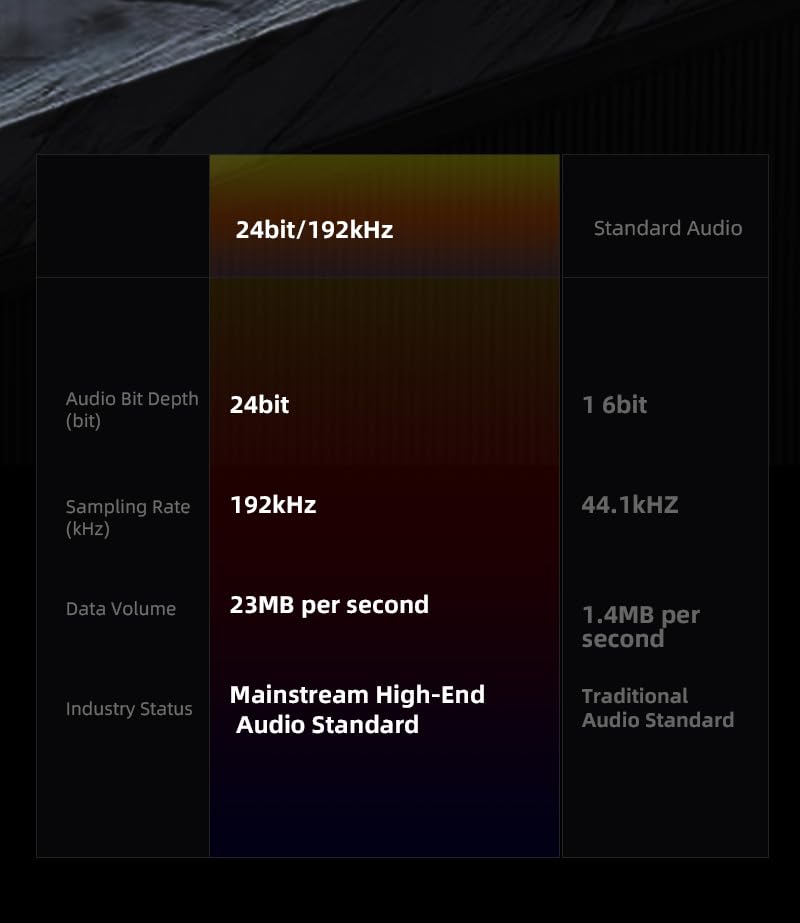
รูปที่ 6: Comparison illustrating the benefits of 24bit/192kHz high-resolution audio supported by the MX-02.
This table highlights the superior bit depth, sampling rate, and data volume of high-resolution audio compared to traditional audio standards.
10. การรับประกันและการสนับสนุน
The XDuoo MX-02 comes with a standard manufacturer's warranty. Please refer to the warranty card included in your package or visit the official XDuoo webเว็บไซต์สำหรับข้อกำหนดและเงื่อนไขการรับประกันโดยละเอียด
For technical support, troubleshooting assistance, or service inquiries, please contact your retailer or the official XDuoo customer support channels.
ผู้ผลิต: XDuoo
แบบอย่าง: เอ็มเอ็กซ์-02