
1. คำแนะนำด้านความปลอดภัยที่สำคัญ
Before using the THERUN Walking Pad Treadmill, please read all instructions carefully to ensure safe operation and prevent injury. Keep this manual for future reference.
- วางลู่วิ่งบนพื้นผิวที่เรียบและมั่นคง
- ตรวจสอบให้แน่ใจว่ามีพื้นที่ว่างรอบลู่วิ่งอย่างเพียงพอ (อย่างน้อย 2 ฟุตทางด้านข้างและด้านหลัง)
- อย่าให้เด็กหรือสัตว์เลี้ยงอยู่ใกล้ลู่วิ่งไฟฟ้าระหว่างการใช้งาน
- รองรับน้ำหนักผู้ใช้สูงสุด 265 ปอนด์ (120 กิโลกรัม)
- ควรสวมรองเท้ากีฬาที่เหมาะสมเสมอ
- หากคุณมีอาการปวด เวียนศีรษะ หรือหายใจไม่ออก ให้หยุดออกกำลังกายทันที
- ถอดปลั๊กเครื่องวิ่งออกจากเต้ารับไฟฟ้าเมื่อไม่ใช้งานหรือก่อนทำความสะอาด/บำรุงรักษา
- Do not use the treadmill if it is damaged or malfunctioning. Contact customer support.
2. สินค้าหมดview
The THERUN YT05-CP Walking Pad Treadmill is a compact and portable fitness device designed for home and office use. It features a 2.5 HP motor, LED display, and app connectivity for enhanced workout tracking and control.

รูปที่ 2.1 : ด้านหน้า view of the THERUN Walking Pad Treadmill.
รูปที่ 2.2: ด้านข้าง view of the THERUN Walking Pad Treadmill, highlighting its low profile.
3. การตั้งค่าและการติดตั้ง
The THERUN YT05-CP Walking Pad Treadmill requires no assembly and is ready for use directly out of the box.
- การแกะกล่อง: นำลู่วิ่งออกจากบรรจุภัณฑ์อย่างระมัดระวัง เก็บรักษาบรรจุภัณฑ์ไว้เพื่อการจัดเก็บหรือขนส่งในอนาคต
- การจัดวาง: Place the treadmill on a firm, level surface. Ensure there is sufficient space around the unit for safe operation. The compact design allows for placement under desks or in small areas.
- การเชื่อมต่อไฟฟ้า: เชื่อมต่อสายไฟเข้ากับลู่วิ่ง แล้วจึงเสียบเข้ากับเต้ารับไฟฟ้าที่มีสายดิน
- การตรวจสอบเบื้องต้น: Before first use, ensure the running belt is centered and free from obstructions.

Figure 3.1: The treadmill is ready to use without installation. Includes remote control and user manual.
4. คู่มือการใช้งาน
The treadmill can be operated via the included remote control or through a compatible mobile application.
4.1 การเปิด/ปิดเครื่อง
- To power on, connect the treadmill to a power source and press the power button on the unit or remote control. The LED display will illuminate.
- To power off, press the power button again. Unplug the unit from the wall when not in use.
4.2 การใช้รีโมทคอนโทรล
The remote control allows for easy adjustment of speed.
- เริ่ม/หยุด: Press the start/stop button to begin or end a workout.
- การปรับความเร็ว: Use the '+' and '-' buttons to increase or decrease the speed. The speed range is 0.6 to 3.8 mph.
4.3 การเชื่อมต่อแอพ
This walking pad can be linked to three compatible applications, allowing for enhanced control, scenario switching, and exercise data recording.
- Download one of the compatible fitness apps to your smartphone or tablet.
- ตรวจสอบให้แน่ใจว่าได้เปิดใช้งานบลูทูธบนอุปกรณ์ของคุณแล้ว
- Open the app and follow the on-screen instructions to pair with your THERUN treadmill.
- Once connected, you can control speed, track progress, and access various workout modes through the app.

Figure 4.1: App integration for personalized workouts and virtual scenery runs.
4.4 จอแสดงผล LED
The integrated LED display shows essential workout information such as speed, time, distance, and calories burned.
4.5 การทำงานที่มีเสียงรบกวนต่ำ
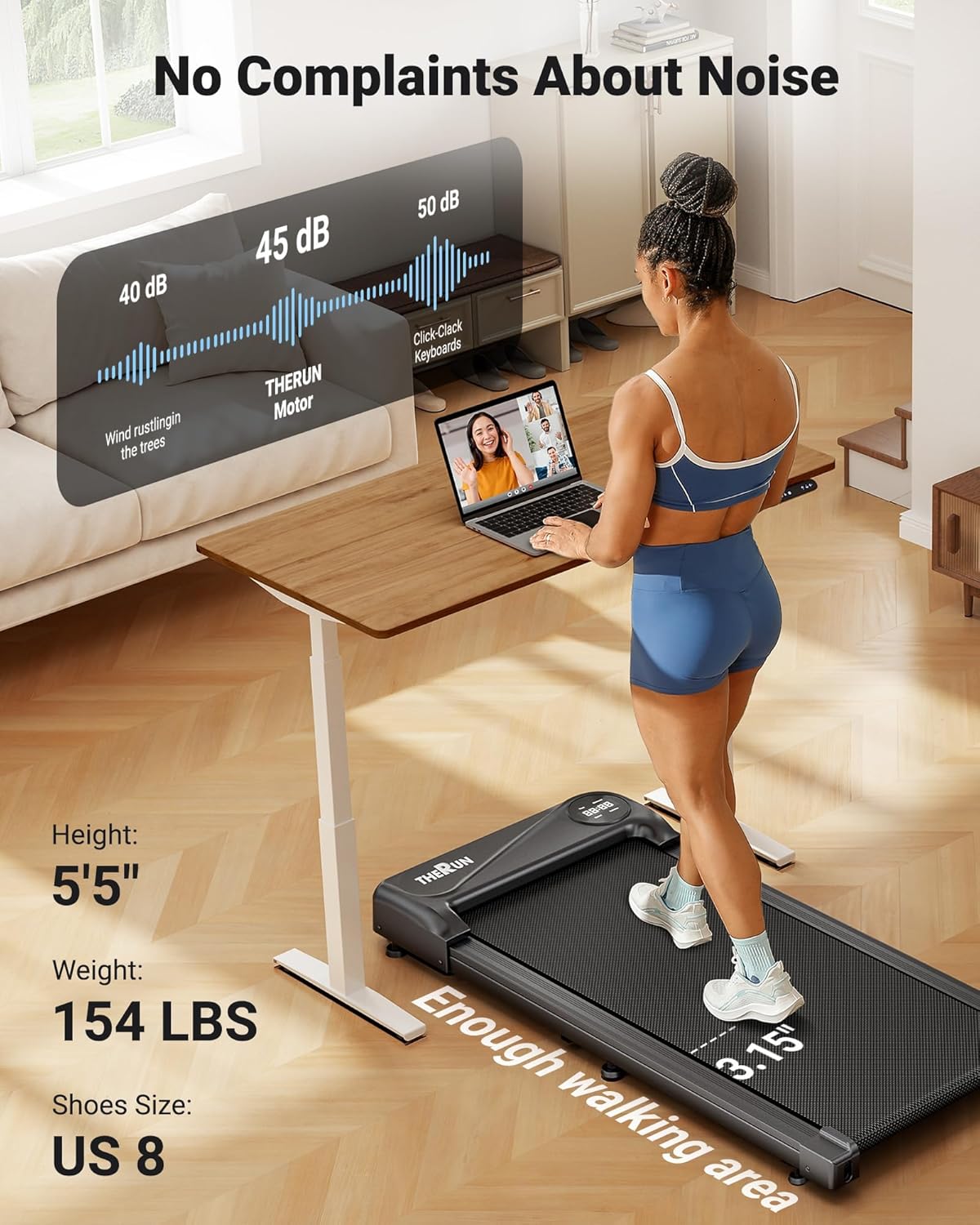
The treadmill is equipped with a 2.5 HP motor designed for quiet operation, producing approximately 45 dB of noise. This is comparable to ambient library noise, ensuring minimal disturbance during use.

Figure 4.2: The 45 dB motor ensures quiet operation, suitable for home or office environments.
5. การบำรุงรักษา
การบำรุงรักษาตามปกติจะช่วยให้ลู่วิ่งของคุณมีอายุการใช้งานยาวนานและมีประสิทธิภาพสูงสุด
- การทำความสะอาด: เช็ดทำความสะอาดพื้นผิวลู่วิ่งด้วยผ้าเช็ดทำความสะอาดamp เช็ดทำความสะอาดด้วยผ้าหลังการใช้งานทุกครั้ง หลีกเลี่ยงการใช้สารทำความสะอาดที่มีฤทธิ์กัดกร่อนหรือตัวทำละลาย
- การหล่อลื่นสายพาน: The running belt may require lubrication periodically. Refer to the specific instructions in the included user manual for your model regarding lubrication frequency and type of lubricant.
- การปรับสายพาน: If the running belt shifts to one side or slips, it may need adjustment. Consult the detailed instructions in the full user manual for proper belt centering and tensioning procedures.
- พื้นที่จัดเก็บ: When not in use, the compact design and built-in transport wheels allow for easy movement and storage under furniture or in narrow spaces.

Figure 5.1: The treadmill's compact design and transport wheels facilitate easy storage.
6 การแก้ไขปัญหา
หากคุณพบปัญหาเกี่ยวกับลู่วิ่งไฟฟ้า โปรดดูวิธีแก้ไขปัญหาทั่วไปต่อไปนี้:
- เครื่องวิ่งไฟฟ้าไม่เปิดใช้งาน: Ensure the power cord is securely plugged into both the treadmill and a functional electrical outlet. Check if the power switch on the treadmill is in the 'ON' position.
- Running belt stops or slows unexpectedly: Check the power connection. Ensure the maximum weight capacity (265 lbs) is not exceeded. The belt may require lubrication or adjustment.
- รีโมทคอนโทรลไม่ตอบสนอง: ใส่แบตเตอรี่กลับเข้าไปในรีโมทคอนโทรล ตรวจสอบให้แน่ใจว่าไม่มีสิ่งกีดขวางระหว่างรีโมทและตัวรับสัญญาณของลู่วิ่ง
- ปัญหาการเชื่อมต่อแอป: Ensure Bluetooth is enabled on your device and the app is updated to the latest version. Try restarting both the treadmill and your device.
For persistent issues or problems not listed here, please contact THERUN customer support.
7. ข้อมูลจำเพาะ
| คุณสมบัติ | ข้อมูลจำเพาะ |
|---|---|
| ยี่ห้อ | วิ่ง |
| ชื่อรุ่น | YT05-CP |
| ขนาดสินค้า (กxยxส) | ลึก 41.9 นิ้ว x กว้าง 19.6 นิ้ว x สูง 4.5 นิ้ว |
| น้ำหนักสินค้า | 34.4 ปอนด์ |
| วัสดุ | เหล็กอัลลอยด์ |
| ความเร็วสูงสุด | 3.8 ไมล์ต่อชั่วโมง |
| ความเร็วขั้นต่ำ | 0.6 ไมล์ต่อชั่วโมง |
| คุณสมบัติพิเศษ | การเชื่อมต่อแอป |
| กลุ่มเป้าหมาย | ผู้ใหญ่ |
| แรงม้าสูงสุด | 2.5 แรงม้า |
| จำเป็นต้องประกอบ | เลขที่ |
| ประเภทจอภาพ | นำ |
| คำแนะนำน้ำหนักสูงสุด | 265 ปอนด์ |
| ระดับเสียง | ประมาณ 45 เดซิเบล |
8. การรับประกันและการสนับสนุน
8.1 ข้อมูลการรับประกัน
Your purchase includes a 1-year protection plan. This warranty covers manufacturing defects and ensures the product meets quality standards under normal use.
8.2 การสนับสนุนลูกค้า
For any questions, concerns, or assistance with your THERUN Walking Pad Treadmill, our professional support team is available. Please contact us via email for product guides, documents, or troubleshooting assistance.

Figure 8.1: THERUN offers exclusive after-sales service and support for your treadmill.