
การแนะนำ
This manual provides detailed instructions for the safe and efficient operation of your TOOLTOP Silverflo 8586D-III PRO Hot Air Welding and Soldering Station. This 2-in-1 station is designed for SMD and BGA rework, featuring a hot air gun and a soldering iron with dual digital temperature displays and a 10-minute sleep mode.
ข้อมูลด้านความปลอดภัย
โปรดอ่านคำเตือนและคำแนะนำด้านความปลอดภัยทั้งหมดอย่างละเอียดก่อนใช้ผลิตภัณฑ์นี้ การไม่ปฏิบัติตามคำแนะนำเหล่านี้อาจทำให้เกิดไฟฟ้าช็อต ไฟไหม้ หรือการบาดเจ็บร้ายแรงได้
- ควรใช้งานสถานีในบริเวณที่มีการระบายอากาศดีเสมอ
- The soldering iron tip and hot air nozzle reach very high temperatures. Avoid direct contact with skin or flammable materials.
- สวมใส่อุปกรณ์ป้องกันส่วนบุคคลที่เหมาะสม รวมถึงแว่นตานิรภัย
- Do not use the station near water or in damp เงื่อนไข.
- Ensure the power cord is undamaged and properly grounded.
- Unplug the unit from the power source when not in use or before cleaning/maintenance.
- เก็บให้พ้นจากมือเด็ก
เนื้อหาแพ็คเกจ
ตรวจสอบว่ามีรายการทั้งหมดอยู่ในแพ็คเกจ:
- 1 x Silverflo 8586D-III PRO Hot Air Welding and Soldering Station (main unit)
- ปืนลมร้อน 1 อัน
- 1 x หัวแร้งบัดกรี
- 1 x Soldering Iron Stand with Cleaning Sponge
- หัวเป่าลมร้อน 3 ชิ้น (ขนาดต่างๆ)
- 1 x สายไฟ
- 1 x คู่มือผู้ใช้ (เอกสารนี้)
การตั้งค่า
- การแกะกล่อง: นำส่วนประกอบทั้งหมดออกจากบรรจุภัณฑ์อย่างระมัดระวัง ตรวจสอบความเสียหายที่อาจเกิดขึ้น
- การจัดวาง: Place the station on a stable, heat-resistant, and non-flammable surface. Ensure adequate ventilation around the unit.
- เชื่อมต่อปืนลมร้อน: Plug the hot air gun connector into the designated port on the front panel of the station. Ensure it is securely fastened.
- เชื่อมต่อหัวแร้ง: Plug the soldering iron connector into its designated port on the front panel. Place the soldering iron in its stand.
- การเชื่อมต่อไฟฟ้า: เชื่อมต่อสายไฟเข้ากับตัวเครื่อง แล้วจึงเสียบเข้ากับเต้ารับไฟฟ้าที่มีสายดิน
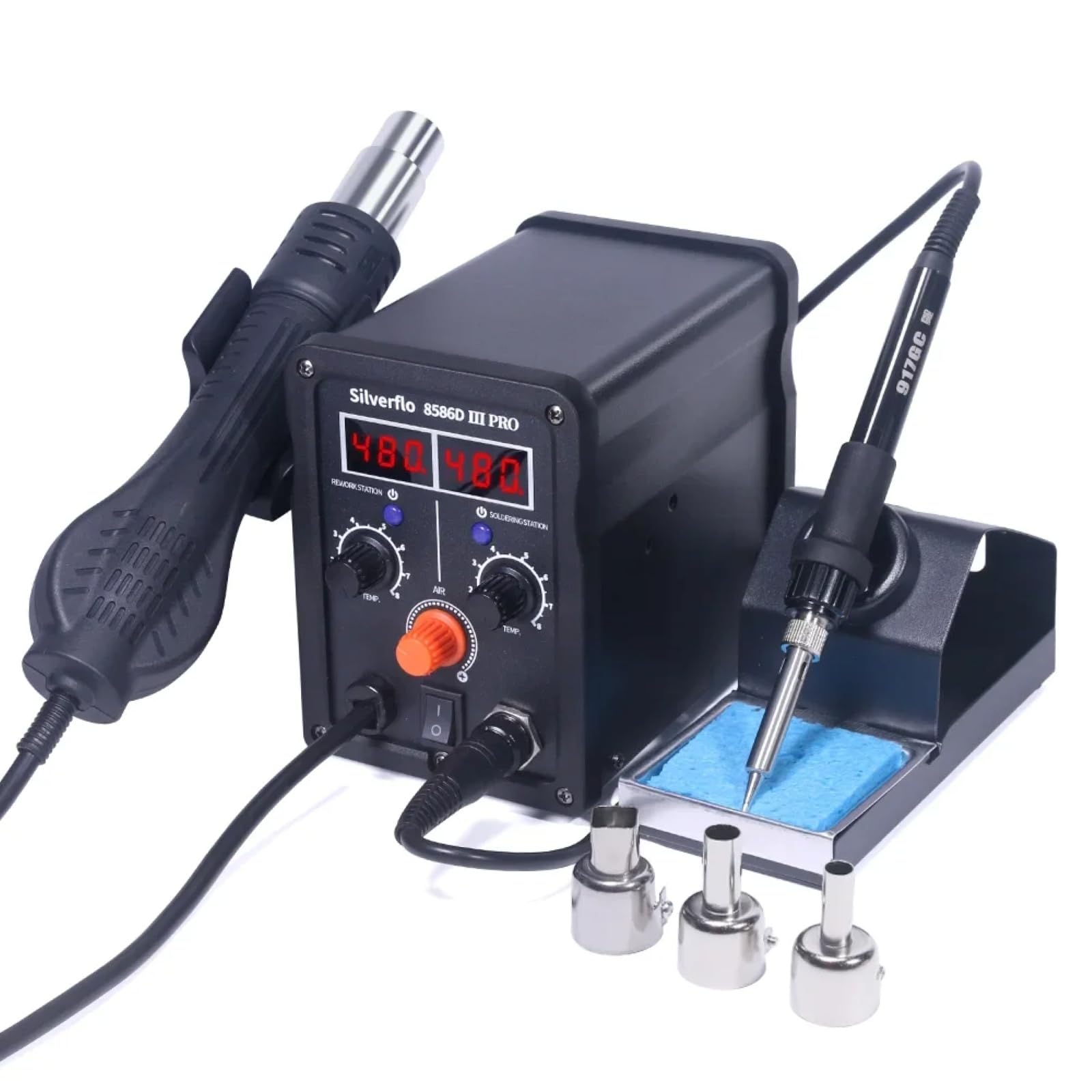
Image: The Silverflo 8586D-III PRO station with its hot air gun and soldering iron connected, ready for use.
คำแนะนำการใช้งาน
เปิด/ปิดเครื่อง
Locate the main power switch on the front panel of the station. Flip the switch to the "ON" position to power on the unit. The digital displays will illuminate. Flip to "OFF" to power down.
การปรับอุณหภูมิ

Image: The control panel of the station, highlighting the dual digital temperature displays and the separate adjustment knobs for the hot air gun and soldering iron.
- ปืนลมร้อน: Use the "TEMP" knob under "REWORK STATION" to adjust the hot air temperature. The corresponding digital display will show the set temperature. Use the "AIR" knob to adjust the airflow.
- หัวแร้ง: Use the "TEMP" knob under "SOLDERING STATION" to adjust the soldering iron temperature. The corresponding digital display will show the set temperature.

ภาพ: รายละเอียด view of the 75W soldering iron tip, illustrating its rapid heating capability for efficient work.
โหมดสลีป
The station features intelligent sleep modes to conserve energy and prolong component life.

Image: An illustration explaining the 10-minute sleep mode for the soldering iron. If no usage or movement is detected for over 10 minutes, the iron enters sleep mode. To reactivate, simply pick up the iron or adjust its temperature knob.
- 10-Minute Sleep Mode (Soldering Iron): If the soldering iron detects no usage or movement for more than 10 minutes, it will automatically enter sleep mode, reducing its temperature to a safe level. To wake it up, simply pick up the soldering iron or adjust its temperature knob.
- Magnetic Induction Sleep (Hot Air Gun): When the hot air gun is placed in its holder, it will automatically cool down and enter standby mode. Picking it up from the holder will cause it to quickly heat up to the preset temperature.
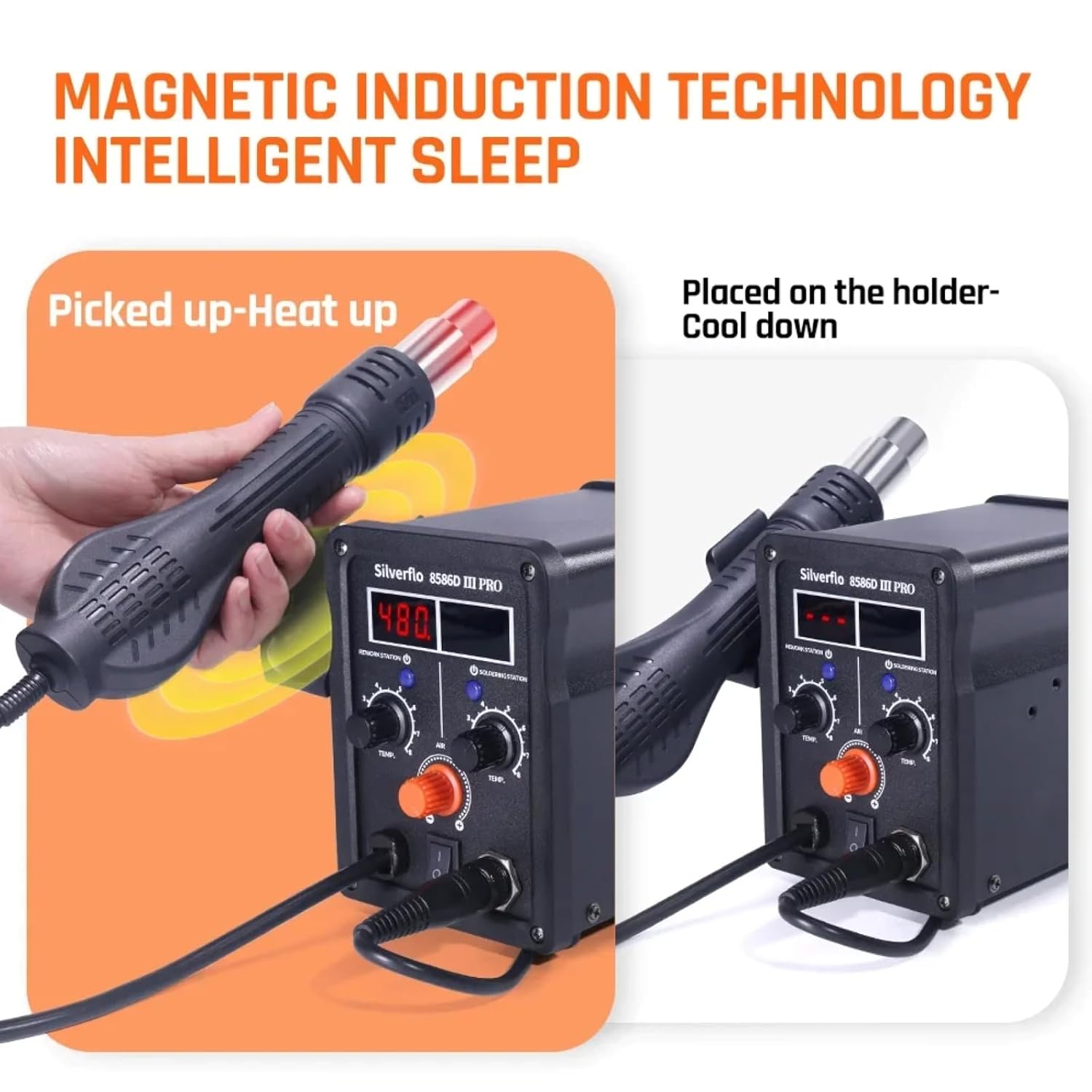
Image: A visual representation of the magnetic induction technology. The hot air gun heats up when picked from its holder and cools down when placed back, ensuring safety and energy efficiency.
การสอบเทียบอุณหภูมิแบบดิจิตอล
The station supports digital temperature calibration for enhanced accuracy. Refer to the specific instructions in the full manual for the calibration procedure, typically involving an external temperature sensor.

Image: The Silverflo 8586D-III PRO station alongside a digital temperature calibration device, illustrating the capability for precise temperature adjustments.
การซ่อมบำรุง
- หัวแร้งบัดกรี: Regularly clean the soldering iron tip using the included sponge (dampened with water) or brass wool. Tin the tip with solder after each use to prevent oxidation. Replace tips when they become excessively worn or corroded.
- Hot Air Nozzles: Ensure hot air nozzles are free from debris. Clean them gently if necessary.
- การทำความสะอาดยูนิต: Disconnect power before cleaning. Wipe the exterior of the station with a soft, dry cloth. Do not use abrasive cleaners or solvents.
- พื้นที่จัดเก็บ: เก็บเครื่องไว้ในที่แห้งและปราศจากฝุ่นเมื่อไม่ได้ใช้งาน
การแก้ไขปัญหา
| ปัญหา | สาเหตุที่เป็นไปได้ | สารละลาย |
|---|---|---|
| สถานีไม่เปิดไฟ | ไม่มีไฟเลี้ยง; สวิตช์ไฟปิดอยู่; สายไฟชำรุด | ตรวจสอบเต้ารับไฟฟ้า ตรวจสอบให้แน่ใจว่าสวิตช์ไฟเปิดอยู่ ตรวจสอบสายไฟว่ามีรอยชำรุดหรือไม่ |
| หัวแร้งไม่ร้อน | Iron in sleep mode; Loose connection; Faulty heating element. | Pick up iron or adjust temperature; Check iron connection; Contact support if element is faulty. |
| ปืนลมร้อนไม่ร้อนหรือไม่มีลมออกมา | Gun not picked up from holder; Loose connection; Airflow knob set to minimum. | Pick up gun from holder; Check gun connection; Adjust AIR knob. |
| Inaccurate temperature display. | Needs calibration; Sensor issue. | Perform digital temperature calibration; Contact support if issue persists. |
ข้อมูลจำเพาะ
| คุณสมบัติ | รายละเอียด |
|---|---|
| แบบอย่าง | TT-Silverflo 8586D-III |
| กำลังไฟที่กำหนด | 780วัตต์ |
| หัวแร้งไฟฟ้า | 75วัตต์ |
| ช่วงอุณหภูมิหัวแร้ง | 200°C ~ 480°C (392°F ~ 896°F) |
| ช่วงอุณหภูมิของปืนลมร้อน | 100°C ~ 480°C (212°F ~ 896°F) |
| ประเภทจอภาพ | จอแสดงผลดิจิตอลคู่ |
| โหมดสลีป | 10-Minute (Soldering Iron), Magnetic Induction (Hot Air Gun) |
| การรับรอง | ซีอี, โรเอชเอส |
| พาวเวอร์ซัพพลายฉบับที่tage | 120VUS, 220VEU, 230VUK, 240VAU (Specific to region) |
การรับประกัน
This TOOLTOP Silverflo 8586D-III PRO Hot Air Welding and Soldering Station comes with a รับประกัน 1 ปี from the date of purchase. This warranty covers manufacturing defects and workmanship under normal use. It does not cover damage caused by misuse, accident, unauthorized modification, or improper maintenance. Please retain your proof of purchase for warranty claims.
สนับสนุน
For technical assistance, troubleshooting beyond this manual, or warranty inquiries, please contact TOOLTOP customer support. Refer to the product packaging or the official TOOLTOP webเว็บไซต์สำหรับข้อมูลการติดต่อล่าสุด
Webเว็บไซต์: www.tooltop.com
อีเมล: support@tooltop.com


