
การแนะนำ
This manual provides detailed instructions for the safe and efficient operation of your TOOLTOP UKF10 Foot Pedal Capacitor Spot Welder. This device is designed for precise spot welding of 18650 lithium battery packs and other compatible materials, offering multiple welding modes and high power output for various DIY welding applications.
Please read this manual thoroughly before operating the device to ensure proper usage, prevent damage, and maintain safety.
คำแนะนำเพื่อความปลอดภัย
คำเตือน: การไม่ปฏิบัติตามคำแนะนำด้านความปลอดภัยเหล่านี้ อาจส่งผลให้เกิดไฟฟ้าช็อต ไฟไหม้ การบาดเจ็บสาหัส หรือเสียชีวิตได้
- Always wear appropriate personal protective equipment (PPE), including safety glasses, welding gloves, and protective clothing, when operating the spot welder.
- ตรวจสอบให้แน่ใจว่าพื้นที่ทำงานมีการระบายอากาศที่ดีและปราศจากวัสดุไวไฟ
- ห้ามใช้งานเครื่องเชื่อมในที่มืดamp หรือสภาวะเปียกชื้น
- ห้ามเด็กและบุคคลที่ไม่ได้รับอนุญาตเข้าใกล้บริเวณงานเชื่อม
- Do not touch the welding electrodes or workpieces immediately after welding, as they will be hot.
- ถอดแหล่งจ่ายไฟออกก่อนดำเนินการบำรุงรักษาหรือทำความสะอาด
- Use only the original charging cable and accessories provided with the device.
- Do not attempt to disassemble or modify the spot welder. Refer all servicing to qualified personnel.
- Be aware of potential sparks and molten metal during operation.
สินค้าเกินview และส่วนประกอบ
The TOOLTOP UKF10 is a compact and powerful capacitor spot welder. Familiarize yourself with its main components:
- หน่วยหลัก: Contains the control panel, power knob, and charging port.
- Welding Pens: Two intelligent manual spot welding pens for precise application.
- เหยียบเท้า: For triggering welds in foot pedal mode.
- สายชาร์จ: Type-C to Type-C and Type-A to Type-C for charging.
- Nickel Coil: For welding applications.
- Spare Soldering Pins: Replacement pins for the welding pens.
- กระดาษทราย: For preparing surfaces.

Image: The main unit of the TOOLTOP UKF10 spot welder with its intelligent manual welding pens and foot pedal.

Image: Included accessories: foot pedal, nickel coil, C-C charging cable, A-C charging cable, spare soldering pins, and sandpaper.

ภาพ: รายละเอียด view of the intelligent manual spot welding pen, highlighting its ergonomic design and connection points.
การตั้งค่า
- การแกะกล่อง: นำชิ้นส่วนทั้งหมดออกจากบรรจุภัณฑ์อย่างระมัดระวัง และตรวจสอบดูว่ามีส่วนใดเสียหายหรือไม่
- การชาร์จ: Before first use, fully charge the spot welder using the provided Type-C charging cable. Connect one end to the welder's Type-C port and the other to a compatible USB power adapter (not included). The display will indicate charging status.
- ปากกาเชื่อมแบบเชื่อมต่อ: Insert the intelligent manual spot welding pens firmly into their designated ports on the main unit. Ensure a secure connection.
- เชื่อมต่อแป้นเหยียบ (ทางเลือก): If using foot pedal mode, connect the foot pedal to its dedicated port on the main unit.
- เตรียมชิ้นงาน: Ensure the surfaces to be welded are clean, dry, and free from rust, oil, or other contaminants. Use the provided sandpaper if necessary.
คำแนะนำการใช้งาน
เปิด/ปิดเครื่อง
- To power on, press and hold the power button (usually integrated with the knob) for a few seconds until the display illuminates.
- หากต้องการปิดเครื่อง ให้กดปุ่มเปิด/ปิดค้างไว้อีกครั้งจนกว่าจอแสดงผลจะดับลง
Mode Selection and Adjustments
The UKF10 offers multiple welding modes and adjustable parameters for precise control. Use the main knob and display to navigate and adjust settings.

Image: The control system interface displaying various adjustable parameters: Mode (Manual/Auto), Preheat, Pause, Gear (power level), Trigger, and Stitch Welding.
- โหมดการเชื่อม: Select between Manual, Automatic, or Foot Pedal welding modes.
- โหมดแมนนวล: Triggered by a button on the welding pen.
- โหมดอัตโนมัติ: Welds automatically when both pen tips contact the workpiece.
- โหมดแป้นเหยียบ: Triggered by pressing the connected foot pedal.
- Preheat (0.1-0.5ms): Adjusts the preheating time to prepare the material for welding, improving weld quality.
- Pause (1-20ms): Sets the pause duration between welding pulses.
- Gear (001-100): Controls the welding power level. Start with lower settings and gradually increase as needed.
- Trigger (0.5-5.0s): Sets the trigger delay or duration.
- Stitch Welding (1-2 times): Configures the number of welding pulses for a single trigger.
Rotate the knob to select a parameter and press the knob to confirm or enter adjustment mode. Rotate again to change the value, and press to confirm.
กระบวนการเชื่อม
- เลือกโหมด: Choose your desired welding mode (Manual, Automatic, or Foot Pedal).
- ปรับการตั้งค่า: Based on the material thickness and type, adjust the Preheat, Gear (power), and other parameters. Refer to the material compatibility guidelines below.
- ตำแหน่งชิ้นงาน: Place the nickel strip or other material onto the battery terminal or workpiece.
- Apply Welding Pens: Firmly press both welding pen tips onto the nickel strip, ensuring good contact with both the strip and the underlying material. Maintain even pressure.
- การเชื่อมแบบทริกเกอร์:
- โหมดแมนนวล: Press the button on the welding pen.
- โหมดอัตโนมัติ: The weld will trigger automatically once good contact is detected.
- โหมดแป้นเหยียบ: เหยียบแป้นเหยียบ
- ตรวจสอบรอยเชื่อม: After welding, carefully inspect the weld joint for strength and appearance. Adjust settings if the weld is too weak or too strong.
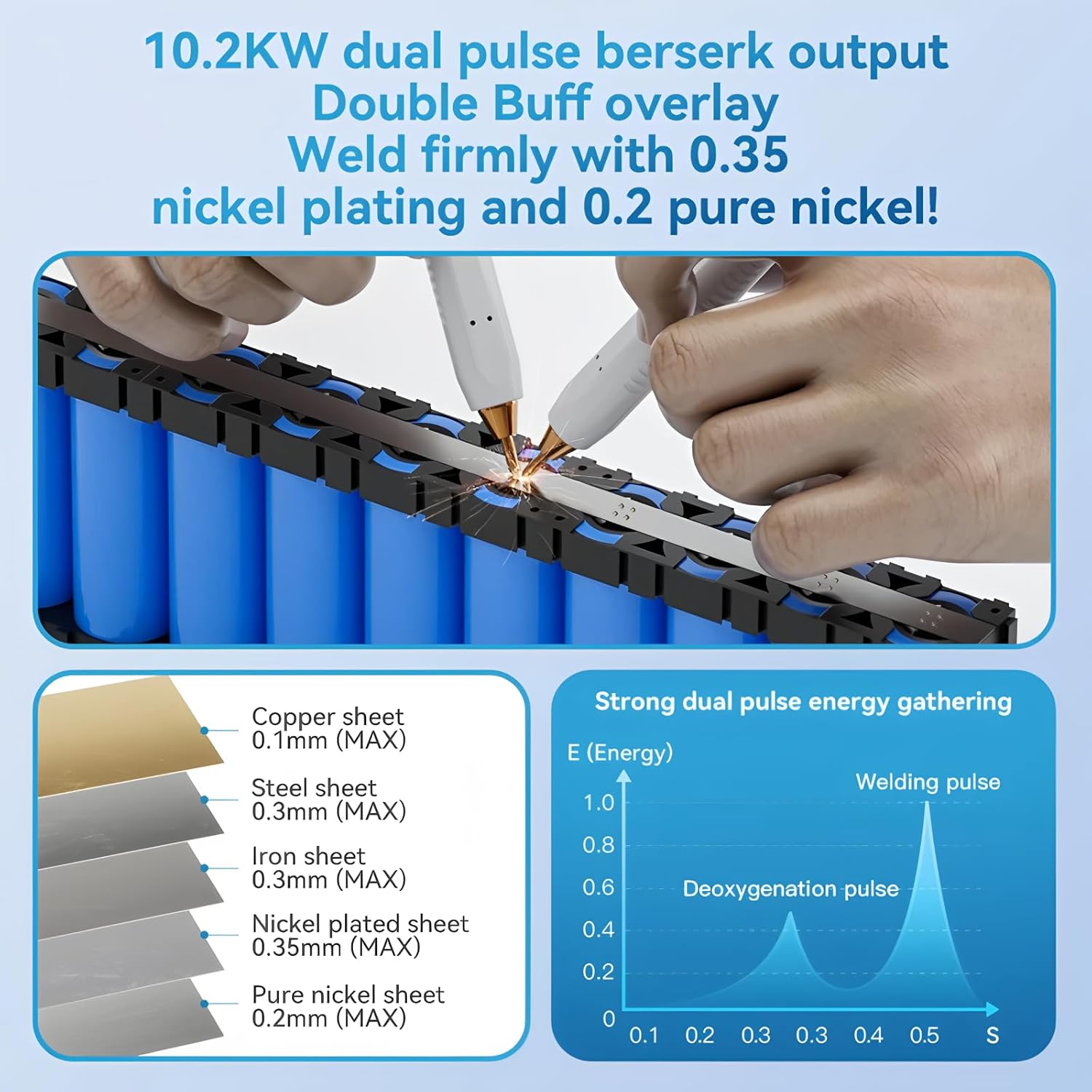
Image: Illustration of the spot welding process on battery cells, showing the application of welding pens to a nickel strip.
ความเข้ากันได้ของวัสดุ
The UKF10 spot welder is capable of welding various materials with specific thickness limitations:
| ประเภทวัสดุ | ความหนาสูงสุด |
|---|---|
| แผ่นทองแดง | 0.1มม. |
| แผ่นเหล็ก | 0.3มม. |
| แผ่นเหล็ก | 0.3มม. |
| Nickel plated sheet | 0.35มม. |
| Pure nickel sheet | 0.2มม. |
Note: Optimal welding results depend on material cleanliness, proper pressure, and correct power settings.
การซ่อมบำรุง
- การทำความสะอาด: Regularly clean the welding pen tips and the main unit with a dry, soft cloth. Ensure no metal dust or debris accumulates around the connections.
- สภาพขั้วไฟฟ้า: Inspect welding pen tips for wear or oxidation. If necessary, gently sand them with fine sandpaper to ensure good conductivity. Replace worn-out soldering pins with the provided spares.
- พื้นที่จัดเก็บ: Store the spot welder in a cool, dry place, away from direct sunlight and moisture. Ensure it is fully charged before long-term storage to preserve battery life.
- การดูแลแบตเตอรี่ ควรหลีกเลี่ยงการปล่อยให้แบตเตอรี่หมดจนเกลี้ยงบ่อยๆ ควรชาร์จแบตเตอรี่เมื่อไฟแสดงสถานะแบตเตอรี่เหลือน้อย
การแก้ไขปัญหา
| ปัญหา | สาเหตุที่เป็นไปได้ | สารละลาย |
|---|---|---|
| เครื่องเชื่อมไม่เปิดใช้งาน | แบตเตอรี่อ่อน; กดปุ่มเปิด/ปิดไม่ถูกต้อง | Charge the device; Press and hold the power button firmly. |
| รอยเชื่อมที่ไม่แข็งแรงหรือไม่สม่ำเสมอ | Insufficient power setting; Dirty or oxidized welding tips; Poor contact with workpiece; Material too thick | Increase "Gear" (power) setting; Clean or replace welding tips; Ensure firm and even pressure; Check material thickness against specifications. |
| Excessive sparks or burn-through | Too high power setting; Material too thin | Decrease "Gear" (power) setting; Verify material thickness is within limits. |
| Welder overheats | Continuous heavy use; Poor ventilation | Allow the welder to cool down; Ensure adequate airflow around the unit. |
| Foot pedal not triggering | Foot pedal not connected; Welder not in Foot Pedal mode | Ensure foot pedal is securely connected; Select "Foot Pedal" mode on the welder. |
ข้อมูลจำเพาะ
- หมายเลขรุ่น: TT-Awithz-UKF10
- กำลังขับ: 10200W (พีค)
- พอร์ตชาร์จ: ประเภทซี
- โหมดการเชื่อม: แบบแมนนวล, แบบอัตโนมัติ, แบบเหยียบเท้า
- พารามิเตอร์ที่ปรับได้: Preheat, Pause, Gear (1-100), Trigger, Stitch Welding
- Capacitor Lifespan: 500,000+ cycles (based on AWithZ laboratory testing)
- ใบรับรอง: ซีอี, โรเอชเอส
- ผู้ผลิต: ทูลท็อป

ภาพ: ภายใน view highlighting the high-quality Farad capacitors, indicating a life extension of 120%, over 500,000 cycles, and a 30% increase in charging speed.
การรับประกันและการสนับสนุน
The TOOLTOP UKF10 Foot Pedal Capacitor Spot Welder comes with a manufacturer's warranty. Please refer to your purchase documentation for specific warranty terms and conditions.
- ความพร้อมของอะไหล่ในสหภาพยุโรป: 1 ปี
- For technical support, warranty claims, or service inquiries, please contact your retailer or the manufacturer directly.
- Do not attempt to repair the device yourself, as this may void the warranty and pose safety risks.